















Draft Messages
Draft messages are unsent messages stored locally. They let users continue writing later or recover text after closing the app.
Best Practices
- Enable drafts at composer setup time so all channels share consistent behavior.
- Save drafts on screen exit or navigation to avoid data loss.
- Keep draft creation lightweight to avoid blocking navigation.
- Surface draft previews in lists to help users resume quickly.
- Clear drafts after successful send to avoid stale previews.
Enabling Draft Messages
Enable drafts by setting drafts.enabled = true in MessageComposer. See this guide.
useEffect(() => {
  chatClient.setMessageComposerSetupFunction(({ composer }) => {
    composer.updateConfig({
      drafts: {
        enabled: true,
      },
    });
  });
}, [chatClient]);
Note:
Without this, draft messages aren’t stored.
Creating Draft Messages
Call messageComposer.createDraft() when the user navigates away. If you don’t, the draft won’t be saved.
import { useMessageComposer } from "stream-chat-react-native";

// Inside the component where you want to create a draft
const messageComposer = useMessageComposer();

// Function to create a draft message. Call this when you want to save the draft.
const handleCreateDraft = async () => {
  await messageComposer.createDraft();
};
Handling Draft Creation on Screen Unmount with React Navigation
Example for react-navigation that saves drafts when leaving a channel or thread:
The hook uses useFocusEffect to detect screen removal and call createDraft.
Call useCreateDraftFocusEffect in channel and thread screens where you want drafts saved on unmount.
import { useCallback } from "react";
import { useMessageComposer } from "stream-chat-react-native";
import { useFocusEffect, useNavigation } from "@react-navigation/native";

export const useCreateDraftFocusEffect = () => {
  const navigation = useNavigation();
  const messageComposer = useMessageComposer();

  useFocusEffect(
    useCallback(() => {
      return navigation.addListener("beforeRemove", async () => {
        await messageComposer.createDraft();
      });
    }, [navigation, messageComposer]),
  );
};
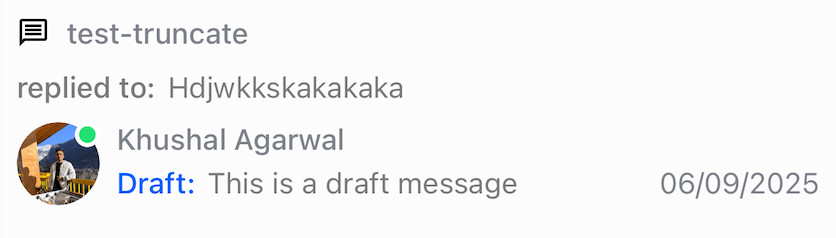
Draft previews appear in ChannelPreview and ThreadListItem, and drafts are restored in the message input when the user returns.
| Draft Message Preview on Channel list | Draft Message Preview on Thread list |
|---|---|
 |
 |