















Custom ChannelList
This guide shows common customizations for ChannelList.
Best Practices
- Keep
filtersaligned with any event-handler overrides to avoid inconsistent list state. - Scope custom event handlers to the specific behavior you want; fall back to defaults otherwise.
- Use
channelRenderFilterFnwhen multiple lists are mounted to prevent cross-list reordering. - Prefer
additionalFlatListPropsfor pagination tweaks instead of re-implementing list logic. - Guard
loadNextPagecalls withhasNextPageandloadingChannelsto avoid duplicate fetches.
Customizing Event Handlers
ChannelList uses event listeners to update when changes occur.
If a new message is received, a user is added to a channel, or other events take place, the ChannelList will update its UI accordingly.
Note: filters do not apply to list updates triggered by events.
You can override each event handler via props:
| Event Type | Default Behavior | Prop to override |
|---|---|---|
channel.deleted |
Remove channel from the list | onChannelDeleted |
channel.hidden |
Remove channel from the list | onChannelHidden |
channel.truncated |
Updates the channel | onChannelTruncated |
channel.updated |
Updates the channel | onChannelUpdated |
channel.visible |
Adds the channel to the list | onChannelVisible |
message.new |
Moves the channel to top of the list | lockChannelOrder, onNewMessage |
notification.added_to_channel |
Adds the new channel to the top of the list and starts watching it | onAddedToChannel |
notification.message_new |
Adds the new channel to the top of the list and starts watching it | onNewMessageNotification |
notification.removed_from_channel |
Removes the channel from the list | onRemovedFromChannel |
Example: a ChannelList of frozen channels.
const filters = {
  members: { $in: ['vishal'] },
  frozen: true
}

<ChannelList filters={filters} />
notification.message_new fires when a message is received on a channel that isn't loaded but includes the current user.
By default, the SDK queries that channel and adds it to the top of the list, regardless of filters. That means unfrozen channels may appear in a frozen-only list.
Override this behavior with a custom onNewMessageNotification on ChannelList.
It receives setChannels (state setter) and the event for notification.message_new.
const filters = {
  members: { $in: ["vishal"] },
  frozen: true,
};

const customOnNewMessageNotification = async (setChannels, event) => {
  const eventChannel = event.channel;

  // If the channel is frozen, then don't add it to the list.
  if (!eventChannel?.id || !eventChannel.frozen) return;

  try {
    const newChannel = client.channel(eventChannel.type, eventChannel.id);
    await newChannel.watch();
    setChannels((channels) => [newChannel, ...channels]);
  } catch (error) {
    console.log(error);
  }
};

<ChannelList
  filters={filters}
  onNewMessageNotification={customOnNewMessageNotification}
/>;
Handle other events similarly as needed.
Replacing infinite scroll with a "Load More" button
ChannelList component accepts the List prop, which is a component to render the list of channels.
Default is ChannelListMessenger, which consumes ChannelsContext and uses FlatList with loadNextPage
from ChannelsContext is attached to onEndReached prop of underlying FlatList to allow infinite scroll pagination.
Override FlatList props via additionalFlatListProps on ChannelList or ChannelListMessenger. Add a footer button and disable infinite scroll by overriding onEndReached.
The "Load More" button should call loadNextPage. Use hasNextPage and loadingChannels to control visibility.
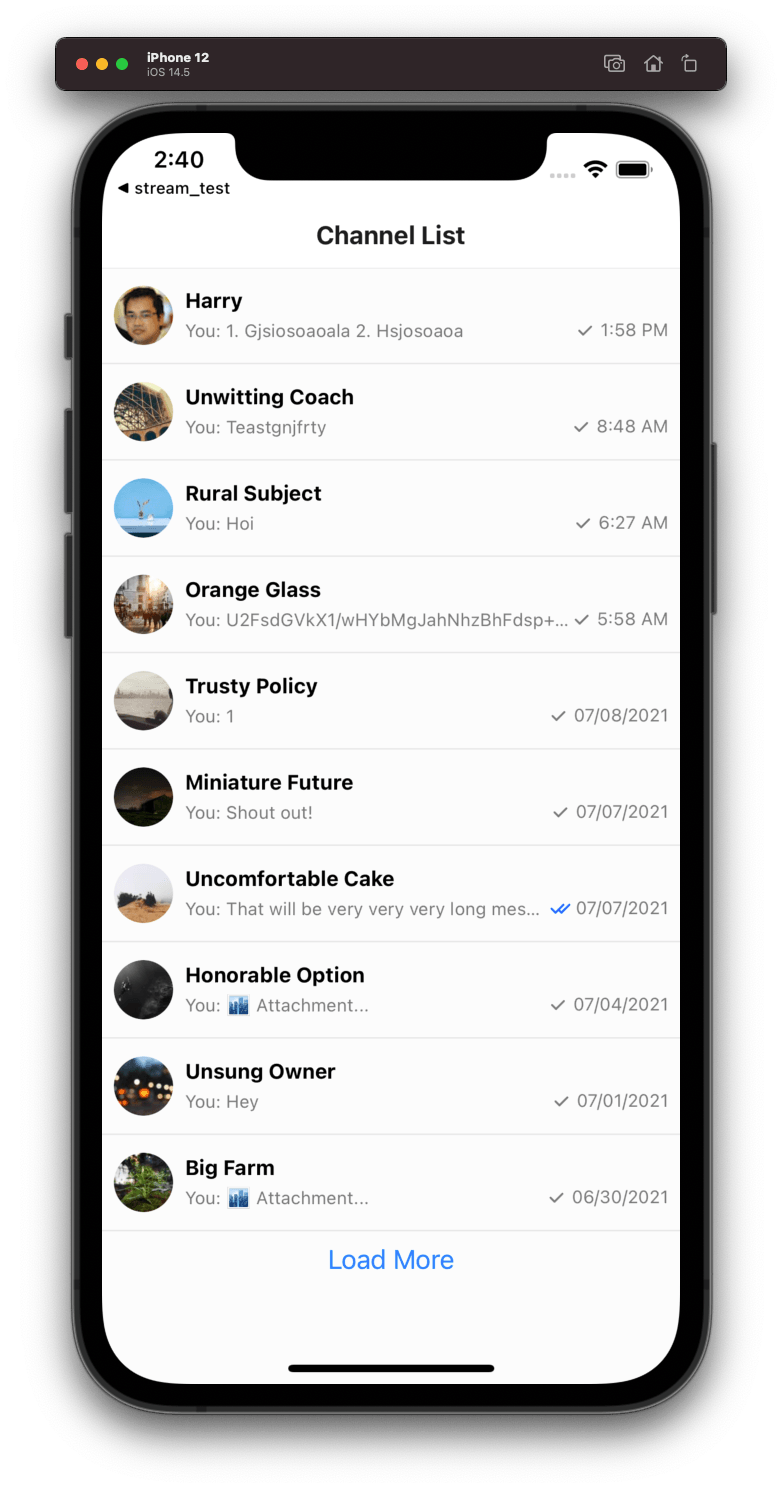
import { Button } from "react-native";
import { useChannelsContext } from "stream-chat-react-native";

const FooterLoadMoreButton = () => {
  const { loadingChannels, loadNextPage, hasNextPage } = useChannelsContext();

  if (loadingChannels || !hasNextPage) return null;

  return <Button title={"Load More"} onPress={loadNextPage} />;
};

<ChannelList
  additionalFlatListProps={{
    ListFooterComponent: FooterLoadMoreButton,
    onEndReached: () => null,
  }}
/>;
Multiple Channel Lists
This example will focus on the specific use case where there are two ChannelList components in the same application.
With two lists (A and B), both will process all message.new events. A message in list B can reorder list A. Use custom rendering filters to avoid this.
Using channelRenderFilterFn prop
By default, ChannelList pulls missing channels from client.activeChannels, which can reorder lists unexpectedly.
Use channelRenderFilterFn to apply custom filtering logic (type, custom fields, etc.) to rendered channels.
const customChannelFilterFunction = (channels: Channel[]) => {
  return channels.filter(/** your custom filter logic */);
};

<ChannelList
  channelRenderFilterFn={customChannelFilterFunction}
  filters={filters}
/>;