








Reactions
Reactions enable communication between users when speakers are limited or users are muted.
Best Practices
- Keep reactions visible - Display reactions prominently but non-intrusively
- Support common emojis - Include universally understood reactions
- Auto-dismiss reactions - Remove reactions after a reasonable duration
- Allow customization - Let users choose from multiple reaction options
Send an emoji to the call:
const reaction = {
  type: "reaction",
  emoji_code: ":like:",
  custom: {},
};
const call = useCall();
call?.sendReaction(reaction);
Reaction Mapper
The SDK provides a default reaction mapper for emojis. Customize emoji maps by passing your own mapper to the supportedReactions prop of CallContent.
The ParticipantReaction component handles the reaction map automatically.
Example:
import {
  StreamReactionType,
  Call,
  CallContent,
  StreamCall,
} from "@stream-io/video-react-native-sdk";

const reactions: StreamReactionType[] = [
  {
    type: "reaction",
    emoji_code: ":rolling_on_the_floor_laughing:",
    custom: {},
    icon: "🤣",
  },
  {
    type: "reaction",
    emoji_code: ":like:",
    custom: {},
    icon: "👍",
  },
  {
    type: "reaction",
    emoji_code: ":rocket:",
    custom: {},
    icon: "🚀",
  },
  {
    type: "reaction",
    emoji_code: ":dislike:",
    custom: {},
    icon: "👎",
  },
  {
    type: "reaction",
    emoji_code: ":fireworks:",
    custom: {},
    icon: "🎉",
  },
  {
    type: "reaction",
    emoji_code: ":raised-hands:",
    custom: {},
    icon: "🙌",
  },
  {
    type: "raised-hand",
    emoji_code: ":raised-hand:",
    custom: {},
    icon: "✋",
  },
];

const VideoCallUI = () => {
  let call: Call;
  // your logic to create a new call or get an existing call

  return (
    <StreamCall call={call}>
      <CallContent supportedReactions={reactions} />
    </StreamCall>
  );
};
Use in ReactionsControls to list and send supported reactions:
import {
  StreamReactionType,
  Call,
  CallContent,
  StreamCall,
  ReactionsButton,
} from "@stream-io/video-react-native-sdk";
import { View, StyleSheet } from "react-native";

const reactions: StreamReactionType[] = [
  {
    type: "reaction",
    emoji_code: ":rolling_on_the_floor_laughing:",
    custom: {},
    icon: "🤣",
  },
  {
    type: "reaction",
    emoji_code: ":like:",
    custom: {},
    icon: "👍",
  },
  {
    type: "reaction",
    emoji_code: ":rocket:",
    custom: {},
    icon: "🚀",
  },
  {
    type: "reaction",
    emoji_code: ":dislike:",
    custom: {},
    icon: "👎",
  },
  {
    type: "reaction",
    emoji_code: ":fireworks:",
    custom: {},
    icon: "🎉",
  },
  {
    type: "reaction",
    emoji_code: ":raised-hands:",
    custom: {},
    icon: "🙌",
  },
  {
    type: "raised-hand",
    emoji_code: ":raised-hand:",
    custom: {},
    icon: "✋",
  },
];

const CustomCallControls = () => {
  return (
    <View style={styles.buttonGroup}>
      <ReactionsButton supportedReactions={reactions} />
      {/* Other Call Controls */}
    </View>
  );
};

const VideoCallUI = () => {
  let call: Call;
  // your logic to create a new call or get an existing call

  return (
    <StreamCall call={call}>
      <CallContent CallControls={CustomCallControls} />
    </StreamCall>
  );
};

const styles = StyleSheet.create({
  buttonGroup: {
    flexDirection: "row",
    justifyContent: "space-evenly",
    paddingVertical: 10,
  },
});
Custom Participant Reaction
Customize participant reactions by passing your own component to CallContent.
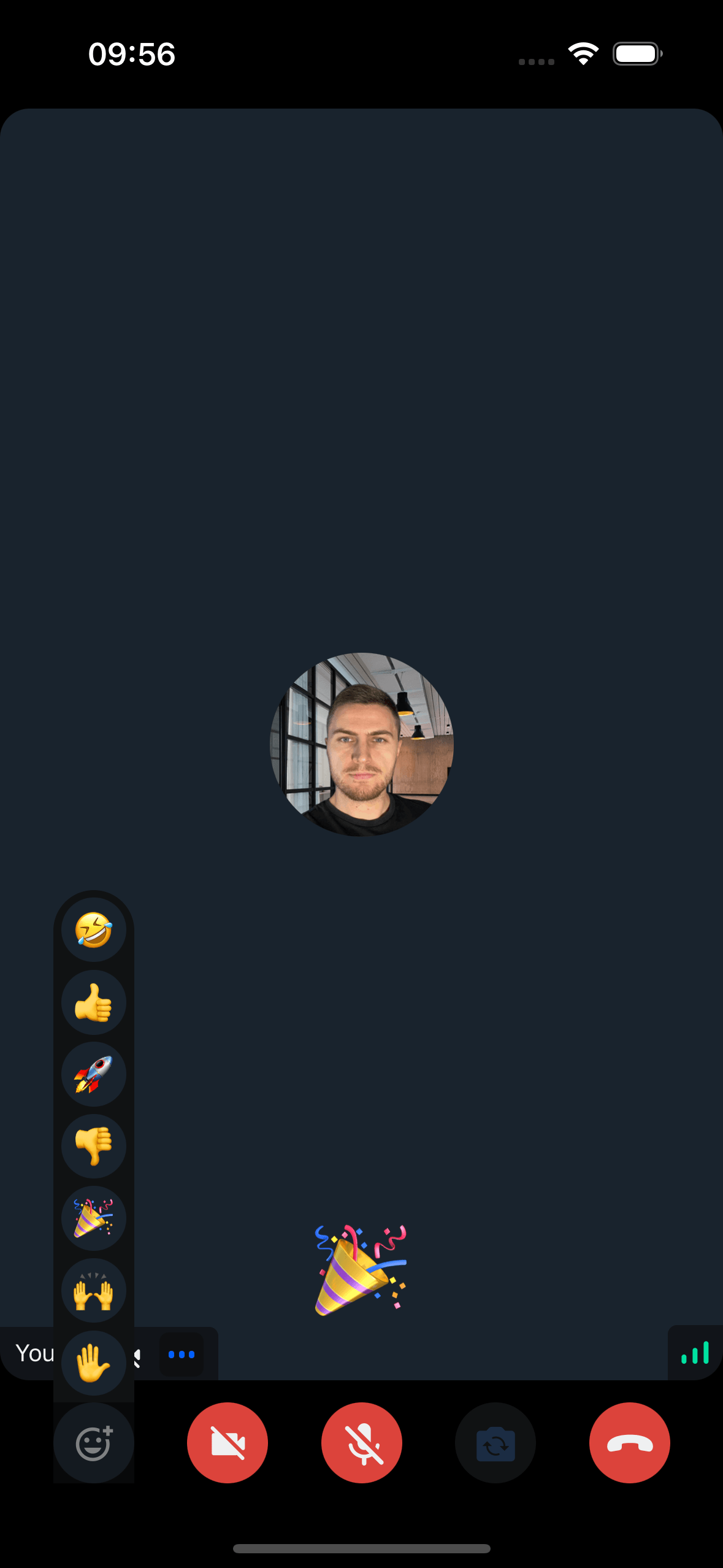
Example:
import { ParticipantReactionProps } from "@stream-io/video-react-native-sdk";
import { StyleSheet, Text, View } from "react-native";

const CustomParticipantReaction = ({
  participant,
  supportedReactions,
}: ParticipantReactionProps) => {
  const { reaction } = participant;

  const currentReaction =
    reaction &&
    supportedReactions.find(
      (supportedReaction) =>
        supportedReaction.emoji_code === reaction.emoji_code,
    );

  return (
    <View style={styles.background}>
      <Text style={styles.reaction}>{currentReaction?.icon}</Text>
    </View>
  );
};

const styles = StyleSheet.create({
  background: {
    alignItems: "center",
    justifyContent: "center",
    zIndex: 2,
  },
  reaction: {
    fontSize: 50,
  },
});
Final Steps
Pass the custom component to the ParticipantReaction prop of CallContent:
import {
  Call,
  CallContent,
  StreamCall,
  StreamReactionType,
} from "@stream-io/video-react-native-sdk";

const VideoCallUI = () => {
  let call: Call;
  // your logic to create a new call or get an existing call

  const reactions: StreamReactionType[] = [
    {
      type: "reaction",
      emoji_code: ":rolling_on_the_floor_laughing:",
      custom: {},
      icon: "🤣",
    },
    {
      type: "reaction",
      emoji_code: ":like:",
      custom: {},
      icon: "👍",
    },
    {
      type: "reaction",
      emoji_code: ":rocket:",
      custom: {},
      icon: "🚀",
    },
    {
      type: "reaction",
      emoji_code: ":dislike:",
      custom: {},
      icon: "👎",
    },
    {
      type: "reaction",
      emoji_code: ":fireworks:",
      custom: {},
      icon: "🎉",
    },
    {
      type: "reaction",
      emoji_code: ":raised-hands:",
      custom: {},
      icon: "🙌",
    },
    {
      type: "raised-hand",
      emoji_code: ":raised-hand:",
      custom: {},
      icon: "✋",
    },
  ];

  return (
    <StreamCall call={call}>
      <CallContent
        supportedReactions={reactions}
        ParticipantReaction={CustomParticipantReaction}
      />
    </StreamCall>
  );
};
Note:
Access participant data using hooks from useCallStateHooks:
- useParticipants - Returns details for all participants
- useRemoteParticipants - Returns details for remote participants only
- useConnectedUser / useLocalParticipant - Returns local participant details