
 React
React iOS
iOS Android
 Flutter
 Angular
 JavaScript
 Unity
Unity Unreal
 Node
Node Python
 Ruby
Ruby PHP
PHP Java
Java .NET
.NET Go
Go REST
RESTlate final _threadListController = StreamThreadListController(
limit: 30,
client: StreamChat.of(context).client,
options: ThreadOptions(
replyLimit: ...,
memberLimit: ...,
participantLimit: ...,
),
);This is beta documentation for Stream Chat Flutter SDK v10. For the latest stable version, see the latest version (v9).
StreamThreadListView
StreamThreadListView is a widget that shows an overview of all threads the current user participated in.
Each thread tile displays:
- The user avatar of the thread's parent message author
- The channel name the thread belongs to
- A preview of the parent message that started the thread
- A footer with participant avatars, reply count, and a relative timestamp
- An unread badge when there are unread replies
The list is paginated by default, and only the most recently updated threads are loaded initially. Older threads are loaded only when the user scrolls to the end of the thread list.
Usage
The widget is backed by a controller named StreamThreadListController, which is responsible for loading the threads and managing the state of the widget.
The StreamThreadListController has a few properties that can be used to customize the behavior of the widget:
limit: The maximum number of threads to load per page.ThreadOptions.replyLimit: The maximum number of (latest) replies to load per thread.ThreadOptions.memberLimit: The maximum number of members to load per thread.ThreadOptions.participantLimit: The maximum number of participants to load per thread.
Once the controller is created, it can be passed to the StreamThreadListView widget.
StreamThreadListView(
  controller: _threadListController,
);
This will create a paginated list of threads, which will load more threads as the user scrolls to the end of the list.
| No threads | Thread list |
|---|---|
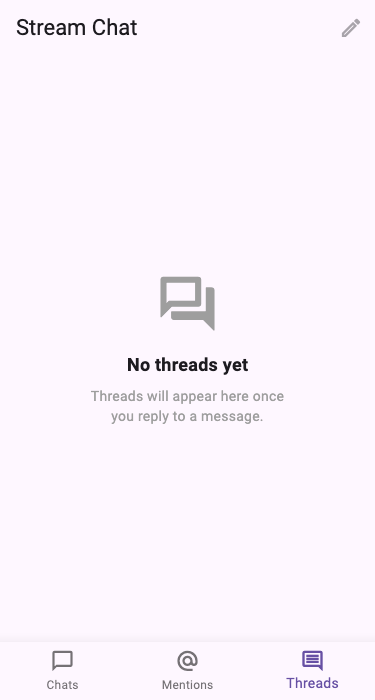 | 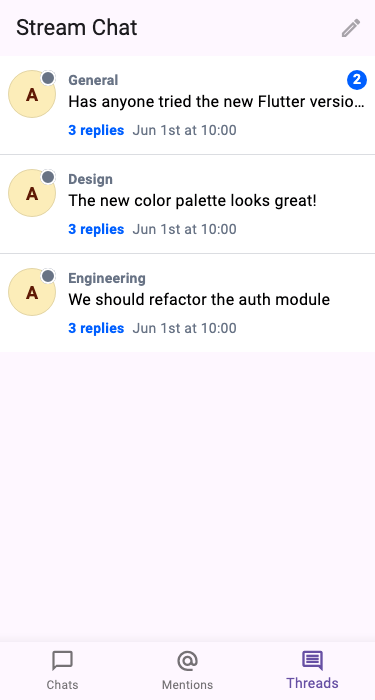 |
Unread Threads
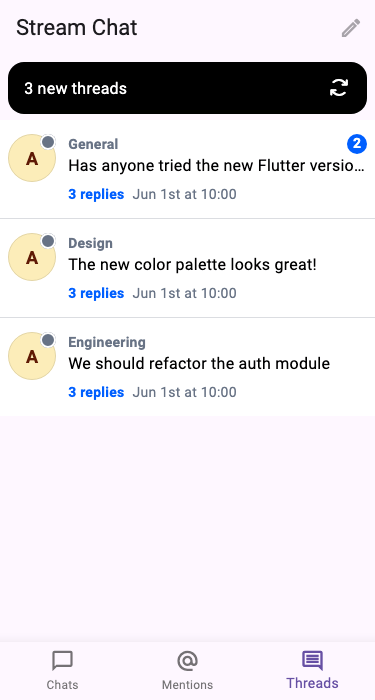
While the user is viewing the thread list, and a new thread is created, or a thread which is not yet loaded is updated, we can show a banner informing the user about the number of new threads. The user can then click on the banner to reload the thread list and load the newly updated threads.
To implement this feature, we can use the StreamUnreadThreadsBanner widget and pass the number of unread threads to it.
Column(
  children: [
    ValueListenableBuilder(
      valueListenable: _threadListController.unseenThreadIds,
      builder: (_, unreadThreads, __) => StreamUnreadThreadsBanner(
        unreadThreads: unreadThreads,
        onTap: () => _threadListController
            .refresh(resetValue: false)
            // Clear the list of unseen threads once the threads are refreshed.
            .then((_) => _threadListController.clearUnseenThreadIds()),
      ),
    ),
    Expanded(
      child: StreamThreadListView(
        controller: _threadListController,
      ),
    ),
  ],
);
This will show a banner at the top of the thread list, which will display the number of unread threads. When the user clicks on the banner, the thread list will be refreshed, and the banner will be hidden.
Handling Thread Taps
To handle taps on threads, we can use the onThreadTap callback provided by the StreamThreadListView widget.
StreamThreadListView(
  controller: _threadListController,
  onThreadTap: (thread) {
    // Navigate to thread conversation
  },
);
We can also handle long presses on threads using the onThreadLongPress callback.
StreamThreadListView(
  controller: _threadListController,
  onThreadLongPress: (thread) {
    // Handle the long press on the thread.
  },
);
Customizing Thread Items
Using itemBuilder
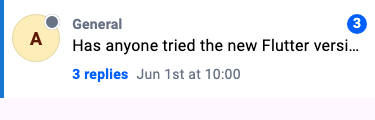
You can customize individual thread items using the itemBuilder parameter:
StreamThreadListView(
  controller: _threadListController,
  itemBuilder: (context, threads, index, defaultWidget) {
    final thread = threads[index];
    // Return your custom widget here.
  },
);
Using StreamComponentFactory
For app-wide customization of thread tiles, register a custom builder through StreamComponentFactory. This replaces the default StreamThreadListTile rendering for every StreamThreadListView in your app.
StreamChat(
  client: client,
  componentBuilders: StreamComponentBuilders(
    extensions: streamChatComponentBuilders(
      threadListItem: (context, props) {
        // props is StreamThreadListTileProps containing thread, currentUser, onTap, onLongPress
        return MyCustomThreadTile(
          thread: props.thread,
          onTap: props.onTap,
        );
      },
    ),
  ),
  child: MaterialApp(...),
)
The StreamThreadListTileProps class contains:
| Property | Type | Description |
|---|---|---|
thread | Thread | The thread displayed by the tile |
currentUser | User? | The current user |
onTap | GestureTapCallback? | Called when the tile is tapped |
onLongPress | GestureLongPressCallback? | Called when the tile is long pressed |
Theming
You can customize the look of all thread tiles using StreamThreadListTileThemeData via StreamChatThemeData.threadListTileTheme.
When a theme property is null, the tile falls back to computed defaults derived from the ambient StreamTextTheme and StreamColorScheme.
StreamChatTheme(
  data: StreamChatThemeData(
    threadListTileTheme: StreamThreadListTileThemeData(
      backgroundColor: Colors.white,
      threadChannelNameStyle: TextStyle(fontWeight: FontWeight.bold),
      threadReplyToMessageStyle: TextStyle(color: Colors.grey),
      threadReplyCountStyle: TextStyle(color: Colors.blue),
      threadLatestReplyTimestampStyle: TextStyle(color: Colors.grey),
      threadLatestReplyTimestampFormatter: (context, date) {
        return '${date.hour}:${date.minute}';
      },
      threadUnreadMessageCountStyle: TextStyle(color: Colors.white),
      threadUnreadMessageCountBackgroundColor: Colors.red,
    ),
  ),
  child: ...,
)| Property | Type | Default |
|---|---|---|
padding | EdgeInsetsGeometry? | EdgeInsets.symmetric(vertical: 14, horizontal: 8) |
backgroundColor | Color? | StreamColorScheme.backgroundApp |
threadChannelNameStyle | TextStyle? | captionEmphasis with textTertiary color |
threadReplyToMessageStyle | TextStyle? | bodyDefault |
threadLatestReplyMessageStyle | TextStyle? | bodyDefault |
threadReplyCountStyle | TextStyle? | captionEmphasis with textLink color |
threadLatestReplyTimestampStyle | TextStyle? | captionDefault with textTertiary color |
threadLatestReplyTimestampFormatter | DateFormatter? | formatRecentDateTime (outputs "Just now", "Today at 9:41", "Yesterday at 9:41", etc.) |
threadUnreadMessageCountStyle | TextStyle? | numericXl with textOnAccent color |
threadUnreadMessageCountBackgroundColor | Color? | accentPrimary |
Sub-widgets
StreamThreadListTile is composed of several smaller widgets that can also be used independently:
| Widget | Description |
|---|---|
ThreadTitle | Displays the channel name as a single-line label |
ThreadRootMessagePreview | Shows the parent message as a formatted preview using StreamMessagePreviewText |
ThreadFooter | Displays participant avatars (StreamUserAvatarStack), reply count, and a relative timestamp |
ThreadUnreadCount | Unread message count badge |
Other Customizations
The StreamThreadListView widget provides a few other parameters that can be used to customize the appearance and behavior of the widget:
StreamThreadListView(
  controller: controller,
  emptyBuilder: (context) {
    // Return your custom empty state widget here.
  },
  loadingBuilder: (context) {
    // Return your custom loading state widget here.
  },
  errorBuilder: (context, error) {
    // Return your custom error state widget here.
  },
  separatorBuilder: (context, threads, index) {
    // Return your custom separator widget here.
  },
);