
 React
React iOS
iOS Android
 Flutter
 Angular
 JavaScript
 Unity
Unity Unreal
 Node
Node Python
 Ruby
Ruby PHP
PHP Java
Java .NET
.NET Go
Go REST
RESTStreamMessageListView(
messageBuilder: (context, message, defaultProps) {
return StreamMessageWidget.fromProps(
props: defaultProps.copyWith(
actionsBuilder: (context, defaultActions) => [
...defaultActions,
StreamContextMenuAction(
leading: const Icon(Icons.star),
label: const Text('Favourite'),
onTap: () => _favourite(message),
),
],
),
);
},
)This is beta documentation for Stream Chat Flutter SDK v10. For the latest stable version, see the latest version (v9).
Message Actions
Customizing Message Actions
Introduction
Message actions appear in an overlay when you long-press a message.
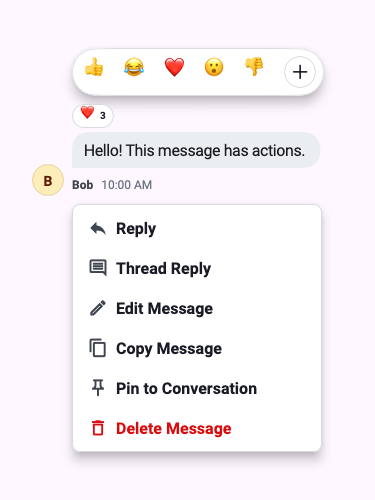
By default, the SDK renders the following message actions:
- Reply
- Thread reply
- Edit message (own messages only)
- Copy message
- Delete message (own messages only)
- Flag message
- Pin message
- Mark unread
Edit and delete are only available on messages sent by the current user. Pinning a message requires the appropriate channel role permissions. Mark unread is only available on messages from other users when read events are enabled.
StreamContextMenuAction
Message actions are now rendered as StreamContextMenuAction<T> widgets (from stream_core_flutter), which are self-rendering and support two dispatch mechanisms:
value— when tapped inside a popup route, pops the route with this value, then callsonTapif providedonTap— aVoidCallback?for inline usage or additional side effects after route dismissal
Adding a Custom Action via actionsBuilder
Use actionsBuilder on StreamMessageWidgetProps to append or modify actions:
Removing a Default Action
Filter the defaultActions list to remove specific actions:
actionsBuilder: (context, defaultActions) => [
  ...defaultActions.where((a) => a.props.value is! DeleteMessage),
]
App-wide Custom Actions via Component Factory
To apply actions changes across the entire app, use StreamComponentFactory:
StreamChat(
  client: client,
  componentBuilders: StreamComponentBuilders(
    extensions: streamChatComponentBuilders(
      messageWidget: (context, props) {
        return DefaultStreamMessage(
          props: props.copyWith(
            actionsBuilder: (context, defaultActions) {
              return StreamContextMenuAction.partitioned(
                items: [
                  ...defaultActions,
                  StreamContextMenuAction(
                    leading: Icon(context.streamIcons.informationCircle),
                    label: const Text('Info'),
                    onTap: () => showInfo(props.message),
                  ),
                ],
              );
            },
          ),
        );
      },
    ),
  ),
  child: ...,
)
Destructive Actions
Use the .destructive constructor for actions that should be styled as destructive:
StreamContextMenuAction<MessageAction>.destructive(
  value: DeleteMessage(message: message),
  leading: Icon(context.streamIcons.trashBin),
  label: const Text('Delete'),
)
Grouping Actions with Separators
Helper methods automatically insert StreamContextMenuSeparator widgets between items:
// Insert a separator between every item
StreamContextMenuAction.separated(items: actions)

// Group into normal / destructive sections with separator between them
StreamContextMenuAction.partitioned(items: actions)

// Custom sections
StreamContextMenuAction.sectioned(sections: [normalActions, destructiveActions])
showStreamDialog
Use showStreamDialog<T> instead of showDialog when presenting Stream modals. It re-wraps StreamChatTheme across the route boundary and applies a consistent transition:
final action = await showStreamDialog<MessageAction>(
  context: context,
  builder: (_) => StreamMessageActionsModal(
    message: message,
    messageWidget: messageWidget,
    messageActions: [
      StreamContextMenuAction<MessageAction>(
        value: CopyMessage(message: message),
        leading: Icon(context.streamIcons.copy),
        label: Text(context.translations.copyMessageLabel),
        onTap: () => _copyMessage(message),
      ),
    ],
  ),
);

if (action is CopyMessage) _copyMessage(action.message);
StreamMessageActionsModal
StreamMessageActionsModal.messageActions now accepts List<Widget> instead of List<StreamMessageAction>. The onActionTap callback has been removed — handle dispatch via onTap on each action or by awaiting the dialog return value.
StreamContextMenu and StreamContextMenuSeparator
For custom inline action menus, use StreamContextMenu as a themed container:
StreamContextMenu(
  children: [
    StreamContextMenuAction<MessageAction>(
      value: reply,
      label: const Text('Reply'),
    ),
    const StreamContextMenuSeparator(),
    StreamContextMenuAction<MessageAction>.destructive(
      value: delete,
      label: const Text('Delete'),
    ),
  ],
)On this page: