
 React
React iOS
iOS Android
 Flutter
 Angular
 JavaScript
 Unity
Unity Unreal
 Node
Node Python
 Ruby
Ruby PHP
PHP Java
Java .NET
.NET Go
Go REST
REST# MacOS Intel
$ export URL=$(curl -s https://api.github.com/repos/GetStream/stream-cli/releases/latest | grep Darwin_x86 | cut -d '"' -f 4 | sed '1d')
$ curl -L $URL -o stream-cli.tar.gz
$ tar -xvf stream-cli.tar.gz
# We don't sign our binaries today, so we need to explicitly trust it.
$ xattr -d com.apple.quarantine stream-cli
# MacOS ARM
$ export URL=$(curl -s https://api.github.com/repos/GetStream/stream-cli/releases/latest | grep Darwin_arm | cut -d '"' -f 4 | sed '1d')
$ curl -L $URL -o stream-cli.tar.gz
$ tar -xvf stream-cli.tar.gz
# We don't sign our binaries today, so we need to explicitly trust it.
$ xattr -d com.apple.quarantine stream-cli
# Linux x86
$ export URL=$(curl -s https://api.github.com/repos/GetStream/stream-cli/releases/latest | grep Linux_x86 | cut -d '"' -f 4 | sed '1d')
$ curl -L $URL -o stream-cli.tar.gz
$ tar -xvf stream-cli.tar.gz
# Linux ARM
$ export URL=$(curl -s https://api.github.com/repos/GetStream/stream-cli/releases/latest | grep Linux_arm64 | cut -d '"' -f 4 | sed '1d')
$ curl -L $URL -o stream-cli.tar.gz
$ tar -xvf stream-cli.tar.gz
# Windows x86
> $latestRelease = Invoke-WebRequest "https://api.github.com/repos/GetStream/stream-cli/releases/latest"
> $json = $latestRelease.Content | ConvertFrom-Json
> $url = $json.assets | ? { $_.name -match "Windows_x86" } | select -expand browser_download_url
> Invoke-WebRequest -Uri $url -OutFile "stream-cli.zip"
> Expand-Archive -Path ".\stream-cli.zip"
# Windows ARM
> $latestRelease = Invoke-WebRequest "https://api.github.com/repos/GetStream/stream-cli/releases/latest"
> $json = $latestRelease.Content | ConvertFrom-Json
> $url = $json.assets | ? { $_.name -match "Windows_arm" } | select -expand browser_download_url
> Invoke-WebRequest -Uri $url -OutFile "stream-cli.zip"
> Expand-Archive -Path ".\stream-cli.zip"Stream CLI
Stream's Command Line Interface (CLI) makes it easy to create and manage your Stream apps directly from the terminal.
The repository is available here. The documentation is available here, including a full documentation of every command.
Installation
The Stream CLI is written in Go and precompiled into a single binary. It doesn't have any prerequisites.
You can find the binaries in the Release section of the GitHub repository.
Via Script
Via Homebrew
$ brew tap GetStream/stream-cli https://github.com/GetStream/stream-cli
$ brew install stream-cli
Compile yourself
$ git clone git@github.com:GetStream/stream-cli.git
$ cd stream-cli
$ go build ./cmd/stream-cli
$ ./stream-cli --version
stream-cli version 1.0.0
Getting Started
In order to initialize the CLI, it’s as simple as:
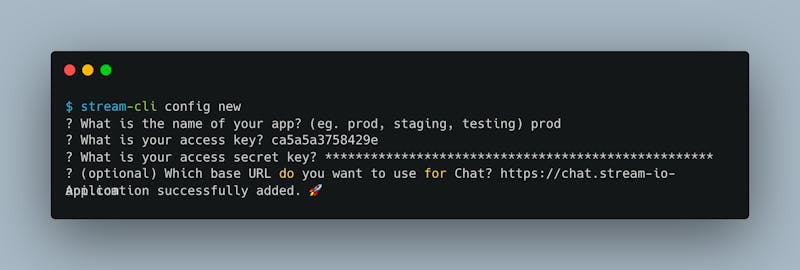
Note: Your API key and secret can be found on the Stream Dashboard and is specific to your application.
Use Cases and example
A couple of example use cases can be found here. We’ve also created a separate documentation for the import feature.
🚨Warning
We purposefully chose the executable name stream-cli to avoid conflict with another tool called imagemagick which already has a stream executable.
If you do not have imagemagick installed, it might be more comfortable to rename stream-cli to stream . Alternatively you can set up a symbolic link:
$ ln -s ~/Downloads/stream-cli /usr/local/bin/stream
$ stream --version
stream-cli version 1.0.0
Syntax
Basic commands use the following syntax:
$ stream-cli [chat|feeds] [command] [args] [options]Example:
$ stream-cli chat get-channel -t messaging -i redteamThe --help keyword is available every step of the way. Examples:
$ stream-cli --help
$ stream-cli chat --help
$ stream-cli chat get-channel --help
Auto completion
We provide autocompletion for the most popular shells (PowerShell, Bash, ZSH, Fish).
$ stream-cli completion --helpIssues
If you’re experiencing problems directly related to the CLI, please add an issue on GitHub.
For other issues, submit a support ticket.
Changelog
As with any project, things are always changing. If you’re interested in seeing what’s changed in the Stream CLI, the changelog for this project can be tracked in the Release page of the repository.