















Channel
The Channel component is the main entry point for many Stream Chat customizations and contains the majority of the content providers and a significant amount of the logic utilized by Stream Chat for React Native.
Components, custom and out of the box, channel information, and UI integrated chat functions are disseminated by the contexts contained in Channel.
MessageList, MessageInput, and Thread all rely on Channel to function correctly.
Basic Usage
Channel takes an instance of a StreamChat channel as a prop.
You can create a channel, or if you are navigating from the ChannelList, access the selected channel via the parameter passed to the onSelect function.
import { StreamChat } from "stream-chat";
import {
  Channel,
  Chat,
  MessageInput,
  MessageList,
  OverlayProvider,
} from "stream-chat-react-native";

const client = StreamChat.getInstance("api_key");

export const App = () => {
  const [channel, setChannel] = useState();

  useEffect(() => {
    const createAndWatchChannel = async () => {
      const newChannel = client.channel("messaging", "channel_id");
      await newChannel.watch();
      setChannel(newChannel);
    };

    createAndWatchChannel();
  }, []);

  return (
    <OverlayProvider>
      <Chat client={client}>
        <Channel channel={channel}>
          <MessageList />
          <MessageInput />
        </Channel>
      </Chat>
    </OverlayProvider>
  );
};
Context Providers
Channel contains providers for the ChannelContext, KeyboardContext, MessageInputContext, MessagesContext, PaginatedMessageListContext, SuggestionsContext, ThreadContext, and TypingContext.
These can be accessed using the corresponding hooks.
| Context | Hook |
|---|---|
ChannelContext |
useChannelContext |
KeyboardContext |
useKeyboardContext |
MessageInputContext |
useMessageInputContext |
MessagesContext |
useMessagesContext |
PaginatedMessageListContext |
usePaginatedMessageListContext |
SuggestionsContext |
useSuggestionsContext |
ThreadContext |
useThreadContext |
TypingContext |
useTypingContext |
UI Customizations
Channel is the entry point for customizing the majority of the Stream Chat for React Native SDK.
The UI can be tailored to your design by replacing any number of components with custom components.
Custom components provided as props to Channel will be utilized throughout the SDK where appropriate.
Customizing the message avatar can be done easily by providing a custom component to the appropriate prop.
import { Image } from "react-native";
import { Channel, useMessageContext } from "stream-chat-react-native";

const CustomAvatar = () => {
  const { message } = useMessageContext();

  return <Image source={{ uri: message.user?.image }} />;
};

<Channel MessageAvatar={CustomAvatar} />;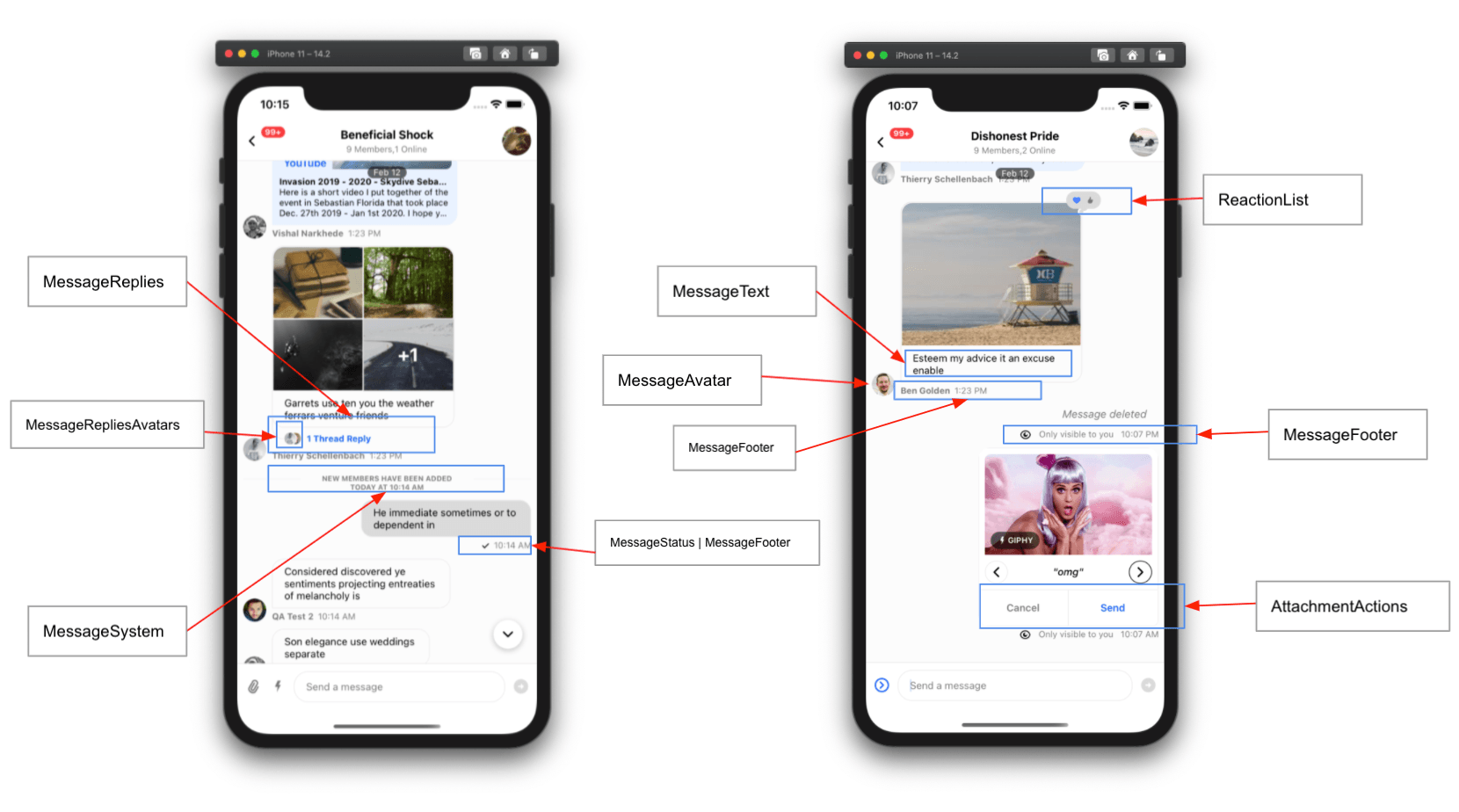
Props
channel
Channel instance from the StreamChat client.
| Type |
|---|
| Channel |
keyboardVerticalOffset
Distance between top of the screen and top of Channel component. This is often the header height.
| Type |
|---|
| number |
additionalKeyboardAvoidingViewProps
Additional props provided to the underlying KeyboardAvoidingView.
| Type |
|---|
| Object |
additionalTextInputProps
Additional props provided to the underlying TextInput within MessageInput.
| Type |
|---|
| object |
additionalPressableProps
Additional props provided to the underlying Pressable used by components within a message such as MessageContent.
| Type |
|---|
| object |
allowThreadMessagesInChannel
Display the Show thread message in channel button inside the thread MessageInput.
| Type | Default |
|---|---|
| boolean | true |
ayncMessagesLockDistance
Controls how many pixels to the top side the user has to scroll in order to lock the recording view and allow the user to lift their finger from the screen without stopping the recording.
| Type | Default |
|---|---|
| Number | 50 |
ayncMessagesMinimumPressDuration
Controls the minimum duration(in milliseconds) that the user has to press on the record button in the composer, in order to start recording a new voice message.
| Type | Default |
|---|---|
| Number | 500 |
ayncMessagesMultiSendEnabled
When it’s enabled, recorded messages won’t be sent immediately. Instead they will “stack up” in the composer allowing the user to send multiple voice recording as part of the same message.
| Type | Default |
|---|---|
| Boolean | true |
ayncMessagesSlideToCancelDistance
Controls how many pixels to the leading side the user has to scroll in order to cancel the recording of a voice message.
| Type | Default |
|---|---|
| Number | 100 |
audioRecordingEnabled
Controls whether the feature is enabled.
| Type | Default |
|---|---|
| Boolean | false |
autoCompleteSuggestionsLimit
Maximum number of suggestions to display as part of autocomplete feature within input box.
| Type | Default |
|---|---|
| Number | 10 |
autoCompleteTriggerSettings
Function that returns the trigger settings for the auto complete input.
| Type | Default |
|---|---|
| function | ACITriggerSettings |
compressImageQuality
Image compression quality prior to uploading.
On iOS values of 0.8 and above don't reduce the quality noticeably in most images. A value of 0.8 will reduce the file size in iOS by approximately half compared to a value of 1.
| Type | Default |
|---|---|
| number 0 to 1 (1 is best quality) |
iOS: 0.8 Android: 1 |
deletedMessagesVisibilityType
Controls the visibility of the deleted messages within the channel.
always: The deleted messages in the channel will be visible to both the sender and receiver.never: The deleted messages will not be visible to anyone.sender: The deleted messages in the channel will only be visible to sender.receiver: The deleted messages in the channel will only be visible to receiver.
| Type | Default |
|---|---|
| enum('always', 'never', 'receiver', 'sender') | 'both' |
disableKeyboardCompatibleView
Enable or disable the underlying KeyboardAvoidingView.
| Type | Default |
|---|---|
| boolean | false |
disableTypingIndicator
Disable typing indicator in MessageList.
| Type | Default |
|---|---|
| boolean | false |
dismissKeyboardOnMessageTouch
Dismiss the keyboard when a user touches any of the messages in the list.
| Type | Default |
|---|---|
| boolean | false |
doDocUploadRequest
Override of the file upload request when a user selects a file from the file picker.
The function must return a Promise that is resolved to an object with the key file that is the URL of the uploaded file.
This can be used to store file attachments in your own custom CDN.
| Type |
|---|
| function |
| Parameter | Description |
|---|---|
| file | File |
| channel | current channel instance |
doImageUploadRequest
Override of the image upload request when a user selects an image from the image picker.
The function must return a Promise that is resolved to an object with the key file that is the URL of the uploaded image.
This can be used to store image attachments in your own custom CDN.
| Type |
|---|
| function |
| Parameter | Description |
|---|---|
| image | File |
| channel | current channel instance |
doMarkReadRequest
Override the mark read request.
This prop should only be used for advanced functionality in which you want to conditionally allow mark-read requests.
Don not use this function to disable the read-receipts feature. If you would like to disable read-receipts, this can be done via Read Events on the dashboard.
Example
const doMarkReadRequest = (channel) => {
  if (/** Some custom logic here */) {
    channel.markRead();
  }
};| Type |
|---|
| Function |
| Parameter | Description |
|---|---|
channel |
channel instance |
setChannelUnreadUiState | undefined |
(state) =>void |
doSendMessageRequest
Override the send message request.
This function must return a Promise equivalent to client.sendMessage.
This prop should only be used for advanced functionality in which you want to alter the message object before sending.
Example
const doSendMessageRequest = (channelId, messageObject) => {
  if (/** Some custom logic here */) {
    messageObject.isSpecial = true;
  }
  return channel.sendMessage(messageObject);
}| Type |
|---|
| function |
| Parameter | Description |
|---|---|
| channelId | string |
| messageObject | object |
doUpdateMessageRequest
Override the update message request.
This function must return a Promise equivalent to client.updateMessage.
This prop should only be used for advanced functionality in which you want to alter the message object before updating it.
const doUpdateMessageRequest = (channelId, messageObject) => {
  const numberOfUpdates = (messageObject.numberOfUpdates ?? 0) + 1;
  const messageToSend = { ...messageObject, numberOfUpdates };
  return client.updateMessage(messageToSend);
};| Type |
|---|
| function |
| Parameter | Description |
|---|---|
| channelId | string |
| messageObject | object |
emojiSearchIndex
Prop to override the default emoji search index in AutoCompleteSuggestionList.
Read this guide to know how it works.
| Type |
|---|
| Object |
enableMessageGroupingByUser
Note: This prop is available only in SDK version >= v3.9.0
If false, consecutive messages from same user won't be grouped together.
| Type | Default |
|---|---|
| boolean | true |
enableSwipeToReply
If true, the user can swipe to reply to a message.
| Type | Default |
|---|---|
| Boolean | true |
enforceUniqueReaction
Limits reactions to one per user. If a user selects another reaction, their previous reaction will be replaced. This is similar to reaction UX of iMessage.
| Type | Default |
|---|---|
| boolean | false |
forceAlignMessages
Forces alignment of messages in the list to either the left or right side of the screen. By default, received messages are aligned on the left side of the screen, and sent messages are aligned on the right.
| Type | Default |
|---|---|
| 'left' | 'right' | false | false |
formatDate
Format function that returns a string to be used for the date in the message status and delete message component.
| Type |
|---|
| function |
| Parameter | Description |
|---|---|
| date | date to format provided as a string, Date, or number (Unix Timestamp) |
getMessagesGroupStyles
Messages with message list are grouped with some smart logic for example avatar of sender only appears for last message of the group.
Messages are grouped together on UI if they are sent back to back by a user within certain timeframe (this timeframe can be controlled by
a prop MaxTimeBetweenGroupedMessages on Channel component). getMessagesGroupStyles prop can be used to override the logic
which determines the position of particular message within a group of messages for example top, bottom, middle, single etc. And depending
on value, certain UI elements are hidden or shown on UI e.g, message timestamp, user avatar etc.
You can find the default logic in getGroupStyles function.
Group styles returned by this function can be accessed by groupStyles value from MessageContext
within custom components.
| Type |
|---|
| function |
giphyEnabled
Enable Giphy commands feature on the MessageInput component.
| Type | Default |
|---|---|
| boolean | true |
globalUnreadCountLimit
Maximum number of unread messages to show as a count on a channel before adding a +.
The max allowable is 255, which when reached displays as 255+.
| Type | Default |
|---|---|
| number | 255 |
giphyVersion
The Giphy version to render - check the keys of the Image Object for possible values.
| Type | Default |
|---|---|
| string | 'fixed_height' |
handleAttachButtonPress
Function to customize the behaviour when the AttachButton is pressed in the message input.
| Type |
|---|
() => void |
handleBan
Function called when the Ban User action is invoked from message actions list. This function does not override the default behavior of the Ban User action. Please refer to the guide on customizing message actions for details.
| Type |
|---|
| function |
| Parameter | Description |
|---|---|
| message | message the action is called on |
handleCopy
Function called when the Copy Message action is invoked from message actions list. This function does not override the default behavior of the Copy Message action. Please refer to the guide on customizing message actions for details.
| Type |
|---|
| function |
| Parameter | Description |
|---|---|
| message | message the action is called on |
handleDelete
Function called when the Delete Message action is invoked from message actions list. This function does not override the default behavior of the Delete Message action. Please refer to the guide on customizing message actions for details.
| Type |
|---|
| function |
| Parameter | Description |
|---|---|
| message | message the action is called on |
handleEdit
Function called when the Edit Message action is invoked from message actions list. This function does not override the default behavior of the Edit Message action. Please refer to the guide on customizing message actions for details.
| Type |
|---|
| function |
| Parameter | Description |
|---|---|
| message | message the action is called on |
handleFlag
Function called when the Flag Message action is invoked from message actions list. This function does not override the default behavior of the Flag Message action. Please refer to the guide on customizing message actions for details.
| Type |
|---|
| function |
| Parameter | Description |
|---|---|
| message | message the action is called on |
handleMarkUnread
Function called when the Mark Unread action is invoked from message actions list. This function does not override the default behavior of the Mark Unread action. Please refer to the guide on customizing message actions for details.
| Type |
|---|
| function |
| Parameter | Description |
|---|---|
| message | message the action is called on |
handleMute
Function called when the Mute User action is invoked from message actions list. This function does not override the default behavior of the Mute User action. Please refer to the guide on customizing message actions for details.
| Type |
|---|
| function |
| Parameter | Description |
|---|---|
| message | message the action is called on |
handlePinMessage
Function called when the Pin to Conversation or Unpin from Conversation action is invoked from message actions list. This function does not override the default behavior of the Pin to Conversation or Unpin from Conversation action. Please refer to the guide on customizing message actions for details.
| Type |
|---|
| function |
| Parameter | Description |
|---|---|
| message | message the action is called on |
handleReaction
Function called when a reaction is selected in the message menu, this is called on both the add and remove action. This function does not override the default behavior of the reaction being selected. Please refer to the guide on customizing message actions for details.
| Type |
|---|
| Function |
| Parameter | Description |
|---|---|
message |
Message the action is called on. |
reactionType |
String designating the type of reaction. |
handleQuotedReply
Function called when the Reply action is invoked from message actions list. This function does not override the default behavior of the Reply action. Please refer to the guide on customizing message actions for details.
| Type |
|---|
| function |
| Parameter | Description |
|---|---|
| message | message the action is called on |
handleRetry
Function called when the Retry action is invoked from message actions list. This function does not override the default behavior of the Retry action. Please refer to the guide on customizing message actions for details.
| Type |
|---|
| function |
| Parameter | Description |
|---|---|
| message | message the action is called on |
handleThreadReply
Function called when the Thread Reply action is invoked from message actions list. This function does not override the default behavior of the Thread Reply action. Please refer to the guide on customizing message actions for details.
| Type |
|---|
| function |
| Parameter | Description |
|---|---|
| message | message the action is called on |
hasCameraPicker
Enable the file picker on the MessageInput component.
| Type | Default |
|---|---|
| Boolean | true |
hasCommands
Enable commands on the MessageInput component.
| Type | Default |
|---|---|
| boolean | true |
hasFilePicker
Enable the file picker on the MessageInput component.
| Type | Default |
|---|---|
| Boolean | true |
hasImagePicker
Enable the image picker on the MessageInput component.
| Type | Default |
|---|---|
| Boolean | true |
hideDateSeparators
Hide inline date separators in MessageList component.
| Type | Default |
|---|---|
| boolean | false |
hideStickyDateHeader
Note: This prop is available only in SDK version >= v3.9.0
Hide sticky date header in MessageList component.
| Type | Default |
|---|---|
| boolean | false |
initialScrollToFirstUnreadMessage
Load messages in a channel at the first unread message.
| Type | Default |
|---|---|
| boolean | false |
initialValue
The initial value for the MessageInput component.
| Type |
|---|
| string |
isAttachmentEqual
Function which returns true if passing nextAttachment to render would return the same result as passing prevAttachment to render, otherwise return false.
| Type |
|---|
| function |
| Parameter | Description |
|---|---|
| prevAttachment | previous message attachment to be compared |
| nextAttachment | next message attachment to be compared |
keyboardBehavior
Behavior for the keyboard passed to the underlying KeyboardAvoidingView.
| Type |
|---|
| 'height' | 'position' | 'padding' |
legacyImageViewerSwipeBehaviour
Note: This prop is available only in SDK version >= v3.9.0
Enables/disables the legacy image viewer behavior.
When true, within the image viewer you can keep swiping left to scroll through all the images that have been loaded within a channel so far. Be aware that this creates quite a lot of extra work for the JS thread to keep track of image attachments loaded in a channel and pre-populating them in the viewer for smooth transitions.
| Type | Default |
|---|---|
| boolean | false |
loadingMore
Override the loadingMore value supplied by the channel query logic.
| Type |
|---|
| Boolean |
loadingMoreRecent
Override the loadingMoreRecent value supplied by the channel query logic.
| Type |
|---|
| Boolean |
markdownRules
Object specifying rules defined within simple-markdown.
| Type |
|---|
| object |
markReadOnMount
Boolean to enable/disable the marking of channel as read when the Channel component is mounted.
| Type |
|---|
| Boolean |
maxMessageLength
Maximum length of the message text. The default value is supplied by the channel config.
| Type |
|---|
| number |
maxNumberOfFiles
Maximum number of files (documents & images), that can be attached per message.
| Type | Default |
|---|---|
| number | 10 |
maxTimeBetweenGroupedMessages
Maximum time in milliseconds between consecutive messages from the same user to still consider them grouped together.
| Type | Default |
|---|---|
| number | infinite |
mentionAllAppUsersEnabled
Allows any of the app users to be mentioned in a message, as part of autocomplete feature within input box. By default only members of channel can be mentioned while composing a message.
| Type | Default |
|---|---|
| boolean | false |
mentionAllAppUsersQuery
Query to be used for searching users as part of autocomplete mention feature within input box. Please check the Querying Users docs for more details on filters/sort/options.
mentionAllAppUsersQuery={{
  filters: {
    id: {
      $in: ['vishal', 'lucas']
    }
  },
  sort: {},
  options: {}
}}| Type |
|---|
| object |
messageId
Load the channel at a specified message instead of the most recent message.
| Type |
|---|
| string |
messageActions
An array of, or function that returns and array of, actions that can be performed on a message shown in the message menu. Please refer to the guide on customizing message actions for details.
| Type | Default |
|---|---|
| Array | Function | messageActions |
| Parameter | Description |
|---|---|
actionInfo |
An object containing the original actions and relevant message data |
messageContentOrder
Order in which to render the content of a message.
| Type | Default |
|---|---|
| array | ['quoted_reply', 'gallery', 'files', 'text', 'attachments'] |
messageSwipeToReplyHitSlop
The hitSlop prop is used to define the area around the component where the user can interact with it.
This is for the message swipe to reply feature.
| Type | Default |
|---|---|
Object{ top: number, left: number, bottom: number, right: number } |
{left: screenWidth, right: screenWidth} |
messageTextNumberOfLines
Number of lines for the message text in the Message Overlay.
| Type | Default |
|---|---|
| number | 5 |
myMessageTheme
Theme applied to messages of the current user.
| Type |
|---|
| object |
Please make sure to memoize or pass static reference for this object.
newMessageStateUpdateThrottleInterval
Note: This prop is available only in SDK version >= v3.9.0
Throttling interval (in milliseconds) for react state update for channel, when new messages arrive in chat. By default state updates are throttled at 500 ms, but for high concurrency application this prop should be adjusted to 1000 ms to avoid excessive overload on JS thread.
| Type | Default |
|---|---|
| number | 500 |
numberOfLines
Maximum number of lines that underlying TextInput component within MessageInput should expand to.
| Type | Default |
|---|---|
| number | 5 |
onChangeText
Callback that is called when the text input's text changes.
| Type |
|---|
| function |
| Parameter | Description |
|---|---|
| text | changed text |
onLongPressMessage
Function called when a user long presses a message. The default opens the message menu.
| Type |
|---|
| function |
| Parameter | Description |
|---|---|
| payload | { actionHandlers, message } |
onPressMessage
Function called when a user presses a message.
The default handler for message press interactions acts differently when pressing on reactions and attachments. You will have to handle these cases when overriding this function.
| Type |
|---|
| function |
| Parameter | Description |
|---|---|
| payload | { additionalInfo, actionHandlers, message } |
The additionalInfo prop is handy for getting information from certain click events.
A good example of this is getting the user details when a textMention (for example @Enigma-I-am) is clicked.
For example:
<Channel
      onPressMessage={({ additionalInfo, defaultHandler, emitter }) => {

          if (emitter === 'textMention') {
            console.log(additionalInfo?.user);
            return;
          }

          if (emitter === 'card' || emitter === 'textLink') {
            console.log(additionalInfo?.url);
            return;
          }

          if (emitter === 'fileAttachment') {
            console.log(additionalInfo?.attachment);
            return;
          }

          defaultHandler?.();
      }}
    >
:::info
The additionalInfo prop will change over time as we explore more use-cases for different emitter's.
onPressInMessage
Function called immediately when a touch is engaged on a message, before onPressMessage.
| Type |
|---|
| function |
| Parameter | Description |
|---|---|
| payload | { actionHandlers, message } |
overrideOwnCapabilities
Object to override the capabilities of current user, which are affected by number of factors such as user permissions, channel type configurations and channel settings. These capabilities are used to enable or disable certain UI features within the SDK. To know more about capabilities, please take a look at following documentation:
/chat/docs/javascript/chat_permission_policies/
For example:
<Channel
  overrideOwnCapabilities={{
    uploadFile: false,
    sendLinks: false
  }}
Available keys for the object:
banChannelMembersWhen false, "Block User" message action won't be available within message menu.deleteAnyMessageWhen false, "Delete Message" action won't be available for received message within message menu.deleteOwnMessageWhen false, "Delete Message" action won't be available for own message within message menu.flagMessageWhen false, "Flag Message" message action won't be available within message menu.pinMessageWhen false, "Pin Message" action won't be available within message menu.quoteMessageWhen false, "Reply" message action won't be available within message menu.readEventsWhen false, read receipts for message won't be rendered.sendLinksWhen false, user will not be allowed to send URLs in message.sendMessageWhen false, message input component will renderSendMessageDisallowedIndicatorinstead of input box.sendReactionWhen false, reaction selector (OverlayReactionList) component won't be available within message menu.sendReplyWhen false, "Thread Reply" message action won't be available within message menu.sendTypingEventsWhen false, typing events won't be sent from current user.updateAnyMessageWhen false, "Edit Message" action won't be available for received messages within message menu.updateOwnMessageWhen false, "Edit Message" action won't be available for own messages within message menu.uploadFileWhen false, upload file button (AttachButton) won't be available withinMessageInputcomponent.
| Type |
|---|
| object |
reactionListPosition
The position of the reaction list in the message component. By default, the reaction list is positioned on top the message content.
| Type | Default value |
|---|---|
top | bottom |
'top' |
selectReaction
Full override of the reaction function on a message.
This function must return a function that takes as a parameter the reactionType as a string.
Please refer to the guide on customizing message actions for details.
| Type |
|---|
| function | null |
| Parameter | Description |
|---|---|
| message | message the action is called on |
sendImageAsync
Sends a message with attachments in asynchronous way. By default, a message can't be sent until all the image/file attachments have been uploaded. If this prop is set to true, every attachment will be sent as a separate message, as soon as the upload is complete.
| Type | Default |
|---|---|
| boolean | false |
setInputRef
Callback function to set the ref on the underlying TextInput in MessageInput.
| Type |
|---|
| function |
| Parameter | Description |
|---|---|
| ref | ref of the TextInput |
shouldShowUnreadUnderlay
Boolean to enable/disable the message underlay background when there are unread messages in the Message List.
| Type | Default |
|---|---|
boolean|undefined |
true |
stateUpdateThrottleInterval
Note: This prop is available only in SDK version >= v3.9.0
Throttling interval (in milliseconds) for react state update for channel, (except new messages). By default state updates are throttled at 500 ms, but for high concurrency application this prop should be adjusted to 1000 ms to avoid excessive overload on JS thread.
| Type | Default |
|---|---|
| number | 500 |
supportedReactions
List of reactions which can be added on message. Please refer to the guide on customizing reactions for details.
| Type | Default |
|---|---|
| Array | reactionData |
thread
Can be either a LocalMessage object or a ThreadType that when set indicates a thread is open.
Both of the types may be used interchangeably.
When used with the Thread component this will display the thread.
When used with the standard MessageList component this will prevent any singleton components in the OverlayProvider form getting out of sync.
thread should be set on all Channel components when a thread is open.
| Type |
|---|
| object |
threadList
Tells the Channel component if it is rendering a thread. We use this flag to avoid concurrency problems between a regular channel and a channel containing a thread.
| Type |
|---|
| boolean |
openPollCreationDialog
Function called immediately when the poll creation button is clicked in the attachment picker. Can be used to override the default behaviour of the poll creation UI appearing as a Modal.
If overridden, a payload is passed containing the sendMessage callback from MessageInputContext is passed, so that CreatePoll
| Type |
|---|
| function |
| Parameter | Description |
|---|---|
| payload | { sendMessage } |
hasCreatePoll
A boolean value that is responsible for controlling whether the poll creation button is visible or not.
| Type |
|---|
| boolean |
UI Components Props
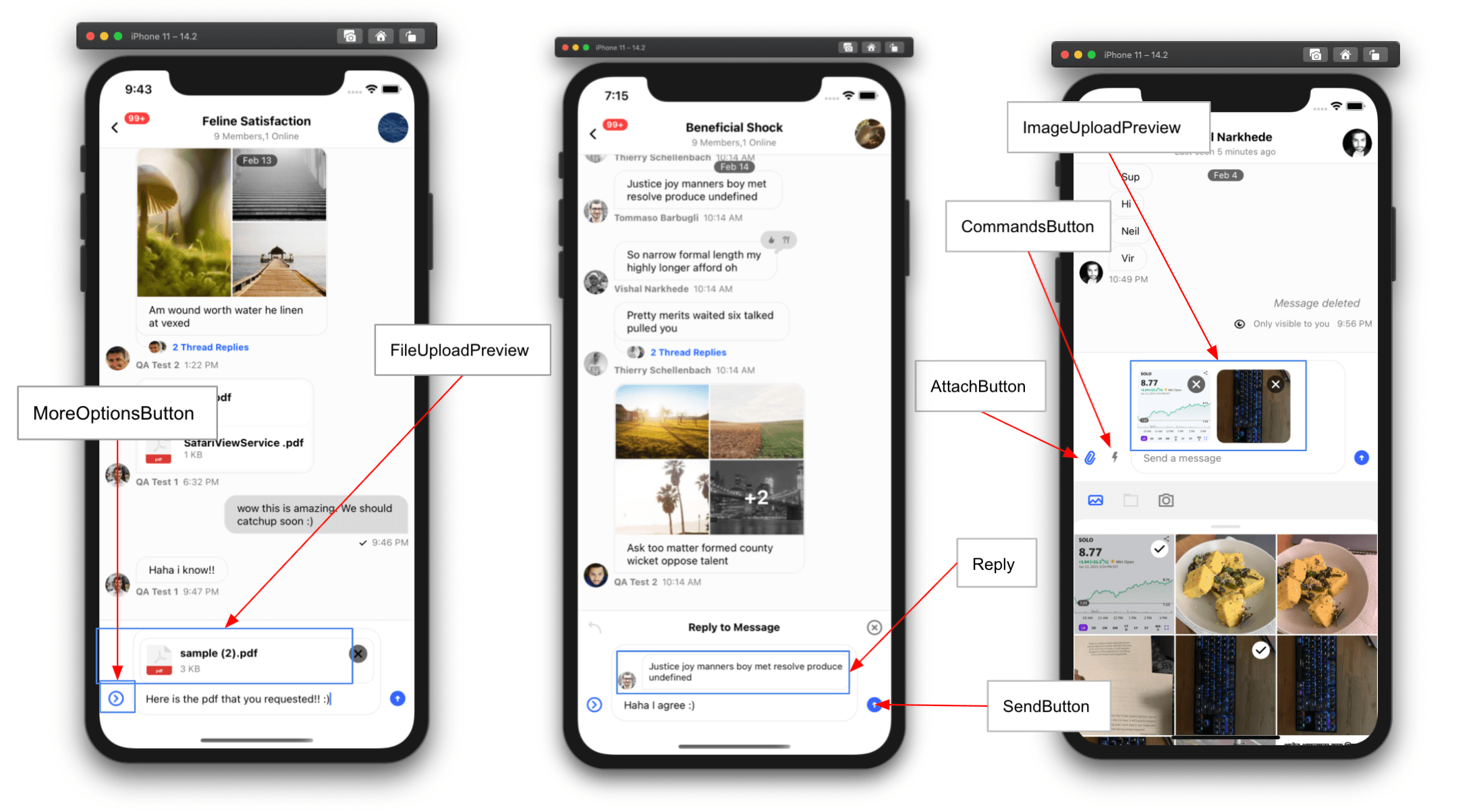
AttachButton
Component to render the attach button next to input box.
| Type | Default |
|---|---|
| ComponentType | AttachButton |
Attachment
Component for rendering attachments in MessageList.
Available props:
attachment{object}
| Type | Default |
|---|---|
| ComponentType | Attachment |
AttachmentActions
Component to render additional actions on attachment. for example send, shuffle, cancel in case of Giphy.
| Type | Default |
|---|---|
| ComponentType | AttachmentActions |
AudioAttachment
Component for rendering the Audio Attachment
| Type | Default |
|---|---|
| ComponentType | AudioAttachment |
AudioAttachmentUploadPreview
Component prop used to customize the audio attachment upload preview when its uploading/uploaded in the MessageInput.
| Type | Default |
|---|---|
| ComponentType | AudioAttachment |
AudioRecorder
Custom UI component to render audio recorder controls in MessageInput.
| Type | Default |
|---|---|
| ComponentType | AudioRecorder |
AudioRecordingInProgress
Custom UI component to render audio recording in progress in MessageInput. It renders the waveform, duration etc, for the recording.
| Type | Default |
|---|---|
| ComponentType | AudioRecordingInProgress |
AudioRecordingLockIndicator
Custom UI component to render audio recording lock indicator in MessageInput that can be dragged up to lock the recording start.
| Type | Default |
|---|---|
| ComponentType | AudioRecordingLockIndicator |
AudioRecordingPreview
Custom UI component to render audio recording preview in MessageInput that allows playing the recording.
| Type | Default |
|---|---|
| ComponentType | AudioRecordingPreview |
AudioRecordingWaveform
Custom UI component to render audio recording waveform in MessageInput.
| Type | Default |
|---|---|
| ComponentType | AudioRecordingWaveform |
AutoCompleteSuggestionHeader
Component to render the autocomplete suggestion header.
| Type | Default |
|---|---|
| ComponentType | AutoCompleteSuggestionHeader |
AutoCompleteSuggestionItem
Component to render the autocomplete suggestion item.
| Type | Default |
|---|---|
| ComponentType | AutoCompleteSuggestionItem |
AutoCompleteSuggestionList
Component to render the autocomplete suggestion list.
| Type | Default |
|---|---|
| ComponentType | AutoCompleteSuggestionList |
Card
Component to render any custom type of attachment. Please check the guides for Custom Attachment
| Type | Default |
|---|---|
| ComponentType | Card |
CardCover
Component to render main body for Card component which renders custom type of attachment.
Please check the guides for Custom Attachment.
| Type |
|---|
| ComponentType |
CardFooter
Component to render footer for Card component which renders custom type of attachment. Please check the guides for Custom Attachment.
| Type |
|---|
| ComponentType |
CardHeader
Component to render header for Card component which renders custom type of attachment. Please check the guides for Custom Attachment.
| Type |
|---|
| ComponentType |
CommandsButton
Component to render button next to input box, which when pressed opens commands list.
| Type | Default |
|---|---|
| ComponentType | CommandsButton |
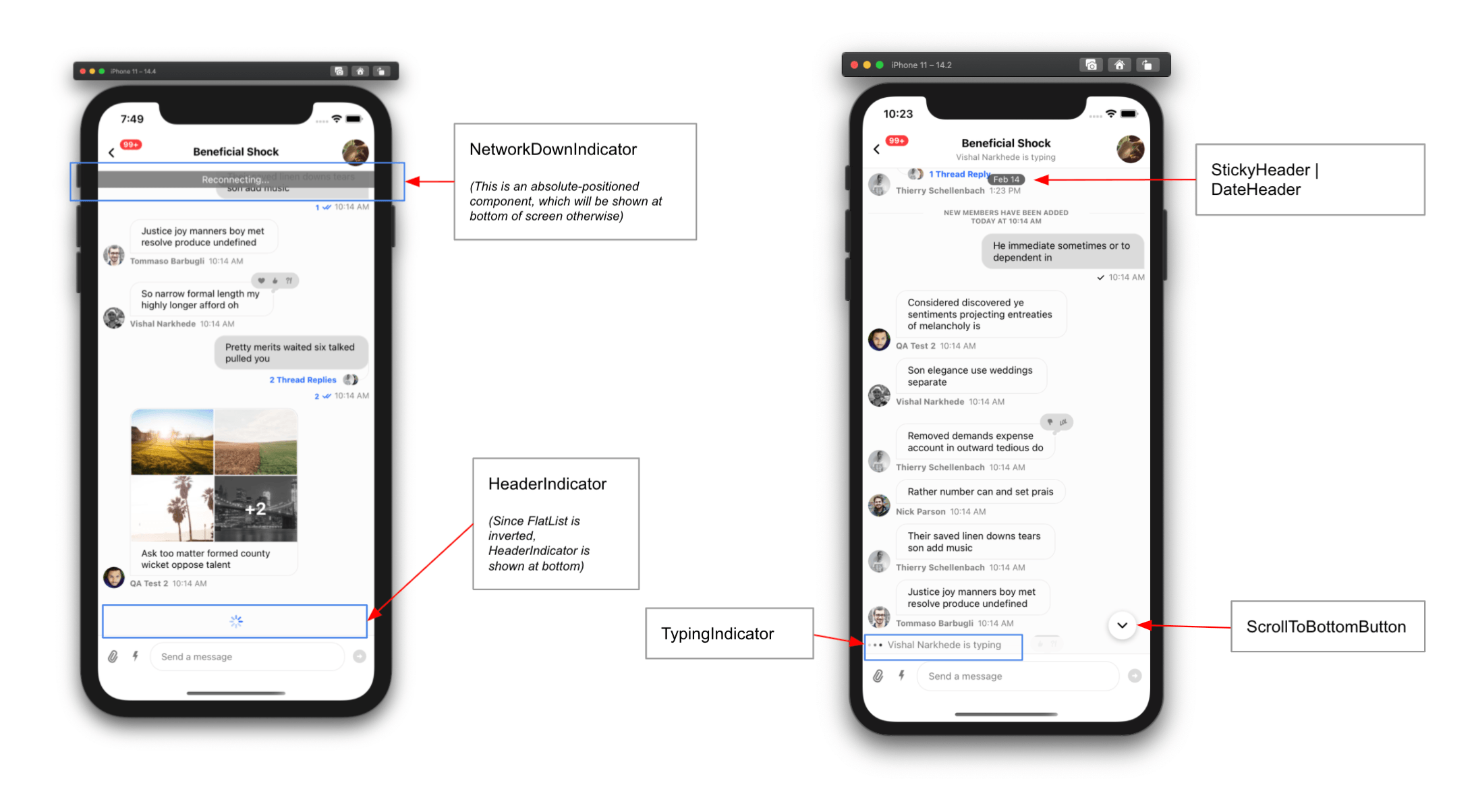
DateHeader
Component to render sticky date header within enclosed MessageList component.
| Type | Default |
|---|---|
| ComponentType | DateHeader |
EmptyStateIndicator
Component to render, when channel has no messages.
| Type | Default |
|---|---|
| ComponentType | EmptyStateIndicator |
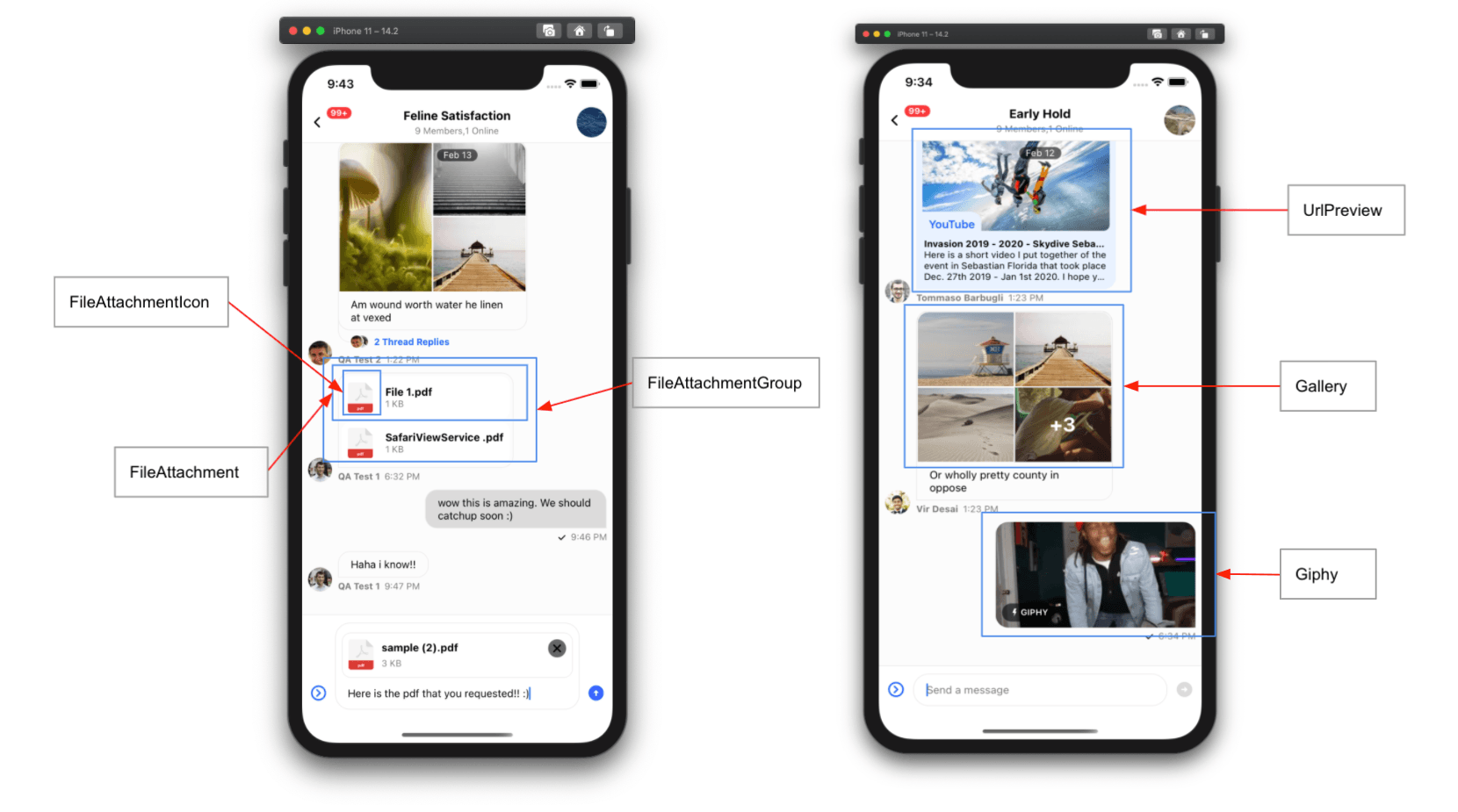
FileAttachmentIcon
Component to render file icon for file type attachment.
| Type | Default |
|---|---|
| ComponentType | FileIcon |
FileAttachment
Component to render 'file' type attachment in MessageList.
| Type | Default |
|---|---|
| ComponentType | FileAttachment |
FileAttachmentGroup
Component to render group of file type attachments, when there are multiple file type attachments in message.
| Type | Default |
|---|---|
| ComponentType | FileAttachmentGroup |
FileUploadPreview
Component to render preview of attached file, within enclosed MessageInput component.
| Type | Default |
|---|---|
| ComponentType | FileUploadPreview |
FlatList
FlatList component for underlying MessageList component.
| Type | Default |
|---|---|
| ComponentType | flat-list-mvcp |
Gallery
Component to render 'image' type attachments in the MessageList.
| Type | Default |
|---|---|
| ComponentType | Gallery |
Giphy
Component to render Giphy type attachments in MessageList.
| Type | Default |
|---|---|
| ComponentType | Giphy |
ImageLoadingFailedIndicator
Component to render when image fails to load in Gallery.
| Type | Default |
|---|---|
| ComponentType | ImageLoadingFailedIndicator |
ImageLoadingIndicator
Component to render when image is loading in Gallery.
| Type | Default |
|---|---|
| ComponentType | ImageLoadingIndicator |
ImageUploadPreview
Component to render preview of attached images, within enclosed MessageInput component
| Type | Default |
|---|---|
| ComponentType | ImageUploadPreview |
InlineDateSeparator
Component to render inline date separators between messages which were created at a difference of more than a day.
| Type | Default |
|---|---|
| ComponentType | InlineDateSeparator |
InlineUnreadIndicator
Component to render inline separator in MessageList, to indicate the position of last read message in list.
| Type | Default |
|---|---|
| ComponentType | InlineUnreadIndicator |
Input
Component to render UI part of enclosed MessageInput component. Please read section in guides about Customizing Message Input.
| Type |
|---|
| ComponentType |
InputButtons
Component to render action buttons (CommandsButton and AttachButton) on left side of input box, within enclosed MessageInput component.
| Type | Default |
|---|---|
| ComponentType | InputButtons |
InputEditingStateHeader
Component to render the header when a message is been edited on the message input.
| Type | Default |
|---|---|
| ComponentType | InputEditingStateHeader |
InputGiphySearch
Component to render the message input when the Giphy command is triggered.
| Type | Default |
|---|---|
| ComponentType | InputGiphySearch |
InputReplyStateHeader
Component to render the header on the message input when a message is been replied to.
| Type | Default |
|---|---|
| ComponentType | InputReplyStateHeader |
KeyboardCompatibleView
Component to override underlying default KeyboardCompatibleView. Generally you won't need to use this prop at all,
you can simply use following props instead:
| Type | Default |
|---|---|
| ComponentType | KeyboardCompatibleView |
LoadingErrorIndicator
Component to render full screen error indicator, when channel fails to load.
| Type | Default |
|---|---|
| ComponentType | LoadingErrorIndicator |
LoadingIndicator
Component to render full screen error indicator, when channel fails to load.
| Type | Default |
|---|---|
| ComponentType | LoadingIndicator |
MessageActionList
Component for rendering a message action list within the message menu.
| Type | Default |
|---|---|
| ComponentType | MessageActionList | undefined |
MessageActionListItem
Component for rendering message action list items within a message action list.
| Type | Default |
|---|---|
| ComponentType | MessageActionListItem | undefined |
MessageAvatar
Component to render avatar of sender for message, within MessageList. This component is only rendered for messages from other users.
| Type | Default |
|---|---|
| ComponentType | MessageAvatar |
MessageBounce
Component to render bounce action handler on click or long press of a Bounced message, within MessageList.
| Type | Default |
|---|---|
| ComponentType | MessageBounce |
MessageContent
Component to render content of message including status, attachments, reactions etc., within MessageList.
| Type | Default |
|---|---|
| ComponentType | MessageContent |
MessageDeleted
Component to render deleted message.
| Type | Default |
|---|---|
| ComponentType | MessageDeleted |
MessageEditedTimestamp
Component to render message edited label in message when the message is clicked, within MessageList. This component is only rendered for messages from other users.
| Type | Default |
|---|---|
| ComponentType | MessageEditedTimestamp |
MessageError
Component to customize the message error component.
| Type | Default |
|---|---|
| ComponentType | MessageError |
MessageFooter
Component to render footer for message, within MessageList.
| Type | Default |
|---|---|
| ComponentType | MessageFooter |
MessageHeader
Component to render header for message, within MessageList.
| Type |
|---|
| ComponentType |
MessageMenu
Component to customize the message contextual menu which allows users to perform actions on a message and react to messages.
| Type | Default |
|---|---|
| ComponentType | MessageMenu | undefined |
MessagePinnedHeader
Component to render pinned message label for message, within MessageList.
| Type |
|---|
| ComponentType |
MessageReplies
Component to show number of thread replies and avatars of members who replied on message
| Type | Default |
|---|---|
| ComponentType | MessageReplies |
MessageRepliesAvatars
Component to show avatars of members who thread replied on message.
| Type | Default |
|---|---|
| ComponentType | MessageRepliesAvatars |
MessageSimple
Component to render a message within MessageList.
Please check guides section for Customizing Message UI for details.
| Type | Default |
|---|---|
| ComponentType | MessageSimple |
MessageStatus
Component to render status of message, which includes time and read-receipts.
| Type | Default |
|---|---|
| ComponentType | MessageStatus |
MessageSwipeContent
Component that renders when the user swipes on a message.
| Type | Default |
|---|---|
| ComponentType | MessageSwipeContent | undefined |
MessageSystem
Component to render system type messages. Purpose of system messages is to inform user about changes to channel. System messages are part of message history, and have a property type set as system.
You can add system messages within message history in following scenarios:
- A user gets added to or removed from channel
- A user accepts invite to join a channel
- Channel is updated
| Type | Default |
|---|---|
| ComponentType | MessageSystem |
MessageText
Component to render text of message. By default, we use Simple Markdown package to render the text content of message. If you decide to use this prop, please be aware that you will need to handle the markdown rendering yourself.
| Type | Default |
|---|---|
| ComponentType | renderText |
MessageReactionPicker
Reaction selector component displayed within the message menu when user long presses a message.
| Type | Default |
|---|---|
| ComponentType | MessageReactionPicker | undefined |
MessageUserReactionsAvatar
Component for rendering an avatar in the message user reactions in the message menu.
| Type | Default |
|---|---|
| ComponentType | MessageUserReactionsAvatar | undefined |
MessageUserReactionsItem
Component prop to customize the individual user reaction item in the MessageUserReactions component of MessageMenu. This includes the avatar, reaction type, and the name of the person who has reacted, etc.
| Type | Default |
|---|---|
| ComponentType | MessageUserReactionsItem | undefined |
MessageUserReactions
List of reactions component within the message menu.
| Type | Default |
|---|---|
| ComponentType | MessageUserReactions | undefined |
MoreOptionsButton
Component to render a button within enclosed MessageInput, which when pressed shows more options such as AttachButton, CommandsButton.
| Type | Default |
|---|---|
| ComponentType | MoreOptionsButton |
NetworkDownIndicator
Component to render an indicator at top of the channel, which shows up when there is some issue with network or connection.
| Type | Default |
|---|---|
| ComponentType | NetworkDownIndicator |
ReactionListBottom
Component to render list of reactions at the bottom of the message bubble.
| Type | Default |
|---|---|
| ComponentType | ReactionListBottom |
ReactionListTop
Component to render list of reactions at top of the message bubble.
| Type | Default |
|---|---|
| ComponentType | ReactionListTop |
Reply
Component to render preview of parent of message for quoted reply.
| Type | Default |
|---|---|
| ComponentType | Reply |
ScrollToBottomButton
Component to render a button which when pressed, scrolls the message list to bottom.
| Type | Default |
|---|---|
| ComponentType | ScrollToBottomButton |
SendButton
Component to render a send message button, within enclosed MessageInput component.
| Type | Default |
|---|---|
| ComponentType | SendButton |
SendMessageDisallowedIndicator
Component to render indicator stating send message feature is not allowed for current user.
| Type | Default |
|---|---|
| ComponentType | SendMessageDisallowedIndicator |
ShowThreadMessageInChannelButton
Component to render a checkbox within enclosed Thread component, which when checked sets a show_in_channel property to true on a message.
| Type | Default |
|---|---|
| ComponentType | ShowThreadMessageInChannelButton |
StartAudioRecordingButton
Custom UI component for audio recording mic button in MessageInput.
| Type | Default |
|---|---|
| ComponentType | StartAudioRecordingButton |
TypingIndicator
Component to render typing indicator within enclosed MessageList component.
| Type | Default |
|---|---|
| ComponentType | TypingIndicator |
TypingIndicatorContainer
Component to render container in which typing indicator gets rendered within enclosed MessageList component.
| Type | Default |
|---|---|
| ComponentType | TypingIndicatorContainer |
UnreadMessagesNotification
Component to render the floating unread indicator on the message list when the first unread message is not in the view.
| Type | Default |
|---|---|
| ComponentType | UnreadMessagesNotification |
UploadProgressIndicator
Component to render upload progress indicator as an overlay above ImageUploadPreview and FileUploadPreview.
| Type | Default |
|---|---|
| ComponentType | UploadProgressIndicator |
UrlPreview
Component to render preview of URLs in MessageList.
| Type | Default |
|---|---|
| ComponentType | Card |
CreatePollContent
A custom UI component used to render the entire poll creation form. It has access to the CreatePollContext values by default through the useCreatePollContext hook.
| Type | Default |
|---|---|
| ComponentType | CreatePollContent |
PollContent
A Component prop used to render the content of the Poll component in MessageList.
The component has full access to the entire Poll reactive state through the usePollState hook.
| Type | Default |
|---|---|
| ComponentType | PollContent |
Props
PollHeader
A Component prop used to render the header of the PollContent component.
| Type | Default |
|---|---|
| ComponentType | PollHeader |
PollButtons
A Component prop used to render the buttons of the PollContent component.
| Type | Default |
|---|---|
| ComponentType | PollButtons |
StreamingMessageView
Custom UI component to display an AI generated message.
| Type | Default |
|---|---|
| component | StreamingMessageView |
StopMessageStreamingButton
Custom UI component to display the button to stop AI generation instead of the SendButton one in MessageInput.
| Type | Default |
|---|---|
| component | StopMessageStreamingButton |