















Channel Pinning and Archiving
Channel Pinning and Archiving
Channel pinning and archiving let users pin channels to the top or hide them from lists.
Best Practices
- Use
pinned_atandarchived_atfrom membership to drive UI state reliably. - When customizing
ChannelList, keeponChannelMemberUpdatedwired up so membership changes for pinning and archiving are reflected. - Keep pin/unpin and archive/unarchive actions idempotent and optimistic.
- Filter or sort consistently so pinned channels don’t disappear on updates.
- Avoid mixing pinned and archived filters in the same list unless clearly labeled.
- Provide clear affordances so users can undo pin/archive actions easily.
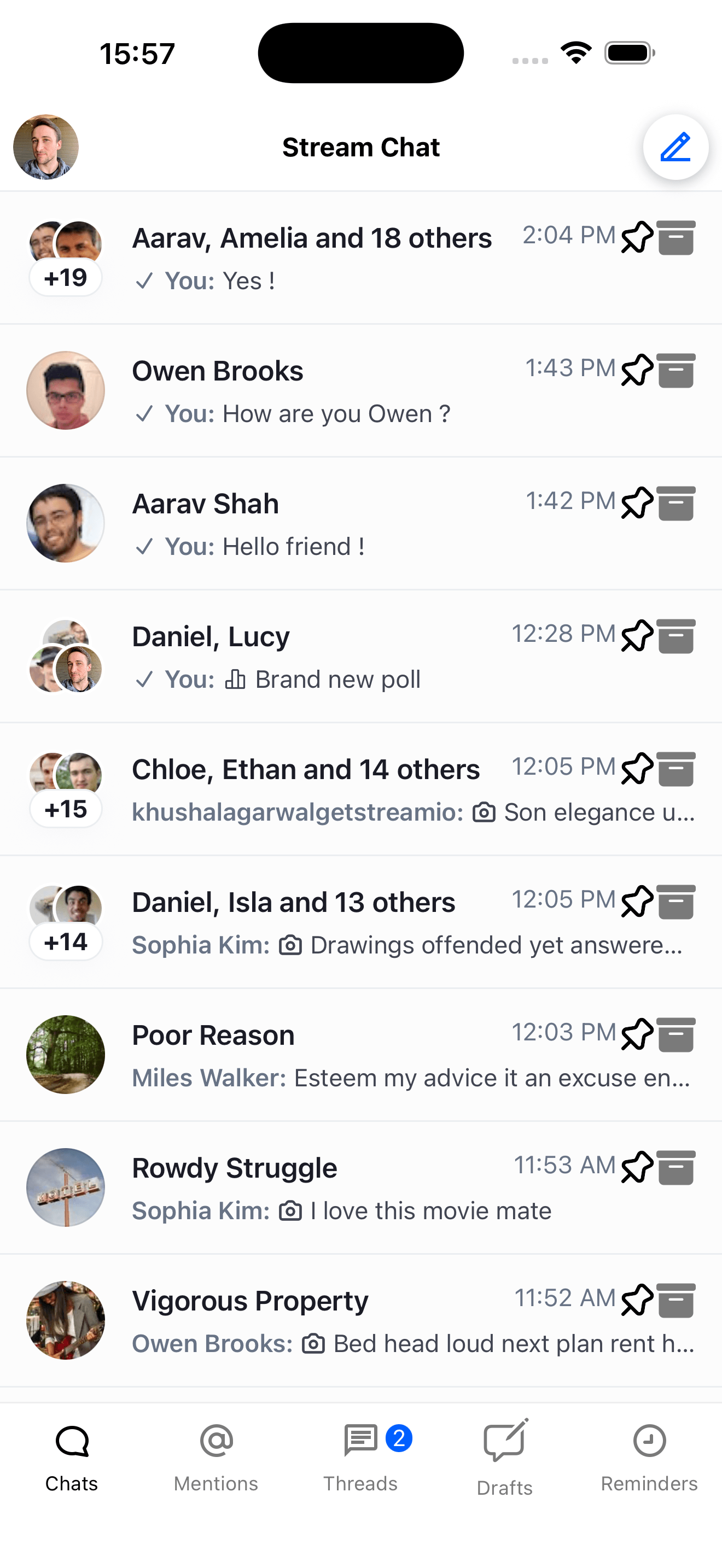 | 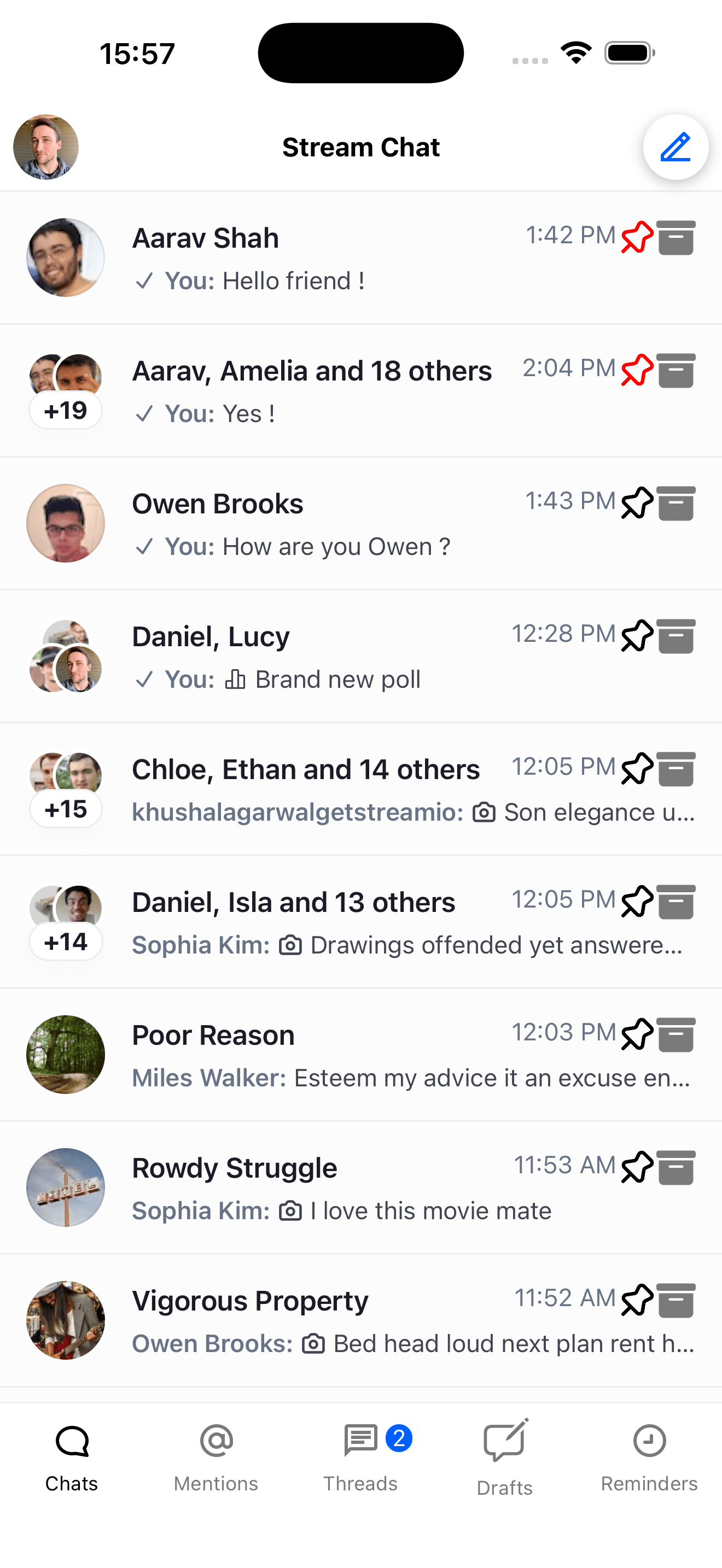 |
| Chat screen with customize background button | Wallpaper overview screen with background image options |
Channel Pinning
Pinning moves a channel to the top of the list (when sorted accordingly).
Pin and unpin are part of the default channel action items and appear automatically in the channel options sheet that opens from the swipe row on a channel preview — most apps don't need any custom integration to support pinning. By default these items are excluded from the standalone Channel Details screen (surface === 'details'); the Channel Details screen surfaces pin/unpin through its own UI patterns. See Customizing pin/unpin per surface below for how to opt in or opt out.
To pin or unpin a channel programmatically, use the channel.pin() and channel.unpin() methods:
await channel.pin();await channel.unpin();Read pinned status via membership?.pinned_at from useChannelMembershipState.
If you need a fully custom UI for pin/unpin (separate from the default action items), you can wire it up like this:
import { Pressable } from "react-native";
import {
  Pin,
  Unpin,
  useChannelMembershipState,
} from "stream-chat-react-native";

const CustomChannelPreview = ({ channel }) => {
  const membership = useChannelMembershipState(channel);

  return (
    <Pressable
      onPress={async () => {
        if (membership?.pinned_at) {
          await channel.unpin();
        } else {
          await channel.pin();
        }
      }}
    >
      {membership?.pinned_at ? (
        <Unpin height={24} width={24} pathFill="red" />
      ) : (
        <Pin size={24} />
      )}
    </Pressable>
  );
};
Customizing pin/unpin per surface
If you want pin/unpin on the Channel Details surface as well, override getChannelActionItems and branch on context.surface:
import {
  ChannelList,
  GetChannelActionItems,
  Pin,
  Unpin,
} from "stream-chat-react-native";

const getChannelActionItems: GetChannelActionItems = ({
  defaultItems,
  context,
}) => {
  if (context.surface !== "details") return defaultItems;

  const pinItem = {
    id: "pin",
    label: context.isPinned ? "Unpin" : "Pin",
    Icon: context.isPinned ? Unpin : Pin,
    placement: "sheet" as const,
    type: "standard" as const,
    action: context.isPinned ? context.actions.unpin : context.actions.pin,
  };

  return [...defaultItems, pinItem];
};

<ChannelList getChannelActionItems={getChannelActionItems} />;
Conversely, to remove pin/unpin from the channel list options sheet, filter on context.surface === 'list' and drop the pin item.
Channel Archiving
Archiving hides a channel and can be filtered by archived status.
To archive a channel, you can use the channel.archive() method.
await channel.archive();To unarchive a channel, you can use the channel.unarchive() method.
await channel.unarchive();Read archived status via membership?.archived_at from useChannelMembershipState.
An example of how to implement channel archiving is shown below:
import { Pressable } from "react-native";
import { Archive, useChannelMembershipState } from "stream-chat-react-native";

const CustomChannelPreview = ({ channel }) => {
  const membership = useChannelMembershipState(channel);

  return (
    <Pressable
      onPress={async () => {
        if (membership?.archived_at) {
          await channel.unarchive();
        } else {
          await channel.archive();
        }
      }}
    >
      {membership?.archived_at ? (
        <Archive height={24} width={24} pathFill="red" />
      ) : (
        <Archive height={24} width={24} />
      )}
    </Pressable>
  );
};
Filtering Channels
Filter by pinned/archived status using the filters prop on ChannelList.
For archived channels, you can use the archived filter.
const filters = {
  archived: true,
};
<ChannelList filters={filters} />;
For pinned channels, you can use the pinned filter.
const filters = {
  pinned: true,
};
<ChannelList filters={filters} />;
Sorting Channels
Sort by pinned status using the sort prop on ChannelList.
For pinned channels, you can use the pinned_at field.
const sort = [{ pinned_at: -1 }, { last_message_at: -1 }, { updated_at: -1 }];

<ChannelList sort={sort} />;
This sorts by pinned status, then last message date, then updated date.