
 React
React iOS
iOS Android
 Flutter
 Angular
 JavaScript
 Unity
Unity Unreal
 Node
Node Python
 Ruby
Ruby PHP
PHP Java
Java .NET
.NET Go
Go REST
RESTclass ChannelPage extends StatelessWidget {
const ChannelPage({
super.key,
});
@override
Widget build(BuildContext context) {
return Scaffold(
appBar: const StreamChannelHeader(),
body: Column(
children: <Widget>[
Expanded(
child: StreamMessageListView(),
),
const StreamMessageInput(),
],
),
);
}
}This is beta documentation for Stream Chat Flutter SDK v10. For the latest stable version, see the latest version (v9).
StreamMessageListView
A Widget For Displaying A List Of Messages
Find the pub.dev documentation here
Background
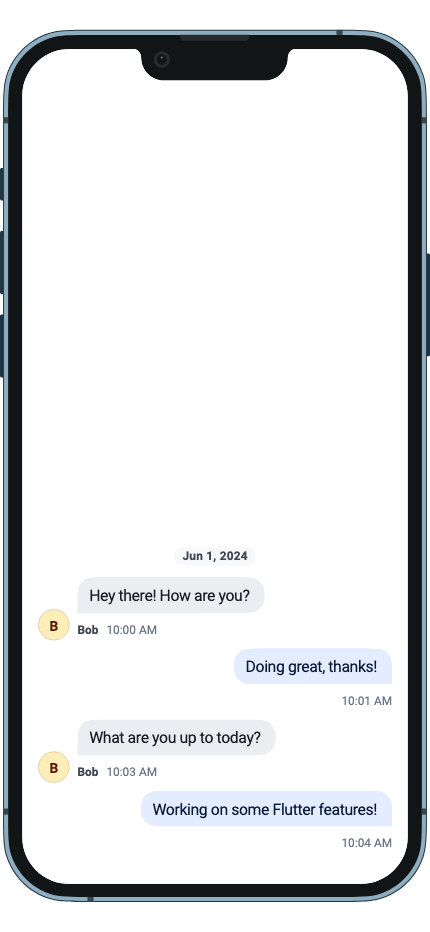
Every channel can contain a list of messages sent by users inside it. The StreamMessageListView widget
displays the list of messages inside a particular channel along with possible attachments and
other message attributes (if the message is pinned for example). This sets it apart from the StreamMessageSearchListView
which may not contain messages only from a single channel and is used to search for messages across
many.
Basic Example
The StreamMessageListView shows the list of messages of the current channel. It has inbuilt support for
common messaging functionality: displaying and editing messages, adding / modifying reactions, support
for quoting messages, pinning messages, and more.
An example of how you can use the StreamMessageListView is:
Enable Threads
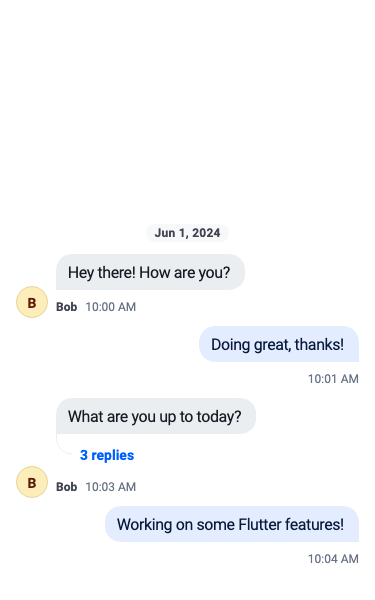
Threads are made of a parent message and replies linked to it. To enable threading, the SDK requires you
to supply a threadBuilder which will supply the page when the thread is clicked.
StreamMessageListView(
    threadBuilder: (_, parentMessage) {
        return ThreadPage(
            parent: parentMessage,
        );
    },
),
The StreamMessageListView itself can render the thread by supplying the parentMessage parameter.
StreamMessageListView(
    parentMessage: parent,
),
Building Custom Messages
You can also supply your own implementation for displaying messages using the messageBuilder parameter.
To customize the existing implementation, look at the StreamMessageWidget documentation instead.
StreamMessageListView(
    messageBuilder: (context, message, defaultProps) {
        // Build the default widget
        return StreamMessageWidget.fromProps(props: defaultProps);

        // Or customize props before building
        return StreamMessageWidget.fromProps(
          props: defaultProps.copyWith(
            actionsBuilder: (context, actions) => [...actions, myAction],
          ),
        );

        // Or replace entirely
        return MyCustomMessageWidget(message: message);
    },
),
Swipe to Reply
Enable swipe-to-reply gestures on messages using the swipeToReply parameter:
StreamMessageListView(
  swipeToReply: true,
),
When enabled, users can swipe a message to trigger the reply action. The swipe gesture is disabled for deleted and failed messages.
Loading & Empty States
The StreamMessageListView provides built-in skeleton loading and empty state components:
- Skeleton loading: While messages are loading, a shimmer animation shows placeholder message bubbles. Customize with
loadingBuilder. - Empty state: When no messages exist, a centered prompt is shown. Customize with
emptyBuilder.
StreamMessageListView(
  loadingBuilder: (context) => MyCustomLoadingWidget(),
  emptyBuilder: (context) => MyCustomEmptyState(),
),
The default components are StreamMessageListSkeletonLoading and StreamMessageListEmptyState.
Floating Date Divider
The message list displays a floating date divider that shows the date of the currently visible messages as the user scrolls. The divider fades when it approaches an inline date separator to avoid visual overlap.
List-Level Callbacks
These callbacks are forwarded to all messages in the list, eliminating the need to set them per-message:
StreamMessageListView(
  onEditMessageTap: (message) => _editMessage(message),
  onReplyTap: (message) => _replyToMessage(message),
  onUserAvatarTap: (user) => _showUserProfile(user),
  onReactionsTap: (message) => _showReactions(message),
  onQuotedMessageTap: (message) => _scrollToMessage(message),
  onMessageLinkTap: (message, url) => _openLink(url),
  onUserMentionTap: (user) => _showUserProfile(user),
),