
 React
React iOS
iOS Android
 Flutter
 Angular
 JavaScript
 Unity
Unity Unreal
 Node
Node Python
 Ruby
Ruby PHP
PHP Java
Java .NET
.NET Go
Go REST
RESTclass ChannelListPage extends StatefulWidget {
const ChannelListPage({
super.key,
required this.client,
});
final StreamChatClient client;
@override
State<ChannelListPage> createState() => _ChannelListPageState();
}
class _ChannelListPageState extends State<ChannelListPage> {
late final _controller = StreamChannelListController(
client: widget.client,
filter: Filter.in_(
'members',
[StreamChat.of(context).currentUser!.id],
),
channelStateSort: const [SortOption('last_message_at')],
);
@override
void dispose() {
_controller.dispose();
super.dispose();
}
@override
Widget build(BuildContext context) => Scaffold(
body: RefreshIndicator(
onRefresh: _controller.refresh,
child: StreamChannelListView(
controller: _controller,
onChannelTap: (channel) => Navigator.push(
context,
MaterialPageRoute(
builder: (_) => StreamChannel(
channel: channel,
child: const ChannelPage(),
),
),
),
),
),
);
}This is beta documentation for Stream Chat Flutter SDK v10. For the latest stable version, see the latest version (v9).
StreamChannelListView
A Widget For Displaying A List Of Channels
Find the pub.dev documentation here
Background
Channels are fundamental elements of Stream Chat and constitute shared spaces which allow users to message each other.
1:1 conversations and groups are both examples of channels, albeit with some (distinct/non-distinct) differences. Displaying the list of channels that a user is a part of is a pattern present in most messaging apps.
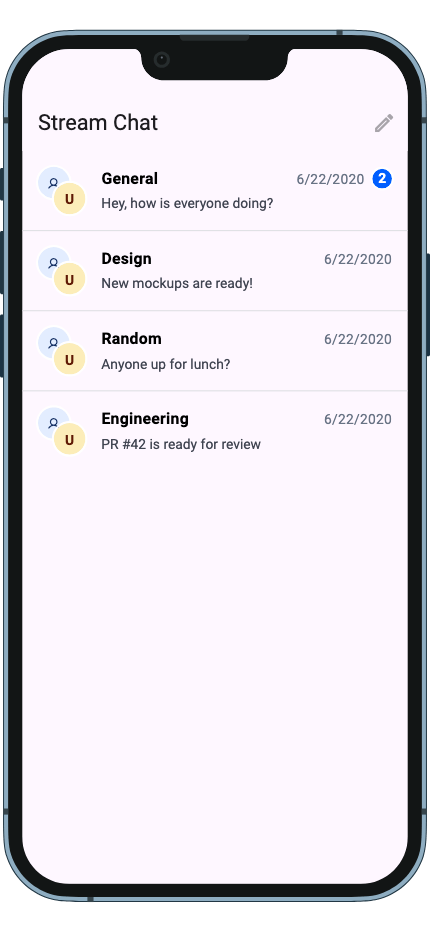
The StreamChannelListView widget allows displaying a list of channels to a user. By default, this is NOT
ONLY the channels that the user is a part of. This section goes into setting up and using a StreamChannelListView
widget.
Make sure to check the StreamChannelListController documentation for more information on how to use the controller to manipulate the StreamChannelListView.
Basic Example
Here is a basic example of the StreamChannelListView widget. It consists of the main widget itself, a StreamChannelListController to control the list of channels and a callback to handle the tap of a channel.
Channel List Item (StreamChannelListItem)
Each row in the list is rendered by StreamChannelListItem (previously StreamChannelListTile). The new component accepts only the essential interaction properties — slot customization (avatar, title, subtitle, timestamp) is done via StreamComponentFactory.
Basic usage:
StreamChannelListItem(
  channel: channel,
  onTap: () => openChannel(channel),
  onLongPress: () => showOptions(channel),
  selected: isSelected,
)
Customizing the Channel List Item
To customize the slot widgets, provide a builder via StreamComponentFactory:
StreamComponentFactory(
  builders: StreamComponentBuilders(
    extensions: streamChatComponentBuilders(
      channelListItem: (context, props) => StreamChannelListTile(
        avatar: StreamChannelAvatar(channel: props.channel),
        title: Text(props.channel.name ?? ''),
        subtitle: Text(props.channel.lastMessageAt?.toString() ?? ''),
        onTap: props.onTap,
        onLongPress: props.onLongPress,
        selected: props.selected,
      ),
    ),
  ),
  child: ...,
)
StreamChannelListTile is the low-level presentational component that renders pre-resolved slot values without any channel-specific logic.
Using itemBuilder for Per-Row Customization
The itemBuilder parameter on StreamChannelListView lets you replace individual rows entirely:
StreamChannelListView(
  controller: _controller,
  itemBuilder: (context, channels, index, defaultTile) {
    return ListTile(
      tileColor: Colors.amberAccent,
      title: Center(
        child: StreamChannelName(channel: channels[index]),
      ),
    );
  },
),
Theming Channel List Items
Use StreamChannelListItemThemeData (previously StreamChannelPreviewThemeData) to style list items:
StreamChatTheme(
  data: StreamChatThemeData(
    channelListItemTheme: StreamChannelListItemThemeData(
      titleStyle: const TextStyle(fontWeight: FontWeight.bold),
      subtitleStyle: const TextStyle(color: Colors.grey),
      timestampStyle: const TextStyle(fontSize: 12),
    ),
  ),
  child: ...,
)
State-Dependent Background Colors
StreamChannelListItemThemeData.backgroundColor uses WidgetStateProperty for state-dependent styling:
StreamChannelListItemTheme(
  data: StreamChannelListItemThemeData(
    backgroundColor: WidgetStateProperty.resolveWith((states) {
      if (states.contains(WidgetState.selected)) return Colors.blue.shade50;
      return Colors.white;
    }),
  ),
  child: StreamChannelListView(controller: _controller),
)
Subtree Theme Override
StreamChannelListItemTheme(
  data: StreamChannelListItemThemeData(
    titleStyle: const TextStyle(color: Colors.blue),
  ),
  child: StreamChannelListView(controller: _controller),
)On this page: