
 React
React iOS
iOS Android
 Flutter
 Angular
 JavaScript
 Unity
Unity Unreal
 Node
Node Python
 Ruby
Ruby PHP
PHP Java
Java .NET
.NET Go
Go REST
REST.str-chat__message--pinned .str-chat__message-bubble::before {
content: "📌";
display: flex;
align-items: center;
justify-content: center;
position: absolute;
background-color: papayawhip;
font-size: 0.6rem;
width: 1.4rem;
height: 1.4rem;
border-radius: 9999px;
z-index: 1;
top: -10px;
}
.str-chat__message--other.str-chat__message--pinned
.str-chat__message-bubble::before {
right: -10px;
}
.str-chat__message--me.str-chat__message--pinned
.str-chat__message-bubble::before {
left: -10px;
}This is beta documentation for Stream Chat React SDK v14. For the latest stable version, see the latest version (v13)
.
Pin Indicator
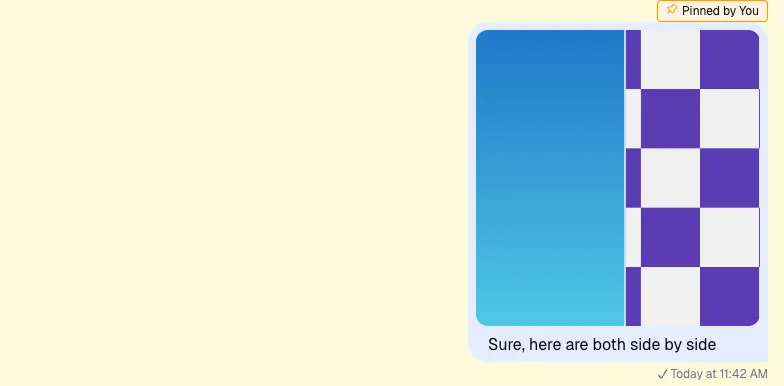
This example shows how to create a custom pin indicator for pinned messages. Pinned messages highlight important content.
Best Practices
- Use CSS-only pins for simple visuals; use components for richer data.
- Ensure pinned indicators don’t obscure message content.
- Respect permission rules for who can pin/unpin.
- Keep pin UI consistent between channel and thread views.
- Test pinned messages in grouped and quoted contexts.
Custom Pin Indicator
CSS Based Solution
Start with a simple CSS-only approach. The required classes are already toggled. Add a ::before pseudo-element with a pin icon when a message is pinned.
Component Based Solution
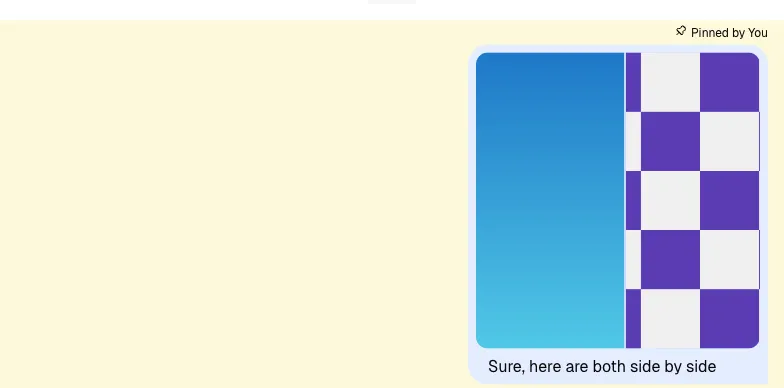
CSS is less flexible for JS interactions, so a component-based solution is useful. Here we show the user who pinned the message. Register your component with WithComponents so the nested message UI can read it from ComponentContext.
import { Channel, WithComponents } from "stream-chat-react";

const CustomPinIndicator = () => {
  const { message } = useMessageContext("CustomPinIndicator");

  const pinnedBy = message.pinned_by?.name || message.pinned_by?.id;

  if (!pinnedBy) return null;

  return <div className="pin-indicator">📌 Pinned by {pinnedBy}</div>;
};

//...

<WithComponents overrides={{ PinIndicator: CustomPinIndicator }}>
  <Channel>...</Channel>
</WithComponents>;
.pin-indicator {
grid-area: pin;
}
.str-chat__message.str-chat__message--other,
.str-chat__message.str-chat__quoted-message-preview {
grid-template-areas:
". pin"
"avatar message"
". replies"
". translation-notice"
". custom-metadata"
". metadata";
}
.str-chat__message.str-chat__message--me {
grid-template-areas:
"pin"
"message"
"replies"
"translation-notice"
"custom-metadata"
"metadata";
}
Read More
See Permissions v2 for pinning permissions.