
 React
React iOS
iOS Android
 Flutter
 Angular
 JavaScript
 Unity
Unity Unreal
 Node
Node Python
 Ruby
Ruby PHP
PHP Java
Java .NET
.NET Go
Go REST
RESTimport {
Channel,
ChannelHeader,
MessageComposer,
MessageList,
Thread,
Window,
WithComponents,
} from "stream-chat-react";
const CustomPollHeader = () => <div>Custom Header</div>;
const App = () => (
<WithComponents overrides={{ PollHeader: CustomPollHeader }}>
<Channel>
<Window>
<ChannelHeader />
<MessageList />
<MessageComposer />
</Window>
<Thread />
</Channel>
</WithComponents>
);This is beta documentation for Stream Chat React SDK v14. For the latest stable version, see the latest version (v13)
.
Polls
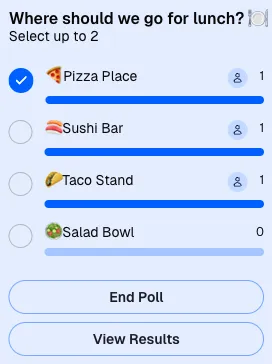
Messages can contain polls. By default, polls are created from the message composer and rendered through the Poll component, which provides PollContext and then renders PollContent.
Best Practices
- Use the default poll UI unless your app needs a distinct voting flow.
- Read live poll state from
poll.state, not fromMessageContext.message. - Keep poll option text concise so message bubbles remain readable.
- Customize
PollActionsonly when you need different dialogs or button flows. - Use quoted-message components for polls inside quoted messages; there is no dedicated
QuotedPollsurface.
Poll UI Customization
The current poll UI is customized through these override keys:
PollContentfor the overall poll bodyPollHeaderfor the title and selection instructionsPollOptionSelectorfor each selectable optionPollActionsfor the actions and dialogs rendered below the option list
If a poll appears in a quoted message, it uses the normal quoted-message surfaces such as QuotedMessage or QuotedMessagePreview.
Poll header customization
Poll option selector customization
import { Channel, WithComponents } from "stream-chat-react";

const CustomPollOptionSelector = () => <div>Custom Option Selector</div>;

<WithComponents overrides={{ PollOptionSelector: CustomPollOptionSelector }}>
  <Channel>{/* ... */}</Channel>
</WithComponents>;
Poll actions customization
PollActions controls the action buttons and dialog flows rendered below the poll options. The default component accepts these override props:
AddCommentPromptEndPollAlertPollAnswerListPollOptionsFullListPollResultsSuggestPollOptionForm
You can override the whole PollActions component or only the nested dialog surfaces:
import { Channel, PollActions, WithComponents } from "stream-chat-react";

const CustomPollActions = () => (
  <PollActions
    AddCommentPrompt={CustomAddCommentPrompt}
    EndPollAlert={CustomEndPollAlert}
    PollAnswerList={CustomPollAnswerList}
    PollOptionsFullList={CustomPollOptionsFullList}
    PollResults={CustomPollResults}
    SuggestPollOptionForm={CustomSuggestPollOptionForm}
  />
);

<WithComponents overrides={{ PollActions: CustomPollActions }}>
  <Channel>{/* ... */}</Channel>
</WithComponents>;
Poll content layout customization
If you want to restructure the poll layout, override PollContent:
import {
  Channel,
  PollActions,
  PollHeader,
  PollOptionList,
  WithComponents,
} from "stream-chat-react";

const CustomPollContent = () => (
  <div>
    <PollHeader />
    <PollOptionList optionsDisplayCount={10} />
    <PollActions />
  </div>
);

<WithComponents overrides={{ PollContent: CustomPollContent }}>
  <Channel>{/* ... */}</Channel>
</WithComponents>;
Poll API And State
To fully customize poll UI, use the poll instance from PollContext and subscribe to poll.state.
import { usePollContext, useStateStore } from "stream-chat-react";

const pollStateSelector = (state) => ({
  latest_votes_by_option: state.latest_votes_by_option,
  ownVotesByOptionId: state.ownVotesByOptionId,
});

const CustomComponent = () => {
  const { poll } = usePollContext();
  const { latest_votes_by_option, ownVotesByOptionId } = useStateStore(
    poll.state,
    pollStateSelector,
  );

  return (
    <pre>
      {JSON.stringify({ latest_votes_by_option, ownVotesByOptionId }, null, 2)}
    </pre>
  );
};
The poll instance exposes methods such as query, update, partialUpdate, close, delete, createOption, updateOption, deleteOption, castVote, removeVote, addAnswer, removeAnswer, queryAnswers, and queryOptionVotes.
Do not rely on MessageContext.message for live poll state. It is seed data only. Use poll.state.
PollContext
PollContext is available to descendants of the rendered Poll component.
| Value | Description | Type |
|---|---|---|
poll | The Poll instance retrieved from the low-level client. | Poll |
Examples
Read the current poll from context
import { usePollContext } from "stream-chat-react";

const Component = () => {
  const { poll } = usePollContext();

  return <div>{poll.id}</div>;
};On this page: