
 React
React iOS
iOS Android
 Flutter
 Angular
 JavaScript
 Unity
Unity Unreal
 Node
Node Python
 Ruby
Ruby PHP
PHP Java
Java .NET
.NET Go
Go REST
REST@Composable
public fun MessageComposer(
messageComposerState: MessageComposerState,
...,
)This is beta documentation for Stream Chat Android SDK v7. For the latest stable version, see the latest version (v6)
.
Implementing Own Capabilities
Each Channel has a list of capabilities that can be performed in it, such as muting a user, deleting messages and many others. Not all channels should have the same capabilities, nor should all users, which is where own capabilities come into play.
Inside of Channel you will find a property with a signature ownCapabilities: Set<String>. Which channel capabilities this set contains depends on the current user's role (for example admin, guest, etc.), the channel type (for example messaging, livestream, etc.) and channel level settings. You can read more about channel capabilities here and more about channel level settings here.
Integrating channel capabilities into the UI
If you are using our bound UI components in combination with our ViewModels, then own capabilities work out of the box without any additional effort from your side, otherwise you will have to pass the correct set of capabilities to individual components.
Different components have different ways of passing own capabilities to them, so we’ll go through them individually. Capabilities that were a part of the minimal chat experience before the introduction of own capabilities will be highlighted in bold with an asterisk next to them.
As a safety precaution, by default an empty set is passed wherever ownCapabilities: Set<String> is required. This gives the user no capabilities. Passing a set containing all capabilities will give the user potentially dangerous capabilities such as the ability to delete any message.
MessageComposer
The file containing MessageComposer can be found here.
MessageComposer receives MessageComposerState. This class holds the necessary data to make MessageComposer work, including a set of own capabilities.
These are used internally by the component and by the ChatComponentFactory methods that render the composer's sub-components.
The default ChatComponentFactory implementations use these capabilities to show or hide the attachments button, send button, and other composer elements. To customize this behavior, override the relevant factory methods (see Component Factory).
For example, to always show the attachments button regardless of capabilities:
class CustomComponentFactory(
    private val delegate: ChatComponentFactory = object : ChatComponentFactory {},
) : ChatComponentFactory by delegate {

    @Composable
    override fun MessageComposerLeadingContent(params: MessageComposerLeadingContentParams) {
        // Always show the attachments button, ignoring capabilities
        IconButton(onClick = params.onAttachmentsClick) {
            Icon(
                painter = painterResource(id = R.drawable.stream_compose_ic_add),
                contentDescription = "Attachments",
            )
        }
    }
}
Let's take a look at MessageComposerState:
public data class MessageComposerState(
    ..., // State
    val ownCapabilities: Set<String> = setOf()
)
The file containing MessageComposerState can be found here.
MessageComposer respects the following capabilities:
- send-message *
- send-links *
- upload-file *
- send-typing-events *
Own capabilities are publicly exposed inside MessageComposerController and MessageComposerViewModel as ownCapabilities: StateFlow<Set<String>>.
For this component, as well as all the other examples, the capabilities in bold are a part of the "default" behavior that is set up for most users in the dashboard.
SelectedMessageMenu
@Composable
public fun SelectedMessageMenu(
    message: Message,
    messageOptions: List<MessageOptionItemState>,
    ownCapabilities: Set<String>,
    ..., // Handlers and customization options
)
The file containing SelectedMessageMenu can be found here.
The ownCapabilities parameter controls which reactions and options are shown. The component delegates rendering to ChatComponentFactory. Override MessageMenuHeaderContent() to customize how reaction capabilities are applied, or MessageMenuOptions() to customize the options list.
SelectedMessageMenu respects the following capability:
- send-reaction *
Additional capabilities are checked by defaultMessageOptionsState(), which builds the options list based on the channel's capabilities:
@Composable
public fun defaultMessageOptionsState(
    selectedMessage: Message,
    currentUser: User?,
    isInThread: Boolean,
    channel: Channel,
): List<MessageOptionItemState>
This function uses the ChatTheme.messageOptionsTheme.optionVisibility property and the channel's ownCapabilities to produce the correct list of MessageOptionItemState. Read more about customizing what options SelectedMessageMenu shows here.
defaultMessageOptionsState respects the following capabilities:
- send-reply *
- pin-message
- delete-any-message
- delete-own-message *
- update-any-message
- update-own-message *
Own capabilities are publicly exposed inside MessageListViewModel as ownCapabilities: StateFlow<Set<String>>.
SelectedReactionsMenu
@Composable
public fun SelectedReactionsMenu(
    message: Message,
    currentUser: User?,
    ownCapabilities: Set<String>,
    ..., // Handlers and customization options
)
The file containing SelectedReactionsMenu can be found here.
The ownCapabilities parameter controls whether the "add reaction" button is shown in the menu. The component delegates rendering to ChatComponentFactory — override ReactionsMenuContent() to customize how the reaction capability is applied.
SelectedReactionsMenu respects the following capability:
- send-reaction *
SelectedChannelMenu
@Composable
public fun SelectedChannelMenu(
    selectedChannel: Channel,
    ..., // State, handlers and content
    centerContent: @Composable ColumnScope.() -> Unit = {
        // Default content, uses own capabilities to regulate
        // deleting and leaving channels
    },
)
The file containing SelectedChannelMenu can be found here.
SelectedChannelMenu contains a Channel value. It uses the ownCapabilities property contained by that Channel value to leverage own capabilities inside the default center content.
SelectedChannelMenu respects the following capabilities:
- leave-channel *
- delete-channel
Other capabilities
There are channel capabilities which are not implemented in the SDK because we do not offer the corresponding components or the functionality. You can implement these yourself after creating the correct components.
These are as follows:
- freeze-channel
- set-channel-cooldown
- search-messages
- update-channel
- update-channel-members
- ban-channel-members
Additionally, the capability send-typing-events* is implemented in our MessageComposerController used by our MessageComposerViewModel. Please keep this in mind should you wish to not use our ViewModels.
How capabilities affect the UI
Let's take MessageComposer into consideration.
If we left it with the default, empty set of own capabilities we would get the following result:
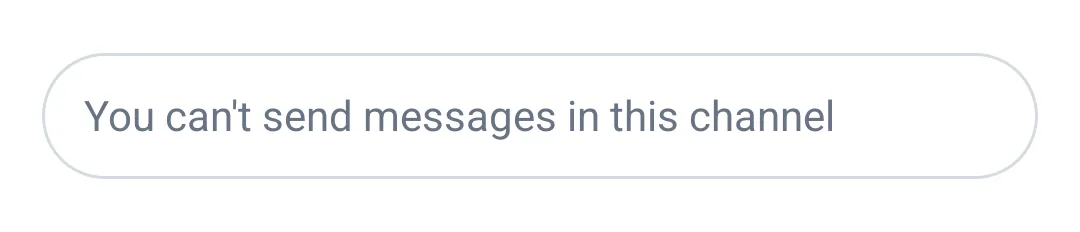 |
|---|
This leaves the user unable to perform any action provided by the composer. Ideally, you should let your Dashboard App settings regulate capabilities, but if you wish to control them manually, you can do so.
Take a look at the object called ChannelCapabilities:
public object ChannelCapabilities {
    /** Ability to ban channel members. */
    public const val BAN_CHANNEL_MEMBERS: String = "ban-channel-members"
    ... // Other capabilities
}
The file containing ChannelCapabilities can be found here.
This object contains all relevant channel capabilities as type safe properties. You can use the properties to build a set containing only the capabilities you want enabled for the user.
If you were to enable the user to send messages, links, attachments and typing events, you would build a set as follows:
val customOwnCapabilities = setOf(
    ChannelCapabilities.SEND_MESSAGE,
    ChannelCapabilities.SEND_LINKS,
    ChannelCapabilities.UPLOAD_FILE,
    ChannelCapabilities.SEND_TYPING_EVENTS
)
Then use it to create MessageComposerState:
val messageComposerState = MessageComposerState(
    ownCapabilities = customOwnCapabilities
)
And finally pass the MessageComposerState to the stateless MessageComposer component:
MessageComposer(
    messageComposerState = messageComposerState,
    ..., // State, handlers and content.
)
This enables the following capabilities:
- send-message *
- send-links *
- upload-file *
- send-typing-events *
And results in MessageComposer having the following appearance:
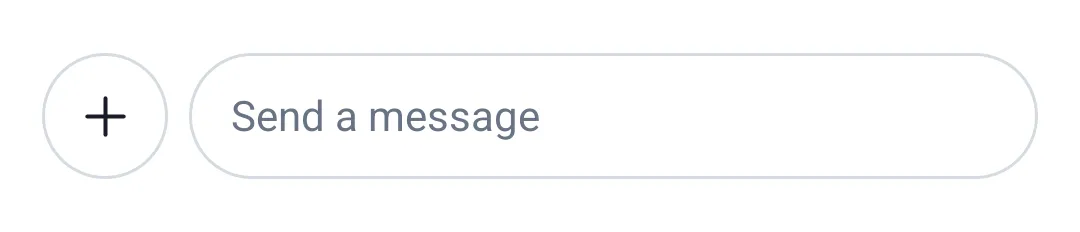 |
|---|
Please note that providing custom client side capabilities leaves you in charge of making sure that users are not awarded with dangerous capabilities and that different clients are in sync. This is why it is recommended to fetch own capabilities that are provided to you by the server.