


Test and troubleshoot
Make a test call before you call real people. If a call fails, find the symptom in the tables below. To test calls that you accept, call your number from a phone.
Before you test
- The Agent list shows only voice agents. You need at least one voice agent.
- On a SIP trunk, Test call is not available until the trunk has a password and at least one number. The dashboard shows the reason.
- For a Stream number, Test call does not work once you attach the number to Stream. Call it from a phone instead.
Make a test call
1
Open the trunk or the number
For a SIP trunk, go to Agents > Telephony > SIP trunks and open the trunk. For a Stream number, go to Agents > Telephony > Phone numbers and open the number's actions menu.
2
Start the call
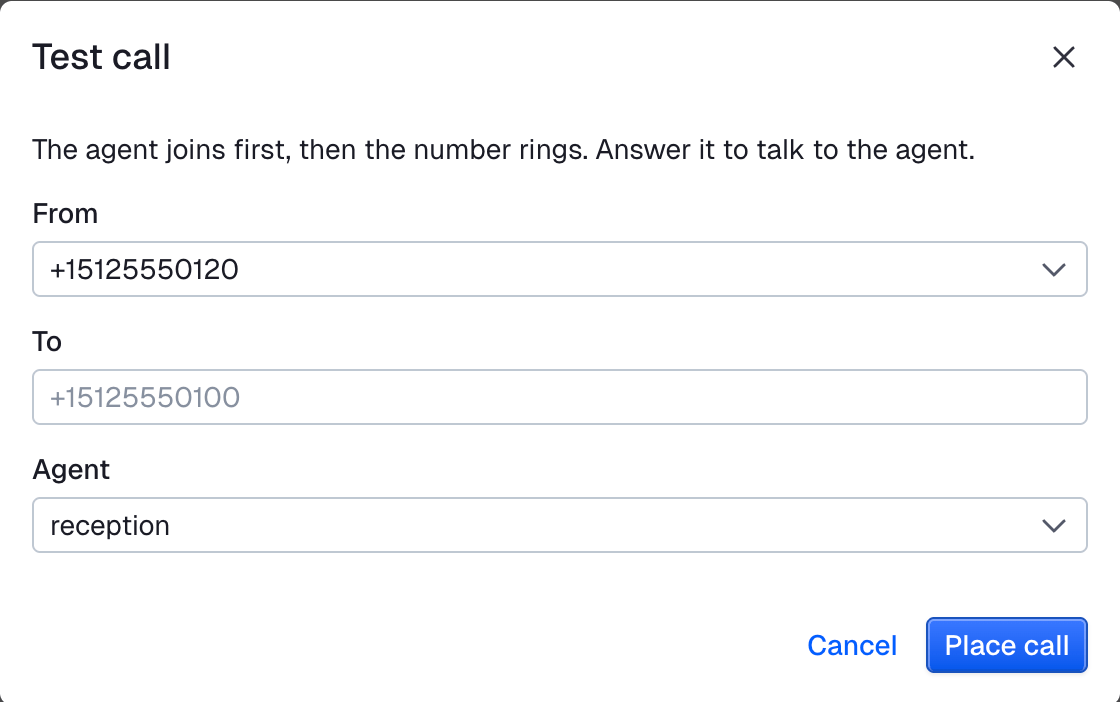
Click Test call. Select the From number, type the To number and select the Agent. Then click Place call.
3
Answer the phone
Answer the phone and say hello. An agent that places calls speaks after you.
Symptoms and fixes
Calls you make
| Symptom | Cause | Fix |
|---|---|---|
| The dashboard shows "Enter the host name only, such as sip.example.com" | The Host has sip: or a port, for example sip:sip.example.com:5060 |
Type the hostname only, for example sip.example.com. Type the port in Port. |
| The call fails with "opted out" in the error message | The person that you call opted out of your calls. | Do not call this number. |
| The call fails with "only sandbox recipients can be reached" in the error message | Your app is in the sandbox. It stays there until it has an approved use case. The Agents > Telephony > 10DLC page shows "Sandboxed until a use case is approved". | Call a number on the list of allowed numbers, or click Edit allowed numbers on the 10DLC page. See The sandbox list. |
| The call fails with "minutes of calls a day" in the error message | Your app used the calls that the sandbox allows for today. | Call again on the next day (UTC). |
| The call fails with "is not a number" in the error message | The From number is not one of your numbers. | Buy the number, or add it to your SIP trunk. |
| The call fails with "has no password" in the error message | The SIP trunk has no password. | Set the Password of the trunk and click Save. |
| The person answers but never hears the greeting | The agent says its greeting the moment it joins, before the phone rings. | Set greeting empty for an agent that places calls. See Call with an agent. |
| The call fails with "did not confirm the call" in the error message | The phone vendor did not confirm the call. It can still ring. | Do not place the call again at once. If it keeps happening, see Get help. |
| Stream accepts the call, but the phone does not ring. The agent waits and nobody joins. | On a SIP trunk, a value of the trunk is wrong, or your carrier refuses the caller ID. | Check in this order: the Host, then the Username and Password, then the From number. Your carrier must accept the From number as caller ID. |
| The agent waits and nobody joins, and no fix above helps | The API does not return the cause. | See Get help. |
Calls you accept
| Symptom | Cause | Fix |
|---|---|---|
| A caller rings your number, but nobody answers | The number is not attached to Stream. | On the Numbers page, click Attach to Stream next to the number. See Attach the number. |
| The number is attached, but the caller hears silence | The number has no agent, and no code of yours was waiting when the call arrived. | Give the number an agent, or start your code first, then call. See Give the number an agent. |
| Your code waits for calls, but none reach it | The number has an agent, which answers every call. | Remove the agent from the number. See Change or remove the agent. |
| The first caller gets the agent, but a caller at the same time does not | Your code is already on as many calls as it takes. Code that waits for a single call answers only one. | Raise the capacity of your dispatch worker, or run more workers. |
Both
| Symptom | Cause | Fix |
|---|---|---|
| The person hung up, but the session is still running | The agent does not leave on its own. | Close the session when you get participant_left. See End the call. After a Test call, click End test on the session page that opens. |
Buying a number
| Symptom | Cause | Fix |
|---|---|---|
Buying fails with phone_number_needs_address |
The number is outside the US and Canada. | Choose a number in the US or Canada. For another country, contact support. See Countries. |
Twilio errors and Telnyx errors list the errors of each carrier. SIP responses lists the usual SIP responses of any carrier.
Get help
Contact support and give:
- The session id. After a Test call, it is in the address of the session page that opens. For a call you accept, it is the id of the session that your code opened. If no session opened, give the number that was called and the time.
- The
vendor_call_id, if you placed the call through the API. - The From and To numbers, and the time of the call (UTC).