


Purchase a phone number
Buy a phone number from Stream, in the dashboard or through the API. Stream handles the carrier, so you need no carrier account or SIP trunk. Each number has a monthly price, shown in the search results. You pay it from the day you buy the number until you release it.
Countries
Stream sells numbers in the United States and Canada, so search with country set to US or CA.
A search for another country can still list numbers, because it asks the providers directly.
You can't buy those numbers: the purchase fails with phone_number_needs_address or phone_vendor_failed.
For a number in another country, contact support.
To call from a number in another country, you can also use your own SIP trunk.
Buy in the dashboard
Open the search
Go to Agents > Telephony > Phone numbers and click Buy number.
Search for a number
Type the two-letter code of the Country, for example US. To narrow the search, type an Area code. Then click Search.
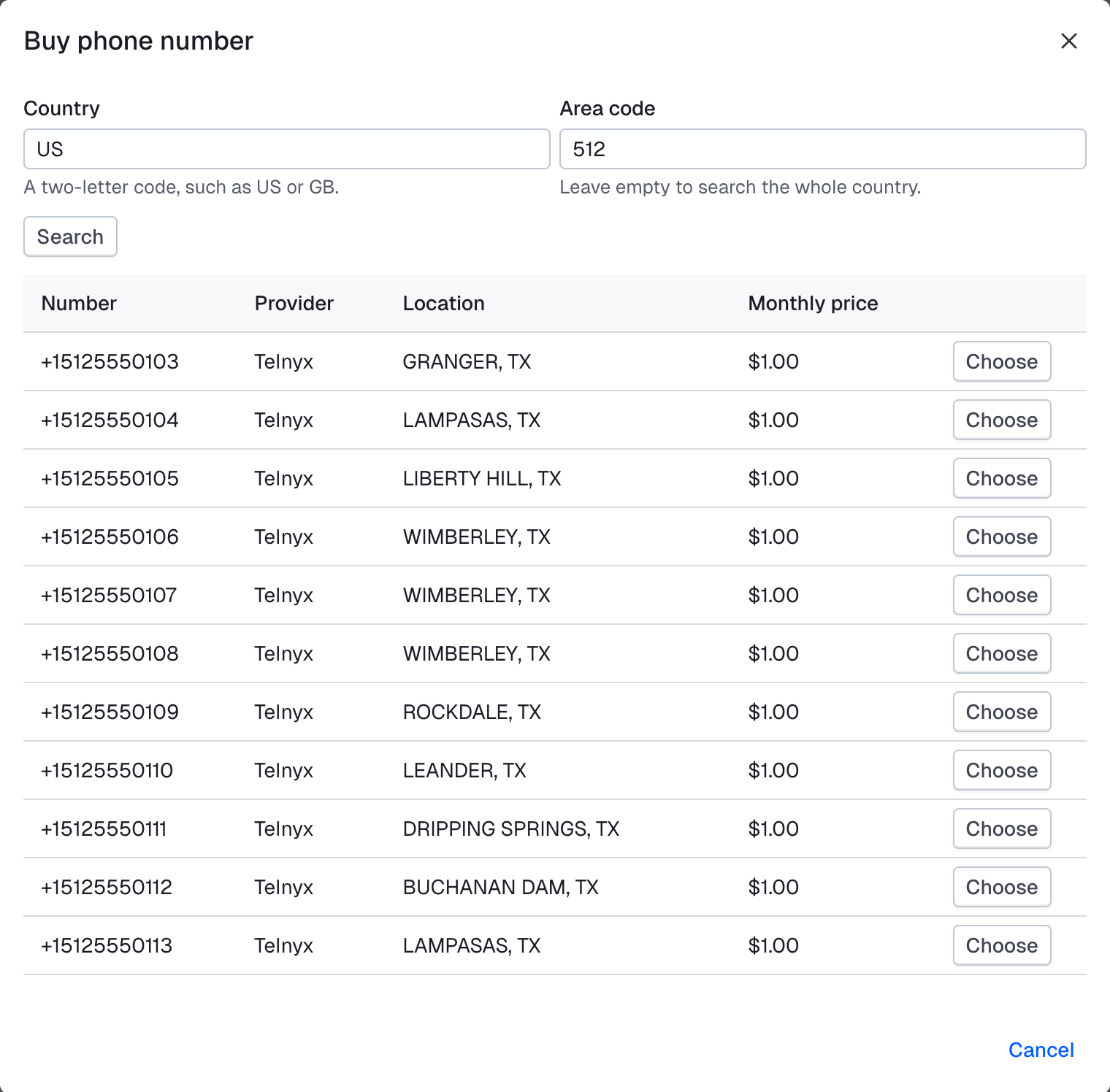
Choose a number
Click Choose next to a number. Check its monthly price and Features.
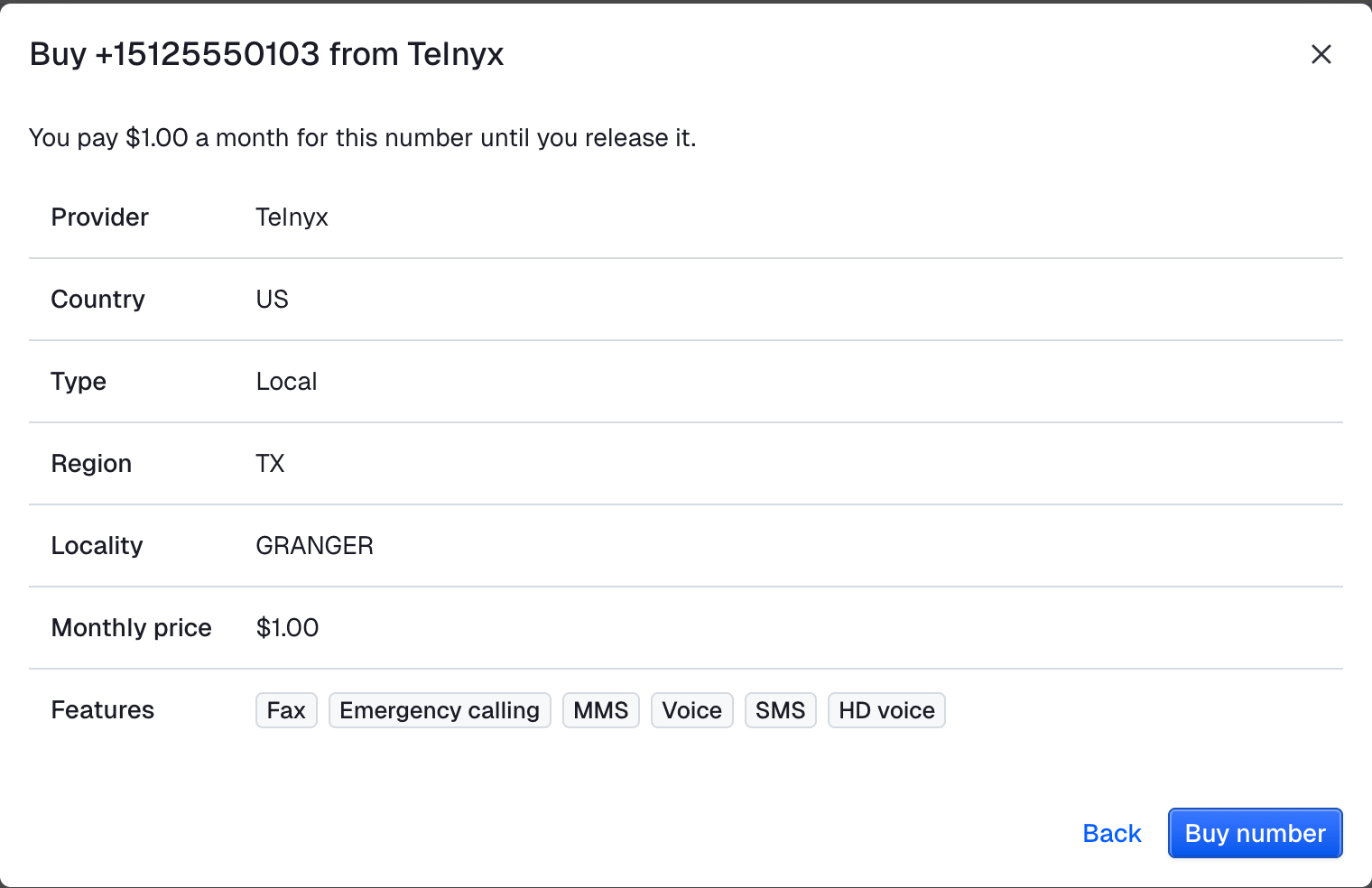
Buy the number
Click Buy number.
Buy through the API
Buy through the API when your backend sets up numbers itself, for example one per customer.
With the Stream CLI, copy the vendor, e164 and country of a search result into the second command.
curl -fsSL https://getstream.io/cli/beta/install.sh | bash # the agents commands are in the beta CLI
getstream agents api SearchPhoneNumbers --request '{"country": "US", "limit": 1}'
getstream agents api BuyPhoneNumber --request '{"vendor": "twilio", "e164": "+15125550100", "country": "US"}'const { numbers } = await agent.client.get("/v1/phone/numbers/available", {
query: { country: "US", limit: 1 },
});
const [offer] = numbers;
if (!offer) throw new Error("no vendor has a number in US to sell");
const number = await agent.client.post("/v1/phone/numbers", {
body: { vendor: offer.vendor, e164: offer.e164, country: offer.country },
});
console.log("bought", number.e164); // +15125550100from vision_agents.plugins import stream
phone = stream.Phone()
found = await phone.search("US", limit=1)
offer = found.numbers[0]
number = await phone.buy(offer.vendor, offer.e164, offer.country)
print("bought", number.e164) # +15125550100offer = agent.client.get("/v1/phone/numbers/available", query: { country: "US", limit: 1 })["numbers"].first
number = agent.client.post("/v1/phone/numbers", body: {
vendor: offer["vendor"], e164: offer["e164"], country: offer["country"], tags: agent.cost_tracking
})
puts "bought #{number["e164"]}" # +15125550100use GetStream\VisionAgents\Generated\{BuyNumberRequest, NumberSearchResult, PhoneNumber};
$offered = NumberSearchResult::fromArray($agent->client->get('/v1/phone/numbers/available', query: ['country' => 'US', 'limit' => 1]));
$offer = $offered->numbers[0];
$number = PhoneNumber::fromArray($agent->client->post('/v1/phone/numbers', body: new BuyNumberRequest(e164: $offer->e164, vendor: $offer->vendor, country: $offer->country)->toArray()));
echo 'bought ', $number->e164, "\n"; // +15125550100number, err := agent.PurchaseAnyNumber(ctx, agents.NumberSearch{Country: "US"})
if err != nil {
return err
}
fmt.Println("bought", number) // +15125550100using System.Text.Json;
var found = await agent.Client.GetAsync<JsonElement>("/v1/phone/numbers/available",
new Dictionary<string, string?> { ["country"] = "US", ["limit"] = "1" });
var offers = found.GetProperty("numbers");
if (offers.GetArrayLength() == 0) throw new InvalidOperationException("no vendor has a number in US to sell");
var offer = offers[0];
var number = await agent.Client.PostAsync<JsonElement>("/v1/phone/numbers", new
{
vendor = offer.GetProperty("vendor").GetString(),
e164 = offer.GetProperty("e164").GetString(),
country = offer.GetProperty("country").GetString(),
});
Console.WriteLine($"bought {number.GetProperty("e164")}"); // +15125550100use vision_agents::SearchPhoneNumbersQuery;
use vision_agents::types::BuyNumberRequest;
let client = agent.router()?;
let found = client
.search_phone_numbers(&SearchPhoneNumbersQuery {
country: Some("US".into()),
limit: Some(1),
..Default::default()
})
.await?;
let pick = found.numbers.first().ok_or("no US number is available")?;
let number = client
.buy_phone_number(&BuyNumberRequest {
e164: pick.e164.clone(),
vendor: pick.vendor.clone(),
country: Some(pick.country.clone()),
..Default::default()
})
.await?;
println!("bought {}", number.e164); // +15125550100If the search names no vendor, Stream asks every provider. Providers that could not answer are listed in skipped, with the reason.
Buy with the vendor, e164 and country of the result you picked.
Only buy results whose country is US or CA.
Buy a number once and reuse it. Don't buy a new one each time your code runs.
Manage your numbers
List your numbers to find the one to attach or call from. Release a number you no longer need, so its monthly charge stops.
With the Stream CLI:
getstream agents api ListPhoneNumbers
getstream agents api ReleasePhoneNumber --e164 +15125550100const held = await agent.client.get("/v1/phone/numbers");
await agent.client.delete("/v1/phone/numbers/{e164}", {
path: { e164: "+15125550100" },
});from vision_agents.plugins import stream
phone = stream.Phone()
held = await phone.numbers()
await phone.release("+15125550100")The list shows the numbers that you own, newest first.
To also list the numbers that you released, set include_released to true. What you paid for them still shows on that month's bill.
With the CLI:
getstream agents api ListPhoneNumbers --request '{"include_released": true}'The Python numbers() lists only the numbers that you hold.
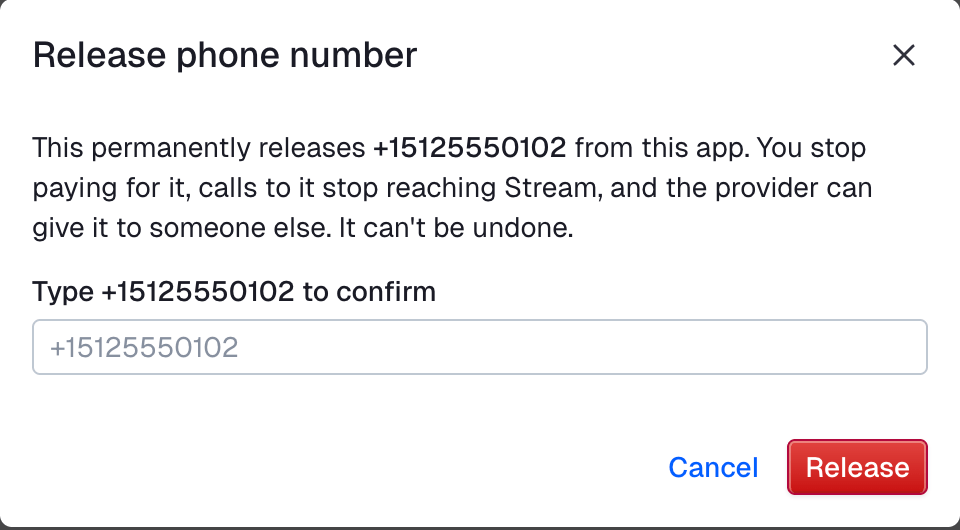
When you release a number that you bought from Stream, its monthly charge stops. The number is also detached, so calls to it stop reaching Stream. The provider can then give the number to someone else, so you may not get it back.
In the dashboard, go to Agents > Telephony > Phone numbers, open the number's actions menu and click Release. Type the number to confirm, then click Release.
Numbers on your SIP trunk are also in the API list, with vendor set to sip_trunk. The dashboard lists them on the trunk's page.
When you release such a number, it stays with your carrier.
Existing phone numbers
To call from a number that you already have, put it on your SIP trunk. Such a number can place calls but not receive them. Contact support to help move existing phone numbers to Stream.
Compliance
Laws on phone calls and AI differ by country and state. Breaking them gets your account suspended.
- Your agent says it is an AI. It never pretends to be a person.
- Don't spam people.
- Outbound calls usually need the person's written consent first.
To make calls, your account needs enough prepaid balance. For outbound calls, you must also verify your identity.
In the places that you call, you are responsible for:
- Consent to calls from an AI agent
- The hours when you may call
- Do Not Call lists
Next
- To answer calls on the number, attach it to Stream.
- To call people from it, see Making calls.