
 React
React iOS
iOS Android
 Flutter
 Angular
 JavaScript
 Unity
Unity Unreal
 Node
Node Python
 Ruby
Ruby PHP
PHP Java
Java .NET
.NET Go
Go REST
RESTimport { useEffect } from "react";
import { useChatContext } from "stream-chat-react-native";
const DraftSetup = () => {
const { client } = useChatContext();
useEffect(() => {
client.setMessageComposerSetupFunction(({ composer }) => {
composer.updateConfig({
drafts: {
enabled: true,
},
});
});
}, [client]);
return null;
};This is beta documentation for Stream Chat React Native SDK v9. For the latest stable version, see the latest version (v8)
.
Draft Messages
Draft messages are unsent messages stored locally. They let users continue writing later or recover text after closing the app.
Best Practices
- Enable drafts at composer setup time so all channels share consistent behavior.
- Save drafts on screen exit or navigation to avoid data loss.
- Keep draft creation lightweight to avoid blocking navigation.
- Surface draft previews in lists to help users resume quickly.
- Clear drafts after successful send to avoid stale previews.
Enabling Draft Messages
Enable drafts by setting drafts.enabled = true in MessageComposer. See this guide.
Without this, draft messages aren’t stored.
Creating Draft Messages
Call messageComposer.createDraft() when the user navigates away. If you don’t, the draft won’t be saved.
import { useMessageComposer } from "stream-chat-react-native";

// Inside the component where you want to create a draft
const messageComposer = useMessageComposer();

// Function to create a draft message. Call this when you want to save the draft.
const handleCreateDraft = async () => {
  await messageComposer.createDraft();
};
Handling Draft Creation on Screen Unmount with React Navigation
Example for react-navigation that saves drafts when leaving a channel or thread:
The hook uses useFocusEffect to detect screen removal and call createDraft.
Call useCreateDraftFocusEffect in channel and thread screens where you want drafts saved on unmount.
import { useCallback } from "react";
import { useMessageComposer } from "stream-chat-react-native";
import { useFocusEffect, useNavigation } from "@react-navigation/native";

export const useCreateDraftFocusEffect = () => {
  const navigation = useNavigation();
  const messageComposer = useMessageComposer();

  useFocusEffect(
    useCallback(() => {
      const unsubscribe = navigation.addListener("beforeRemove", () => {
        void messageComposer.createDraft();
      });

      return unsubscribe;
    }, [navigation, messageComposer]),
  );
};
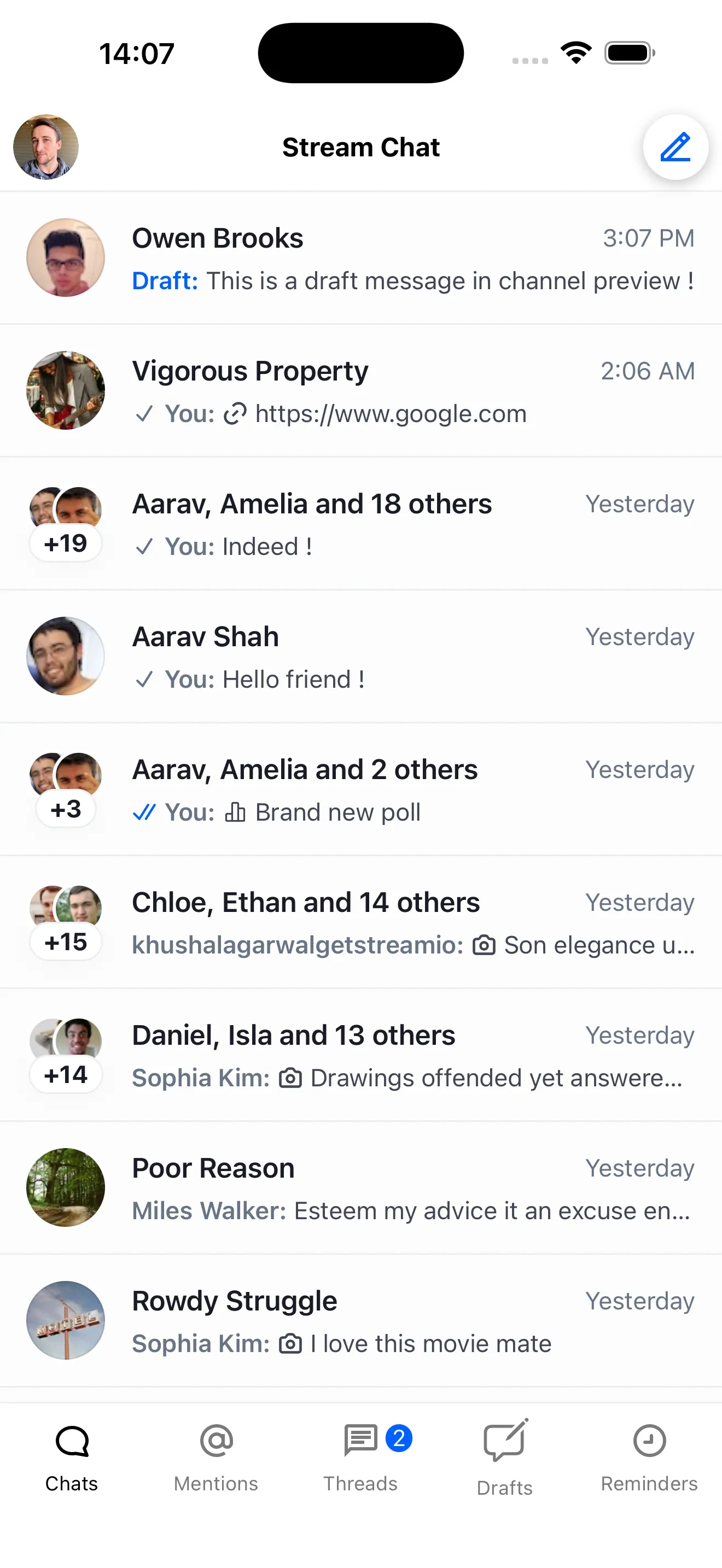
Channel previews can show draft previews, and drafts are restored in the message input when the user returns to a channel or thread.
| Draft Message Preview on Channel list |
|---|
 |