
 React
React iOS
iOS Android
 Flutter
 Angular
 JavaScript
 Unity
Unity Unreal
 Node
Node Python
 Ruby
Ruby PHP
PHP Java
Java .NET
.NET Go
Go REST
RESTimport { useEffect, useState } from "react";
import { StreamChat } from "stream-chat";
import {
Channel,
Chat,
MessageComposer,
MessageList,
OverlayProvider,
} from "stream-chat-react-native";
const client = StreamChat.getInstance("api_key");
export const App = () => {
const [channel, setChannel] = useState();
useEffect(() => {
const createAndWatchChannel = async () => {
const newChannel = client.channel("messaging", "channel_id");
await newChannel.watch();
setChannel(newChannel);
};
createAndWatchChannel();
}, []);
return (
<OverlayProvider>
<Chat client={client}>
<Channel channel={channel}>
<MessageList />
<MessageComposer />
</Channel>
</Chat>
</OverlayProvider>
);
};This is beta documentation for Stream Chat React Native SDK v9. For the latest stable version, see the latest version (v8)
.
Channel
Channel is the main entry point for customization and hosts most of the contexts and logic used by the React Native SDK. MessageList, MessageComposer, and Thread require it.
Best Practices
- Create and watch channels once, then reuse the instance across renders.
- Render
ChannelunderOverlayProviderandChatto ensure all contexts are available. - Customize UI by replacing specific components instead of re-implementing core logic.
- Keep custom components lightweight to avoid performance regressions in lists.
- Use channel props for behavior changes before reaching for custom overrides.
Basic Usage
Channel takes a StreamChat channel instance. Create one via creating channels or read it from ChannelList via the onSelect callback.
Context Providers
Channel provides ChannelContext, KeyboardContext, MessageInputContext, MessagesContext, PaginatedMessageListContext, AttachmentPickerContext, MessageComposerContext, ThreadContext, and TypingContext via their hooks.
| Context | Hook |
|---|---|
ChannelContext | useChannelContext |
KeyboardContext | useKeyboardContext |
MessageInputContext | useMessageInputContext |
MessagesContext | useMessagesContext |
PaginatedMessageListContext | usePaginatedMessageListContext |
AttachmentPickerContext | useAttachmentPickerContext |
MessageComposerContext | useMessageComposerAPIContext |
ThreadContext | useThreadContext |
TypingContext | useTypingContext |
UI Customizations
Channel is the entry point for most UI customization. Replace components via props and they will be used throughout the SDK where applicable.
Customizing the message avatar can be done easily by providing a custom component to the appropriate prop.
import { Image } from "react-native";
import { Channel, useMessageContext } from "stream-chat-react-native";

const CustomAuthor = () => {
  const { message } = useMessageContext();

  return <Image source={{ uri: message.user?.image }} />;
};

<Channel MessageAuthor={CustomAuthor} />;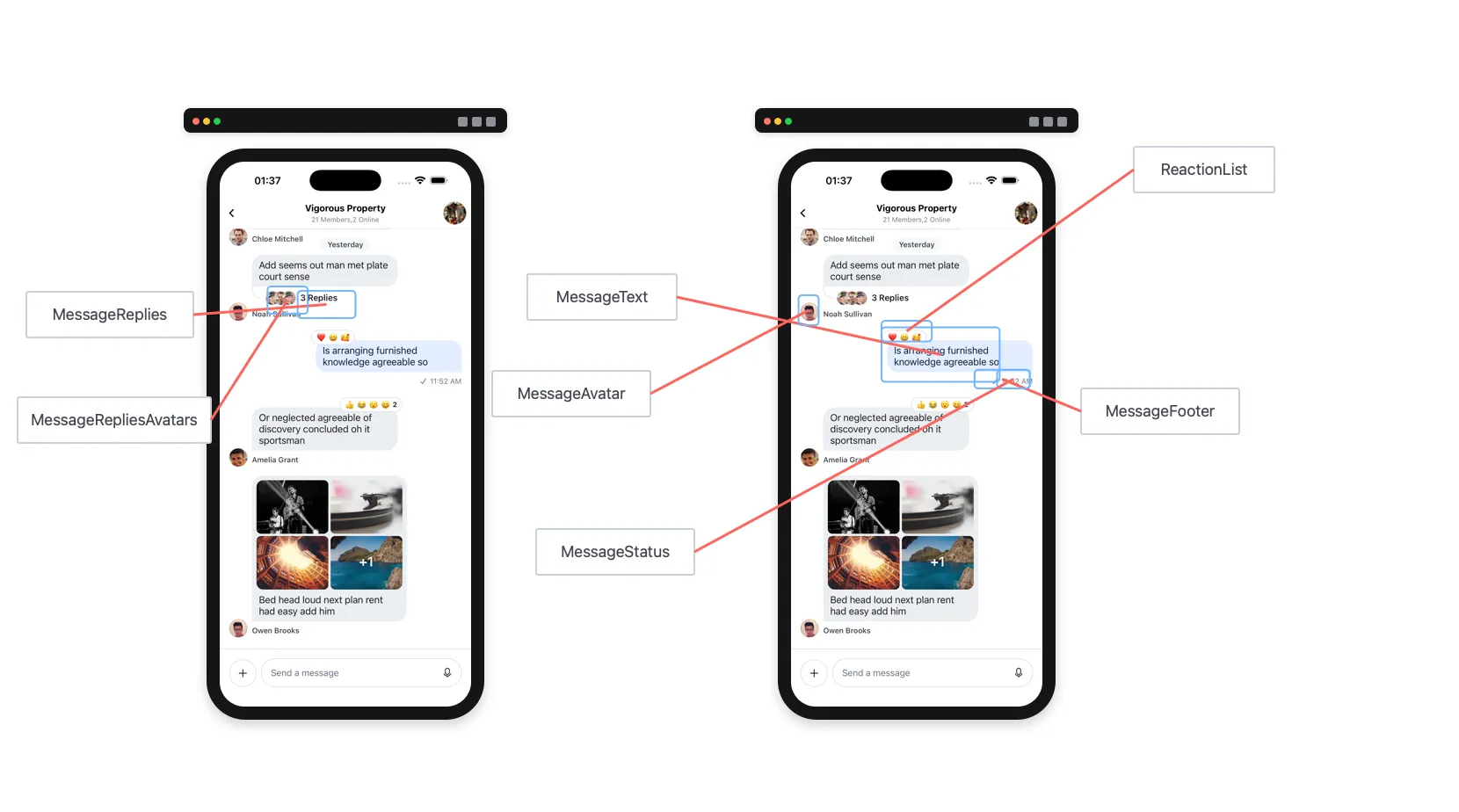
Props
channel
Channel instance from the Stream Chat client.
| Type |
|---|
| Channel |
keyboardVerticalOffset
Vertical offset used by the built-in keyboard handling. Set this to your header height so the same top offset is applied consistently across platforms.
| Type |
|---|
| number |
additionalKeyboardAvoidingViewProps
Extra props passed to KeyboardAvoidingView.
| Type |
|---|
| Object |
additionalTextInputProps
Extra props passed to the underlying TextInput in MessageComposer.
| Type |
|---|
| object |
additionalPressableProps
Extra props passed to the underlying Pressable used in message components like MessageContent.
| Type |
|---|
| object |
allowConcurrentAudioPlayback
Allow multiple audio players to play at once.
| Type | Default |
|---|---|
| Boolean | false |
allowSendBeforeAttachmentsUpload
When enabled, the user can send a message before all attachments have finished uploading. Defaults to the value of enableOfflineSupport from the Chat component.
| Type |
|---|
| Boolean |
allowThreadMessagesInChannel
Show the Show thread message in channel button in thread MessageComposer.
| Type | Default |
|---|---|
| boolean | true |
asyncMessagesLockDistance
Pixels the user must drag upward to lock recording and lift their finger without stopping it.
| Type | Default |
|---|---|
| Number | 50 |
asyncMessagesMinimumPressDuration
Minimum press duration (ms) on the record button to start voice recording.
| Type | Default |
|---|---|
| Number | 500 |
audioRecordingSendOnComplete
Controls what happens after a completed voice recording upload.
true: send the voice recording immediately after upload.false: keep it in the composer so the user can add text, attachments, or more recordings before sending.
| Type | Default |
|---|---|
| Boolean | true |
asyncMessagesSlideToCancelDistance
Pixels the user must drag toward the leading side to cancel voice recording.
| Type | Default |
|---|---|
| Number | 75 |
audioRecordingEnabled
Enable or disable audio recording.
| Type | Default |
|---|---|
| Boolean | false |
attachmentPickerBottomSheetHeight
Height of the attachment picker bottom sheet when open.
| Type | Default |
|---|---|
| Number | 333 |
attachmentSelectionBarHeight
Height of the attachment selection bar in the attachment picker.
| Type | Default |
|---|---|
| Number | 72 |
bottomInset
Height of items located below the MessageComposer when present. This inset determines the underlying shift to the MessageList when the attachment picker is opened.
Set this on Channel as the default screen-level configuration. If the value needs to change after mount, update it via setBottomInset from useAttachmentPickerContext.
| Type | Default |
|---|---|
| Number | 0 |
compressImageQuality
Image compression quality before upload.
On iOS, values >= 0.8 usually keep quality while reducing size. A value of 0.8 can roughly halve file size vs 1.0.
| Type | Default |
|---|---|
| number 0 to 1 (1 is best quality) | iOS: 0.8 Android: 1 |
createPollOptionGap
Gap between options in the poll creation dialog.
| Type | Default |
|---|---|
| Number | 8 |
customMessageSwipeAction
Custom action executed when the user swipes a message row.
| Type | Default |
|---|---|
({channel, message}: {channel: Channel, message: LocalMessage}) => void | The default action is swipe to reply. |
deletedMessagesVisibilityType
Controls visibility of deleted messages in the channel.
always: Visible to both sender and receiver.never: Visible to no one.sender: Visible only to the sender.receiver: Visible only to the receiver.
| Type | Default |
|---|---|
| enum('always', 'never', 'receiver', 'sender') | 'always' |
disableAttachmentPicker
When true, the attachment picker is hidden. Defaults to true when the image media library is not available.
| Type |
|---|
| Boolean |
disableKeyboardCompatibleView
Enable or disable the underlying KeyboardAvoidingView.
| Type | Default |
|---|---|
| boolean | false |
disableTypingIndicator
Disable the typing indicator in MessageList.
| Type | Default |
|---|---|
| boolean | false |
dismissKeyboardOnMessageTouch
Dismiss the keyboard when the user touches a message in the list.
| Type | Default |
|---|---|
| boolean | true |
doFileUploadRequest
Override the file upload request when a user selects a file. Must return a Promise.
Use this to store files in your own CDN.
| Type |
|---|
| Function |
This matches the definition of UploadRequestFn from the stream-chat package.
export type UploadRequestFn = (
  fileLike: FileReference | FileLike,
) => Promise<MinimumUploadRequestResult>;
doMarkReadRequest
Override the mark read request.
This prop should only be used for advanced functionality in which you want to conditionally allow mark-read requests.
Do not use this function to disable read receipts. If you would like to disable read-receipts, this can be done via Read Events on the dashboard.
Example
const doMarkReadRequest = (channel) => {
  if (/** Some custom logic here */) {
    channel.markRead();
  }
};| Type |
|---|
| Function |
| Parameter | Description |
|---|---|
channel | channel instance |
setChannelUnreadUiState | undefined | (state) =>void |
doSendMessageRequest
Override the send message request.
This function must return a Promise equivalent to client.sendMessage.
Use this only if you need to alter the message object before sending.
Example
const doSendMessageRequest = (channelId, messageObject) => {
  if (/** Some custom logic here */) {
    messageObject.isSpecial = true;
  }
  return channel.sendMessage(messageObject);
}| Type |
|---|
| function |
| Parameter | Description |
|---|---|
| channelId | string |
| messageObject | object |
| options | object | undefined |
preSendMessageRequest
A method invoked just after the first optimistic update of a new message, but before any other HTTP requests happen. Can be used to do extra work (such as creating a channel, or editing a message) before the local message is sent.
| Type |
|---|
| function |
| Parameter | Description |
|---|---|
options.localMessage | The local message object (LocalMessage) |
options.message | The message payload (StreamMessage) |
options.options | Optional send message options (SendMessageOptions) |
doUpdateMessageRequest
Override the update message request.
This function must return a Promise equivalent to client.updateMessage.
Use this only if you need to alter the message object before updating.
const doUpdateMessageRequest = (channelId, messageObject) => {
  const numberOfUpdates = (messageObject.numberOfUpdates ?? 0) + 1;
  const messageToSend = { ...messageObject, numberOfUpdates };
  return client.updateMessage(messageToSend);
};| Type |
|---|
| function |
| Parameter | Description |
|---|---|
| channelId | string |
| messageObject | object |
| options | object | undefined |
enableMessageGroupingByUser
If false, consecutive messages from the same user won't be grouped.
| Type | Default |
|---|---|
| boolean | true |
enableSwipeToReply
If true, users can swipe the full MessageItemView row to reply to a message.
| Type | Default |
|---|---|
| Boolean | true |
enforceUniqueReaction
Limits reactions to one per user. Selecting a new reaction replaces the previous one (similar to iMessage).
| Type | Default |
|---|---|
| boolean | false |
forceAlignMessages
Forces all messages to align left or right. By default, received messages are left and sent messages are right.
| Type | Default |
|---|---|
| 'left' | 'right' | false | false |
getMessageGroupStyle
Messages are grouped so UI elements like avatars only appear for the last message in a group. Messages are grouped when the same user sends them within a time window (controlled by maxTimeBetweenGroupedMessages on Channel). Use getMessageGroupStyle to override group position logic (top, bottom, middle, single), which affects UI like timestamps and avatars.
Default logic lives in getGroupStyles. Access the computed styles via MessageContext.groupStyles in custom components.
| Type |
|---|
| function |
giphyVersion
Giphy image version to render. See the Image Object keys for options.
| Type | Default |
|---|---|
| string | 'fixed_height' |
handleAttachButtonPress
Customize behavior when the AttachButton is pressed in the message input.
| Type |
|---|
() => void |
handleBan
Called when the Ban User action is triggered. It does not override default behavior. See customize message actions.
| Type |
|---|
| function |
| Parameter | Description |
|---|---|
| message | message the action is called on |
handleBlockUser
Called when the Block User action is triggered. It does not override default behavior. See customize message actions.
| Type |
|---|
| function |
| Parameter | Description |
|---|---|
| message | message the action is called on |
handleCopy
Called when the Copy Message action is triggered. It does not override default behavior. See customize message actions.
| Type |
|---|
| function |
| Parameter | Description |
|---|---|
| message | message the action is called on |
handleDelete
Called when the Delete Message action is triggered. It does not override default behavior. See customize message actions.
| Type |
|---|
| function |
| Parameter | Description |
|---|---|
| message | message the action is called on |
handleDeleteForMe
Called when the Delete Message for me action is triggered. It does not override default behavior. See customize message actions.
| Type |
|---|
| function |
| Parameter | Description |
|---|---|
| message | message the action is called on |
handleEdit
Called when the Edit Message action is triggered. It does not override default behavior. See customize message actions.
| Type |
|---|
| function |
| Parameter | Description |
|---|---|
| message | message the action is called on |
handleFlag
Called when the Flag Message action is triggered. It does not override default behavior. See customize message actions.
| Type |
|---|
| function |
| Parameter | Description |
|---|---|
| message | message the action is called on |
handleMarkUnread
Called when the Mark Unread action is triggered. It does not override default behavior. See customize message actions.
| Type |
|---|
| function |
| Parameter | Description |
|---|---|
| message | message the action is called on |
handleMute
Called when the Mute User action is triggered from the message actions list. It does not override default behavior. See customize message actions.
| Type |
|---|
| function |
| Parameter | Description |
|---|---|
| message | message the action is called on |
handlePinMessage
Called when the Pin to Conversation or Unpin from Conversation action is triggered. It does not override default behavior. See customize message actions.
| Type |
|---|
| function |
| Parameter | Description |
|---|---|
| message | message the action is called on |
handleReaction
Called when a reaction is selected in the message menu (add or remove). It does not override default behavior. See customize message actions.
| Type |
|---|
| Function |
| Parameter | Description |
|---|---|
message | Message the action is called on. |
reactionType | String designating the type of reaction. |
handleQuotedReply
Called when the Reply action is triggered. It does not override default behavior. See customize message actions.
| Type |
|---|
| function |
| Parameter | Description |
|---|---|
| message | message the action is called on |
handleRetry
Called when the Retry action is triggered. It does not override default behavior. See customize message actions.
| Type |
|---|
| function |
| Parameter | Description |
|---|---|
| message | message the action is called on |
handleThreadReply
Called when the Thread Reply action is triggered. It does not override default behavior. See customize message actions.
| Type |
|---|
| function |
| Parameter | Description |
|---|---|
| message | message the action is called on |
hasCameraPicker
Enable the camera picker in MessageComposer.
| Type | Default |
|---|---|
| Boolean | true |
hasCommands
Enable commands in MessageComposer.
| Type | Default |
|---|---|
| boolean | true |
hasFilePicker
Enable the file picker in MessageComposer.
| Type | Default |
|---|---|
| Boolean | true |
hasImagePicker
Enable the image picker in MessageComposer.
| Type | Default |
|---|---|
| Boolean | true |
hideDateSeparators
Hide inline date separators in MessageList.
| Type | Default |
|---|---|
| boolean | false |
hideStickyDateHeader
Hide the sticky date header in MessageList.
| Type | Default |
|---|---|
| boolean | false |
initialScrollToFirstUnreadMessage
Load the channel starting at the first unread message.
| Type | Default |
|---|---|
| boolean | false |
initializeOnMount
Controls whether Channel should run channel.watch() whenever it mounts a new channel. When set to false, it is the integrator's responsibility to run channel.watch() to receive WebSocket events for that channel.
Useful when viewing channels in a read-only mode or for ephemeral channels that should not be created until the first message is sent.
| Type | Default |
|---|---|
| boolean | true |
isAttachmentEqual
Returns true if rendering nextAttachment would produce the same result as prevAttachment, otherwise false.
| Type |
|---|
| function |
| Parameter | Description |
|---|---|
| prevAttachment | previous message attachment to be compared |
| nextAttachment | next message attachment to be compared |
isMessageAIGenerated
A function that determines whether a message was AI-generated. Used to enable streaming message rendering via StreamingMessageView.
| Type | Default |
|---|---|
(message: MessageType) => boolean | () => false |
keyboardBehavior
Behavior for the keyboard passed to the underlying KeyboardAvoidingView.
| Type |
|---|
| 'height' | 'position' | 'padding' |
loadingMore
Override the loadingMore value supplied by the channel query logic.
| Type |
|---|
| Boolean |
loadingMoreRecent
Override the loadingMoreRecent value supplied by the channel query logic.
| Type |
|---|
| Boolean |
markdownRules
Rules for simple-markdown.
| Type |
|---|
| object |
markReadOnMount
Enable/disable marking the channel as read when Channel mounts.
| Type | Default |
|---|---|
| Boolean | true |
maxTimeBetweenGroupedMessages
Maximum time (ms) between consecutive messages from the same user to keep them grouped.
| Type | Default |
|---|---|
| number | infinite |
messageId
Load the channel at a specified message instead of the most recent message.
| Type |
|---|
| string |
messageActions
An array of actions, or a function returning an array, shown in the message menu. See customize message actions.
| Type | Default |
|---|---|
| Array | Function | messageActions |
| Parameter | Description |
|---|---|
actionInfo | An object containing the original actions and relevant message data |
messageContentOrder
Order for rendering message content.
| Type | Default |
|---|---|
| array | ['quoted_reply', 'gallery', 'files', 'poll', 'ai_text', 'attachments', 'text', 'location'] |
messageInputFloating
When true, renders the message input in a floating style.
| Type | Default |
|---|---|
| boolean | false |
messageSwipeToReplyHitSlop
Defines the hitSlop area for the full-row swipe-to-reply gesture.
| Type | Default |
|---|---|
Object{ top: number, left: number, bottom: number, right: number } | {left: screenWidth, right: screenWidth} |
messageTextNumberOfLines
Number of lines for message text in the Message Overlay.
| Type | Default |
|---|---|
| number | 5 |
myMessageTheme
Theme applied to the current user’s messages.
| Type |
|---|
| object |
Memoize this object or pass a stable reference.
newMessageStateUpdateThrottleInterval
This prop is deprecated.
Throttle interval (ms) for channel state updates when new messages arrive. Default is 500 ms. For high concurrency, increase (for example 1000 ms) to reduce JS thread load.
| Type | Default |
|---|---|
| number | 500 |
numberOfAttachmentImagesToLoadPerCall
Number of images loaded per CameraRoll.getPhotos call.
| Type | Default |
|---|---|
| Number | 25 |
numberOfAttachmentPickerImageColumns
Number of columns in the image picker.
| Type | Default |
|---|---|
| Number | 3 |
onAlsoSentToChannelHeaderPress
Called when the "Also sent to channel" header is pressed in a thread message.
| Type |
|---|
| function |
onLongPressMessage
Called when a user long-presses a message. The default opens the message menu.
| Type |
|---|
| function |
| Parameter | Description |
|---|---|
| payload | { actionHandlers, message } |
onPressMessage
Called when a user presses a message.
The default handler behaves differently for reactions and attachments. Handle those cases if you override it.
| Type |
|---|
| function |
| Parameter | Description |
|---|---|
| payload | { additionalInfo, actionHandlers, message } |
additionalInfo provides extra data for certain emitters (for example, user details for textMention).
For example:
<Channel
      onPressMessage={({ additionalInfo, defaultHandler, emitter }) => {

          if (emitter === 'textMention') {
            console.log(additionalInfo?.user);
            return;
          }

          if (emitter === 'card' || emitter === 'textLink') {
            console.log(additionalInfo?.url);
            return;
          }

          if (emitter === 'fileAttachment') {
            console.log(additionalInfo?.attachment);
            return;
          }

          defaultHandler?.();
      }}
    >
additionalInfo may change as we add more emitter use cases.
onPressInMessage
Called on touch start, before onPressMessage.
| Type |
|---|
| function |
| Parameter | Description |
|---|---|
| payload | { actionHandlers, message } |
overrideOwnCapabilities
Override the current user's capabilities (normally derived from permissions, channel type, and channel settings). These capabilities enable or disable UI features. See:
/chat/docs/javascript/chat_permission_policies/
Example:
<Channel
  overrideOwnCapabilities={{
    uploadFile: false,
    sendLinks: false
  }}
Available keys:
banChannelMembersWhen false, "Block User" is hidden in the message menu.deleteAnyMessageWhen false, "Delete Message" is hidden for received messages.deleteOwnMessageWhen false, "Delete Message" is hidden for own messages.flagMessageWhen false, "Flag Message" is hidden.pinMessageWhen false, "Pin Message" is hidden.quoteMessageWhen false, "Reply" is hidden.readEventsWhen false, read receipts aren't rendered.sendLinksWhen false, users can't send URLs.sendMessageWhen false,SendMessageDisallowedIndicatorreplaces the input.sendReactionWhen false, the reaction selector is hidden.sendReplyWhen false, "Thread Reply" is hidden.sendTypingEventsWhen false, typing events aren't sent.updateAnyMessageWhen false, "Edit Message" is hidden for received messages.updateOwnMessageWhen false, "Edit Message" is hidden for own messages.uploadFileWhen false,AttachButtonis hidden inMessageComposer.
| Type |
|---|
| object |
reactionListPosition
Position of the reaction list in the message component. Default is above the message content.
| Type | Default value |
|---|---|
top | bottom | 'top' |
reactionListType
Type of reaction list to render. Controls the visual style of the reaction list.
| Type | Default |
|---|---|
'clustered' | 'simple' | 'clustered' |
selectReaction
Full override of the message reaction handler. It must return a function that accepts reactionType (string). See customize message actions.
| Type |
|---|
| function | null |
| Parameter | Description |
|---|---|
| message | message the action is called on |
setInputRef
Callback function to set the ref on the underlying TextInput in MessageComposer.
| Type |
|---|
| function |
| Parameter | Description |
|---|---|
| ref | ref of the TextInput |
shouldShowUnreadUnderlay
Enable/disable the unread underlay background in the message list.
| Type | Default |
|---|---|
boolean|undefined | true |
stateUpdateThrottleInterval
Throttle interval (ms) for channel state updates (excluding new messages). Default is 500 ms. For high concurrency, increase (for example 1000 ms) to reduce JS thread load.
| Type | Default |
|---|---|
| number | 500 |
supportedReactions
List of reactions users can add to messages. See customizing reactions.
| Type | Default |
|---|---|
| Array | reactionData |
thread
Can be a LocalMessage or ThreadType. Setting it indicates a thread is open. Both types are interchangeable.
With Thread, this displays the thread. With the standard MessageList, it keeps singleton components in OverlayProvider in sync.
Set thread on all Channel components when a thread is open.
| Type |
|---|
| object |
threadList
Indicates the Channel is rendering a thread. Used to avoid concurrency issues between the main channel and thread.
| Type |
|---|
| boolean |
openPollCreationDialog
Called when the poll creation button is clicked in the attachment picker. Use it to override the default modal UI.
If overridden, a payload is passed with sendMessage from MessageInputContext for use in CreatePoll.
| Type |
|---|
| function |
| Parameter | Description |
|---|---|
| payload | { sendMessage } |
hasCreatePoll
Controls whether the poll creation button is visible.
| Type |
|---|
| boolean |
topInset
Distance from the top of the screen the attachment picker should open to when expanded. This is often set to the header height.
Set this on Channel as the default screen-level configuration. If the value needs to change after mount, update it via setTopInset from useAttachmentPickerContext.
| Type | Default |
|---|---|
| Number | 0 |
urlPreviewType
Controls the type of URL preview shown for messages with links.
| Type | Default |
|---|---|
'full' | 'compact' | 'full' |
maximumMessageLimit
A prop that limits how many messages are kept in memory.
Useful for high-traffic channels (for example, a livestream) where retaining every message in memory is unnecessary.
Behavior notes:
- It affects how the underlying
MessageListworks - When the limit is exceeded, the oldest messages are pruned (in memory only)
- Messages are not pruned if you are near the top of the
MessageList - Pagination still works for messages removed from memory
| Type |
|---|
| number |
UI Components Props
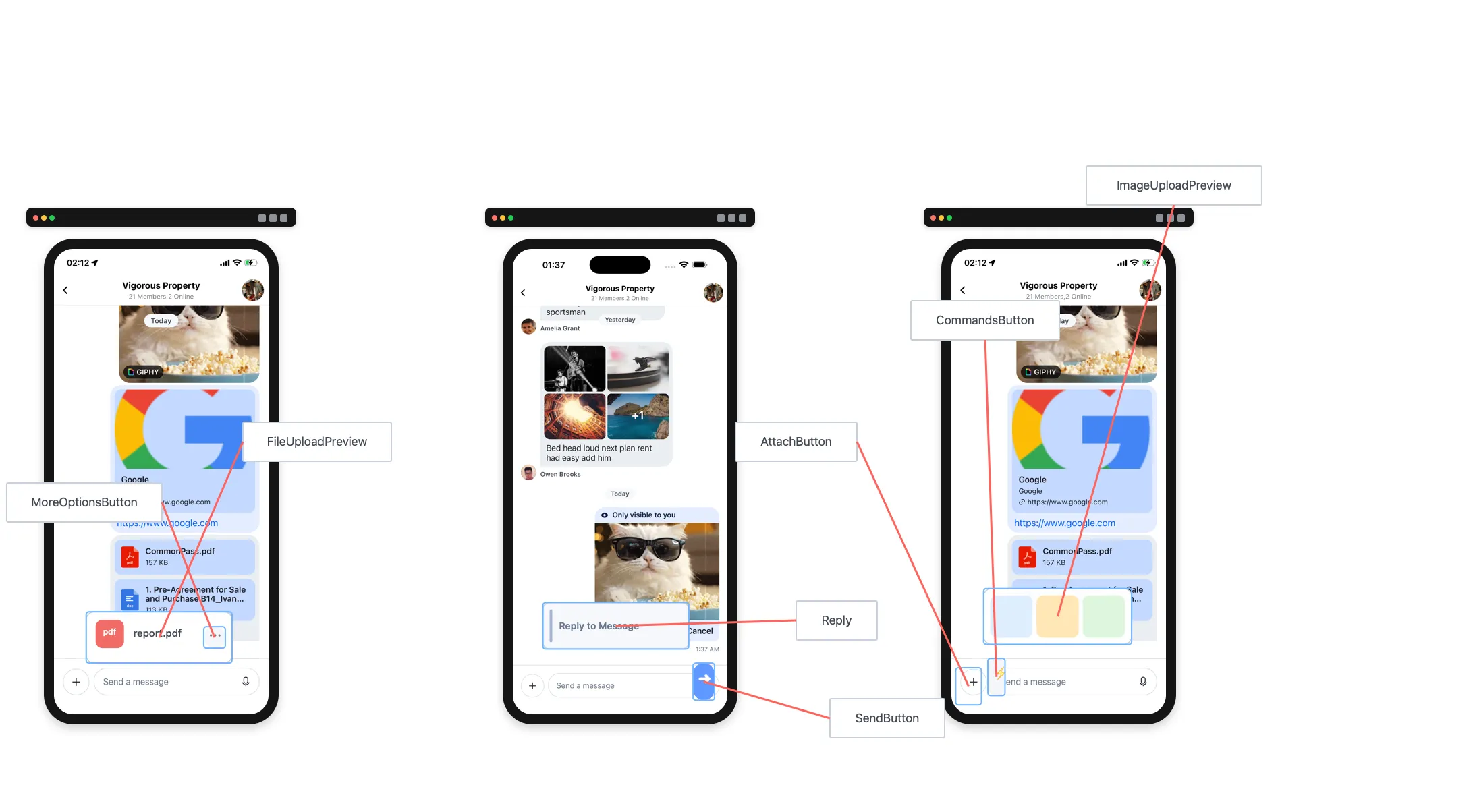
AttachButton
Renders the attach button next to the input box.
| Type | Default |
|---|---|
| ComponentType | AttachButton |
Attachment
Renders attachments in MessageList.
Available props:
attachment{object}
| Type | Default |
|---|---|
| ComponentType | Attachment |
AudioAttachment
Renders the audio attachment.
| Type | Default |
|---|---|
| ComponentType | AudioAttachment |
AudioAttachmentUploadPreview
Customize the audio attachment upload preview in MessageComposer.
| Type | Default |
|---|---|
| ComponentType | AudioAttachmentUploadPreview |
AudioRecorder
Custom UI for audio recorder controls in MessageComposer.
| Type | Default |
|---|---|
| ComponentType | AudioRecorder |
AudioRecordingInProgress
Custom UI for an in-progress audio recording in MessageComposer (waveform, duration, etc.).
| Type | Default |
|---|---|
| ComponentType | AudioRecordingInProgress |
AudioRecordingLockIndicator
Custom lock indicator for audio recording in MessageComposer.
| Type | Default |
|---|---|
| ComponentType | AudioRecordingLockIndicator |
AudioRecordingPreview
Custom UI to preview and play an audio recording in MessageComposer.
| Type | Default |
|---|---|
| ComponentType | AudioRecordingPreview |
AudioRecordingWaveform
Custom waveform UI for audio recording in MessageComposer.
| Type | Default |
|---|---|
| ComponentType | AudioRecordingWaveform |
AutoCompleteSuggestionHeader
Renders the autocomplete suggestion header.
| Type | Default |
|---|---|
| ComponentType | AutoCompleteSuggestionHeader |
AutoCompleteSuggestionItem
Renders an autocomplete suggestion item.
| Type | Default |
|---|---|
| ComponentType | AutoCompleteSuggestionItem |
AutoCompleteSuggestionList
Renders the autocomplete suggestion list.
| Type | Default |
|---|---|
| ComponentType | AutoCompleteSuggestionList |
AttachmentPickerContent
Renders the content of the attachment picker bottom sheet.
| Type | Default |
|---|---|
| ComponentType | AttachmentPickerContent |
AttachmentPickerSelectionBar
Renders the attachment picker selection bar (image, file, camera icons).
| Type | Default |
|---|---|
| ComponentType | AttachmentPickerSelectionBar |
AttachmentPickerIOSSelectMorePhotos
Renders the "select more photos" option for limited gallery access on iOS.
| Type | Default |
|---|---|
| ComponentType | undefined | AttachmentPickerIOSSelectMorePhotos |
AttachmentUploadPreviewList
Renders previews of attached files and images in MessageComposer.
| Type | Default |
|---|---|
| ComponentType | AttachmentUploadPreviewList |
CooldownTimer
Renders a countdown timer for message send cooldowns in MessageComposer.
| Type | Default |
|---|---|
| ComponentType | CooldownTimer |
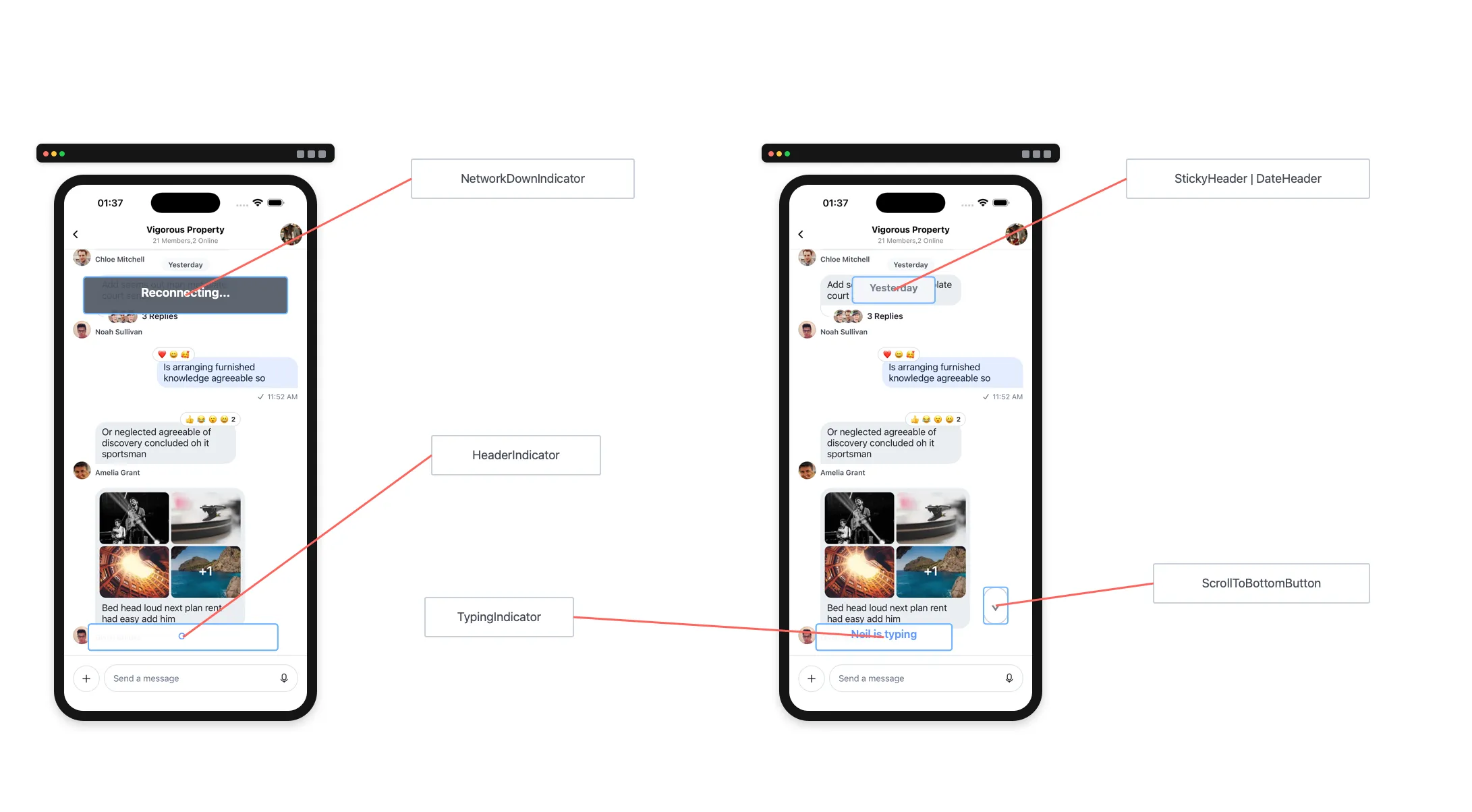
DateHeader
Renders the sticky date header in MessageList.
| Type | Default |
|---|---|
| ComponentType | DateHeader |
EmptyStateIndicator
Renders when the channel has no messages.
| Type | Default |
|---|---|
| ComponentType | EmptyStateIndicator |
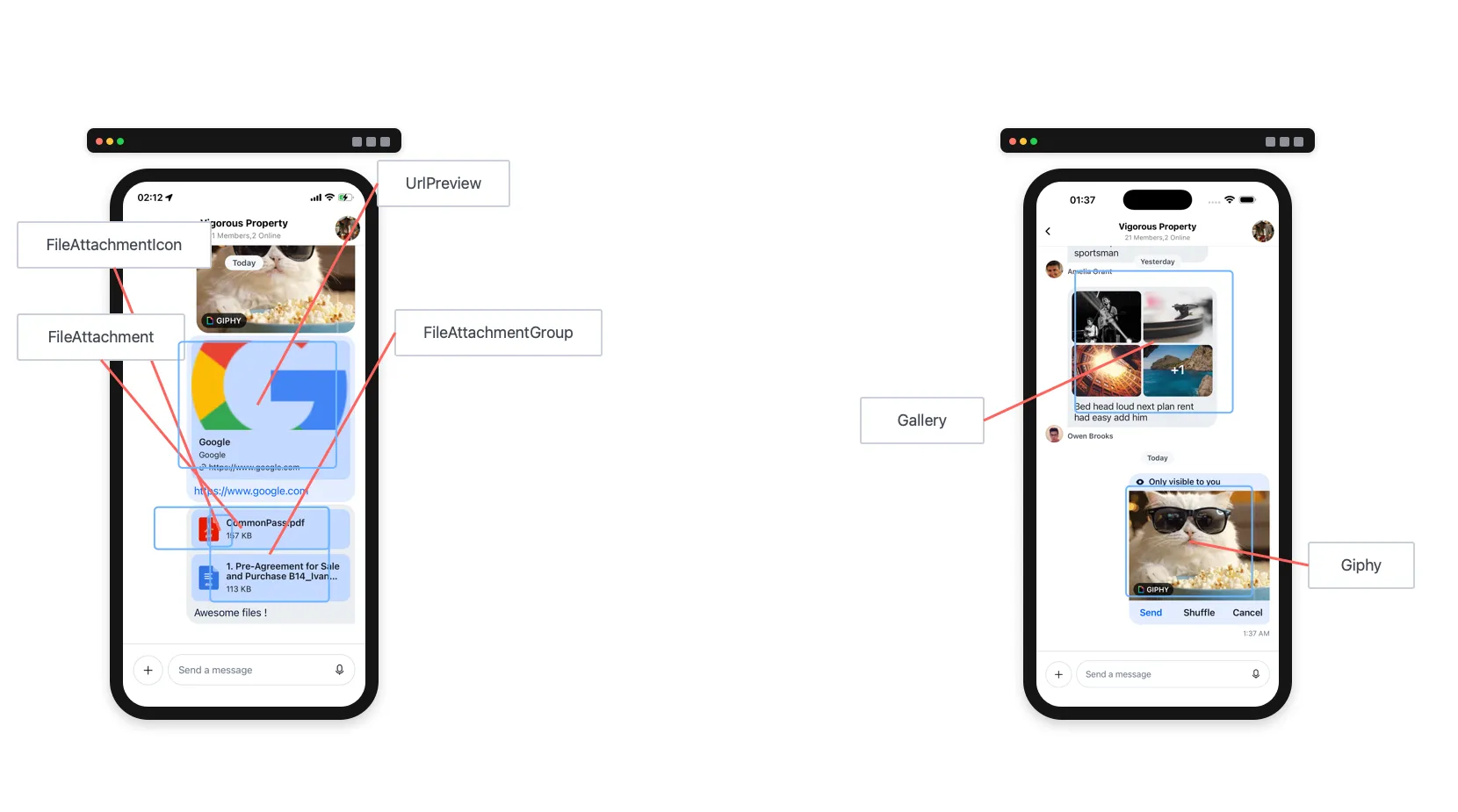
FileAttachmentIcon
Renders the file icon for file attachments.
| Type | Default |
|---|---|
| ComponentType | FileIcon |
FileAttachment
Renders file attachments in MessageList.
| Type | Default |
|---|---|
| ComponentType | FileAttachment |
FileAttachmentGroup
Renders a group of file attachments when a message has multiple files.
| Type | Default |
|---|---|
| ComponentType | FileAttachmentGroup |
FilePreview
Renders a preview of a file attachment.
| Type | Default |
|---|---|
| ComponentType | FilePreview |
FileAttachmentUploadPreview
Customize the file attachment upload preview in MessageComposer.
| Type | Default |
|---|---|
| ComponentType | FileAttachmentUploadPreview |
FileUploadInProgressIndicator
Renders the progress indicator shown while a file is being uploaded.
| Type | Default |
|---|---|
| ComponentType | FileUploadInProgressIndicator |
FileUploadRetryIndicator
Renders the retry indicator shown when a file upload fails.
| Type | Default |
|---|---|
| ComponentType | FileUploadRetryIndicator |
FileUploadNotSupportedIndicator
Renders an indicator when file upload is not supported.
| Type | Default |
|---|---|
| ComponentType | FileUploadNotSupportedIndicator |
ImageAttachmentUploadPreview
Customize the image attachment upload preview in MessageComposer.
| Type | Default |
|---|---|
| ComponentType | ImageAttachmentUploadPreview |
ImageUploadInProgressIndicator
Renders the progress indicator shown while an image is being uploaded.
| Type | Default |
|---|---|
| ComponentType | ImageUploadInProgressIndicator |
ImageUploadRetryIndicator
Renders the retry indicator shown when an image upload fails.
| Type | Default |
|---|---|
| ComponentType | ImageUploadRetryIndicator |
ImageUploadNotSupportedIndicator
Renders an indicator when image upload is not supported.
| Type | Default |
|---|---|
| ComponentType | ImageUploadNotSupportedIndicator |
VideoAttachmentUploadPreview
Customize the video attachment upload preview in MessageComposer.
| Type | Default |
|---|---|
| ComponentType | VideoAttachmentUploadPreview |
ImageOverlaySelectedComponent
Indicator shown for selected images in the image picker.
| Type | Default |
|---|---|
| ComponentType | undefined | ImageOverlaySelectedComponent |
FlatList
FlatList component used by MessageList.
| Type | Default |
|---|---|
| ComponentType | flat-list-mvcp |
Gallery
Renders image attachments in MessageList.
| Type | Default |
|---|---|
| ComponentType | Gallery |
Giphy
Renders Giphy attachments in MessageList.
| Type | Default |
|---|---|
| ComponentType | Giphy |
ImageLoadingFailedIndicator
Renders when an image fails to load in Gallery.
| Type | Default |
|---|---|
| ComponentType | ImageLoadingFailedIndicator |
ImageLoadingIndicator
Renders while an image is loading in Gallery.
| Type | Default |
|---|---|
| ComponentType | ImageLoadingIndicator |
InlineDateSeparator
Renders inline date separators between messages more than a day apart.
| Type | Default |
|---|---|
| ComponentType | InlineDateSeparator |
InlineUnreadIndicator
Renders an inline separator in MessageList to mark the last read message.
| Type | Default |
|---|---|
| ComponentType | InlineUnreadIndicator |
Input
Renders the UI for the enclosed MessageComposer.
See Customizing Message Composer.
| Type |
|---|
| ComponentType |
InputButtons
Renders action buttons (AttachButton) on the left side of the MessageComposer.
| Type | Default |
|---|---|
| ComponentType | InputButtons |
KeyboardCompatibleView
Override the default KeyboardCompatibleView. You likely won't need this; use these props instead:
| Type | Default |
|---|---|
| ComponentType | KeyboardCompatibleView |
LoadingErrorIndicator
Full-screen error indicator when the channel fails to load.
| Type | Default |
|---|---|
| ComponentType | LoadingErrorIndicator |
LoadingIndicator
Renders a full-screen loading indicator when a channel is loading.
| Type | Default |
|---|---|
| ComponentType | LoadingIndicator |
Message
Renders a message wrapper component in MessageList.
| Type | Default |
|---|---|
| ComponentType | Message |
MessageActionList
Renders the message action list in the message menu.
| Type | Default |
|---|---|
| ComponentType | MessageActionList |
MessageActionListItem
Renders a message action item within the action list.
| Type | Default |
|---|---|
| ComponentType | MessageActionListItem |
MessageAuthor
Renders the sender avatar in MessageList. Only shown for other users’ messages.
| Type | Default |
|---|---|
| ComponentType | MessageAuthor |
MessageBlocked
Renders a blocked message indicator in MessageList.
| Type | Default |
|---|---|
| ComponentType | MessageBlocked |
MessageBounce
Renders the bounce action handler for bounced messages in MessageList.
| Type | Default |
|---|---|
| ComponentType | MessageBounce |
MessageComposerLeadingView
Renders the leading (left) view in the message composer.
| Type | Default |
|---|---|
| ComponentType | MessageComposerLeadingView |
MessageComposerTrailingView
Renders the trailing (right) view in the message composer.
| Type | Default |
|---|---|
| ComponentType | MessageComposerTrailingView |
MessageContent
Renders message content (status, attachments, reactions, etc.) in MessageList.
For lighter decoration around the existing content body, prefer MessageContentTopView, MessageContentBottomView, MessageContentLeadingView, and MessageContentTrailingView over replacing MessageContent entirely.
| Type | Default |
|---|---|
| ComponentType | MessageContent |
MessageContentTopView
Renders an optional prop-less component above the main message content body in MessageContent. See MessageContentTopView for usage guidance.
If omitted, nothing is rendered. Use useMessageContext() inside the component if you need message state such as alignment, message, or isMyMessage.
| Type | Default |
|---|---|
ComponentType | undefined | undefined |
MessageContentBottomView
Renders an optional prop-less component below the main message content body in MessageContent. See MessageContentBottomView for usage guidance.
If omitted, nothing is rendered. Use useMessageContext() inside the component if you need message state such as alignment, message, or isMyMessage.
| Type | Default |
|---|---|
ComponentType | undefined | undefined |
MessageContentLeadingView
Renders an optional prop-less component to the left of the main message content body in MessageContent. See MessageContentLeadingView for usage guidance.
If omitted, nothing is rendered. MessageContent only creates the horizontal wrapper for leading/trailing content when at least one of MessageContentLeadingView or MessageContentTrailingView is provided. Use useMessageContext() inside the component if you need message state such as alignment, message, or isMyMessage.
| Type | Default |
|---|---|
ComponentType | undefined | undefined |
MessageContentTrailingView
Renders an optional prop-less component to the right of the main message content body in MessageContent. See MessageContentTrailingView for usage guidance.
If omitted, nothing is rendered. MessageContent only creates the horizontal wrapper for leading/trailing content when at least one of MessageContentLeadingView or MessageContentTrailingView is provided. Use useMessageContext() inside the component if you need message state such as alignment, message, or isMyMessage.
| Type | Default |
|---|---|
ComponentType | undefined | undefined |
MessageDeleted
Renders a deleted message.
| Type | Default |
|---|---|
| ComponentType | MessageDeleted |
MessageError
Customize the message error component.
| Type | Default |
|---|---|
| ComponentType | MessageError |
MessageFooter
Renders the message footer in MessageList.
| Type | Default |
|---|---|
| ComponentType | MessageFooter |
MessageHeader
Renders the header for a message in MessageList.
| Type | Default |
|---|---|
| ComponentType | MessageHeader |
MessageInputHeaderView
Renders the header view of the message input area (for example, reply preview or editing state).
| Type | Default |
|---|---|
| ComponentType | MessageInputHeaderView |
MessageInputLeadingView
Renders the leading (left) view of the message input area.
| Type | Default |
|---|---|
| ComponentType | MessageInputLeadingView |
MessageInputTrailingView
Renders the trailing (right) view of the message input area.
| Type | Default |
|---|---|
| ComponentType | MessageInputTrailingView |
MessageList
Renders the list of messages in the channel.
| Type | Default |
|---|---|
| ComponentType | MessageList |
MessageLocation
Renders location attachments in messages.
| Type |
|---|
| ComponentType |
MessageMenu
Legacy placeholder for the long-press context menu container.
The active runtime overlay path is composed directly from MessageReactionPicker, MessageActionList, and MessageUserReactions. Overriding MessageMenu does not affect the current long-press UI.
| Type | Default |
|---|---|
| ComponentType | MessageMenu |
MessagePinnedHeader
Renders the pinned message label in MessageList.
| Type | Default |
|---|---|
| ComponentType | MessagePinnedHeader |
MessageReminderHeader
Renders the reminder header for messages that have reminders set.
| Type | Default |
|---|---|
| ComponentType | MessageReminderHeader |
MessageSavedForLaterHeader
Renders the "saved for later" header for bookmarked messages.
| Type | Default |
|---|---|
| ComponentType | MessageSavedForLaterHeader |
SentToChannelHeader
Renders the "also sent to channel" header for thread messages shown in the main channel.
| Type | Default |
|---|---|
| ComponentType | SentToChannelHeader |
MessageReplies
Shows thread reply count and avatars of users who replied.
| Type | Default |
|---|---|
| ComponentType | MessageReplies |
MessageRepliesAvatars
Renders avatars of users who replied in the thread.
| Type | Default |
|---|---|
| ComponentType | MessageRepliesAvatars |
MessageSpacer
Renders a prop-less spacer inside the outer MessageItemView row. Use it to inject flexible whitespace or simple layout structure without replacing the full message row.
If omitted, nothing is rendered. Provide your own component if needed, and use useMessageContext() inside it for message state such as alignment.
| Type | Default |
|---|---|
ComponentType | undefined | undefined |
MessageItemView
Renders a message in MessageList.
See Customizing Message UI. For layout-only changes around the row, prefer MessageSpacer.
| Type | Default |
|---|---|
| ComponentType | MessageItemView |
MessageStatus
Renders message status (time and read receipts).
| Type | Default |
|---|---|
| ComponentType | MessageStatus |
MessageSwipeContent
Renders content when the user swipes a message row.
| Type | Default |
|---|---|
| ComponentType | MessageSwipeContent |
MessageSystem
Renders system messages that inform users about channel changes. System messages are part of history and have type: "system".
System messages appear when:
- A user gets added to or removed from channel
- A user accepts invite to join a channel
- Channel is updated
| Type | Default |
|---|---|
| ComponentType | MessageSystem |
MessageText
Renders message text. By default, the SDK uses Simple Markdown. If you override this, you must handle markdown rendering yourself.
| Type | Default |
|---|---|
| ComponentType | renderText |
MessageTimestamp
Renders the timestamp for a message.
| Type | Default |
|---|---|
| ComponentType | MessageTimestamp |
MessageReactionPicker
Reaction selector shown in the long-press overlay.
| Type | Default |
|---|---|
| ComponentType | MessageReactionPicker |
MessageUserReactionsAvatar
Renders an avatar in the user reactions sheet shown from the long-press overlay.
| Type | Default |
|---|---|
| ComponentType | MessageUserReactionsAvatar |
MessageUserReactionsItem
Customize an individual item in MessageUserReactions (avatar, reaction type, user name, etc.).
| Type | Default |
|---|---|
| ComponentType | MessageUserReactionsItem |
MessageUserReactions
Renders the reactions list shown from the long-press overlay.
| Type | Default |
|---|---|
| ComponentType | MessageUserReactions |
NetworkDownIndicator
Renders an indicator at the top of the channel when the network/connection is down.
| Type | Default |
|---|---|
| ComponentType | NetworkDownIndicator |
ReactionListBottom
Renders the reactions list below the message bubble.
| Type | Default |
|---|---|
| ComponentType | ReactionListBottom |
ReactionListTop
Renders the reactions list above the message bubble.
| Type | Default |
|---|---|
| ComponentType | ReactionListTop |
ReactionListClustered
Renders a clustered reaction list that groups reactions together.
| Type | Default |
|---|---|
| ComponentType | ReactionListClustered |
ReactionListItem
Renders an individual reaction item in the reaction list.
| Type | Default |
|---|---|
| ComponentType | ReactionListItem |
ReactionListItemWrapper
Renders a wrapper around each reaction item in the reaction list.
| Type | Default |
|---|---|
| ComponentType | ReactionListItemWrapper |
ReactionListCountItem
Renders the count badge for a reaction type in the reaction list.
| Type | Default |
|---|---|
| ComponentType | ReactionListCountItem |
Reply
Renders a preview of the parent message for quoted replies.
| Type | Default |
|---|---|
| ComponentType | Reply |
ScrollToBottomButton
Renders a button that scrolls the message list to the bottom.
| Type | Default |
|---|---|
| ComponentType | ScrollToBottomButton |
SendButton
Renders the send message button inside MessageComposer.
| Type | Default |
|---|---|
| ComponentType | SendButton |
SendMessageDisallowedIndicator
Renders an indicator when the current user can't send messages.
| Type | Default |
|---|---|
| ComponentType | SendMessageDisallowedIndicator |
ShowThreadMessageInChannelButton
Renders a checkbox in Thread that sets show_in_channel to true when checked.
| Type | Default |
|---|---|
| ComponentType | ShowThreadMessageInChannelButton |
StartAudioRecordingButton
Custom mic button for audio recording in MessageComposer.
| Type | Default |
|---|---|
| ComponentType | StartAudioRecordingButton |
StickyHeader
Renders the sticky date header component in MessageList.
| Type | Default |
|---|---|
| ComponentType | StickyHeader |
TypingIndicator
Renders the typing indicator in MessageList.
| Type | Default |
|---|---|
| ComponentType | TypingIndicator |
TypingIndicatorContainer
Renders the container for the typing indicator in MessageList.
| Type | Default |
|---|---|
| ComponentType | TypingIndicatorContainer |
UnreadMessagesNotification
Renders the floating unread indicator when the first unread message is off-screen.
| Type | Default |
|---|---|
| ComponentType | UnreadMessagesNotification |
UnsupportedAttachment
Renders a fallback for attachment types that are not natively supported by the SDK.
| Type | Default |
|---|---|
| ComponentType | UnsupportedAttachment |
UrlPreview
Renders URL previews in MessageList.
| Type | Default |
|---|---|
| ComponentType | UrlPreview |
URLPreviewCompact
Renders compact URL previews in MessageList when urlPreviewType is set to 'compact'.
| Type | Default |
|---|---|
| ComponentType | URLPreviewCompact |
VideoThumbnail
Renders video thumbnails for video attachments in MessageList.
| Type | Default |
|---|---|
| ComponentType | VideoThumbnail |
CreatePollContent
A custom UI component used to render the entire poll creation form. It has access to the CreatePollContext values by default through the useCreatePollContext hook.
| Type | Default |
|---|---|
| ComponentType | CreatePollContent |
PollContent
A Component prop used to render the content of the Poll component in MessageList.
The component has full access to the entire Poll reactive state through the usePollState hook.
| Type | Default |
|---|---|
| ComponentType | PollContent |
Props
PollHeader
A Component prop used to render the header of the PollContent component.
| Type | Default |
|---|---|
| ComponentType | PollHeader |
PollButtons
A Component prop used to render the buttons of the PollContent component.
| Type | Default |
|---|---|
| ComponentType | PollButtons |
StreamingMessageView
Custom UI for an AI-generated message.
| Type | Default |
|---|---|
| component | StreamingMessageView |
StopMessageStreamingButton
Custom button to stop AI generation, shown instead of SendButton in MessageComposer.
| Type | Default |
|---|---|
| component | StopMessageStreamingButton |
On this page:
- Best Practices
- Basic Usage
- Context Providers
- UI Customizations
- Props
- channel
- keyboardVerticalOffset
- additionalKeyboardAvoidingViewProps
- additionalTextInputProps
- additionalPressableProps
- allowConcurrentAudioPlayback
- allowSendBeforeAttachmentsUpload
- allowThreadMessagesInChannel
- asyncMessagesLockDistance
- asyncMessagesMinimumPressDuration
- audioRecordingSendOnComplete
- asyncMessagesSlideToCancelDistance
- audioRecordingEnabled
- attachmentPickerBottomSheetHeight
- attachmentSelectionBarHeight
- bottomInset
- compressImageQuality
- createPollOptionGap
- customMessageSwipeAction
- deletedMessagesVisibilityType
- disableAttachmentPicker
- disableKeyboardCompatibleView
- disableTypingIndicator
- dismissKeyboardOnMessageTouch
- doFileUploadRequest
- doMarkReadRequest
- doSendMessageRequest
- preSendMessageRequest
- doUpdateMessageRequest
- enableMessageGroupingByUser
- enableSwipeToReply
- enforceUniqueReaction
- forceAlignMessages
- getMessageGroupStyle
- giphyVersion
- handleAttachButtonPress
- handleBan
- handleBlockUser
- handleCopy
- handleDelete
- handleDeleteForMe
- handleEdit
- handleFlag
- handleMarkUnread
- handleMute
- handlePinMessage
- handleReaction
- handleQuotedReply
- handleRetry
- handleThreadReply
- hasCameraPicker
- hasCommands
- hasFilePicker
- hasImagePicker
- hideDateSeparators
- hideStickyDateHeader
- initialScrollToFirstUnreadMessage
- initializeOnMount
- isAttachmentEqual
- isMessageAIGenerated
- keyboardBehavior
- loadingMore
- loadingMoreRecent
- markdownRules
- markReadOnMount
- maxTimeBetweenGroupedMessages
- messageId
- messageActions
- messageContentOrder
- messageInputFloating
- messageSwipeToReplyHitSlop
- messageTextNumberOfLines
- myMessageTheme
- newMessageStateUpdateThrottleInterval
- numberOfAttachmentImagesToLoadPerCall
- numberOfAttachmentPickerImageColumns
- onAlsoSentToChannelHeaderPress
- onLongPressMessage
- onPressMessage
- onPressInMessage
- overrideOwnCapabilities
- reactionListPosition
- reactionListType
- selectReaction
- setInputRef
- shouldShowUnreadUnderlay
- stateUpdateThrottleInterval
- supportedReactions
- thread
- threadList
- openPollCreationDialog
- hasCreatePoll
- topInset
- urlPreviewType
- maximumMessageLimit
- UI Components Props
- AttachButton
- Attachment
- AudioAttachment
- AudioAttachmentUploadPreview
- AudioRecorder
- AudioRecordingInProgress
- AudioRecordingLockIndicator
- AudioRecordingPreview
- AudioRecordingWaveform
- AutoCompleteSuggestionHeader
- AutoCompleteSuggestionItem
- AutoCompleteSuggestionList
- AttachmentPickerContent
- AttachmentPickerSelectionBar
- AttachmentPickerIOSSelectMorePhotos
- AttachmentUploadPreviewList
- CooldownTimer
- DateHeader
- EmptyStateIndicator
- FileAttachmentIcon
- FileAttachment
- FileAttachmentGroup
- FilePreview
- FileAttachmentUploadPreview
- FileUploadInProgressIndicator
- FileUploadRetryIndicator
- FileUploadNotSupportedIndicator
- ImageAttachmentUploadPreview
- ImageUploadInProgressIndicator
- ImageUploadRetryIndicator
- ImageUploadNotSupportedIndicator
- VideoAttachmentUploadPreview
- ImageOverlaySelectedComponent
- FlatList
- Gallery
- Giphy
- ImageLoadingFailedIndicator
- ImageLoadingIndicator
- InlineDateSeparator
- InlineUnreadIndicator
- Input
- InputButtons
- KeyboardCompatibleView
- LoadingErrorIndicator
- LoadingIndicator
- Message
- MessageActionList
- MessageActionListItem
- MessageAuthor
- MessageBlocked
- MessageBounce
- MessageComposerLeadingView
- MessageComposerTrailingView
- MessageContent
- MessageContentTopView
- MessageContentBottomView
- MessageContentLeadingView
- MessageContentTrailingView
- MessageDeleted
- MessageError
- MessageFooter
- MessageHeader
- MessageInputHeaderView
- MessageInputLeadingView
- MessageInputTrailingView
- MessageList
- MessageLocation
- MessageMenu
- MessagePinnedHeader
- MessageReminderHeader
- MessageSavedForLaterHeader
- SentToChannelHeader
- MessageReplies
- MessageRepliesAvatars
- MessageSpacer
- MessageItemView
- MessageStatus
- MessageSwipeContent
- MessageSystem
- MessageText
- MessageTimestamp
- MessageReactionPicker
- MessageUserReactionsAvatar
- MessageUserReactionsItem
- MessageUserReactions
- NetworkDownIndicator
- ReactionListBottom
- ReactionListTop
- ReactionListClustered
- ReactionListItem
- ReactionListItemWrapper
- ReactionListCountItem
- Reply
- ScrollToBottomButton
- SendButton
- SendMessageDisallowedIndicator
- ShowThreadMessageInChannelButton
- StartAudioRecordingButton
- StickyHeader
- TypingIndicator
- TypingIndicatorContainer
- UnreadMessagesNotification
- UnsupportedAttachment
- UrlPreview
- URLPreviewCompact
- VideoThumbnail
- CreatePollContent
- PollContent
- StreamingMessageView
- StopMessageStreamingButton