
 React
React iOS
iOS Android
 Flutter
 Angular
 JavaScript
 Unity
Unity Unreal
 Node
Node Python
 Ruby
Ruby PHP
PHP Java
Java .NET
.NET Go
Go REST
REST<?xml version="1.0" encoding="UTF-8"?>
<!DOCTYPE plist PUBLIC "-//Apple//DTD PLIST 1.0//EN" "http://www.apple.com/DTDs/PropertyList-1.0.dtd">
<plist version="1.0">
<dict>
<key>NSExtension</key>
<dict>
<key>NSExtensionAttributes</key>
<dict>
<key>IntentsSupported</key>
<array>
<string>INSendMessageIntent</string>
</array>
<key>NSExtensionActivationRule</key>
<dict>
<key>NSExtensionActivationSupportsImageWithMaxCount</key>
<integer>10</integer>
</dict>
</dict>
<key>NSExtensionPointIdentifier</key>
<string>com.apple.share-services</string>
<key>NSExtensionPrincipalClass</key>
<string>DemoShare.ShareViewController</string>
</dict>
</dict>
</plist>This is beta documentation for Stream Chat IOS SDK v5. For the latest stable version, see the latest version (v4)
.
Share Extension
The StreamChat iOS SDK provides possibilities for deeper integration with the operating system, helping your users to engage with your app even when it is not active. One example is the "Share" extension, which allows users to share content via third-party apps from other apps, such as Apple's native Photos app.
Chat Share Extension
In this guide, we will show you how to create such extension, which will share photos from Apple's share sheet to the Stream chat.
In order to get started, you need to create a share extension for your project in Xcode:
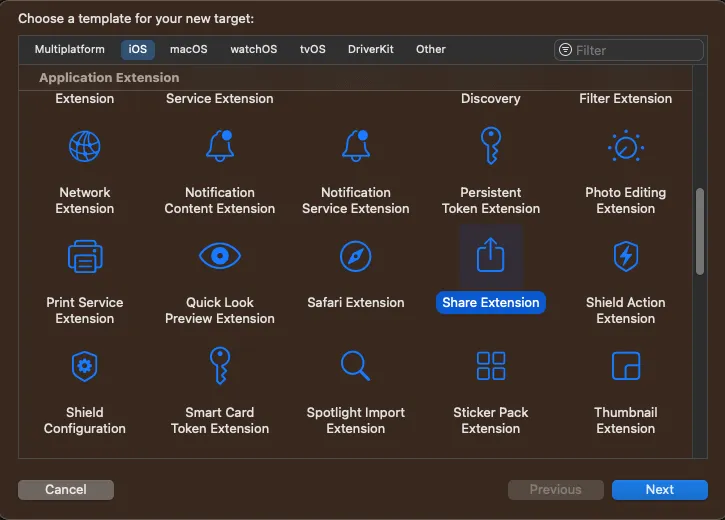
This action will generate a new target and a starting point to implement the share extension. In this example, we will not use a Storyboard, so you can delete that file from the generated code. The Info.plist file needs to be updated accordingly, by removing the storyboard entry. Its contents should look something like this:
Note that the NSExtensionPrincipalClass's name consists of the target name and the name of the class that will be called when the user selects our extension from Apple's native share sheet.
In the NSExtensionActivationRule, we specify how our extension can be activated. Since we want to share images, we will use NSExtensionActivationSupportsImageWithMaxCount, with the value of 10. That means that our extension would be shown when up to 10 images are selected in the photos app. You can configure this value according to your requirements.
Setting up App Groups
To support sharing from an extension, we would need to take the currently logged in user in the main app. To do this, we need to create a shared container between the main app and the service extension. You can do this by adding an app group capability within your projects “Signing & Capabilities” section.
Make sure to use the same group for both targets (app and extension). When you have both configured, you need to adjust your ChatClient setup and add the following code to the configuration object:
var config = ChatClientConfig(apiKeyString: "<# Your API Key Here #>")
config.applicationGroupIdentifier = "group.x.y.z"

let client = ChatClient(config: config)
In order for this to work correctly, you need to do it in the service extension and in the application.
ShareViewController
Next, let's implement the ShareViewController, which is called when the user selects our extension for sharing. In the generated code, the ShareViewController is subclassing the SLComposeServiceViewController, which provides a default UI with a text field and the images to share.
However, in our case we want to have the possibility to select a channel where we want to share the message, so we will change the subclass to UIViewController instead, and provide our custom UI.
Here's how the end result will look like:
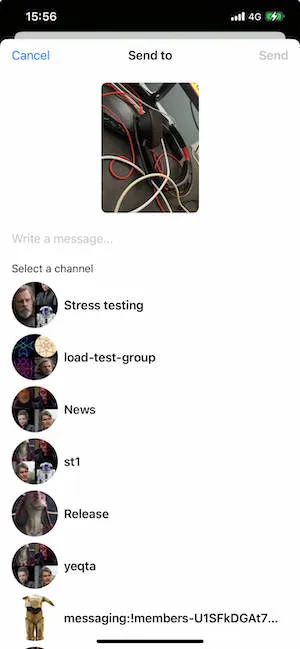
In this example, we will use SwiftUI views, wrapped in a UIHostingController. However, you can build your UI entirely in UIKit as well.
Here's how the ShareViewController's implementation looks like.
import UIKit
import Social
import StreamChat
import SwiftUI
import CoreServices

class ShareViewController: UIViewController {

    override func viewDidLoad() {
        super.viewDidLoad()

        guard let userCredentials = UserDefaults.shared.currentUser else {
            self.extensionContext?.completeRequest(returningItems: [], completionHandler: nil)
            return
        }

        self.view.backgroundColor = .systemBackground
        let demoShareView = UIHostingController(
            rootView: DemoShareView(
                userCredentials: userCredentials,
                extensionContext: self.extensionContext
            )
        ).view!

        demoShareView.frame = view.frame
        self.view.addSubview(demoShareView)
    }
}
First, we try to fetch the current user. Here UserDefaults are used for simplicity. However, in your app, you should store the currently logged in user in a more secure storage, such as the keychain.
Next, we create a UIHostingController with a root view called DemoShareView, and we add this as a subview to the view controller's view.
DemoShareView
Let's check the DemoShareView implementation next.
struct DemoShareView: View {

    @StateObject var viewModel: DemoShareViewModel

    init(
        userCredentials: UserCredentials,
        extensionContext: NSExtensionContext?
    ) {
        let vm = DemoShareViewModel(
            userCredentials: userCredentials,
            extensionContext: extensionContext
        )
        _viewModel = StateObject(wrappedValue: vm)
    }

    var body: some View {
        NavigationStack {
            VStack(alignment: .center) {
                if viewModel.images.count == 1 {
                    ImageToShareView(image: viewModel.images[0])
                } else {
                    ScrollView(.horizontal) {
                        HStack {
                            ForEach(viewModel.images, id: \.self) { image in
                                ImageToShareView(image: image, contentMode: .fill)
                            }
                        }
                    }
                }

                TextField("Write a message...", text: $viewModel.text)
                    .padding(.vertical)

                HStack {
                    if viewModel.channels.isEmpty {
                        ProgressView()
                    } else {
                        Text("Select a channel")
                            .font(.subheadline)
                        Spacer()
                    }
                }

                ShareChannelsView(viewModel: viewModel)
            }
            .padding()
            .navigationTitle("Send to")
            .navigationBarTitleDisplayMode(.inline)
            .toolbar {
                ToolbarItem(placement: .cancellationAction) {
                    Button("Cancel", action: viewModel.dismissShareSheet)
                }
                ToolbarItem(placement: .confirmationAction) {
                    if viewModel.loading {
                        ProgressView()
                    } else {
                        Button("Send") {
                            Task {
                                do {
                                    try await viewModel.sendMessage()
                                } catch {
                                    viewModel.dismissShareSheet()
                                }
                            }
                        }
                        .disabled(viewModel.selectedChannel == nil)
                    }
                }
            }
        }
        .allowsHitTesting(!viewModel.loading)
    }
}
It's a standard SwiftUI implementation for the UI shown above. The toolbar modifier provides Cancel and Send buttons using semantic placements (.cancellationAction and .confirmationAction), with .navigationTitle centering the title automatically.
We are also using few helper views here:
struct ImageToShareView: View {

    private let imageHeight: CGFloat = 180

    var image: UIImage
    var contentMode: ContentMode = .fit

    var body: some View {
        Image(uiImage: image)
            .resizable()
            .aspectRatio(contentMode: contentMode)
            .frame(height: imageHeight)
            .clipShape(.rect(cornerRadius: 8))
    }

}

struct ShareChannelsView: View {

    @ObservedObject var viewModel: DemoShareViewModel

    var body: some View {
        ScrollView {
            LazyVStack(alignment: .leading, spacing: 8) {
                ForEach(viewModel.channels) { channel in
                    Button {
                        viewModel.channelTapped(channel)
                    } label: {
                        HStack {
                            ChatChannelAvatarViewRepresentable(
                                channel: channel,
                                currentUserId: viewModel.currentUserId
                            )
                            .frame(width: 64, height: 64)

                            Text(channel.name ?? channel.id)
                                .bold()
                                .lineLimit(1)
                                .foregroundColor(.primary)
                            Spacer()
                            if viewModel.selectedChannel == channel {
                                Image(systemName: "checkmark")
                            }
                        }
                    }
                }
            }
        }
    }

}

struct ChatChannelAvatarViewRepresentable: UIViewRepresentable {
    var channel: ChatChannel
    var currentUserId: UserId?

    func makeUIView(context: Context) -> ChatChannelAvatarView {
        ChatChannelAvatarView()
    }

    func updateUIView(_ uiView: ChatChannelAvatarView, context: Context) {
        uiView.content = (channel: channel, currentUserId: currentUserId)
    }
}
Next, let's see the implementation of the DemoShareViewModel, that handles the loading of the selected image and sends it to Stream's chat.
The view model uses the state layer (ChannelList and Chat) which provides native async/await APIs. This means we don't need any manual async wrappers.
import Combine
import CoreServices
import UIKit
import StreamChat
import Social

@MainActor
class DemoShareViewModel: ObservableObject {

    private let chatClient: ChatClient
    private let userCredentials: UserCredentials
    private var channelList: ChannelList?
    private var extensionContext: NSExtensionContext?
    private var imageURLs = [URL]() {
        didSet {
            images = imageURLs.compactMap { url in
                if let data = try? Data(contentsOf: url),
                   let image = UIImage(data: data) {
                    return image
                }
                return nil
            }
        }
    }

    var currentUserId: UserId? {
        chatClient.currentUserId
    }

    @Published var channels: [ChatChannel] = []
    @Published var text = ""
    @Published var images = [UIImage]()
    @Published var selectedChannel: ChatChannel?
    @Published var loading = false

    init(
        userCredentials: UserCredentials,
        extensionContext: NSExtensionContext?
    ) {
        var config = ChatClientConfig(apiKeyString: "<# Your API Key Here #>")
        config.isClientInActiveMode = true
        config.applicationGroupIdentifier = "<# Your App Group Identifier #>"

        chatClient = ChatClient(config: config)
        self.userCredentials = userCredentials
        self.extensionContext = extensionContext
        loadChannels()
        loadImages()
    }

    func sendMessage() async throws {
        guard let cid = selectedChannel?.cid else {
            throw ClientError.Unexpected("No channel selected")
        }
        loading = true
        let chat = chatClient.makeChat(for: cid)
        try await chat.get(watch: false)

        let attachmentPayloads = try await withThrowingTaskGroup(of: AnyAttachmentPayload.self) { group in
            for url in imageURLs {
                group.addTask {
                    let uploaded = try await chat.uploadAttachment(with: url, type: .image)
                    let file = try AttachmentFile(url: url)
                    return AnyAttachmentPayload(payload: ImageAttachmentPayload(
                        title: nil,
                        imageRemoteURL: uploaded.remoteURL,
                        file: file
                    ))
                }
            }
            var results = [AnyAttachmentPayload]()
            for try await payload in group {
                results.append(payload)
            }
            return results
        }

        try await chat.sendMessage(with: text, attachments: attachmentPayloads)
        dismissShareSheet()
    }

    func channelTapped(_ channel: ChatChannel) {
        if selectedChannel == channel {
            selectedChannel = nil
        } else {
            selectedChannel = channel
        }
    }

    func dismissShareSheet() {
        loading = false
        extensionContext?.completeRequest(returningItems: [], completionHandler: nil)
    }

    // MARK: - private

    private func loadItem(from itemProvider: NSItemProvider, type: String) async throws -> NSSecureCoding {
        try await withCheckedThrowingContinuation { continuation in
            itemProvider.loadItem(forTypeIdentifier: type) { item, error in
                if let error = error {
                    continuation.resume(throwing: error)
                } else if let item = item {
                    continuation.resume(returning: item)
                } else {
                    continuation.resume(throwing: ClientError.Unknown())
                }
            }
        }
    }

    private func loadImages() {
        Task {
            let inputItems = extensionContext?.inputItems
            var urls = [URL]()
            for inputItem in (inputItems ?? []) {
                if let extensionItem = inputItem as? NSExtensionItem {
                    for itemProvider in (extensionItem.attachments ?? []) {
                        if itemProvider.hasItemConformingToTypeIdentifier(kUTTypeImage as String) {
                            let item = try await loadItem(from: itemProvider, type: kUTTypeImage as String)
                            if let item = item as? URL {
                                urls.append(item)
                            }
                        }
                    }
                }
            }
            self.imageURLs = urls
        }
    }

    private func loadChannels() {
        Task {
            try await chatClient.connectUser(
                userInfo: userCredentials.userInfo,
                token: userCredentials.token
            )
            let query = ChannelListQuery(
                filter: .containMembers(userIds: [chatClient.currentUserId ?? ""])
            )
            let list = chatClient.makeChannelList(with: query)
            self.channelList = list
            try await list.get()
            channels = list.state.channels
        }
    }
}
When we create the view model, we connect the user using the native async connectUser method and use the ChannelList state layer to fetch channels. For sending messages, we use the Chat state layer which provides native async methods for uploading attachments and sending messages.
Note that in this example, for simplicity, we are not paginating through the channels. You can do that by using channelList.loadMoreChannels().
The sendMessage method uses chat.sendMessage(with:attachments:) which is async — when it returns, the message has been sent, so we can dismiss the share sheet directly.
With that, image attachments can successfully be sent to Stream chat from a Share extension.
Donating intents
If you want to have your extension appear in the suggestions of the share sheet, you should donate a INSendMessage intent to SiriKit, when you send a message.
You can find more details about this here.