This is documentation for
Stream Chat Angular SDK v5, which is nolonger actively maintained. For up-to-date documentation, see the latest version (v7)
.
The Stream API allows you to add any attachment to a message. The SDK supports some common types (such as images, videos, etc.) out-of-the-box, but you have to provide your own template to display others.
The Angular SDK has out-of-the-box support for the following types:
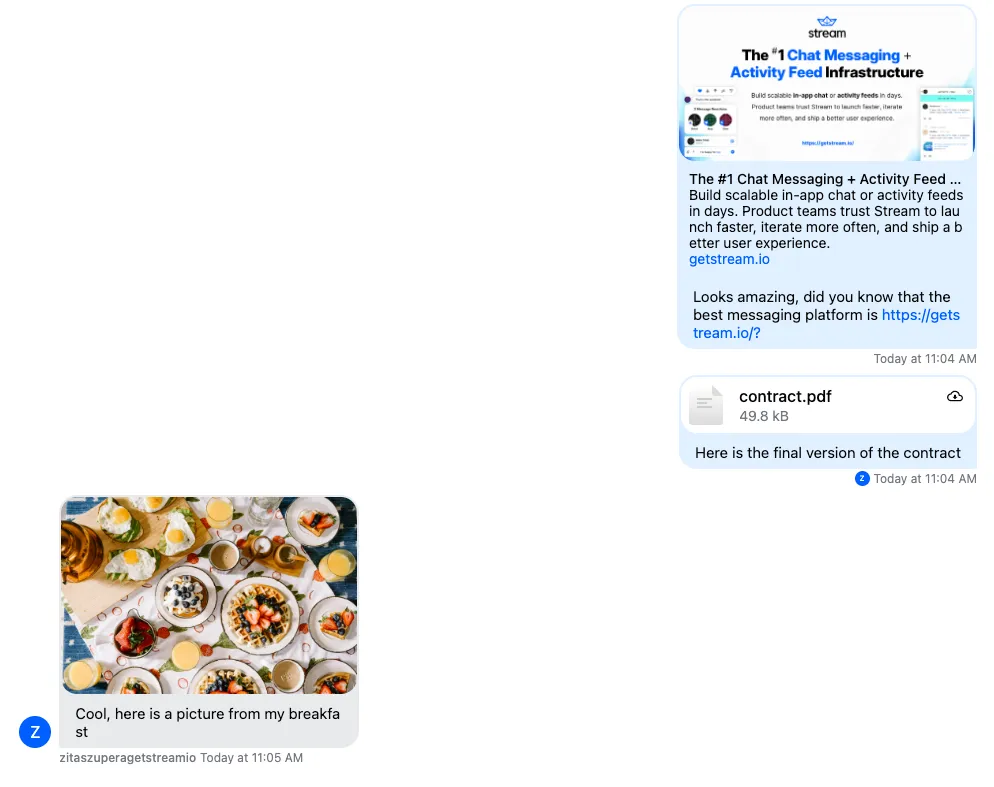
Images (including GIFs) are displayed inline
Videos are displayed inline
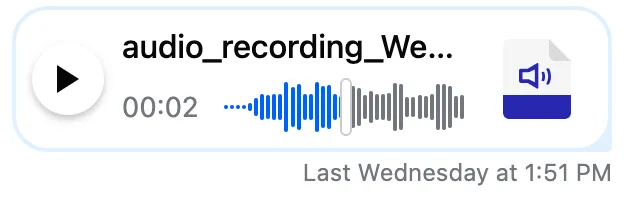
Voice recordings are displayed inline
Other files can be downloaded
Links in a message are enriched with built-in open graph URL scraping
Example 1 - different type of attachments:
Example 2 - voice recording:
This guide will show you how to create custom attachments. In the example, we'll allow users to make payment links to send money to each other, but the same logic works for any attachment.
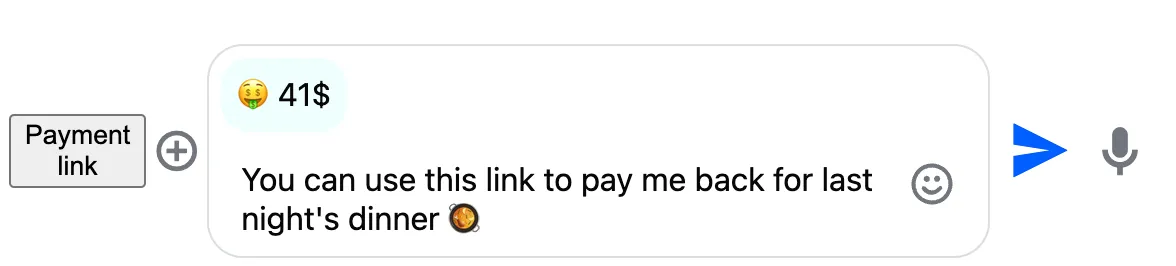
Let's add a button to the message input component to make a payment link. How we create the attachment doesn't matter; the important part is to create an Attachment object we can provide to the AttachmentService.
<!-- Each message input component has it's own instance of the AttachmentService --><stream-message-input #input> <button message-input-start (click)="createPaymentLink(input.attachmentService)" > Payment link </button></stream-message-input>
// Optionally, you can define the shape of your custom attachments to get proper compile checkstype MyGenerics = DefaultStreamChatGenerics & { attachmentType: { type: 'custom'; subtype: 'payment'; value: string; paymentLink: string; };};createPaymentLink(attachmentService: AttachmentService) { const attachment: Attachment<MyGenerics> = { type: 'custom', subtype: 'payment', value: `${Math.ceil(Math.random() * 99)}
The Stream API allows you to add any attachment to a message. The SDK supports some common types (such as images, videos, etc.) out-of-the-box, but you have to provide your own template to display others.
The Angular SDK has out-of-the-box support for the following types:
Images (including GIFs) are displayed inline
Videos are displayed inline
Voice recordings are displayed inline
Other files can be downloaded
Links in a message are enriched with built-in open graph URL scraping
Example 1 - different type of attachments:
Example 2 - voice recording:
This guide will show you how to create custom attachments. In the example, we'll allow users to make payment links to send money to each other, but the same logic works for any attachment.
Let's add a button to the message input component to make a payment link. How we create the attachment doesn't matter; the important part is to create an Attachment object we can provide to the AttachmentService.
<!-- Each message input component has it's own instance of the AttachmentService --><stream-message-input #input> <button message-input-start (click)="createPaymentLink(input.attachmentService)" > Payment link </button></stream-message-input>
,paymentLink:'pay/me/or/else',};// Insert the attachment to the list of custom attachmentsattachmentService.customAttachments$.next([...attachmentService.customAttachments$.value,attachment,]);}
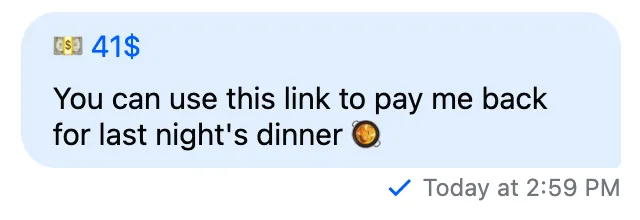
Clicking the "Payment link" will add the attachment to the message, but we don't yet have any visual indicator of this.
The Stream API allows you to add any attachment to a message. The SDK supports some common types (such as images, videos, etc.) out-of-the-box, but you have to provide your own template to display others.
The Angular SDK has out-of-the-box support for the following types:
Images (including GIFs) are displayed inline
Videos are displayed inline
Voice recordings are displayed inline
Other files can be downloaded
Links in a message are enriched with built-in open graph URL scraping
Example 1 - different type of attachments:
Example 2 - voice recording:
This guide will show you how to create custom attachments. In the example, we'll allow users to make payment links to send money to each other, but the same logic works for any attachment.
Let's add a button to the message input component to make a payment link. How we create the attachment doesn't matter; the important part is to create an Attachment object we can provide to the AttachmentService.
<!-- Each message input component has it's own instance of the AttachmentService --><stream-message-input #input> <button message-input-start (click)="createPaymentLink(input.attachmentService)" > Payment link </button></stream-message-input>
// Optionally, you can define the shape of your custom attachments to get proper compile checkstype MyGenerics = DefaultStreamChatGenerics & { attachmentType: { type: 'custom'; subtype: 'payment'; value: string; paymentLink: string; };};createPaymentLink(attachmentService: AttachmentService) { const attachment: Attachment<MyGenerics> = { type: 'custom', subtype: 'payment', value: `${Math.ceil(Math.random() * 99)}
The Stream API allows you to add any attachment to a message. The SDK supports some common types (such as images, videos, etc.) out-of-the-box, but you have to provide your own template to display others.
The Angular SDK has out-of-the-box support for the following types:
Images (including GIFs) are displayed inline
Videos are displayed inline
Voice recordings are displayed inline
Other files can be downloaded
Links in a message are enriched with built-in open graph URL scraping
Example 1 - different type of attachments:
Example 2 - voice recording:
This guide will show you how to create custom attachments. In the example, we'll allow users to make payment links to send money to each other, but the same logic works for any attachment.
Let's add a button to the message input component to make a payment link. How we create the attachment doesn't matter; the important part is to create an Attachment object we can provide to the AttachmentService.
<!-- Each message input component has it's own instance of the AttachmentService --><stream-message-input #input> <button message-input-start (click)="createPaymentLink(input.attachmentService)" > Payment link </button></stream-message-input>
,paymentLink:'pay/me/or/else',};// Insert the attachment to the list of custom attachmentsattachmentService.customAttachments$.next([...attachmentService.customAttachments$.value,attachment,]);}
Clicking the "Payment link" will add the attachment to the message, but we don't yet have any visual indicator of this.
The attachments template variable will contain the list of custom attachments.
By default the SDK will treat all image, file, giphy, video and voiceRecording attachments as built-in. All other type of attachments are treated as custom attachments.
If you want to change the filtering logic, provide your own implementation using the filterCustomAttachment method of the MessageService.
Next, we register the template for the customAttachmentListTemplate$ field of the CustomTemplatesService:

 React
React iOS
iOS Android
 Flutter
 Angular
 JavaScript
 Unity
Unity Unreal
 Node
Node Python
 Ruby
Ruby PHP
PHP Java
Java .NET
.NET Go
Go REST
REST