
 JavaScript
 iOS
iOS Android
 React
React Flutter
 Node
Node Go
Go .NET
.NET PHP
PHP Java
Java Python
 Ruby
Ruby REST
REST// old
feed.addActivity({ foreign_id: "update:123" });
// new
feed.addActivity({ id: "update:123" });V2 to V3 Migration
V3 changes
Backend vs Client side
One of the largest changes is that in V2 we recommended a backend integration. V3 is built with both front-end and backend integrations in mind.
Users
User data on feeds 3.0 is shared with our video and chat products.
SDKs
V3 comes with new SDKs so you want to use the modern SDKs.
Foreign ID vs ID
In v2 you needed to use a foreign id to indicate the uniqueness of activities and map it your system. In V3 of the API this has been replaced by making it possible to specify an ID when creating an activity
Activity structure
// old
activity = {
  actor: "john",
  verb: "post",
  text: "day in NYC",
  image_url: "my image",
  to: ["user:a", "user:b"],
};
// new
activity = {
  user: "john",
  type: "post",
  text: "day in NYC",
  attachments: [{ type: "image", image_url: "" }],
  feeds: ["user:a", "user:b"],
};
1000 Feed pagination limit
V2 of feeds has a limitation that you can only read up to 1000 activities in a feed. V3 has several changes related to this
- You can change a feed’s activity selectors to include certain feeds or queries of activities. This means you can include popular content or content close to the user (geolocation).
- It’s possible to query activities
Comments
Comments are no longer implemented with reactions. They're a separate entity, comments can be nested in any depth.
Aggregated, Notification and Flat feeds
Aggregated and notification feeds are no longer a separate feed type in V3. Aggregation and notification are now just settings on the feed. This makes it easier to switch between how your feeds work.
V3 API specification file
The following API specification files contain all feeds v3 API endpoints and the request and response schemas.
Migration guide
This guide explains how to migrate your existing Feeds v2 setup to Feeds v3 using the Stream Dashboard.
Prerequisites
Before starting the migration, take a moment to read through the points below.
1. Plan to Update Your Client Integration
The migration itself does not require your application to be on Feeds v3 before you kick it off. You can start the migration while your application still talks to Feeds v2, and switch your integration over later (see Completing the Migration).
What is important is that Feeds v2 SDKs are not compatible with Feeds v3 SDKs. The API surface, data model, and client libraries are different. As part of the migration project you will need to update your client and server integrations to use the new Feeds v3 SDKs.
ℹ️ Pick the right SDK for your stack from the Stream Activity Feeds SDKs page. Live traffic replication (Phase 1) keeps your Feeds v2 and Feeds v3 apps in sync while you do the integration work, so there is no rush to finish it before starting the migration.
2. Choose Where the Migrated Data Should Land
When you open the migration modal, you can choose one of three destinations for your migrated Feeds v3 data. Pick the one that fits your situation best.
Option A: Upgrade your existing app in place (recommended when available)
In supported regions, the same app you use for Feeds v2 can be upgraded to Feeds v3, with no separate destination app required. This keeps your API key, secret, and integrations unchanged. When this option is enabled for your app, the migration modal exposes a Convert this app to V3 toggle:
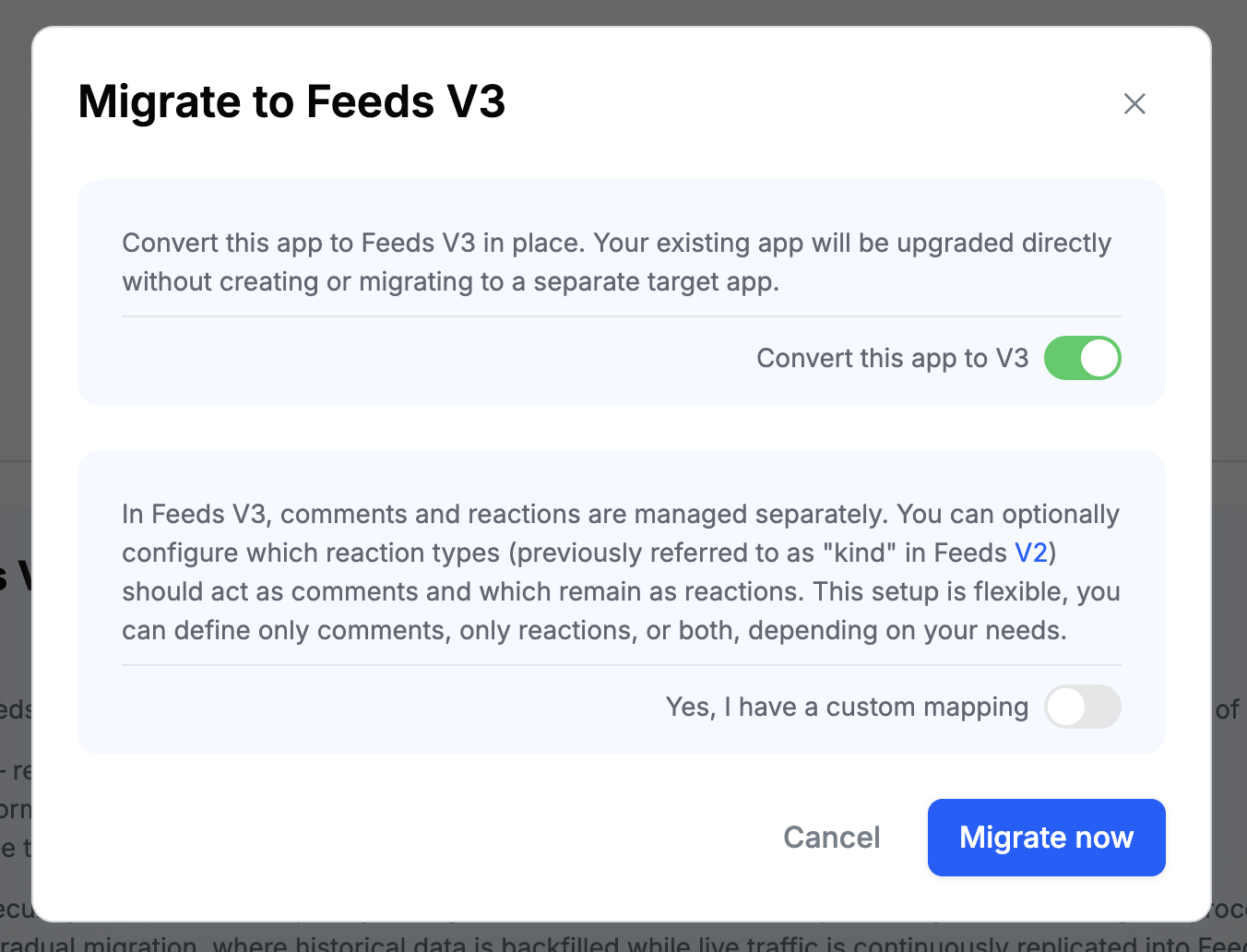
ℹ️ In-place upgrade is not available for all apps and depends on the region your app is hosted in. If you would like to upgrade your existing app instead of creating a new one, please contact support and we will confirm eligibility for your app.
Option B: Auto-create a new Feeds v3 app (default)
By default the migration modal will spin up a brand-new Feeds v3 app for you and use it as the destination. There is nothing to set up beforehand. Just keep the Auto-create app toggle on (it is enabled by default), and a fresh app will be created when you start the migration.
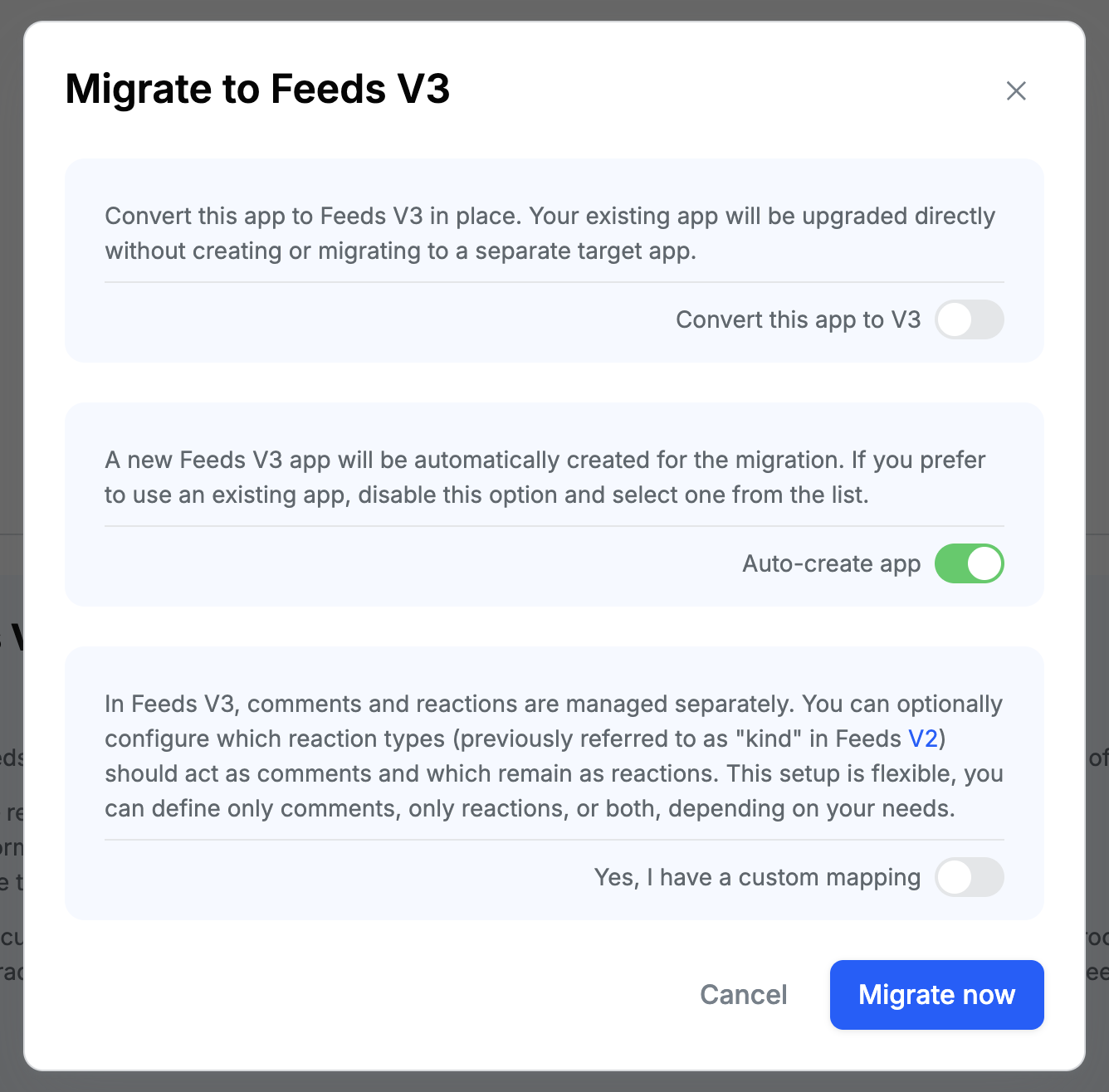
This is the simplest path if you do not already have a Feeds v3 app and you do not need in-place upgrade.
Option C: Use an existing Feeds v3 app
If you already created a Feeds v3 app (for example because you wanted to configure it ahead of time, or you are running multiple migrations into the same destination), you can pick it from the list instead of letting the migration create one.
- In the migration modal, disable the Auto-create app toggle.
- Select your existing Feeds v3 app from the list that appears.
You can create the destination app upfront by going to the Dashboard, creating a new app, enabling the Use Feeds v3 toggle, and selecting one of the supported regions (only regions that support Feeds v3 are available when the toggle is enabled).
Starting the Migration
3. Open the Migration Section
- From the main menu, navigate to Activity Feeds.
- Click Overview.
- Scroll to the bottom of the page to find the Migration section.
- Click Start migration.
4. Confirm the Destination App
Based on the option you picked in step 2, the migration modal behaves differently here:
- Option A (Convert this app to V3 enabled). No destination selection is needed. The migration will write Feeds v3 data back into the same app.
- Option B (Auto-create app enabled, the default). No destination selection is needed. A new Feeds v3 app will be created automatically when you start the migration.
- Option C (Auto-create app disabled). Select your existing Feeds v3 app from the list that appears.
5. Configure the Mapping (Optional)
Feeds v2 and Feeds v3 model data differently. Comments and reactions are separate entities in v3, an activity's identifier can come from your foreign_id, and custom fields can be reshaped on the way in. The migration uses a JSON mapping object to express those rules. Every key is optional, and any key you do not set falls back to a sensible default.
The same mapping is applied to live traffic during Phase 1 and to the bulk export during Phase 3, so historical and ongoing data share the same shape in v3.
How mapping is applied
Each v2 record (activity, reaction, follow) is converted to its v3 equivalent in three passes:
- Identifier rewriting. If
foreign_id: "id"is set, the v2 UUID is swapped for theforeign_idvalue when writing to v3. Thereplacestable is then applied to user and feed identifiers so non-standard prefixes (likeUser:) can be stripped. - Field reshape. Custom fields can be renamed, lifted out of the
extra_contextbag, or promoted to first-class v3 attributes (such astext,parent, orattachments). - Type translation. Reaction kinds are routed to comments, bookmarks, or comment bookmarks, and reaction type names can be remapped (for example,
rockettolike).
User references (any string in the shape SU:<user_id>) are extracted from every custom field automatically and surfaced on mentioned_users in v3. You do not need a separate mapping option for mentions.
Mapping reference
Each section below describes one option, the configuration snippet to use it, and a concrete before (Feeds v2 payload) / after (how it lands in Feeds v3) example. The examples only show the fields relevant to that mapping; in practice the rest of the payload is forwarded through unchanged.
comments
The list of v2 reaction kinds that should be exported as v3 comments. Defaults to ["comment", "reply"] when omitted. Every reaction whose kind matches one of these values is forwarded through v3's AddComment endpoint. Anything else stays a reaction.
{ "comments": ["comment", "reply", "subcomment"] }Example
Feeds v2 reaction:
{
  "kind": "subcomment",
  "user_id": "alice",
  "activity_id": "9c3a...",
  "data": { "message": "great point!" }
}
Lands in Feeds v3 as a comment:
{
  "object_id": "9c3a...",
  "object_type": "activity",
  "user_id": "alice",
  "text": "great point!"
}
bookmarks
The list of v2 reaction kinds that should be exported as v3 activity bookmarks. No default.
{ "bookmarks": ["bookmark", "save"] }Example
Feeds v2 reaction:
{
  "kind": "save",
  "user_id": "alice",
  "activity_id": "9c3a...",
  "data": {}
}
Lands in Feeds v3 as a bookmark on the activity:
{
  "activity_id": "9c3a...",
  "user_id": "alice"
}
comments_bookmarks
The list of v2 reaction kinds that should be exported as bookmarks on a comment (rather than on the parent activity). The matching v2 reaction must carry the target comment's foreign id under its parent field. v3 receives the bookmark through AddCommentBookmark, and the activity's bookmark count is not affected.
{ "comments_bookmarks": ["comment_bookmark"] }Example
Feeds v2 reaction. The parent value is the foreign id of the comment being bookmarked, and it must be set as a top-level field on the reaction body (a sibling of kind, user_id, activity_id, and data), not inside data:
{
  "kind": "comment_bookmark",
  "user_id": "alice",
  "activity_id": "9c3a...",
  "parent": "qa-comment-abc",
  "data": {}
}
Lands in Feeds v3 as a comment bookmark:
{
  "object_id": "qa-comment-abc",
  "object_type": "comment",
  "user_id": "alice"
}
reactions
A translation table for reaction type names. Useful when you want to consolidate or rename reaction types during the migration. The key is the v2 type; the value is the v3 type that should replace it.
{
  "reactions": {
    "hot": "like",
    "rocket": "like",
    "thumb_down": "dislike"
  }
}
ℹ️ Only include reaction types that you actually want to rename. Reaction types that should stay the same in v3 do not need an entry. For example, if you want to keep
likeaslike, you do not need to add"like": "like". Any reaction type not listed in the table is forwarded to v3 with its original name unchanged.
Example
Feeds v2 reaction:
{
  "kind": "rocket",
  "user_id": "bob",
  "activity_id": "9c3a..."
}
Lands in Feeds v3 with the renamed type:
{
  "type": "like",
  "user_id": "bob",
  "activity_id": "9c3a..."
}
comment_field
The field inside reaction data whose value should be used as the comment text in Feeds v3. Defaults to message.
Use this when your v2 application stores the comment body under a different key (for example my_text_field, body, or content).
{ "comment_field": "my_text_field" }Example
Feeds v2 reaction:
{
  "kind": "comment",
  "user_id": "maria",
  "activity_id": "9c3a...",
  "data": { "my_text_field": "hello world!!!" }
}
Lands in Feeds v3 as a comment whose text is taken from my_text_field:
{
  "object_id": "9c3a...",
  "object_type": "activity",
  "user_id": "maria",
  "text": "hello world!!!"
}
Without this mapping, the syncer looks for data.message and would not find any text on the comment.
⚠️ A comment without any text is not a valid Feeds v3 entity, so those requests are rejected by Feeds v3.
- For live traffic (Phase 1), rejected requests land in our dead-letter queue (DLQ). These requests are not lost. Once you correct the mapping (for example, by setting
comment_fieldto the field your application actually uses), the DLQ entries can be replayed so the affected comments land in Feeds v3 correctly.- For the historical backfill (Phases 2 and 3), the export of your existing data is a one-shot pass. If the mapping is wrong while this pass runs, affected comments may end up misinterpreted, partial, or missing in Feeds v3 because the backfill does not loop back through the DLQ.
For this reason, we strongly recommend finalizing your mapping before starting the migration, ideally by validating it against a small sample of v2 reactions first.
foreign_id
Controls how the v2 foreign_id field is handled in v3. Two modes are supported:
-
"foreign_id": "id"makes the v3 activity ID equal to the v2foreign_idvalue, and stashes the original v2 UUID undercustom.original_id. Use this if your application already references activities byforeign_idend-to-end.{ "foreign_id": "id" }Example
Feeds v2 activity:
{
  "actor": "SU:steve",
  "verb": "post",
  "foreign_id": "post-123",
  "text": "hello"
}
Lands in Feeds v3 as:
{ "id": "post-123", "user_id": "steve", "type": "post", "text": "hello", "custom": { "original_id": "9c3a..." } } -
"foreign_id": "<custom_key>"keeps the v2 UUID as the v3 activity ID and moves theforeign_idvalue to the given key undercustom. The originalforeign_idkey is removed so the value is not duplicated.{ "foreign_id": "object_id" }Example
The same Feeds v2 activity as above lands in Feeds v3 as:
{
  "id": "9c3a...",
  "user_id": "steve",
  "type": "post",
  "text": "hello",
  "custom": { "object_id": "post-123" }
}
When omitted, the v2 UUID is preserved as the v3 activity ID and the foreign_id remains inside the extra_context bag.
text (and field renames in general)
Promotes a v2 field to a v3 top-level attribute or to a different custom key. The most common case is making v3's text come from a different source field, such as body.
{ "text": "body" }Example
Feeds v2 activity:
{
  "actor": "SU:steve",
  "verb": "post",
  "body": "hello from the body field"
}
Lands in Feeds v3 as:
{
  "user_id": "steve",
  "type": "post",
  "text": "hello from the body field"
}
The same rule applies to any field name. For example, "owner_id": "author.id" reads owner_id from the v2 activity and writes it to custom.author.id in v3. Target values that contain a dot are interpreted as nested paths inside custom.
{
  "owner_id": "author.id",
  "quality_score": "ranking.score"
}
Example
Feeds v2 activity:
{
  "actor": "SU:steve",
  "verb": "post",
  "owner_id": "steve",
  "quality_score": 0.92
}
Lands in Feeds v3 as:
{
  "user_id": "steve",
  "type": "post",
  "custom": {
    "author": { "id": "steve" },
    "ranking": { "score": 0.92 }
  }
}
extra_context
Controls where the v2 extra_context bag lands in v3.
- Default (
"extra_context"). The bag is nested undercustom.extra_context. - Renamed (
"extra_context": "stuff"). The bag is nested undercustom.stuffinstead, and the default key is left unset. - Flattened (
"extra_context": ""). Each key in the bag is written directly ontocustomwith no wrapper container.
{ "extra_context": "" }Example
Feeds v2 activity with a couple of custom fields:
{
  "actor": "SU:steve",
  "verb": "post",
  "text": "trip recap",
  "city": "NYC",
  "rating": 5
}
With "extra_context": "" (flattened), it lands in Feeds v3 as:
{
  "user_id": "steve",
  "type": "post",
  "text": "trip recap",
  "custom": { "city": "NYC", "rating": 5 }
}
With "extra_context": "stuff", the same custom fields land under custom.stuff:
{
  "custom": { "stuff": { "city": "NYC", "rating": 5 } }
}
parent_id_field (comment replies)
The field on the v2 reaction that holds the parent comment's id. Defaults to parent, which reads from the top-level parent field on the reaction (a sibling of kind, user_id, activity_id, and data).
If your v2 application stores comment threading somewhere else, set this option to an absolute path that points at the value. Use data.<dot.path> to read from inside the reaction's data bag, or any other top-level field name to read from the reaction body directly.
{ "parent_id_field": "data.comment.parent.id" }Every reaction whose configured path resolves to a value is forwarded to v3 as a reply with parent_id populated. Reactions without that value stay top-level comments. Self-referential values (a comment whose parent id equals the activity id) are dropped automatically so the comment lands as top-level instead of being rejected by v3.
Example (default — top-level parent field)
With no parent_id_field set, the syncer reads the parent comment id from the top-level parent field of the reaction:
{
  "kind": "comment",
  "user_id": "john",
  "id": "qa-reply-1",
  "activity_id": "9c3a...",
  "parent": "qa-top-1",
  "data": { "message": "I agree" }
}
Lands in Feeds v3 as a comment with parent_id set:
{
  "id": "qa-reply-1",
  "object_id": "9c3a...",
  "object_type": "activity",
  "user_id": "john",
  "text": "I agree",
  "parent_id": "qa-top-1"
}
Example (custom absolute path)
With "parent_id_field": "data.comment.parent.id", the same reply can be expressed by nesting the parent id inside data:
{
  "kind": "comment",
  "user_id": "john",
  "id": "qa-reply-1",
  "activity_id": "9c3a...",
  "data": {
    "message": "I agree",
    "comment": { "parent": { "id": "qa-top-1" } }
  }
}
It lands in Feeds v3 the same way:
{
  "id": "qa-reply-1",
  "object_id": "9c3a...",
  "object_type": "activity",
  "user_id": "john",
  "text": "I agree",
  "parent_id": "qa-top-1"
}
parent_id (activity reshares)
The activity extra-context field that points at the original activity for a reshare. When set, the syncer resolves the reference and populates v3's parent_id on the reshare activity, which is what powers v3's quote-and-reshare experiences.
{ "parent_id": "shared_origin_post" }Example
Feeds v2 reshare activity (the shared_origin_post field carries an SA: reference to the original activity):
{
  "actor": "SU:steve",
  "verb": "post",
  "text": "reshare with a comment",
  "shared_origin_post": "SA:original-activity-id"
}
Lands in Feeds v3 as:
{
  "user_id": "steve",
  "type": "post",
  "text": "reshare with a comment",
  "parent_id": "original-activity-id"
}
attachments_field (comment attachments)
The dot-path inside reaction data that holds the attachments array for comments. Defaults to attachments.
{ "attachments_field": "media.files" }With the example above, each comment's attachments are read from data.media.files and surfaced on comment.attachments in v3. Every attachment field (asset URL, image URL, thumb URL, title, fallback) is preserved.
Example
Feeds v2 comment reaction with attachments nested under data.media.files:
{
  "kind": "comment",
  "user_id": "maria",
  "activity_id": "9c3a...",
  "data": {
    "message": "look at these landscapes",
    "media": {
      "files": [
        {
          "type": "image",
          "asset_url": "https://images.example.com/a.jpg",
          "title": "mountain"
        }
      ]
    }
  }
}
Lands in Feeds v3 as:
{
  "object_id": "9c3a...",
  "object_type": "activity",
  "user_id": "maria",
  "text": "look at these landscapes",
  "attachments": [
    {
      "type": "image",
      "asset_url": "https://images.example.com/a.jpg",
      "title": "mountain"
    }
  ]
}
activity_attachments_field (activity attachments)
The path inside the v2 activity body that holds the activity-level attachments array. Defaults to empty, which keeps the feature off so existing configurations are unaffected.
{ "activity_attachments_field": "attachments" }When set, the syncer reads attachments out of the activity body, sets v3's Activity.Attachments, and removes the path from extra_context so the data is not duplicated under custom.
Example
Feeds v2 activity with a top-level attachments array:
{
  "actor": "SU:steve",
  "verb": "post",
  "text": "trip photos",
  "attachments": [
    { "type": "image", "asset_url": "https://images.example.com/a.jpg" },
    { "type": "image", "asset_url": "https://images.example.com/b.jpg" }
  ]
}
Lands in Feeds v3 as:
{
  "user_id": "steve",
  "type": "post",
  "text": "trip photos",
  "attachments": [
    { "type": "image", "asset_url": "https://images.example.com/a.jpg" },
    { "type": "image", "asset_url": "https://images.example.com/b.jpg" }
  ]
}
replaces
A table of string substitutions applied to user and feed identifiers before normalization. Use it to strip a non-standard prefix that your v2 application stores on actor references.
{ "replaces": { "User:": "" } }In the example above, a v2 actor stored as User:abc-123 is rewritten to abc-123, which then becomes the v3 user.id after the standard SU: prefix stripping.
Example
Feeds v2 activity with a non-standard actor prefix:
{
  "actor": "User:abc-123",
  "verb": "post",
  "text": "hello"
}
Lands in Feeds v3 as:
{
  "user_id": "abc-123",
  "type": "post",
  "text": "hello"
}
Complete example
Putting the most common options together:
{
  "comments": ["comment", "reply"],
  "bookmarks": ["bookmark"],
  "comments_bookmarks": ["comment_bookmark"],
  "reactions": {
    "hot": "like",
    "rocket": "like",
    "thumb_down": "dislike"
  },
  "foreign_id": "id",
  "text": "body",
  "comment_field": "message",
  "extra_context": "stuff",
  "parent_id_field": "data.comment.parent.id",
  "attachments_field": "media.files",
  "activity_attachments_field": "attachments",
  "parent_id": "shared_origin_post",
  "replaces": { "User:": "" }
}
Mapping configuration is optional but strongly recommended whenever your v2 schema deviates from the defaults. A well-tuned mapping preserves the intent of existing user interactions, keeps your v3 activities clean, and avoids manual data cleanup later.
6. Start the Migration
Once the configuration is complete:
- Click Migrate now to begin the migration process.
Migration Phases
The migration runs automatically in the following three phases.
Phase 1: Live Traffic Replication
- Incoming traffic to your Feeds v2 app is:
- Converted into Feeds v3 format
- Automatically routed to the destination Feeds v3 app
- This ensures that no data is lost during the migration.
Phase 2: Export Data from Feeds v2
- All existing data is gradually exported from your Feeds v2 app, including:
- Feeds
- Activities
- Reactions
- Users
- Collections
- The exported data is securely stored in an S3 bucket.
Phase 3: Import Data into Feeds v3
- The data exported in Phase 2 is imported into your Feeds v3 app.
- This completes the historical data migration.
During migration, you may notice some older activities appearing under a temporary feed called
migration:reactions. This is expected behavior. Reactions added to activities created before traffic replication began are temporarily placed there until the Feeds v2 export and Feeds v3 import complete. After the migration finishes, these activities will be automatically updated and associated with their correct feeds.
Completing the Migration
How to know the historical backfill is done
The migration modal in the Dashboard shows the live state of all three phases. You will know the historical backfill has finished when:
- Data export and transformation shows
completed. - Data import shows
completed. - Traffic replication is still
running(this is expected, see below). - The Complete migration button in the bottom right of the modal turns green and becomes clickable.
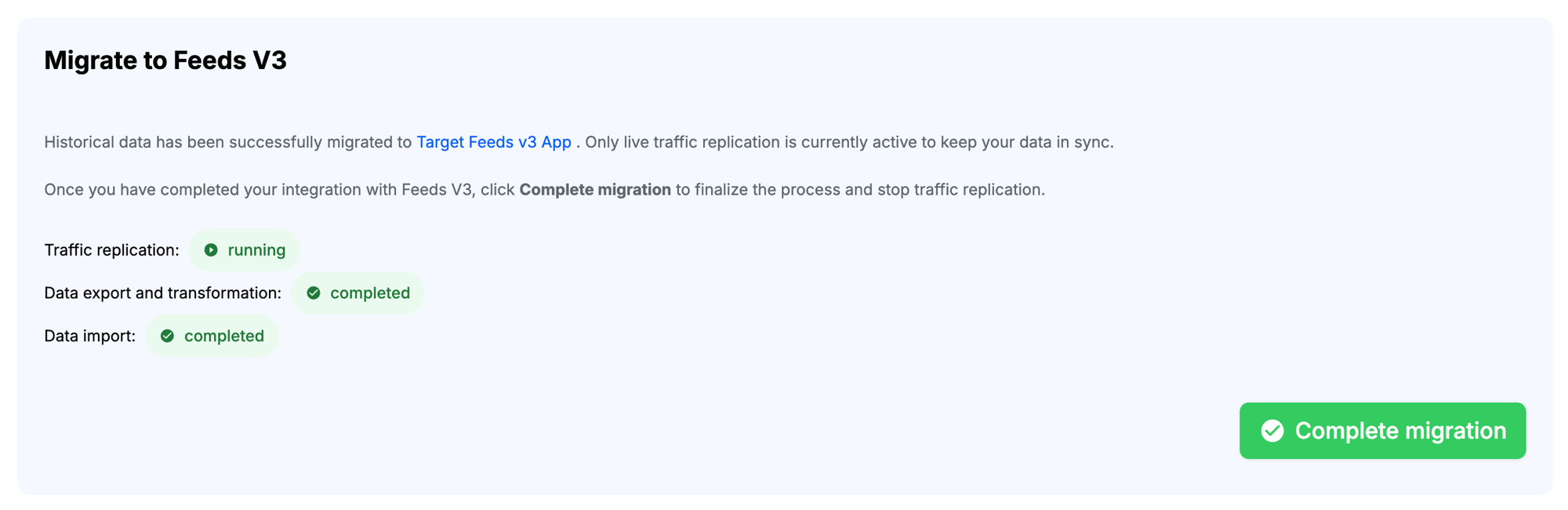
At this point every historical activity, reaction, user, and collection from your Feeds v2 app has already been copied into your Feeds v3 app.
Why traffic replication is still running
After the backfill finishes, live traffic replication stays active on purpose. Every new write that still arrives at your Feeds v2 app continues to be mirrored to your Feeds v3 app in real time. This gives you a safe window to switch your client integration over to Feeds v3 without losing any data: while both sides receive traffic, the two apps stay in sync.
Switching your integration and finishing up
When you are ready to cut over, you have two options:
Option 1: Click "Complete migration" (explicit cutover)
Use this when your client integration is fully on Feeds v3 and you want to immediately stop mirroring writes from v2 to v3.
- Update your application so that all clients write to Feeds v3 instead of Feeds v2.
- Verify in production that your traffic is reaching the Feeds v3 app.
- Click the green Complete migration button in the migration modal.
This finalizes the process and stops live traffic replication.
Option 2: Natural fade-out (no action required)
If you prefer, you do not have to click anything. Once your application stops sending traffic to Feeds v2, there is nothing left to replicate, so all new traffic naturally lands directly on the Feeds v3 app. You can click Complete migration later at your convenience to formally close out the migration in the Dashboard.
Either way, your migration from Feeds v2 to Feeds v3 is now complete.
On this page: