
import { StreamClient } from "@stream-io/node-sdk";

const client = new StreamClient(apiKey, secret);

await client.moderation.upsertModerationRule({
  name: "Inappropriate Content Detection",
  description:
    "Detects and responds to inappropriate content in live video and audio",
  id: "call-inappropriate-content",
  rule_type: "call",
  enabled: true,
  cooldown_period: "5m",
  logic: "OR",
  conditions: [
    {
      type: "keyframe_rule",
      keyframe_rule_params: {
        harm_labels: ["NUDITY", "VIOLENCE"],
        threshold: 3,
        min_confidence: 0.75,
      },
    },
    {
      type: "closed_caption_rule",
      closed_caption_rule_params: {
        threshold: 2,
        llm_harm_labels: {
          HATE_SPEECH:
            "Content that promotes hatred, discrimination, or violence",
        },
      },
    },
  ],
  action_sequences: [
    {
      violation_number: 1,
      actions: ["mute_video", "call_warning"],
      call_options: {
        warning_text: "Please keep your video appropriate",
      },
    },
    {
      violation_number: 2,
      actions: ["mute_audio", "mute_video"],
    },
    {
      violation_number: 3,
      actions: ["kick_user"],
    },
  ],
});Call Moderation
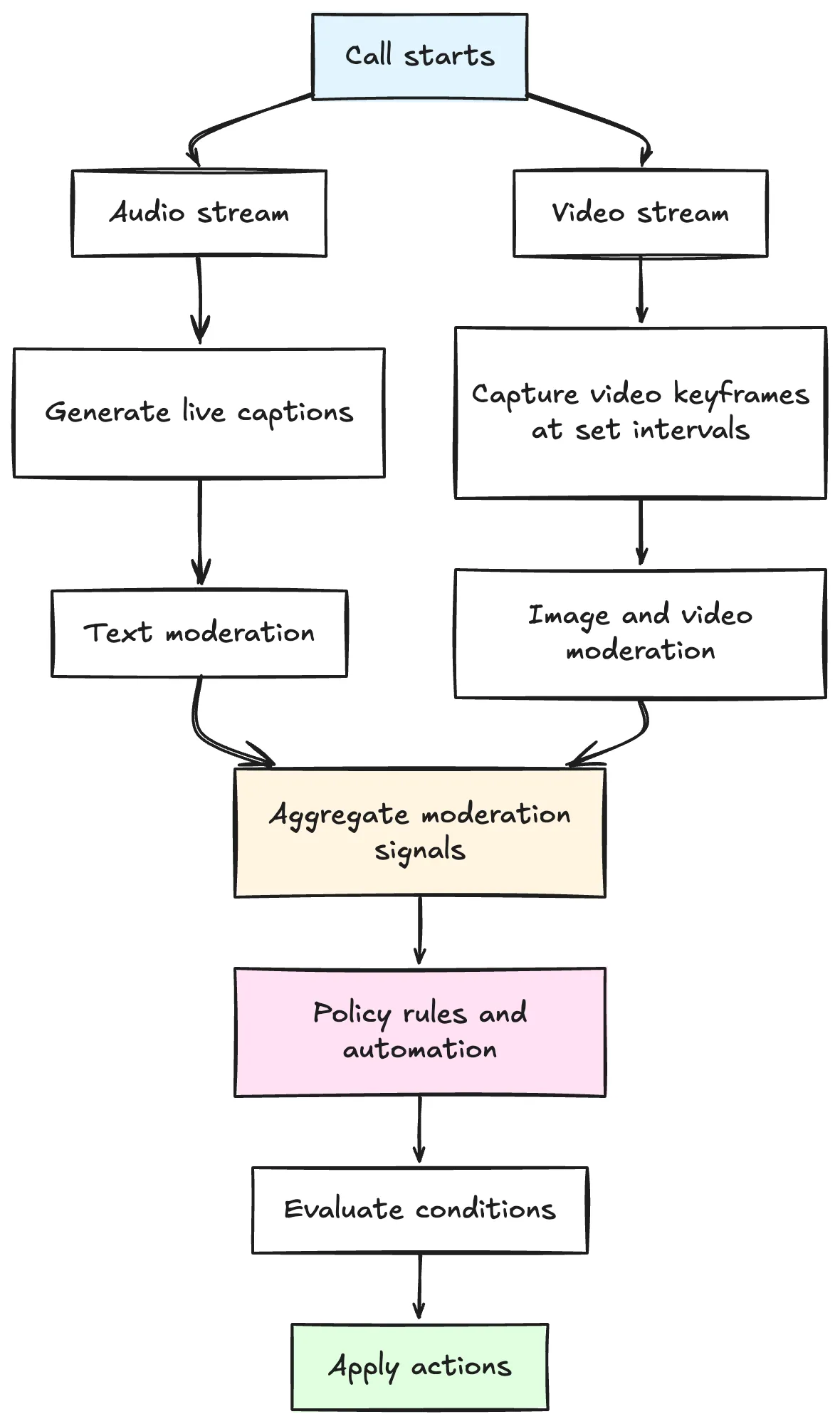
Call moderation provides real-time moderation for any live video and audio experience — including video calls, livestreams, and other live media — automatically taking action when violations are detected. These rules monitor video keyframes and audio transcriptions (closed captions) to detect inappropriate content and respond with escalating actions.
Call moderation requires feature flag to be enabled. Contact support to enable this feature.
How Call Moderation Works
Call moderation operates differently from user and content rules:
- Real-Time Analysis: Video keyframes and audio transcriptions are analyzed in real-time during active sessions (calls, livestreams, etc.)
- Consecutive Violations: Rules track consecutive violations within a single session (not across time windows)
- Escalating Actions: Actions escalate based on violation number (1st violation, 2nd violation, etc.)
- Immediate Execution: Actions are executed immediately when conditions are met, affecting the live session
Configure Via Dashboard
To configure call moderation, you need to create a call rule. You can create a call rule in the dashboard by navigating to Moderation > Rule Builder > Create Rule > Call Rule.
Creating a Call Rule
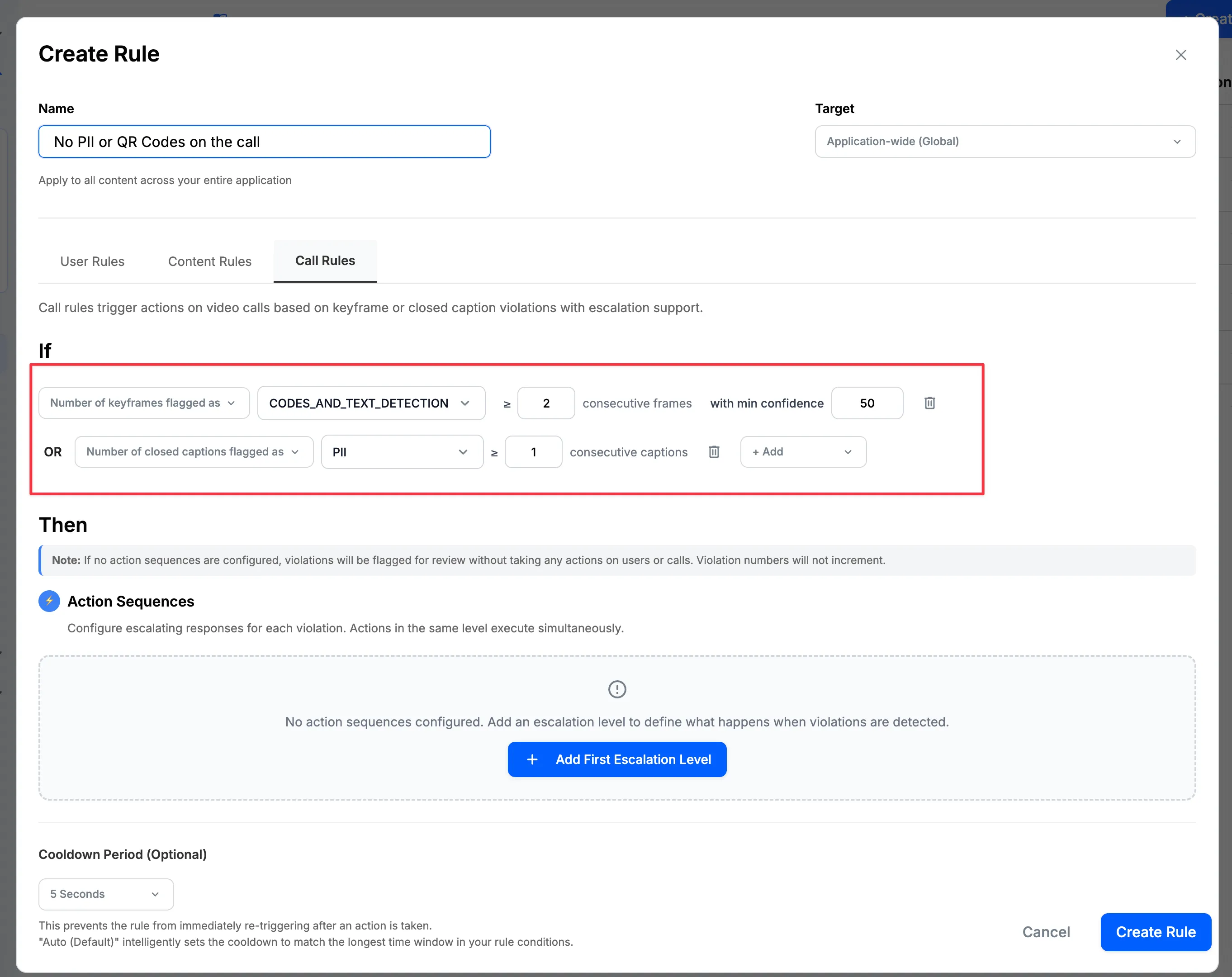
The screenshot above shows following rule:
If
- user's video contains 2 consecutive keyframes containing any sort of QR code with minimum confidence of 50%
- OR if user's audio contains any sort of sharing PII
Then flag the call for review. Flagged calls will be available in the moderation review queue.
Configuring Action Sequences
You can also configure automated actions to be taken when the rule is triggered.
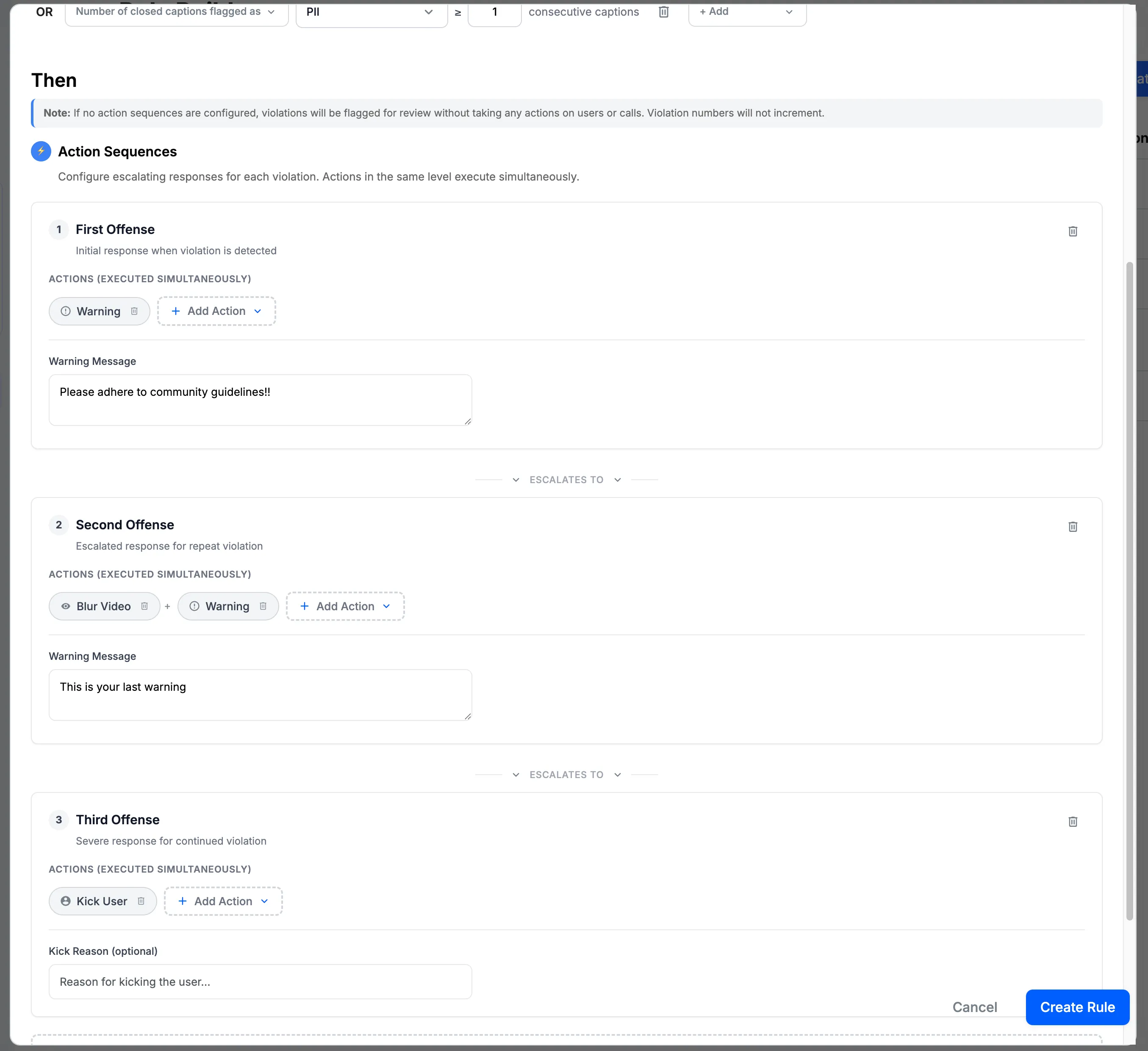
Screenshot above shows following action sequences:
- First violation: Give a warning to the user
- Second violation: Blur the user's video along with another warning
- Third violation: Kick user out of the call.
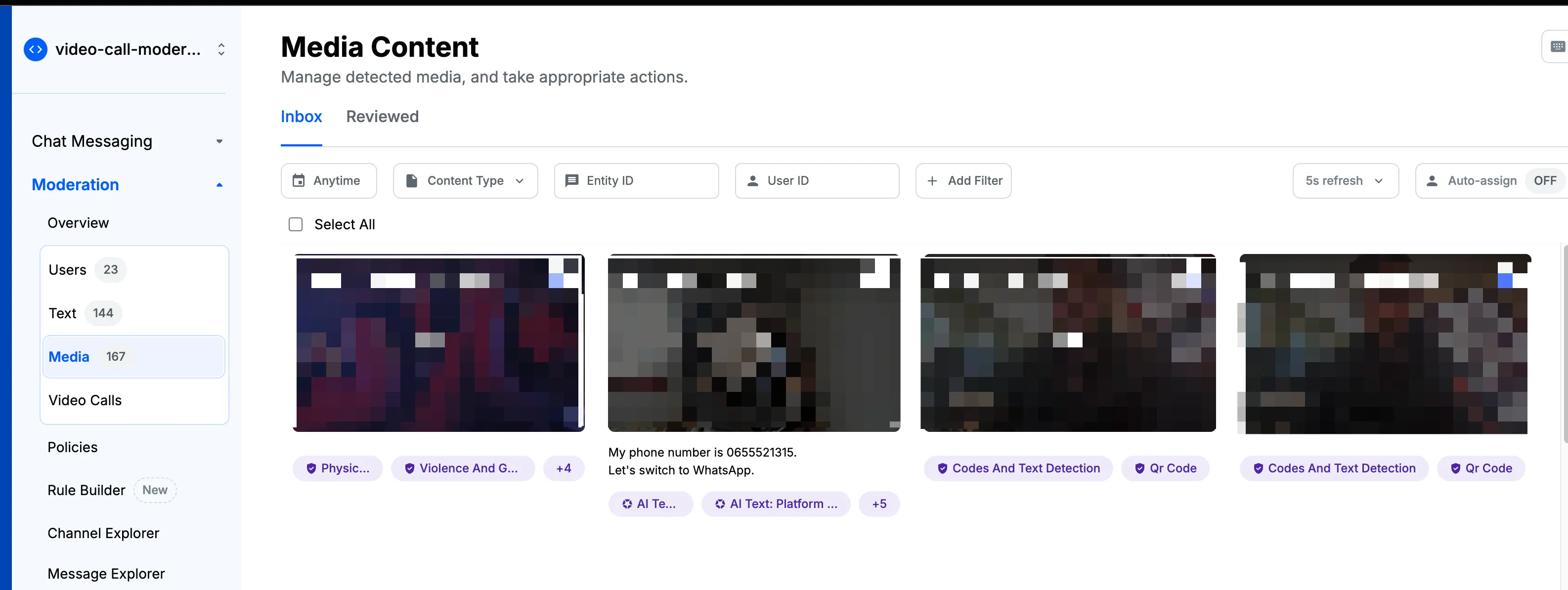
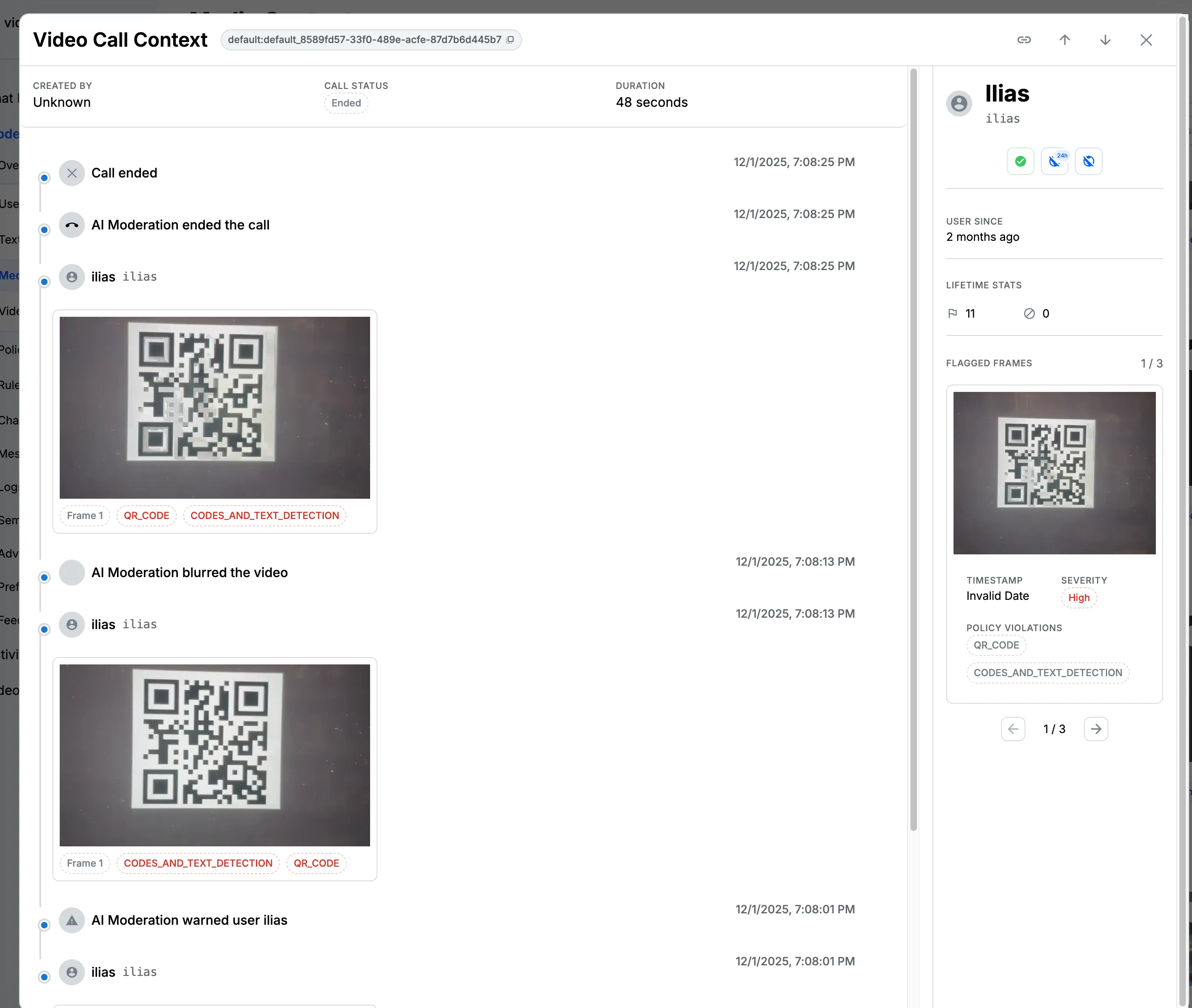
Reviewing Flagged Calls
Flagged calls will be available in the moderation review queue where moderators can review the context and take appropriate actions.
Configure Via API
You can create call rules using the Node.js SDK (@stream-io/node-sdk):
Video Keyframe Condition
Keyframe rules analyze video frames captured during live sessions to detect visual content violations.
Parameters:
harm_labels: Array of harm labels to detect (e.g.,["NUDITY", "VIOLENCE", "WEAPONS"])threshold: Number of consecutive violations required before triggering (e.g.,3)min_confidence: Optional minimum confidence score (0-100) required for matching labels. Default is 50.
Example:
{
  "type": "keyframe_rule",
  "keyframe_rule_params": {
    "harm_labels": ["NUDITY", "VIOLENCE"],
    "threshold": 3,
    "min_confidence": 75
  }
}
This rule triggers when a user's video contains 3 consecutive keyframes with nudity or violence detected, with a minimum confidence score of 75%.
How It Works:
- Video keyframes are captured periodically during the session
- Each keyframe is analyzed for the specified harm labels
- When a keyframe matches the condition, the violation count increments
- When a keyframe doesn't match, the count resets to 0
- When the count reaches the threshold, the rule triggers
Closed Caption Condition
Closed caption rules analyze audio transcriptions from live sessions to detect spoken content violations.
LLM Harm Labels (Configurable):
When LLM configurability is enabled, you can use detailed harm labels with custom descriptions:
Example with LLM Labels:
{
  "type": "closed_caption_rule",
  "closed_caption_rule_params": {
    "threshold": 2,
    "llm_harm_labels": {
      "HATE_SPEECH": "Content that promotes hatred, discrimination, or violence against groups",
      "THREAT": "Content containing threats of violence or harm against individuals or groups"
    }
  }
}
NLP Harm Labels:
With the AI Text (NLP) engine, you can use simple string arrays:
["HATE_SPEECH", "THREAT", "SPAM"]
Example with NLP Labels:
{
  "type": "closed_caption_rule",
  "closed_caption_rule_params": {
    "threshold": 2,
    "harm_labels": ["HATE_SPEECH", "THREAT"]
  }
}
This rule triggers when a user's speech contains 2 consecutive violations of hate speech or threats.
How It Works:
- Audio is transcribed in real-time during the session
- Each transcription segment is analyzed for the specified harm labels
- When a segment matches the condition, the violation count increments
- When a segment doesn't match, the count resets to 0
- When the count reaches the threshold, the rule triggers
Action Sequences (Escalation)
Call rules use action sequences to define escalating responses based on violation number. Unlike user and content rules that use a single action, call rules can have different actions for each violation level.
Key Concepts:
- Violation Number: Tracks how many times this specific rule has been triggered for a user in the current session
- Action Sequences: Define different actions for each violation number (1st violation, 2nd violation, etc.)
- Simultaneous Actions: Multiple actions within the same sequence execute at the same time
- Rule-Level Cooldown: Prevents the same rule from triggering repeatedly within the cooldown period
Example Action Sequence:
{
  "action_sequences": [
    {
      "violation_number": 1,
      "actions": ["mute_video", "call_warning"],
      "call_options": {
        "warning_text": "Please keep your video appropriate"
      }
    },
    {
      "violation_number": 2,
      "actions": ["mute_audio", "mute_video"]
    },
    {
      "violation_number": 3,
      "actions": ["kick_user"]
    }
  ]
}
How Escalation Works:
- First Violation: User receives a warning and video is muted
- Second Violation: User's audio and video are muted
- Third Violation: User is kicked from the call
Rule-Level Cooldown:
The cooldown period prevents the same rule from triggering repeatedly. Once a rule triggers and executes an action sequence, it enters a cooldown period (configurable: 5s, 10s, 1m, 5m, or 10m). During this cooldown, the rule will not trigger again, even if conditions are met.
Cross-Call Violation Tracking
While action sequences handle escalation within a single call, you may also want to take action against users who accumulate violations across multiple calls. The call_violation_count condition lets you create a user rule that triggers when a user reaches a threshold of call rule violations within a time window.
For example, you can ban a user who triggers call rules 5 times across any calls within a 24-hour period.
Configure Via Dashboard
Create a User Rule with the "Call Violation Count" condition. Set the violation threshold and time window. When the user's total call violations across all calls reach the threshold within the configured window, the rule triggers.
Configure Via API
await client.moderation.upsertModerationRule({
  name: "Ban Repeat Call Offenders",
  id: "ban-repeat-call-offenders",
  rule_type: "user",
  enabled: true,
  cooldown_period: "24h",
  logic: "AND",
  conditions: [
    {
      type: "call_violation_count",
      call_violation_count_params: {
        threshold: 5,
        time_window: "24h",
      },
    },
  ],
  action: {
    type: "ban_user",
  },
});
Parameters:
threshold: Number of call rule violations required to trigger (e.g.,5)time_window: Time window to track violations. Supported values:"30m","1h","24h","7d","30d"
How It Works:
- Every time a call rule's action sequence executes (any violation number), a global counter is incremented for the user
- The counter tracks violations across all calls and all call rules, not just a single session
- When a user rule with
call_violation_countis evaluated, it checks whether the user's total call violations within the time window meet or exceed the threshold - This allows combining in-call escalation (action sequences) with cross-call enforcement (user rules)
Available Call Actions
Call rules support the following actions:
Mute Video
Disables the user's video stream.
{
  "actions": ["mute_video"]
}
Note: The mute_video action automatically mutes only video (audio remains unmuted). No additional options are required or used.
Mute Audio
Disables the user's audio/microphone.
{
  "actions": ["mute_audio"]
}
Note: The mute_audio action automatically mutes only audio (video remains unmuted). No additional options are required or used.
Mute User (Audio and Video)
Mutes both audio and video simultaneously by specifying both actions.
{
  "actions": ["mute_audio", "mute_video"]
}
Note: To mute both audio and video, include both mute_audio and mute_video in the actions array. Each action is executed independently with its default behavior.
Blur Video
Blurs the user's video feed (visual censorship).
{
  "actions": ["call_blur"]
}
Note: The call_blur action blurs the video feed. No additional options are required or used.
End Call
Terminates the entire call for all participants.
{
  "actions": ["end_call"]
}
Note: The end_call action terminates the call for all participants. No additional options are required or used.
Kick User
Removes the user from the call (others continue).
{
  "actions": ["kick_user"]
}
Note: The kick_user action removes the user from the call. No additional options are required or used.
Warning
Sends a warning message to the user.
{
  "actions": ["call_warning"],
  "call_options": {
    "warning_text": "Please follow community guidelines"
  }
}
Options:
warning_text: Warning message to display to the user (required)
Webhook Only
Sends a webhook event without executing any call actions. Useful for logging or external integrations.
{
  "actions": ["webhook_only"]
}
Webhook Events
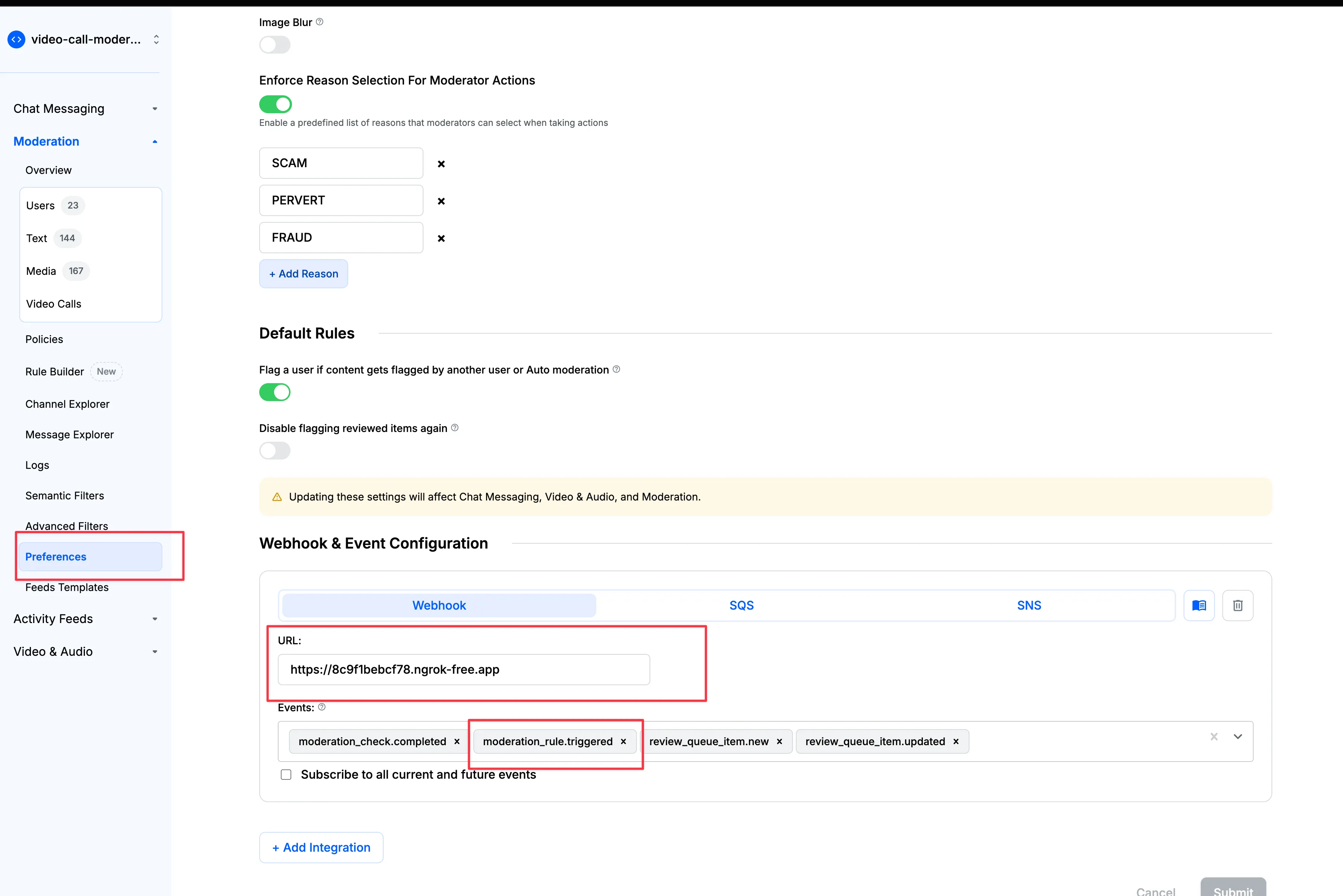
When a call rule is triggered, a webhook event is automatically sent. To configure webhook URL and subscribe to events, navigate to Moderation > Advanced Filters > Preferences > Webhook & Event Configuration. Select the moderation_rule.triggered event to receive call rule trigger events.
Event Type: moderation_rule.triggered
Event Structure:
{
  "type": "moderation_rule.triggered",
  "created_at": "2026-01-20T23:45:04.485362361Z",
  "rule": {
    "id": "0450e7d6-9386-4eb9-a720-f3999979989c",
    "name": "Nudity or hate speech not allowed from men",
    "type": "call",
    "description": "Detects inappropriate content in video calls"
  },
  "violation_number": 1,
  "entity_id": "default:default_test-4013",
  "entity_type": "stream:v1:call",
  "user_id": "test-user-2025b49e-ef45-473f-bb90-4f8f679c8581",
  "triggered_actions": ["mute_video", "call_warning"],
  "review_queue_item_id": "abc123"
}
Fields:
type: Always"moderation_rule.triggered"for rule builder eventscreated_at: ISO 8601 timestamp when the event was createdrule: Object containing rule informationid: Unique identifier for the rulename: Human-readable rule nametype: Rule type ("call","user", or"content")description: Rule description
violation_number: (Call rules only) The violation number that triggered this event (1st violation, 2nd violation, etc.)entity_id: The ID of the entity that triggered the rule (for call rules, this is the call CID)entity_type: The type of entity (for call rules, this is"stream:v1:call")user_id: The ID of the user who triggered the ruletriggered_actions: Array of action types that were executed (e.g.,["mute_video", "call_warning"])review_queue_item_id: (Optional) The review queue item ID if the violation was flagged for review
Note: Webhook events are sent once per rule per violation number per entity. If multiple keyframes or closed captions trigger the same rule with the same violation number, only one webhook event is sent.
Important Notes
Consecutive Violations:
- Keyframe and closed caption rules track consecutive violations within a single session
- If a keyframe/caption doesn't match the condition, the count resets to 0
- The threshold must be reached with consecutive matches
Violation Numbers:
- Violation numbers are tracked per rule, per user, per session
- When a user joins a new session, violation numbers reset
- Violation numbers increment only when the rule's conditions are met
Action Execution:
- Actions within the same violation sequence execute simultaneously
- Actions are executed immediately when conditions are met
- Rule-level cooldown prevents the same rule from triggering repeatedly within the configured cooldown period
Confidence Scores:
- Confidence scores for keyframe rules range from 0-100
- Higher confidence scores indicate more certain detections
- Setting a minimum confidence threshold helps reduce false positives
Cooldown Periods:
- Cooldown periods prevent the same rule from triggering repeatedly
- Cooldown applies to the entire rule after any action sequence is executed
- Supported cooldown values for call rules:
"5s","10s","1m","5m","10m" - You can also use
"auto"to automatically derive the cooldown from the rule's conditions
On this page: