
Bypass User From Moderation
Bypass User From Moderation allows you to exempt specific users from content moderation checks. This is useful for trusted users—such as moderators, bots, or staff accounts—whose content should be published without going through moderation pipelines.
There are two approaches:
- Permission-based bypass — Grant the
SkipMessageModerationpermission to a role. This works for Chat only. - User bypass flag — Set the
bypass_moderationflag on a user via the Dashboard. This works for Chat, Feeds, and Comments.
Permission-Based Bypass (Chat Only)
Stream's permission system lets you grant the SkipMessageModeration action to specific roles. When a user with this permission sends a message, moderation is skipped entirely.
This approach is scoped to Chat message sending and requires the role-based permission system to be enabled on your app.
This is currently only available in the Legacy Stream Dashboard.
To grant SkipMessageModeration to a role via the Dashboard:
- Open the Stream Dashboard and select your app
- In the left sidebar, navigate to Chat Messaging → Roles & Permissions
- Select the Role (e.g.,
admin, or a customtrusted_userrole) and the Scope (channel type, e.g.,messaging) - In the search box on the right, type
skip - Find Skip Message Moderation in the results and check its checkbox
- Click Save
Once assigned, any user with that role will bypass moderation when sending messages in channels of the selected channel type.
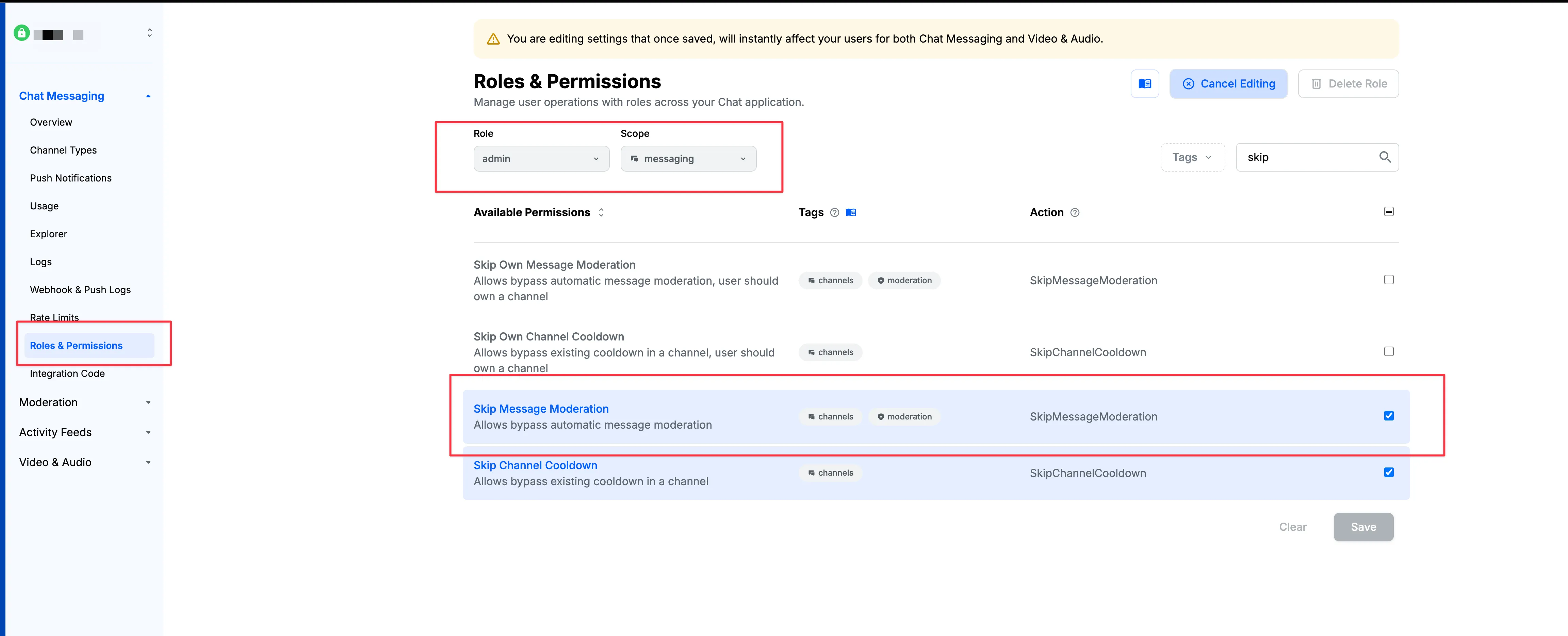
Permission-based bypass applies only to Chat messages. For Feeds activities and comments, use the bypass flag described below.
User Bypass Flag (Chat, Feeds & Comments)
This is only available in the new moderation dashboard.
The bypass_moderation flag can be set on individual users. When enabled, moderation is skipped for all content the user creates across Chat messages, Feeds activities, and Feed comments.
Enable or Disable Bypass
- Navigate to Settings → Users
- Find the user you want to manage
- Click on the value in the bypass_moderation column to open a toggle
- Toggle the switch to enable or disable bypass for that user
- Confirm the change
Changes take effect immediately for any new content the user creates.
Filter Users by Bypass Status
On the Settings → Users page, use the filter sidebar and select the bypass_moderation filter to quickly find all users with bypass enabled or disabled.
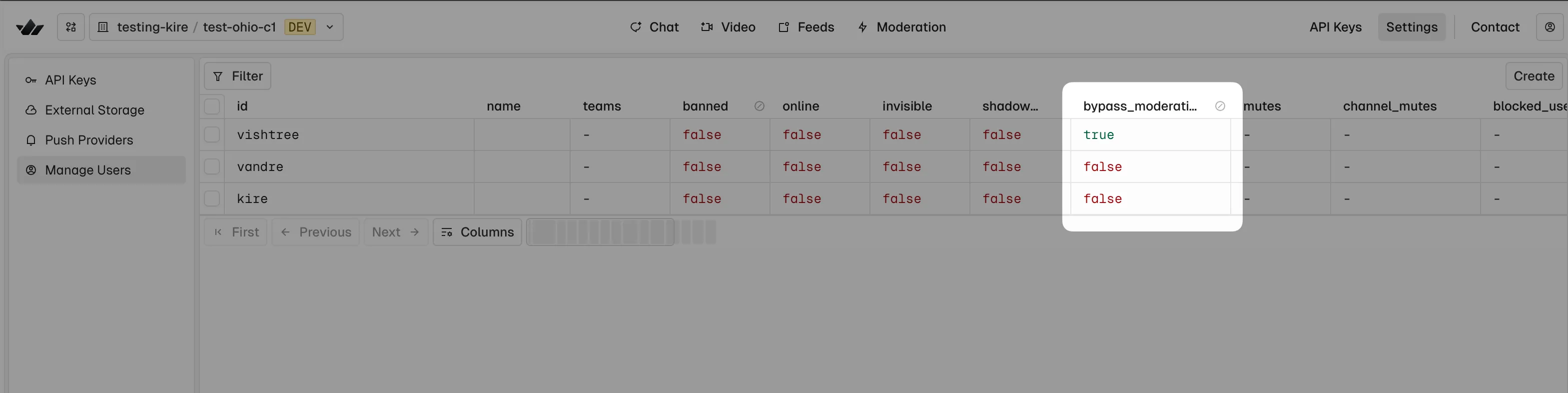
Behavior When Bypass Is Enabled
When bypass_moderation is true for a user:
- Chat messages: Sent immediately without running any moderation rules (AI text, blocklists, semantic filters, image moderation, etc.)
- Feeds activities: Published immediately without moderation
- Feed comments: Posted immediately without moderation
- Audit log: An audit log entry is created with
BypassModeration: trueto maintain observability
Bypass does not affect:
- Manual flags raised by other users
- Actions taken by human moderators
- Ban or shadow-ban status