
// Flag a message
const flag = await client.flagMessage(messageId);

// Flag with a reason and custom data
const flag = await client.flagMessage(messageId, {
  reason: "spam",
  custom: {
    user_comment: "This user is spamming the channel.",
  },
});Flag, Mute & Ban
Overview
Stream provides built-in user actions for moderation that allow users and moderators to flag inappropriate content, mute disruptive users, and ban users who violate community guidelines. These actions integrate seamlessly with the moderation review queue and dashboard.
Flag
Flagging allows any user to report a message or user for review. Flagged content is automatically added to your moderation review queue on the Stream Dashboard, where moderators can take appropriate action.
Flag a Message
client.flag_message(msg["id"], user_id=server_user["id"])@client.flag_message(msg_id, user_id: server_user[:id])client.FlagMessage(ctx, msg.ID, user.ID)await flagClient.FlagMessageAsync(message.Id, user.Id);Flag a User
// Flag a user
const flag = await client.flagUser(userId);

// Flag with a reason
const flag = await client.flagUser(userId, {
  reason: "harassment",
});client.flag_user(user_id, user_id=flagging_user_id)client.FlagUser(ctx, targetUser.ID, flaggingUser.ID)Reasons & Custom Data
You can enhance flags by associating them with a specific reason and custom data. Use a slug or keyword as the reason for easy filtering and translation.
// https://github.com/GetStream/stream-node
// Flag with a reason
await client.moderation.flag({
  entity_type: "stream:chat:v1:message",
  entity_id: messageID,
  reason: "spammy_user",
  user_id: "flagging_user_id",
});

// Flag with a reason and additional custom data
await client.moderation.flag({
  entity_type: "stream:chat:v1:message",
  entity_id: messageID,
  reason: "spammy_user",
  custom: {
    user_comment: "This user is spamming the homepage.",
    page: "homepage",
  },
  user_id: "flagging_user_id",
});
# https://github.com/GetStream/stream-py
# Flag with a reason
client.moderation().flag(
entity_type="stream:chat:v1:message",
entity_id=message_id,
reason="spammy_user",
user_id="flagging_user_id",
)
# Flag with a reason and additional custom data
client.moderation().flag(
entity_type="stream:chat:v1:message",
entity_id=message_id,
reason="spammy_user",
custom={
"user_comment": "This user is spamming the homepage.",
"page": "homepage",
},
user_id="flagging_user_id",
)// https://github.com/GetStream/getstream-go
// Flag with a reason
client.Moderation().Flag(ctx, &getstream.FlagRequest{
EntityType: "stream:chat:v1:message",
EntityID: messageID,
Reason: getstream.PtrTo("spammy_user"),
})
// Flag with a reason and additional custom data
client.Moderation().Flag(ctx, &getstream.FlagRequest{
EntityType: "stream:chat:v1:message",
EntityID: messageID,
Reason: getstream.PtrTo("spammy_user"),
Custom: map[string]interface{}{
"user_comment": "This user is spamming the homepage.",
"page": "homepage",
},
})// https://github.com/GetStream/stream-sdk-java
// Flag with a reason
client.moderation()
.flag(FlagRequest.builder()
.entityType("stream:chat:v1:message")
.entityID(messageID)
.reason("spammy_user")
.build())
.execute();
// Flag with a reason and additional custom data
client.moderation()
.flag(FlagRequest.builder()
.entityType("stream:chat:v1:message")
.entityID(messageID)
.reason("spammy_user")
.custom(Map.of(
"user_comment", "This user is spamming the homepage.",
"page", "homepage"))
.build())
.execute();// https://github.com/GetStream/getstream-php
// Flag with a reason
$client->moderation()->flag(new FlagRequest(
entityType: 'stream:chat:v1:message',
entityID: $messageID,
reason: 'spammy_user',
));
// Flag with a reason and additional custom data
$client->moderation()->flag(new FlagRequest(
entityType: 'stream:chat:v1:message',
entityID: $messageID,
reason: 'spammy_user',
custom: [
'user_comment' => 'This user is spamming the homepage.',
'page' => 'homepage',
],
));# https://github.com/GetStream/getstream-ruby
# Flag with a reason
client.moderation.flag(
GetStream::Generated::Models::FlagRequest.new(
entity_type: "stream:chat:v1:message",
entity_id: message_id,
reason: "spammy_user",
)
)
# Flag with a reason and additional custom data
client.moderation.flag(
GetStream::Generated::Models::FlagRequest.new(
entity_type: "stream:chat:v1:message",
entity_id: message_id,
reason: "spammy_user",
custom: {
"user_comment" => "This user is spamming the homepage.",
"page" => "homepage",
},
)
)// https://github.com/GetStream/getstream-net
// Flag with a reason
await client.Moderation.FlagAsync(new FlagRequest
{
EntityType = "stream:chat:v1:message",
EntityID = messageID,
Reason = "spammy_user",
});
// Flag with a reason and additional custom data
await client.Moderation.FlagAsync(new FlagRequest
{
EntityType = "stream:chat:v1:message",
EntityID = messageID,
Reason = "spammy_user",
Custom = new Dictionary<string, object>
{
{ "user_comment", "This user is spamming the homepage." },
{ "page", "homepage" },
},
});Query Flagged Content
Query flagged messages using the QueryReviewQueue API endpoint to build your own in-app moderation dashboard.
// https://github.com/GetStream/stream-node
const response = await client.moderation.queryReviewQueue({
  filter: { entity_type: "stream:chat:v1:message" },
  sort: [{ field: "created_at", direction: -1 }],
});

for (const item of response.items) {
  console.log(item.message.id);
  console.log(item.message.text);
  console.log(item.created_at);
}
# https://github.com/GetStream/stream-py
response = client.moderation().query_review_queue(
filter={"entity_type": "stream:chat:v1:message"},
sort=[{"field": "created_at", "direction": -1}],
)
for item in response.data.items:
print(item.message.id)
print(item.message.text)
print(item.created_at)// https://github.com/GetStream/getstream-go
response, err := client.Moderation().QueryReviewQueue(ctx, &getstream.QueryReviewQueueRequest{
Filter: map[string]interface{}{
"entity_type": "stream:chat:v1:message",
},
Sort: []getstream.SortParamRequest{
{Field: "created_at", Direction: getstream.PtrTo(-1)},
},
})// https://github.com/GetStream/stream-sdk-java
var response = client.moderation()
.queryReviewQueue(QueryReviewQueueRequest.builder()
.filter(Map.of("entity_type", "stream:chat:v1:message"))
.sort(List.of(SortParamRequest.builder()
.field("created_at")
.direction(-1)
.build()))
.build())
.execute()
.getData();// https://github.com/GetStream/getstream-php
$response = $client->moderation()->queryReviewQueue(new QueryReviewQueueRequest(
filter: ['entity_type' => 'stream:chat:v1:message'],
sort: [new SortParamRequest(field: 'created_at', direction: -1)],
));# https://github.com/GetStream/getstream-ruby
response = client.moderation.query_review_queue(
GetStream::Generated::Models::QueryReviewQueueRequest.new(
filter: { "entity_type" => "stream:chat:v1:message" },
sort: [GetStream::Generated::Models::SortParamRequest.new(
field: "created_at",
direction: -1,
)],
)
)// https://github.com/GetStream/getstream-net
var response = await client.Moderation.QueryReviewQueueAsync(new QueryReviewQueueRequest
{
Filter = new Dictionary<string, object> { { "entity_type", "stream:chat:v1:message" } },
Sort = new List<SortParamRequest>
{
new SortParamRequest { Field = "created_at", Direction = -1 }
},
});For more details on the review queue, see Query Review Queue.
Flag Content API
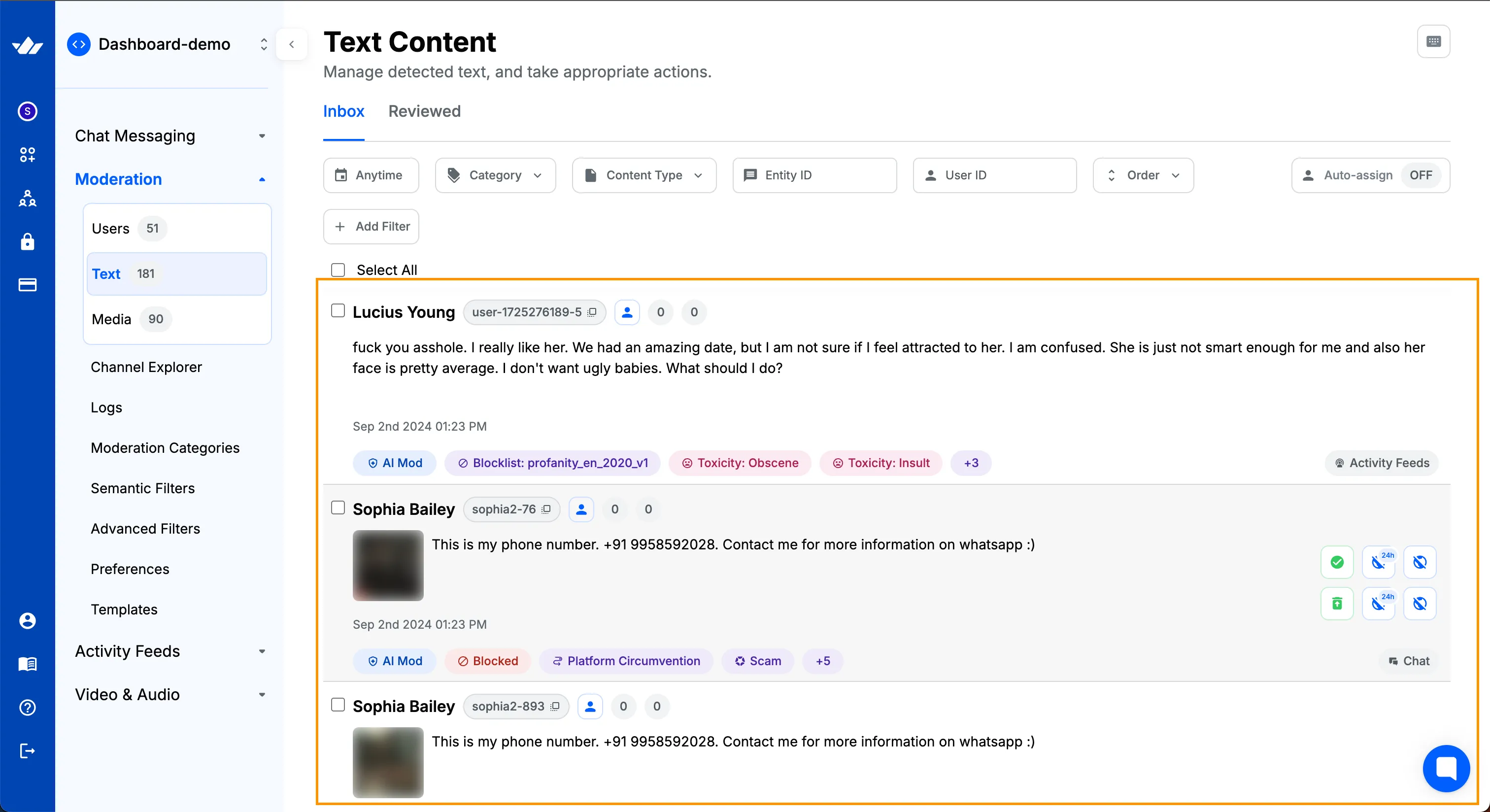
The Flag Content API allows you to programmatically flag content for review. Flagged items appear on the Stream dashboard, where moderators can take appropriate action.
// https://github.com/GetStream/stream-node
await client.moderation.flag({
  entity_type: "entity_type",
  entity_id: "entity_id",
  entity_creator_id: "entity_creator_id",
  reason: "reason for flag",
  custom: {},
  moderation_payload: { texts: ["this is inappropriate"] },
  user_id: "user_id", // only for server-side usage
});
# https://github.com/GetStream/stream-py
client.moderation().flag(
entity_type="entity_type",
entity_id="entity_id",
entity_creator_id="entity_creator_id",
reason="reason for flag",
custom={},
moderation_payload=ModerationPayload(texts=["this is inappropriate"]),
user_id="user_id", # only for server-side usage
)// https://github.com/GetStream/getstream-go
response, err := client.Moderation().Flag(ctx, &getstream.FlagRequest{
EntityType: "entity_type",
EntityID: "entity_id",
EntityCreatorID: getstream.PtrTo("entity_creator_id"),
Reason: getstream.PtrTo("reason for flag"),
ModerationPayload: &getstream.ModerationPayload{
Texts: []string{"this is inappropriate"},
},
})// https://github.com/GetStream/stream-sdk-java
var response = client.moderation()
.flag(FlagRequest.builder()
.entityType("entity_type")
.entityID("entity_id")
.entityCreatorID("entity_creator_id")
.reason("reason for flag")
.moderationPayload(ModerationPayload.builder()
.texts(List.of("this is inappropriate"))
.build())
.build())
.execute()
.getData();// https://github.com/GetStream/getstream-php
$response = $client->moderation()->flag(new FlagRequest(
entityType: 'entity_type',
entityID: 'entity_id',
entityCreatorID: 'entity_creator_id',
reason: 'reason for flag',
moderationPayload: new ModerationPayload(texts: ['this is inappropriate']),
userID: 'user_id', // only for server-side usage
));# https://github.com/GetStream/getstream-ruby
response = client.moderation.flag(
GetStream::Generated::Models::FlagRequest.new(
entity_type: "entity_type",
entity_id: "entity_id",
entity_creator_id: "entity_creator_id",
reason: "reason for flag",
moderation_payload: GetStream::Generated::Models::ModerationPayload.new(
texts: ["this is inappropriate"],
),
user_id: "user_id", # only for server-side usage
)
)// https://github.com/GetStream/getstream-net
var response = await client.Moderation.FlagAsync(new FlagRequest
{
EntityType = "entity_type",
EntityID = "entity_id",
EntityCreatorID = "entity_creator_id",
Reason = "reason for flag",
ModerationPayload = new ModerationPayload
{
Texts = new List<string> { "this is inappropriate" },
},
UserID = "user_id", // only for server-side usage
});Request Params
| key | required | type | description |
|---|---|---|---|
| entity_type | true | string | This is identifier for the type of content you are sending for moderation. This helps with categorizing content on dashboard. E.g., if you have multiple products then you can set unique entity_type for content coming from each product. It could be any string. |
| entity_id | true | string | Unique identifier for entity |
| entity_creator_id | true | string | Unique identifier for user who created this entity. Generally this is the user id of the app user. |
| reason | true | string | Reason for flagging. This is necessary for any moderator to know the intent |
| options.moderation_payload | false | object | Content to be manually reviewed. This is used to display the content on dashboard for review. |
| options.custom | true | string | Any custom properties you may want to attach with this flag |
| options.user_id | false | string | Only needed if flag API is being used with server side usage. |
Response
| key | type | description |
|---|---|---|
| item_id | string | Id for the Review Queue Item which got created as a result of flagging. You can request the entire review queue object using GetReviewQueueItem endpoint |
Flag a User via API
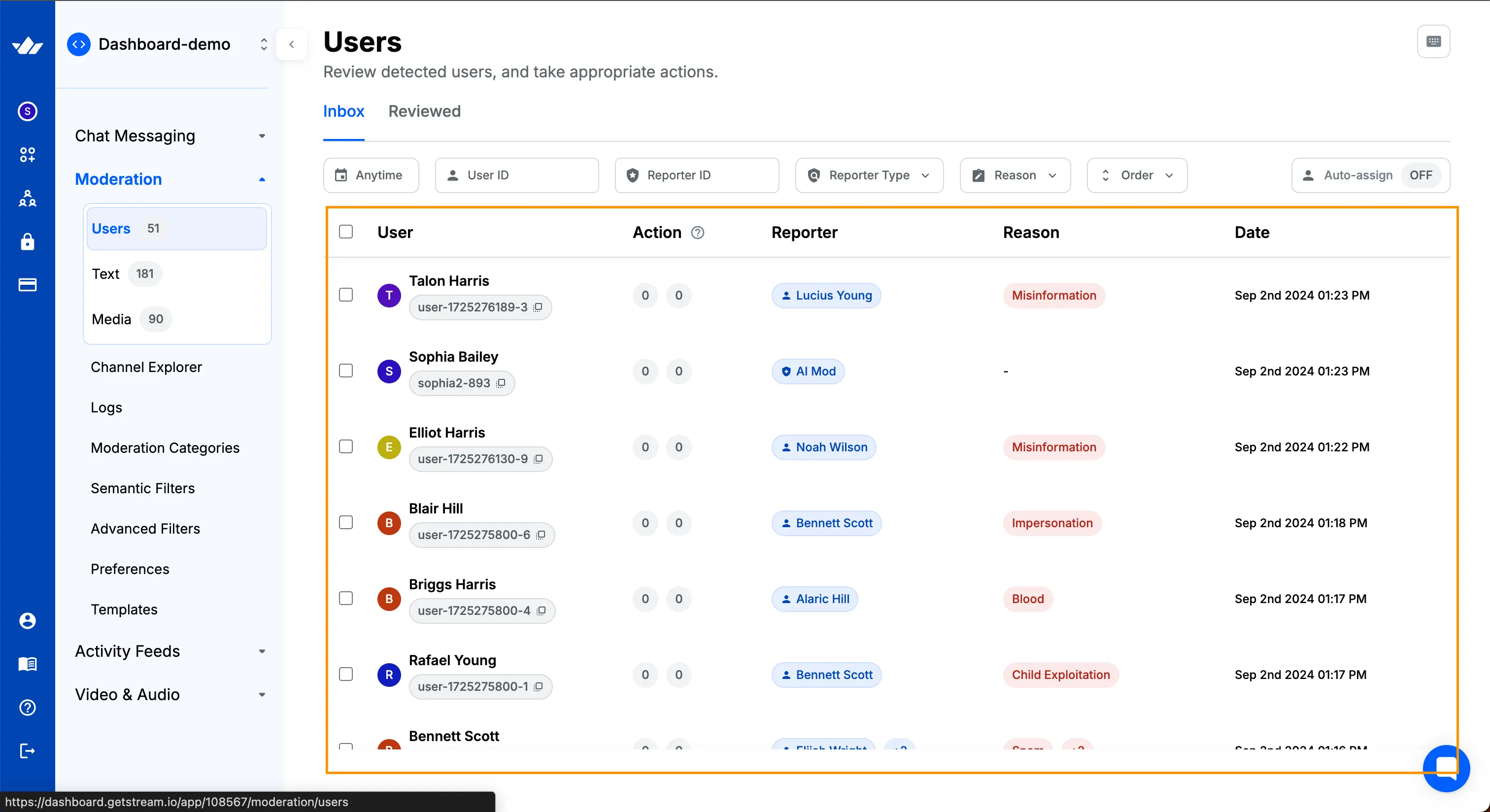
When a user/moderator flags a user, it ends up in "Users" review list.
// https://github.com/GetStream/stream-node
await client.moderation.flag({
  entity_type: "stream:user",
  entity_id: "target_user_id",
  reason: "spam",
  user_id: "user_id", // required for server-side usage
});
# https://github.com/GetStream/stream-py
client.moderation().flag(
entity_type="stream:user",
entity_id="target_user_id",
reason="spam",
user_id="user_id", # required for server-side usage
)// https://github.com/GetStream/getstream-go
response, err := client.Moderation().Flag(ctx, &getstream.FlagRequest{
EntityType: "stream:user",
EntityID: "target_user_id",
Reason: getstream.PtrTo("spam"),
})// https://github.com/GetStream/stream-sdk-java
var response = client.moderation()
.flag(FlagRequest.builder()
.entityType("stream:user")
.entityID("target_user_id")
.reason("spam")
.build())
.execute()
.getData();// https://github.com/GetStream/getstream-php
$response = $client->moderation()->flag(new FlagRequest(
entityType: 'stream:user',
entityID: 'target_user_id',
reason: 'spam',
));# https://github.com/GetStream/getstream-ruby
response = client.moderation.flag(
GetStream::Generated::Models::FlagRequest.new(
entity_type: "stream:user",
entity_id: "target_user_id",
reason: "spam",
)
)// https://github.com/GetStream/getstream-net
var response = await client.Moderation.FlagAsync(new FlagRequest
{
EntityType = "stream:user",
EntityID = "target_user_id",
Reason = "spam",
});
Flag a Message via API
// https://github.com/GetStream/stream-node
await client.moderation.flag({
  entity_type: "stream:chat:v1:message",
  entity_id: "message_id",
  reason: "spam",
  user_id: "user_id", // required for server-side usage
});
# https://github.com/GetStream/stream-py
client.moderation().flag(
entity_type="stream:chat:v1:message",
entity_id="message_id",
reason="spam",
user_id="user_id", # required for server-side usage
)// https://github.com/GetStream/getstream-go
response, err := client.Moderation().Flag(ctx, &getstream.FlagRequest{
EntityType: "stream:chat:v1:message",
EntityID: "message_id",
Reason: getstream.PtrTo("spam"),
})// https://github.com/GetStream/stream-sdk-java
var response = client.moderation()
.flag(FlagRequest.builder()
.entityType("stream:chat:v1:message")
.entityID("message_id")
.reason("spam")
.build())
.execute()
.getData();// https://github.com/GetStream/getstream-php
$response = $client->moderation()->flag(new FlagRequest(
entityType: 'stream:chat:v1:message',
entityID: 'message_id',
reason: 'spam',
));# https://github.com/GetStream/getstream-ruby
response = client.moderation.flag(
GetStream::Generated::Models::FlagRequest.new(
entity_type: "stream:chat:v1:message",
entity_id: "message_id",
reason: "spam",
)
)// https://github.com/GetStream/getstream-net
var response = await client.Moderation.FlagAsync(new FlagRequest
{
EntityType = "stream:chat:v1:message",
EntityID = "message_id",
Reason = "spam",
});
Mute
Any user is allowed to mute another user. Mutes are stored at the user level and returned with the rest of the user information when connectUser is called. A user will be muted until the user is unmuted or the mute is expired.
| name | type | description | default | optional |
|---|---|---|---|---|
| timeout | number | The timeout in minutes until the mute is expired. | no limit | ✓ |
client.muteUser("user-id").enqueue { result ->
  if (result.isSuccess) {
    // User was muted
    val mute: Mute = result.data()
  } else {
    // Handle result.error()
  }
}

client.unmuteUser("user-id").enqueue { result ->
  if (result.isSuccess) {
    // User was unmuted
  } else {
    // Handle result.error()
  }
}
// client-side mute
const mute = await client.muteUser("eviluser");
// client-side mute for 60 minutes
const mute = await client.muteUser("eviluser", null, {
timeout: 60,
});
// server-side mute requires the id of the user creating the mute as well
const mute = await client.muteUser("eviluser", "user_id");//
$mute = $client->muteUser('evil-user', 'user-id');await client.muteUser("eviluser");
await client.unmuteUser("eviluser");import StreamChat
let userController = chatClient.userController(userId: "another_user")
/// 1: Call `ChatUserController.mute` to mute the user.
userController.mute { error in
// handle possible errors
print(error ?? "user muted")
/// 2: Call `ChatUserController.unmute` to unmute the user.
userController.unmute { error in
print(error ?? "user unmuted")
}
}Client->MuteUser(User);
Client->UnmuteUser(User);# server-side mute requires the id of the user creating the mute as well
client.mute_user(target_user["id"], server_user["id"])# server-side mute requires the id of the user creating the mute as well
client.mute_user(target_user["id"], server_user["id"])// server-side mute requires the id of the user creating the mute as well
client.MuteUser(ctx, targetUser.ID, serverUser.ID)// server-side mute requires the id of the user creating the mute as well
await userClient.MuteAsync(targetUser.Id, serverUser.Id);// Mute a user
await channelMember.User.MuteAsync();
// Unmute previously muted user
await channelMember.User.UnmuteAsync();
// Mute a channel
await channel.MuteChannelAsync();
// Mute previously muted channel
await channel.UnmuteChannelAsync();client.muteUser("user-id").enqueue(result -> {
if (result.isSuccess()) {
// User was muted
Mute mute = result.data();
} else {
// Handle result.error()
}
});
client.unmuteUser("user-id").enqueue(result -> {
if (result.isSuccess()) {
// User was unmuted
} else {
// Handle result.error()
}
});After muting a user messages will still be delivered via web-socket. Implementing business logic such as hiding messages from muted users or displaying them differently is left to the developer to implement.
Messages from muted users are not delivered via push (APN/Firebase)
Ban
Users can be banned from an app entirely or from a channel. When a user is banned, they will not be allowed to post messages until the ban is removed or expired but will be able to connect to Chat and to channels as before.
Channel watchers cannot be banned.
It is also possible to ban the user's last known IP address to prevent the creation of new "throw-away" accounts. This type of ban is only applicable on the app level. ISPs often rotate IP addresses, therefore in order to prevent innocent users to be banned, we automatically apply a 30 day timeout when applying an IP ban. This value can be overwritten, if a timeout is supplied in the request. The IP address will be unbanned either after reaching a timeout or with explicit user unban.
It is also possible to delete the user's messages when a ban is applied. If the user is banned from a channel, all their messages in that specific channel can be deleted. Similarly, if the user is banned from an app entirely, all their messages across the app can be deleted. Messages can be deleted in two ways: soft deletion or hard deletion. Soft deletion removes the messages from the client but retains them on the server, making them accessible via server-side export functions. Hard deletion, on the other hand, permanently removes the messages from both the client and the server, ensuring they are no longer retrievable.
In most cases, only admins or moderators are allowed to ban other users from a channel.
| name | type | description | default | optional |
|---|---|---|---|---|
| timeout | number | The timeout in minutes until the ban is automatically expired. | no limit | ✓ |
| reason | string | The reason that the ban was created. | ✓ | |
| ip_ban | boolean | Whether or not to apply IP address ban | false | ✓ |
| banned_by_id | string | The ID of the user who is performing the ban. This is required only when using API from the server-side | ✓ | |
| delete_messages | string | Delete messages of the banned user. Can be "soft" or "hard" which soft-deletes and hard-deletes the messages respectively | ✓ |
Banning a user from all channels can only be done using server-side auth.
// Ban user for 60 minutes from a channel
channelClient.banUser(targetId = "user-id", reason = "Bad words", timeout = 60).enqueue { result ->
  if (result.isSuccess) {
    // User was banned
  } else {
    // Handle result.error()
  }
}

channelClient.unBanUser(targetId = "user-id").enqueue { result ->
  if (result.isSuccess) {
    // User was unbanned
  } else {
    // Handle result.error()
  }
}
// ban a user for 60 minutes from all channel
let data = await client.banUser("eviluser", {
banned_by_id: userID, // ID of the user who is performing the ban (Server-side auth)
timeout: 60,
reason: "Banned for one hour",
});
// ban a user and their IP address for 24 hours
let data = await client.banUser("eviluser", {
banned_by_id: userID,
timeout: 24 * 60,
ip_ban: true,
reason: "Please come back tomorrow",
});
// ban a user from the livestream:fortnite channel
data = await channel.banUser("eviluser", {
banned_by_id: userID,
reason: "Profanity is not allowed here",
});
// remove ban from channel
data = await channel.unbanUser("eviluser");
// remove global ban
data = await authClient.unbanUser("eviluser");# ban a user for 60 minutes from all channel
client.ban_user("eviluser", banned_by_id=admin_id, timeout=60, reason="Banned for one hour")
# ban a user and their IP address for 24 hours
client.ban_user("eviluser", banned_by_id=admin_id, timeout=24*60, ip_ban=true, reason="Please come back tomorrow")
# ban a user from the livestream:fortnite channel and also soft delete the messages
channel.ban_user("eviluser", banned_by_id=admin_id, reason="Profanity is not allowed here", delete_messages="soft")
# remove ban from channel
channel.unban_user("eviluser")
# remove global ban
client.unban_user("eviluser")import StreamChat
/// 1: Create a `ChannelId` that represents the channel you want to ban a user from.
let channelId = ChannelId(type: .messaging, id: "general")
/// 2: Create a `ChatChannelMemberController` to make operations on a channel member.
let controller = chatClient.memberController(userId: "another_user", in: channelId)
/// 3: Call `ChatChannelMemberController.ban` to ban the user from the channel.
controller.ban { error in
// handle possible errors
print(error ?? "user banned")
/// 4: Call `ChatUserController.unmute` to unmute the user.
controller.unban { error in
print(error ?? "user unmuted")
}
}// ban a user for 60 minutes from all channel
$ban = $client->banUser('evil-user', [
'timeout' => 60,
'reason' => 'Banned for one hour',
'banned_by_id' => 'user-id'
]);
// ban a user and their IP address for 24 hours
$ban = $channel->banUser('evil-user', [
'banned_by_id' => 'user-id'
'timeout' => 24*60,
'ip_ban' => true,
'reason' => 'Please come back tomorrow',
]);
// ban a user from the livestream:fortnite channel
$ban = $channel->banUser('evil-user', [
'reason' => 'Banned for one hour',
'banned_by_id' => 'user-id'
]);
// remove ban from channel
$unban = $channel->unbanUser('evil-user');
// remove global ban
$unban = $client->unbanUser('evil-user');// ban a user for 60 minutes from all channel
await client.banUser('eviluser', {
'banned_by_id': userID, // ID of the user who is performing the ban (Server-side auth)
'timeout': 60,
'reason': 'Banned for one hour',
});
// ban a user and their IP address for 24 hours
await client.banUser('eviluser', {
'banned_by_id': userID,
'timeout': 24*60,
'ip_ban': true,
'reason': 'Please come back tomorrow',
});
// ban a user from the livestream:fortnite channel
await channel.banMember(
'banned_by_id': userID,
'reason': 'Profanity is not allowed here',
});
// remove ban from channel
await channel.banMember('eviluser');
// remove global ban
await client.unbanUser('eviluser');// ban a user for 60 minutes from all channel
Client->BanUser(User, FTimespan::FromMinutes(60.), {TEXT("Banned for one hour")});
// ban a user and their IP address for 24 hours
Client->BanUser(User, FTimespan::FromHours(24.), {TEXT("Please come back tomorrow")}, true);
// ban a user from a specific channel
Channel->BanMember(User, {}, {TEXT("Profanity is not allowed here")});
// remove ban from channel
Channel->UnbanMember(User);
// remove global ban
Client->UnbanUser(User);# ban a user for 60 minutes from all channel
client.ban_user("eviluser", banned_by_id: admin_id, timeout: 60, reason: "Banned for one hour")
# ban a user and their IP address for 24 hours
client.ban_user("eviluser", banned_by_id: admin_id, timeout: 24*60, ip_ban: true, reason: "Please come back tomorrow")
# ban a user from the livestream:fortnite channel
channel.ban_user("eviluser", banned_by_id: admin_id, reason: "Profanity is not allowed here")
# remove ban from channel
channel.unban_user("eviluser")
# remove global ban
client.unban_user("eviluser")// ban from channel
channel.BanUser(ctx, target.ID, bannedBy.ID, BanWithReason("spammer"), BanWithExpiration(60))
// ban globally
client.BanUser(ctx, target.ID, bannedBy.ID, BanWithReason("spammer"), BanWithExpiration(60))
// unban from channel
channel.UnBanUser(ctx, target.ID)
// unban globally
client.UnBanUser(ctx, target.ID)// ban from channel
await userClient.BanAsync(new BanRequest
{
Type = channel.Type,
Id = channel.Id,
Reason = "reason",
TargetUserId = targetUser.Id,
UserId = bannedBy.Id,
});
// ban globally
await userClient.BanAsync(new BanRequest
{
Reason = "reason",
TargetUserId = targetUser.Id,
UserId = bannedBy.Id,
});
// unban from channel
await userClient.UnbanAsync(new BanRequest
{
Type = channel.Type,
Id = channel.Id,
TargetUserId = targetUser.Id,
UserId = bannedBy.Id,
});
// unban globally
await userClient.UnbanAsync(new BanRequest
{
TargetUserId = targetUser.Id,
UserId = bannedBy.Id,
});// Ban user for 60 minutes from a channel
channelClient.banUser("user-id", "Bad words", 60).enqueue(result -> {
if (result.isSuccess()) {
// User was banned
} else {
// Handle result.error()
}
});
channelClient.unbanUser("user-id").enqueue(result -> {
if (result.isSuccess()) {
// User was unbanned
} else {
// Handle result.error()
}
});// Dummy example to get IStreamUser to ban
var user = channel.Messages.First().User;
// Dummy example to get IStreamUser to ban
var channelMember = channel.Members.First();
// Ban a user permanently from this channel permanently
await channel.BanUserAsync(user);
// Use any combination of the optional parameters: reason, timeoutMinutes, isIpBan
// Ban a user from this channel for 2 hours with a reason
await channel.BanUserAsync(user, "You got banned for 2 hours for toxic behaviour.", 120);
// Ban a user IP from this channel for 2 hours without a reason
await channel.BanUserAsync(user, timeoutMinutes: 120, isIpBan: true);
// Ban a member from this channel permanently
await channel.BanMemberAsync(channelMember);Query Banned Users
Banned users can be retrieved in different ways:
Using the dedicated query bans endpoint
User Search: you can add the
banned: truecondition to your search. Please note that this will only return users that were banned at the app level and not the ones that were banned only on channels.
// Retrieve the list of banned users
client.queryUsers(
  QueryUsersRequest(
    filter = Filters.eq("banned", true),
    offset = 0,
    limit = 10,
  )
).enqueue { result ->
  if (result.isSuccess) {
    val users: List<User> = result.data()
  } else {
    // Handle result.error()
  }
}

// Query for banned members from one channel
client.queryBannedUsers(filter = Filters.eq("channel_cid", "ChannelType:ChannelId")).enqueue { result ->
  if (result.isSuccess) {
    val bannedUsers: List<BannedUser> = result.data()
  } else {
    // Handle result.error()
  }
}
// retrieve the list of banned users
const response = await client.queryUsers(
{ banned: true },
{},
{ limit: 10, offset: 0 },
);
// query for banned members from one channel
const results = await client.queryBannedUsers({
channel_cid: "livestream:123",
});// retrieve the list of banned users
await client.queryUsers(
filter: Filter.equal('banned', true),
);let userListController = client.userListController(query: .init(filter: .equal(.isBanned, to: true)))
userListController.synchronize() { error in
if error == nil {
userListController.users
}
}// Retrieve the list of banned users
Client->QueryUsers(
FFilter::Equal(TEXT("banned"), true),
{}, // Sort options
true, // Presence
{}, // Pagination options
[](const TArray<FUserRef> Users)
{
// Do something with Users
});
// Query for banned members from one channel
Client->QueryBannedUsers(
FFilter::Equal(TEXT("channel_cid"), TEXT("ChannelType:ChannelId")),
{}, // Sort options
{}, // Pagination options
[](const TArray<FBan> Bans)
{
// Do something with Bans
});$client->queryBannedUsers(["channel_cid" => "ChannelType:ChannelId"]);client.query_banned_users(
{"filter_conditions": {"channel_cid": "ChannelType:ChannelId"}}
)client.query_banned_users({ 'channel_cid' => 'ChannelType:ChannelId' })client.QueryBannedUsers(ctx, &QueryBannedUsersOptions{
QueryOption: &QueryOption{Filter: map[string]interface{}{
"channel_cid": "ChannelType:ChannelId",
}},
})await userClient.QueryBannedUsersAsync(new QueryBannedUsersRequest
{
FilterConditions = new Dictionary<string, object> { { "channel_cid", "ChannelType:ChannelId" } },
});// Retrieve the list of banned users
FilterObject filter = Filters.eq("banned", true);
QueryUsersRequest request = new QueryUsersRequest(filter, 0, 10);
client.queryUsers(request).enqueue(result -> {
if (result.isSuccess()) {
List<User> users = result.data();
} else {
// Handle result.error()
}
});
// Query for banned members from one channel
FilterObject channelFilter = Filters.eq("channel_cid", "ChannelType:ChannelId");
client.queryBannedUsers(channelFilter).enqueue(result -> {
if (result.isSuccess()) {
List<BannedUser> bannedUsers = result.data();
} else {
// Handle result.error()
}
});// Get users banned in the last 24 hours
var request = new StreamQueryBannedUsersRequest
{
CreatedAtAfterOrEqual = new DateTimeOffset().AddHours(-24),
Limit = 30,
Offset = 0,
};
var bannedUsersInfo = await Client.QueryBannedUsersAsync(request);Query Bans Endpoint
The query bans endpoint allows you to list bans for your application. Similar to other query endpoints, you can filter bans by different fields and control the ordering of results.
Globally banned users can only be retrieved using server-side auth
Available fields
| Name | Description | Example | Operators |
|---|---|---|---|
| channel_cid | The channel CID for the ban. When this parameter is not provided, both global and channel bans will be returned. | { channel_cid :{$in:["livestream:1","livestream:2"]}} | $eq, $in |
| user_id | The ID of the banned user | { user_id: "evil_user" } | $eq, $in, $neq, $nin |
| created_at | The date (RFC339) of the ban creation | { created_at: {$gt: "2020-10-02T15:00:00Z"} } | $eq, $gt, $gte, $lt, $lte |
| banned_by_id | The ID of the user that created the ban | { banned_by_id: "42"} | $eq, $in, $neq, $nin |
Pagination for bans can be done in two ways: using offset/limit or using the created_at field. Bans are returned in ascending order by default so to get the second page you need to request bans with created_at less than the created_at of the last ban on the first page. Ordering can be reversed using the sort option.
// Get the bans for channel livestream:123 in descending order
client.queryBannedUsers(
  filter = Filters.eq("channel_cid", "livestream:123"),
  sort = QuerySortByField.descByName("createdAt"),
).enqueue { result ->
  if (result.isSuccess) {
    val bannedUsers: List<BannedUser> = result.data()
  } else {
    // Handle result.error()
  }
}

// Get the page of bans which where created before or equal date for the same channel
client.queryBannedUsers(
  filter = Filters.eq("channel_cid", "livestream:123"),
  sort = QuerySortByField.descByName("createdAt"),
  createdAtBeforeOrEqual = Date(),
).enqueue { result ->
  if (result.isSuccess) {
    val bannedUsers: List<BannedUser> = result.data()
  } else {
    // Handle result.error()
  }
}
// get the bans for channel livestream:123 in descending order
const response = await client.queryBannedUsers(
{ channel_cid: "livestream:123" },
{ created_at: -1 },
);
// get the next page of bans for the same channel
await client.queryBannedUsers(
{ channel_cid: "livestream:123", created_at_before_or_equal: createdAt },
{ created_at: -1 },
);$opts = [
"limit" => 1,
"sort" => [
[
"field" => "created_at",
"direction" => -1
]
]
];
$client->queryBannedUsers(["channel_cid" => "livestream:123"], $opts);client.query_banned_users(
{"filter_conditions": {"channel_cid": "livestream:123"}, "sort": [{"field": "created_at", "direction": -1}]}
)client.query_banned_users({ 'channel_cid' => 'livestream:123' }, {"created_at": -1}, limit: 1)await userClient.QueryBannedUsersAsync(new QueryBannedUsersRequest
{
FilterConditions = new Dictionary<string, object> { { "channel_cid", "livestream:123" } },
Sorts = new List<SortParameter> { new SortParameter { Field = "created_at", Direction = SortDirection.Descending } },
});// Get the bans for channel livestream:123 in reverse chronological order of banning
Client->QueryBannedUsers(
FFilter::Equal(TEXT("channel_cid"), TEXT("livestream:123")),
{{EBanSortField::CreatedAt, ESortDirection::Descending}},
{},
[](const TArray<FBan> Bans)
{
// Do something with Bans
});
// Get the page of bans which were created before or equal to the current time for the same channel
FBanPaginationOptions PaginationOptions;
PaginationOptions.CreatedAtBeforeOrEqual = FDateTime::UtcNow();
Client->QueryBannedUsers(
FFilter::Equal(TEXT("channel_cid"), TEXT("livestream:123")),
{{EBanSortField::CreatedAt, ESortDirection::Descending}},
{PaginationOptions},
[](const TArray<FBan> Bans)
{
// Do something with Bans
});// Get the bans for channel livestream:123 in descending order
FilterObject filter = Filters.eq("channel_cid", "livestream:123");
QuerySorter<BannedUsersSort> sort = QuerySortByField.descByName("createdAt");
client.queryBannedUsers(filter, sort).enqueue(result -> {
if (result.isSuccess()) {
List<BannedUser> bannedUsers = result.data();
} else {
// Handle result.error()
}
});
// Get the page of bans which where created before or equal date for the same channel
client.queryBannedUsers(filter, sort, null, null, null, null, null, new Date()).enqueue(result -> {
if (result.isSuccess()) {
List<BannedUser> bannedUsers = result.data();
} else {
// Handle result.error()
}
});// Get users banned in the last 24 hours
var request = new StreamQueryBannedUsersRequest
{
CreatedAtAfterOrEqual = new DateTimeOffset().AddHours(-24),
Limit = 30,
Offset = 0,
};
var bannedUsersInfo = await Client.QueryBannedUsersAsync(request);Shadow Ban
Instead of a default ban, you can shadow ban users from a channel, set of channels, or an entire App. When a user is shadow banned, they will still be allowed to post messages, but any message sent during the ban will only be visible to the author of the message and invisible to other users of the App.
Shadow banning can delay a persistent bad actor from attempting ban evasion techniques by obfuscating the fact that a ban has occurred for them. Since a shadow ban's effectiveness relies on it not being discovered, shadow bans work best in chats with a high volume of messages and fast velocity where the offending user's messages not receiving engagement appears plausible; think livestreams.
Messages from a shadow banned user will include the shadowed: true flag on the message object. This flag is only visible to users other than the shadow banned user, so the offender will not be able to recognize that they are shadow banned even if they use developer tools to inspect responses from the API. You will need to implement UI logic for how your application will handle shadowed messages. Having the client hide these messages for everybody other than the user sending them is a common approach.
| name | type | description | default | optional |
|---|---|---|---|---|
| timeout | number | The timeout in minutes until the ban is automatically expired. | no-limit | ✓ |
| reason | string | The reason that the ban was created. | - | ✓ |
| ip_ban | boolean | Whether or not to apply IP address ban | false | ✓ |
| banned_by_id | string | The ID of the user who is performing the ban. This is required only when using API from the server-side | - | ✓ |
// Shadow ban user for 60 minutes from a channel
channelClient.shadowBanUser(targetId = "user-id", reason = "Bad words", timeout = 60).enqueue { result ->
   if (result.isSuccess) {
     // User was shadow banned
   } else {
     // Handle result.error()
   }
}

channelClient.removeShadowBan("user-id").enqueue { result ->
  if (result.isSuccess) {
    // Shadow ban was removed
  } else {
    // Handle result.error()
  }
}
// shadow ban a user from all channels
let data = await client.shadowBan("eviluser");
// shadow ban a user from a channel
data = await channel.shadowBan("eviluser");
// remove shadow ban from channel
data = await channel.removeShadowBan("eviluser");
// remove global shadow ban
data = await client.removeShadowBan("eviluser");
// server-side shadow ban
data = await client.shadowBan("eviluser", { banned_by_id: "regularUser" });// shadow ban a user from all channels
await client.shadowBan('eviluser');
// shadow ban a user from a channel
await channel.shadowBan('eviluser');
// remove shadow ban from channel
await channel.removeShadowBan('eviluser');
// remove global shadow ban
await client.removeShadowBan('eviluser');// shadow ban a user from all channels
Client->ShadowBanUser(User);
// shadow ban a user from a channel
Channel->ShadowBanMember(User);
// remove shadow ban from channel
Channel->ShadowUnbanMember(User);
// remove global shadow ban
Client->ShadowUnbanUser(User);$client->shadowBan($targetUser["id"], ["user_id" => $user2["id"]]);
$client->removeShadowBan($targetUser["id"], ["user_id" => $user2["id"]]);client.shadow_ban(target_user["id"], user_id=server_user["id"])
client.remove_shadow_ban(target_user["id"], user_id=server_user["id"])client.shadow_ban(target_user["id"], user_id: server_user["id"])
client.remove_shadow_ban(target_user["id"], user_id: server_user["id"])client.ShadowBan(ctx, targetUser.ID, bannedBy.ID)
client.UnBanUser(ctx, targetUser.ID)await userClient.ShadowBanAsync(new ShadowBanRequest
{
TargetUserId = targetUser.Id,
UserId = bannedBy.Id,
});
await userClient.RemoveShadowBanAsync(new ShadowBanRequest
{
TargetUserId = targetUser.Id,
});// Shadow ban user for 60 minutes from a channel
channelClient.shadowBanUser("user-id", "Bad words", 60).enqueue(result -> {
if (result.isSuccess()) {
// User was shadow banned
} else {
// Handle result.error()
}
});
channelClient.removeShadowBan("user-id").enqueue(result -> {
if (result.isSuccess()) {
// Shadow ban was removed
} else {
// Handle result.error()
}
});// Dummy example to get IStreamUser to ban
var user = channel.Messages.First().User;
// Dummy example to get IStreamUser to ban
var channelMember = channel.Members.First();
// Shadow Ban a user from this channel permanently
await channel.ShadowBanUserAsync(user);
// Shadow Ban a member from this channel
await channel.ShadowBanMemberAsync(channelMember);
// Use any combination of optional parameters: reason, timeoutMinutes, isIpBan
// Shadow Ban a member from this channel permanently
await channel.ShadowBanMemberAsync(channelMember);
// Shadow Ban a member from this channel for 2 hours with a reason
await channel.ShadowBanMemberAsync(channelMember, "Banned for 2 hours for toxic behaviour.", 120);
// Shadow Ban a member IP from this channel for 2 hours without a reason
await channel.ShadowBanMemberAsync(channelMember, timeoutMinutes: 120, isIpBan: true);Administrators can view shadow banned user status in queryChannels(), queryMembers() and queryUsers() .
Future Channel Bans
Future Channel Bans allow you to ban a user not only from a specific channel but also from all future channels you create. When a banned user is added as a member to any new channel created by you, they are automatically marked as banned in that channel.
This is useful for:
- Marketplace sellers preventing problematic buyers from accessing future product channels
- Community moderators enforcing bans across all new channels they create
- Content creators maintaining consistent moderation as they create new channels
Create a Future Channel Ban
To create a Future Channel Ban, use the ban method on a channel with the ban_from_future_channels parameter set to true. This creates both a channel ban and a Future Channel Ban.
Future Channel Bans must be created from a channel context. The channel_cid parameter is required when using ban_from_future_channels.
| name | type | description | default | optional |
|---|---|---|---|---|
| ban_from_future_channels | boolean | Whether to also ban from all future channels created by the banning user | false | ✓ |
| timeout | number | The timeout in minutes until the Future Channel Ban expires (does not affect existing channel bans) | no limit | ✓ |
| reason | string | The reason for the ban | ✓ | |
| shadow | boolean | Whether this is a shadow ban | false | ✓ |
| banned_by_id | string | The ID of the user performing the ban. Required for server-side usage | ✓ |
// Ban with future channels
await channel.banUser("target_user_id", {
  ban_from_future_channels: true,
  reason: "Spam",
});
# Ban with future channels (requires channel context)
client.ban_user('target_user_id',
banned_by_id='creator_id',
type='messaging', # channel type
id='channel_id', # channel id
ban_from_future_channels=True,
reason='Spam')// Ban with future channels (requires channel context)
$client->banUser('target_user_id', [
'banned_by_id' => 'creator_id',
'type' => 'messaging', // channel type
'id' => 'channel_id', // channel id
'ban_from_future_channels' => true,
'reason' => 'Spam',
]);# Ban with future channels (requires channel context)
client.ban_user('target_user_id',
banned_by_id: 'creator_id',
type: 'messaging', # channel type
id: 'channel_id', # channel id
ban_from_future_channels: true,
reason: 'Spam')// Ban with future channels (requires channel context)
client.BanUser(ctx, "target_user_id", "creator_id",
BanWithBanFromFutureChannels(),
BanWithChannel("messaging", "channel_id"),
BanWithReason("Spam"))// Ban with future channels (requires channel context)
await userClient.BanAsync(new BanRequest
{
TargetUserId = "target_user_id",
UserId = "creator_id",
Type = "messaging", // channel type
Id = "channel_id", // channel id
BanFromFutureChannels = true,
Reason = "Spam",
});// Ban with future channels (requires channel context)
User.ban()
.userId("creator_id")
.targetUserId("target_user_id")
.type("messaging") // channel type
.id("channel_id") // channel id
.banFromFutureChannels(true)
.reason("Spam")
.request();How Future Channel Bans Are Applied
When you add a member to a channel you created, the system automatically checks if you have an active Future Channel Ban against that user. If a match is found, the user is immediately marked as banned in that channel.
The following properties are inherited from the Future Channel Ban:
reason- The ban reason is copied to the channel banshadow- If the Future Channel Ban is a shadow ban, the channel ban will also be a shadow ban
Future Channel Bans only apply to channels where you are the creator (created_by_id). If another user creates a channel and adds someone you've banned, your Future Channel Ban will not apply to that channel.
Future Channel Ban Expiration
When you set a timeout on a Future Channel Ban, the expiration applies to the Future Channel Ban itself, not to the individual channel bans created from it.
When a Future Channel Ban expires, it stops applying to new channels. However, users already banned in existing channels remain banned. You must explicitly unban them from each channel if needed.
Remove a Future Channel Ban
To remove a Future Channel Ban, use the unban method with remove_future_channels_ban set to true.
| name | type | description | default | optional |
|---|---|---|---|---|
| remove_future_channels_ban | boolean | Whether to remove the Future Channel Ban | false | ✓ |
| created_by_id | string | The ID of the user who created the Future Channel Ban. Required when removing a Future Channel Ban |
Removing a Future Channel Ban does NOT remove existing channel bans that were created from it. To fully unban a user, you must also unban them from each channel individually.
// Unban and remove future channel ban
await channel.unbanUser("target_user_id", {
  remove_future_channels_ban: true,
});
# Unban and remove future channel ban
client.unban_user('target_user_id',
created_by_id='creator_id',
remove_future_channels_ban=True)// Unban and remove future channel ban
$client->unbanUser('target_user_id', [
'created_by_id' => 'creator_id',
'remove_future_channels_ban' => true
]);# Unban and remove future channel ban
client.unban_user('target_user_id',
created_by_id: 'creator_id',
remove_future_channels_ban: true)// Unban and remove future channel ban
client.UnBanUser(ctx, "target_user_id", "creator_id",
UnbanWithRemoveFutureChannelsBan())// Unban and remove future channel ban
await userClient.UnbanAsync(new BanRequest
{
TargetUserId = "target_user_id",
UserId = "creator_id"
}, removeFutureChannelsBan: true);// Unban and remove future channel ban
User.unban("target_user_id")
.removeFutureChannelsBan(true)
.request();Query Future Channel Bans
You can query Future Channel Bans to list all bans created by a specific user, optionally filtering by the banned user.
Request parameters
| Name | Type | Description | Default |
|---|---|---|---|
| user_id | string | The ID of the user who created the bans (required) | |
| target_user_id | string | Filter by the banned user's ID | |
| exclude_expired_bans | boolean | Whether to exclude expired Future Channel Bans from results | false |
| limit | number | Maximum number of results to return | |
| offset | number | Number of results to skip for pagination |
Response
The response contains a bans array with the following fields for each Future Channel Ban:
| Field | Type | Description |
|---|---|---|
| user | object | The banned user object |
| banned_by | object | The user who created the Future Channel Ban |
| reason | string | The reason for the ban (if provided) |
| shadow | boolean | Whether this is a shadow ban |
| expires | string | When the Future Channel Ban expires (RFC3339, if set) |
| created_at | string | When the Future Channel Ban was created (RFC3339) |
// Query future channel bans
const response = await client.queryFutureChannelBans({
  user_id: "creator_id",
  target_user_id: "target_id", // optional
  exclude_expired_bans: true,
});
# Query future channel bans
response = client.query_future_channel_bans(
user_id='creator_id',
target_user_id='target_id', # optional
exclude_expired_bans=True)// Query future channel bans
$response = $client->queryFutureChannelBans([
'user_id' => 'creator_id',
'target_user_id' => 'target_id' // optional
]);# Query future channel bans
response = client.query_future_channel_bans(
user_id: 'creator_id',
target_user_id: 'target_id' # optional
)// Query future channel bans
response, _ := client.QueryFutureChannelBans(ctx, &QueryFutureChannelBansOptions{
UserID: "creator_id",
TargetUserID: "target_id", // optional
})// Query future channel bans
var response = await userClient.QueryFutureChannelBansAsync(
new QueryFutureChannelBansRequest
{
UserId = "creator_id",
TargetUserId = "target_id" // optional
});// Query future channel bans
var response = User.queryFutureChannelBans()
.userId("creator_id")
.targetUserId("target_id") // optional
.request();Webhook Events
Future Channel Bans trigger webhook events at specific points in their lifecycle:
When Creating a Future Channel Ban
Creating a Future Channel Ban triggers a user.banned event for the immediate channel ban. The Future Channel Ban itself does not trigger a separate event.
When a Future Channel Ban is Applied
When a banned user is added to a channel created by the banning user, two events are triggered in sequence:
member.added- Triggered when the member is added to the channeluser.banned- Triggered immediately after when the Future Channel Ban is applied as a channel ban
The user.banned event payload includes:
| Field | Type | Description |
|---|---|---|
| type | string | "user.banned" |
| cid | string | The channel CID where the ban was applied |
| user | object | The banned user object |
| created_by | object | The user who created the original Future Channel Ban |
| reason | string | The ban reason (inherited from Future Channel Ban) |
| shadow | boolean | Whether this is a shadow ban |
| expiration | string | Always null for bans from Future Channel Bans (expiration is not inherited) |
Removing a Future Channel Ban does not trigger any webhook event. Only the creation and automatic application of bans trigger events.
What properties are inherited when a Future Channel Ban is applied?
reasonandshadoware inherited from the Future Channel Banexpiresis NOT inherited - channel bans created from Future Channel Bans do not have their own expiration
What happens with multiple Future Channel Bans from different users? Only the channel creator's Future Channel Bans apply. If User A has a Future Channel Ban against User C, but User B creates a channel and adds User C, the ban does not apply because User A is not the channel creator.
Can I use Future Channel Bans with shadow banning?
Yes. When you create a Future Channel Ban with shadow: true, all resulting channel bans will also be shadow bans. The banned user will be able to post messages, but those messages will only be visible to themselves.
What happens if I ban a user who is already in my existing channels? Creating a Future Channel Ban only affects future member additions. It does not retroactively ban users from channels where they are already members. You must ban them from existing channels separately.
Can I remove a Future Channel Ban that someone else created? No. Only the user who created the Future Channel Ban (or a server-side request with admin privileges) can remove it.
Why don't I receive a webhook when removing a Future Channel Ban?
Removing a Future Channel Ban is a silent operation that only affects future channel membership. Existing channel bans remain in place and would need to be removed separately (which would trigger their own user.unbanned events).
Related Resources
- Moderation Dashboard - Review flagged content and take moderation actions
- Moderation APIs - Full API reference for moderation endpoints
- Chat Moderation - Chat-specific moderation features
On this page: