# Installation
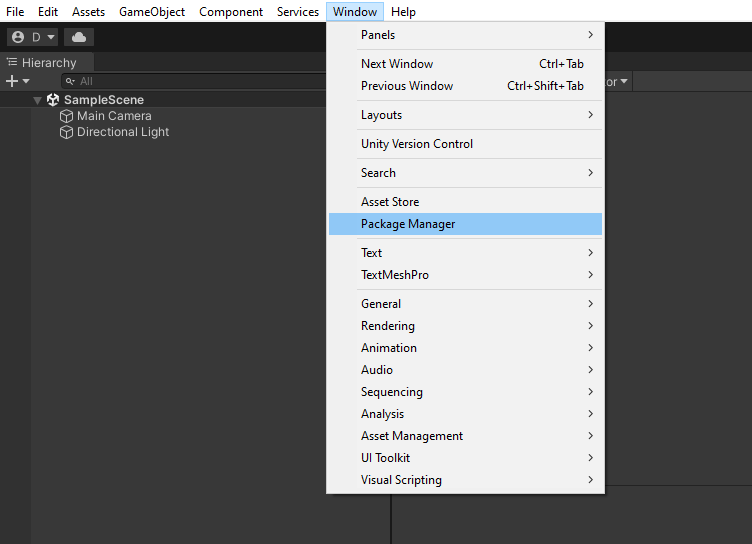
1. Open Unity's Package Manager by selecting from the top bar **Window -> Package Manager**.
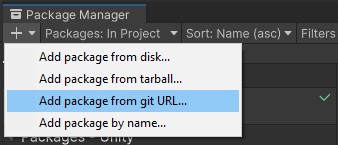
2. Click the **+** button in the top left corner and select the **Add package from git URL...**
3. Paste in the following url and click the **Add** button:
```text
https://github.com/GetStream/stream-video-unity.git?path=/Packages/StreamVideo
```

After the import is complete, the **Stream's Video SDK for Unity** package should appear in the **Packages** window.
## Assembly Definitions
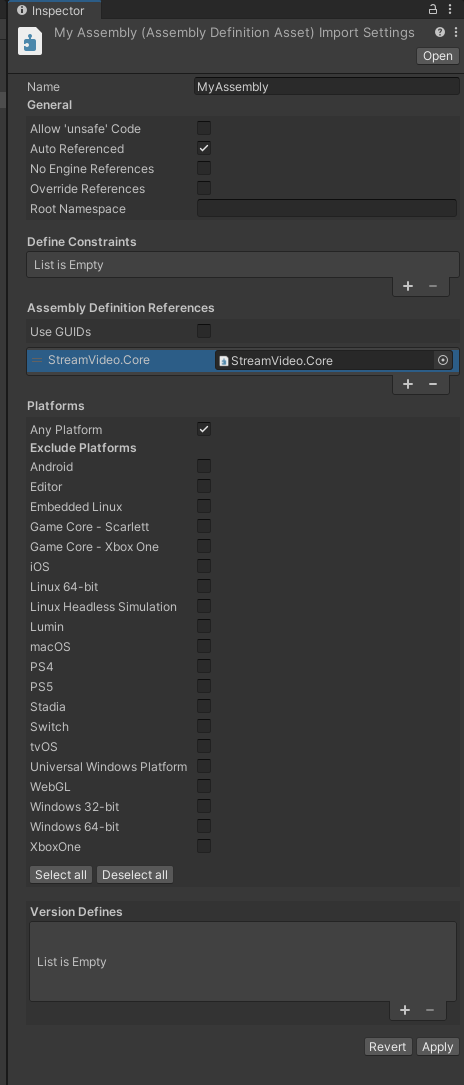
If you're using [Unity's Assembly Definitions](https://docs.unity3d.com/Manual/ScriptCompilationAssemblyDefinitionFiles.html) in your project, you need to add a reference to the `StreamVideo.Core` assembly in the assembly inspector as shown in below:
---
For the most recent version of this documentation, visit [https://getstream.io/video/docs/unity/basics/installation/](https://getstream.io/video/docs/unity/basics/installation/).