# Installation
The Flutter SDK for Stream Video is distributed through [pub.dev](https://pub.dev).
The SDK contains four different packages: [stream_video_flutter](https://pub.dev/packages/stream_video_flutter), [stream_video](https://pub.dev/packages/stream_video), [stream_video_push_notification](https://pub.dev/packages/stream_video_push_notification) and [stream_video_screen_sharing](https://pub.dev/packages/stream_video_screen_sharing).
Releases and changes are published on the [GitHub releases page](https://github.com/GetStream/stream-video-flutter/releases).
### Adding the SDK to your project
To add the Flutter SDK, you can add the latest dependencies for the SDK to your `pubspec.yaml` file:
```yaml
dependencies:
stream_video: ^latest
stream_video_flutter: ^latest
stream_video_push_notification: ^latest
stream_video_screen_sharing: ^latest
```
Additionally, you can also run the `flutter pub add` command in the terminal to do this:
```shell
flutter pub add stream_video_flutter
flutter pub add stream_video
flutter pub add stream_video_push_notification
flutter pub add stream_video_screen_sharing
```
This command will automatically install the latest versions of the Stream SDK packages from pub.dev to the dependencies section of your `pubspec.yaml`.
### Permissions
Making video calls requires the usage of the device's camera and microphone. Therefore, before you can make and answer calls, you need to request permission to use them within your application.
The following permissions must be granted for both Android and iOS:
- Internet Connectivity
- Camera
- Microphone (+ control audio settings to adjust audio level & switch between speaker & earpiece)
- Bluetooth (wireless headset)
#### iOS
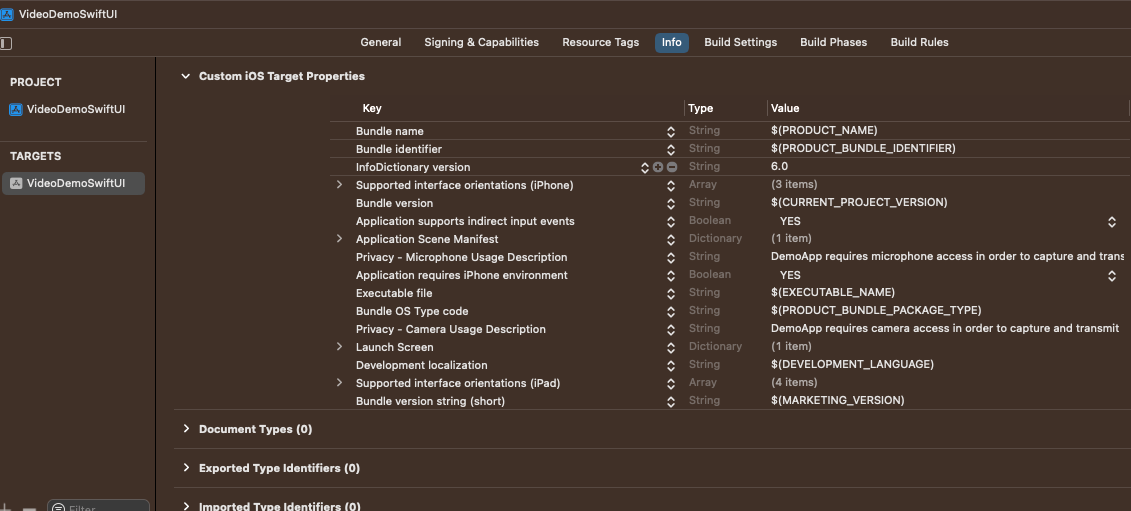
For iOS, we recommend you add the following keys and values to your `Info.plist` file at a minimum:
```xml
NSCameraUsageDescription
$(PRODUCT_NAME) needs access to your camera for video calls.
NSMicrophoneUsageDescription
$(PRODUCT_NAME) needs access to your microphone for voice and video calls.
UIApplicationSupportsIndirectInputEvents
BGTaskSchedulerPermittedIdentifiers
$(PRODUCT_BUNDLE_IDENTIFIER)
UIBackgroundModes
audio
fetch
processing
remote-notification
voip
```
#### Android
For Android, similar permissions are needed in `/android/app/src/main/AndroidManifest.xml`
```xml
```
With Android specifically, you will also need to add additional permission if you would like to use Bluetooth devices:
```xml
```
### VoIP Calling
We also ship the [stream_video_push_notification](https://pub.dev/packages/stream_video_push_notification) package to allow you to add integrations with native calling interfaces such as [CallKit](https://developer.apple.com/documentation/callkit/).
Please check out our [ringing guide](https://getstream.io/video/docs/flutter/advanced/incoming-calls/overview/) for additional setup needed for integration.
---
This page was last updated at 2026-08-10T16:01:02.417Z.
For the most recent version of this documentation, visit [https://getstream.io/video/docs/flutter/basics/installation/](https://getstream.io/video/docs/flutter/basics/installation/).