# Threads & Replies
Threads and replies provide your users with a way to go into more detail about a specific topic.
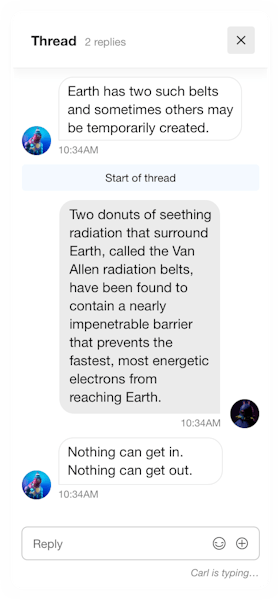
This can be very helpful to keep the conversation organized and reduce noise. To create a thread you simply send a message with a `parent_id` . Have a look at the example below:
```kotlin
val message = Message(
text = "Hello there!",
parentId = parentMessage.id,
)
// Send the message to the channel
channelClient.sendMessage(message).enqueue { result ->
if (result is Result.Success) {
val sentMessage = result.value
} else {
// Handle Result.Failure
}
}
```
```js
const reply = await channel.sendMessage({
text: "Hey, I am replying to a message!",
parent_id: parentID,
show_in_channel: false,
});
```
```swift
import StreamChat
/// 1: Create a `ChannelId` that represents the channel you want to get a message from.
let channelId = ChannelId(type: .messaging, id: "general")
/// 2: Create a `MessageId` that represents the message you want to get.
let messageId = "message-id"
/// 3: Use the `ChatClient` to create a `ChatMessageController` with the `ChannelId` and message id.
let messageController = chatClient.messageController(cid: channelId, messageId: messageId)
/// 4: Call `ChatMessageController.createNewReply` to start a thread.
messageController.createNewReply(text: "What's up?")
```
```php
$response = $channel->sendMessage([
'text' => 'Hey, I am replying to a message!',
'parent_id' => 'parent-id',
'show_in_channel' => false
],
'jenny'
);
```
```dart
final reply = await channel.sendMessage(
Message(text: 'Hey, I am replying to a message!',
parentId: parentID,
showInChannel: false,
));
```
```cpp
// Not yet supported in the Unreal SDK
```
```python
channel.send_message(
{"text": "Hey, I am replying to a message!", "parent_id": msg["id"]},
user["id"],
)
```
```ruby
# require 'stream-chat'
channel.send_message(
{text: "Hey, I am replying to a message!", parent_id: msg["id"]},
user["id"],
)
```
```go
reply := &Message{Text: "Hey, I am replying to a message!", ParentID: msg.ID}
channel.SendMessage(ctx, reply, user.ID)
```
```csharp
await messageClient.SendMessageToThreadAsync(
channel.Type,
channel.Id,
new MessageRequest { Text = "Hey, I am replying to a message!" },
user.Id,
parentId: message.Id);
```
```csharp
// Send simple message with text only
var parentMessage = await channel.SendNewMessageAsync("Let's start a thread!");
var messageInThread = await channel.SendNewMessageAsync(new StreamSendMessageRequest
{
ParentId = parentMessage.Id, // Write in thread
ShowInChannel = false, // Optionally send to both thread and the main channel like in Slack
Text = "Hello",
});
```
```java
// Android SDK
Message message = new Message();
message.setText("Hello there!");
message.setParentId(parentMessage.getId());
// Send the message to the channel
channelClient.sendMessage(message).enqueue(result -> {
if (result.isSuccess()) {
Message sentMessage = result.data();
} else {
// Handle result.error()
}
});
// Backend SDK
Message.send(type, id)
.message(
MessageRequestObject.builder()
.text("Hey, I am replying to a message!")
.parentId(parentId)
.showInChannel(false)
.userId(userId)
.build())
.request();
```
If you specify `show_in_channel` , the message will be visible both in a thread of replies as well as the main channel.
Messages inside a thread can also have reactions, attachments and mention as any other message.
### Thread Pagination
When you read a channel you do not receive messages inside threads. The parent message includes the count of replies which it is usually what apps show as the link to the thread screen. Reading a thread and paginating its messages works in a very similar way as paginating a channel.
```kotlin
// Retrieve the first 20 messages inside the thread
client.getReplies(parentMessage.id, limit = 20).enqueue { result ->
if (result is Result.Success) {
val replies: List = result.value
} else {
// Handle Result.Failure
}
}
// Retrieve the 20 more messages before the message with id "42"
client.getRepliesMore(
messageId = parentMessage.id,
firstId = "42",
limit = 20,
).enqueue { /* ... */ }
```
```js
// retrieve the latest 20 messages inside the thread
await channel.getReplies(parentMessageId, { limit: 20 });
// retrieve the 20 more messages before the message with id "42"
await channel.getReplies(parentMessageId, { limit: 20, id_lte: "42" });
// retrive the oldest 20 messages in the thread
await channel.getReplies(parentMessageId, { limit: 20 }, [{ created_at: 1 }]); // default sort is created_at: -1
```
```swift
let messageController = client.messageController(cid: .init(type: .messaging, id: "general"), messageId: "message-id")
messageController.synchronize() { error in
if error == nil {
messageController.replies
messageController.loadNextReplies()
}
}
```
```dart
import StreamChat
/// 1: Create a `ChannelId` that represents the channel you want to get a message from.
let channelId = ChannelId(type: .messaging, id: "general")
/// 2: Create a `MessageId` that represents the message you want to get.
let messageId = "message-id"
/// 3: Use the `ChatClient` to create a `ChatMessageController` with the `ChannelId` and message id.
let controller = chatClient.messageController(cid: channelId, messageId: messageId)
/// 4: Call `ChatMessageController.loadNextReplies` to get the replies.
controller.loadNextReplies(limit: 25) { error in
if let error = error {
// handle error
print(error)
} else {
// access messages
print(controller.replies)
controller.loadNextReplies(limit: 25) { error in
// handle error / access messages
print(error ?? controller.replies)
}
}
}
```
```cpp
// Not yet supported in the Unreal SDK
```
```python
# retrieve the first 20 messages inside the thread
channel.get_replies(msg["id"])
# retrieve the 20 more messages before the message with id "42"
channel.get_replies(msg["id"], limit=20, id_lte="42")
```
```ruby
# retrieve the first 20 messages inside the thread
channel.get_replies(msg["id"])
# retrieve the 20 more messages before the message with id "42"
channel.get_replies(msg["id"], limit: 20, id_lte: "42")
```
```go
// retrieve the first 20 messages inside the thread
channel.GetReplies(ctx, msg.ID, map[string][]string{
"limit": {"20"},
})
// retrieve the 20 more messages before the message with id "42"
channel.GetReplies(ctx, msg.ID, map[string][]string{
"limit": {"20"},
"id_lte": {"42"},
})
```
```csharp
// retrieve the first 20 messages inside the thread
await messageClient.GetRepliesAsync(message.Id, new MessagePaginationParams
{
Limit = 20,
});
// retrieve the 20 more messages before the message with id "42"
await messageClient.GetRepliesAsync(message.Id, new MessagePaginationParams
{
Limit = 20,
IDLTE = "42",
});
```
```csharp
// Will be implemented soon, raise a GitHub issue if you need this feature https://github.com/GetStream/stream-chat-unity/issues/
```
```java
// Android SDK
int limit = 20;
// Retrieve the first 20 messages inside the thread
client.getReplies(parentMessage.getId(), limit).enqueue(result -> {
if (result.isSuccess()) {
List replies = result.data();
} else {
// Handle result.error()
}
});
// Retrieve the 20 more messages before the message with id "42"
client.getRepliesMore(parentMessage.getId(), "42", limit).enqueue(result -> { /* ... */ });
// Backend SDK
// retrieve the first 20 messages inside the thread
Message.getReplies(parentMessageId).limit(20).request();
// retrieve the 20 more messages before the message with id "42"
Message.getReplies(parentMessageId).limit(20).idLte("42").request();
```
### Quote Message
Instead of replying in a thread, it's also possible to quote a message. Quoting a message doesn't result in the creation of a thread; the message is quoted inline.
To quote a message, simply provide the `quoted_message_id` field when sending a message:
```kotlin
val message = Message(
text = "This message quotes another message!",
replyMessageId = originalMessage.id,
)
channelClient.sendMessage(message).enqueue { /* ... */ }
```
```js
// Create the initial message
await channel.sendMessage({
id: "first_message_id",
text: "The initial message",
});
// Quote the initial message
const res = await channel.sendMessage({
id: "message_with_quoted_message",
text: "This is the first message that quotes another message",
quoted_message_id: "first_message_id",
});
```
```dart
// Create the initial message
await channel.sendMessage(Message(id: 'first_message_id', text: 'The initial message' ));
// Quote the initial message
final res = await channel.sendMessage(Message(
id: 'message_with_quoted_message',
text: 'This is the first message that quotes another message',
quotedMessageId: 'first_message_id',
));
```
```swift
import StreamChat
/// 1: Create a `ChannelId` that represents the channel you want to send a message to.
let channelId = ChannelId(type: .messaging, id: "general")
/// 2: Use the `ChatClient` to create a `ChatChannelController` with the `ChannelId`.
let channelController = chatClient.channelController(for: channelId)
/// 3: Call `ChatChannelController.createNewMessage` with
/// `quotedMessageId` to create the message that quotes another message.
channelController.createNewMessage(text: "Hello!", quotedMessageId: "message-id") { result in
switch result {
case let .success(messageId):
print(messageId)
case let .failure(error):
print(error)
}
}
```
```cpp
// Not yet supported in the Unreal SDK
```
```python
channel.send_message(
{"text": "This is the first message that quotes another message", "quoted_message_id": msg["id"]},
user["id"],
)
```
```ruby
channel.send_message(
{text: "This is the first message that quotes another message", quoted_message_id: msg["id"]},
user["id"],
)
```
```csharp
await messageClient.SendMessageAsync(channel.Type, channel.Id, new MessageRequest
{
Text = "This is the first message that quotes another message",
QuotedMessageId = msg.Id, // Quote the initial message
}, user.Id);
```
```go
msg := &Message{Text: "This is the first message that quotes another message"}
channel.SendMessage(ctx, msg, user.ID, func(msg *messageRequest) {
msg.Message.QuotedMessageId = originalMessage.ID // Quote the initial message
})
```
```csharp
var messageWithQuote = await channel.SendNewMessageAsync(new StreamSendMessageRequest
{
QuotedMessage = quotedMessage,
Text = "Hello",
});
```
```java
// Android SDK
Message message = new Message();
message.setText("This message quotes another message!");
message.setReplyMessageId(originalMessage.getId());
channelClient.sendMessage(message).enqueue(result -> { /* ... */ });
// Backend SDK
Message.send(type, id)
.message(
MessageRequestObject.builder()
.text("This is the first message that quotes another message")
.quotedMessageId("first_message_id")
.userId(userId)
.build())
.request();
```
Based on the provided `quoted_message_id` , the `quoted_message` field is automatically enriched when querying channels with messages. Example response:
```js
{
"id": "message_with_quoted_message",
"text": "This is the first message that quotes another message",
"quoted_message_id": "first_message_id",
"quoted_message": {
"id": "first_message_id",
"text": "The initial message"
}
}
```
```csharp
// Not yet supported in the Unity SDK
```
Quoted messages are only available one level deep. If you want to access deeply quoted messages you will have to fetch them directly either finding the message in response of `channel.query()` or querying message by its ID. Example: `Message A` quotes `Message B` and `Message B` quotes `Message C` . In this case it's not possible to access `Message C` through `Message A` directly. You have to fetch `Message B` from API in order to access it
## Thread List
### Query Threads
It is possible to query the list of threads that current user is participant of. This is useful to create thread list similar to what Slack or Discord has. Response will include threads with unread replies first, sorted by the latest reply timestamp in descending order. Threads with no unread replies will follow, also sorted by the latest reply timestamp in descending order.
```js
const threads = await client.queryThreads();
for (const thread of threads) {
const state = thread.state.getLatestValue();
console.log(state.participants);
console.log(state.replies);
console.log(state.parentMessage.text);
console.log(state.read); // read states of the participants
}
```
```swift
let query = ThreadListQuery(watch: true)
let threadListController = chatClient.threadListController(query: query)
threadListController.synchronize { error in
print(threadListController.threads)
}
```
```json
{
"threads": [
{
"channel_cid": "messaging:E845FF77-2",
"channel": {
"id": "E845FF77-2",
"type": "messaging",
"cid": "messaging:E845FF77-2",
"created_by": {
/*...*/
},
"members": [
/*...*/
],
"member_count": 3,
"config": {
/*...*/
},
"name": "Group"
// ...
},
"parent_message_id": "7d362713-ce68-4c32-95fc-7e6800c2f167",
"parent_message": {
"id": "7d362713-ce68-4c32-95fc-7e6800c2f167",
"text": "Parent 2",
"type": "regular"
// ...
},
"created_by_user_id": "daniel",
"created_by": {
/*...*/
},
"reply_count": 2,
"participant_count": 2,
"thread_participants": [
{
"thread_id": "7d362713-ce68-4c32-95fc-7e6800c2f167",
"user_id": "luke_skywalker",
"user": {
/*...*/
}
// ...
}
],
"last_message_at": "2024-02-05T20:09:47.167368Z",
"created_at": "2024-02-05T20:09:45.379241Z",
"updated_at": "2024-02-05T20:09:47.167368Z",
"title": "Parent 2",
"latest_replies": [
{
"id": "bca4708a-87fc-4cee-9441-86eec59e9c12",
"text": "1",
"type": "reply",
"user": {
/*...*/
}
// ...
}
],
"read": [
{
"user": {
"id": "luke_skywalker",
"role": "user"
// ...
},
"last_read": "0001-01-01T00:00:00Z",
"unread_messages": 2
}
]
}
],
"duration": "108.20ms"
}
```
You can also paginate over the thread list or request specific number of latest replies per thread.
```js
// Example: Get threads created by a specific user, updated after a certain date,
// sorted by creation date (newest first)
const { threads: page1, next: next1 } = await client.queryThreads({
sort: [{ created_at: -1 }],
filter: {
created_by_user_id: { $eq: "user1" },
updated_at: { $gte: "2024-01-01T00:00:00Z" },
},
limit: 10, // Get 10 threads per page
});
// request the next page
const { threads: page2, next: next2 } = await client.queryThreads({
sort: [{ created_at: -1 }],
filter: {
created_by_user_id: { $eq: "user1" },
updated_at: { $gte: "2024-01-01T00:00:00Z" },
},
limit: 10,
next: next1,
});
```
```swift
let query = ThreadListQuery(
watch: true,
limit: 10,
replyLimit: 5,
participantLimit: 25,
next: nextCursor
)
let threadListController = chatClient.threadListController(query: query)
threadListController.synchronize { error in
print(threadListController.threads)
}
// also
threadListController.loadMoreThreads(limit: 10) { result in
// …
}
```
Following is the list of supported options for querying threads:
| name | type | description | default | optional |
| ----------------- | ------- | --------------------------------------------------------------------------------------- | ------- | -------- |
| reply_limit | number | Number of latest replies to fetch per thread | 2 | ✓ |
| participant_limit | number | Number of thread participants to request per thread | 100 | ✓ |
| limit | number | Maximum number of threads to return in response | 10 | ✓ |
| watch | boolean | If true, all the channels corresponding to threads returned in response will be watched | true | ✓ |
| member_limit | number | Number of members to request per thread channel | 100 | ✓ |
### Filtering and Sorting Threads
You can filter and sort threads using MongoDB-style query operators. This allows you to create more specific queries and organize the results according to your needs.
#### Supported Sort Fields
You can sort threads by the following fields:
- `active_participant_count`: Number of active participants in the thread
- `created_at`: Thread creation timestamp
- `last_message_at`: Timestamp of the last message in the thread
- `parent_message_id`: ID of the parent message
- `participant_count`: Total number of participants in the thread
- `reply_count`: Number of replies in the thread
- `updated_at`: Thread last update timestamp
Use `1` for ascending order and `-1` for descending order.
#### Allowed Sort Combinations
When sorting threads, below are the supported field combinations:
1. `has_unread`, `last_message_at`, `parent_message_id`
2. `last_message_at`, `parent_message_id`
3. `created_at`
4. `updated_at`
5. `reply_count`
6. `participant_count`
7. `active_participant_count`
8. `parent_message_id`
#### Default Sort
If no sort parameters are provided, threads are sorted by default using the following combination:
```json
[{ "has_unread": -1 }, { "last_message_at": -1 }, { "parent_message_id": -1 }]
```
This means threads are sorted by:
1. Unread status (unread threads first)
2. Last message timestamp (newest first)
3. Parent message ID (descending)
#### Supported Filter Fields
You can filter threads using the following fields and operators:
| Name | Type | Supported Operators | Description |
| -------------------- | -------------------------- | ----------------------------------- | -------------------------------------- |
| `channel_cid` | string or list of strings | `$eq`, `$in` | Filter by channel CID |
| `channel.disabled` | boolean | `$eq` | Filter by **channel** `disabled` field |
| `parent_message_id` | string or list of strings | `$eq`, `$in` | Filter by parent message ID |
| `created_by_user_id` | string or list of strings | `$eq`, `$in` | Filter by thread creator's user ID |
| `created_at` | string (RFC3339 timestamp) | `$eq`, `$gt`, `$lt`, `$gte`, `$lte` | Filter by thread creation timestamp |
| `updated_at` | string (RFC3339 timestamp) | `$eq`, `$gt`, `$lt`, `$gte`, `$lte` | Filter by thread update timestamp |
| `last_message_at` | string (RFC3339 timestamp) | `$eq`, `$gt`, `$lt`, `$gte`, `$lte` | Filter by last message timestamp |
```js
// Example: Get threads created by a specific user, updated after a certain date,
// sorted by creation date (newest first)
const { threads: page1, next: next1 } = await client.queryThreads({
sort: [{ created_at: -1 }],
filter: {
created_by_user_id: { $eq: "user1" },
updated_at: { $gte: "2024-01-01T00:00:00Z" },
},
limit: 10, // Get 10 threads per page
});
// request the next page
const { threads: page2, next: next2 } = await client.queryThreads({
sort: [{ created_at: -1 }],
filter: {
created_by_user_id: { $eq: "user1" },
updated_at: { $gte: "2024-01-01T00:00:00Z" },
},
limit: 10,
next: next1,
});
```
```python
# Get threads created by a specific user, updated after a certain date,
# sorted by creation date (newest first)
filter_conditions = {
"created_by_user_id": {"$eq": "user1"},
"updated_at": {"$gte": "2024-01-01T00:00:00Z"}
}
sort_conditions = [
{"created_at": -1}
]
# First page
response = client.query_threads(
filter=filter_conditions,
sort=sort_conditions,
limit=10,
user_id=user["id"]
)
# Get the next page using the 'next' token from the response
if response.get("next"):
next_page = client.query_threads(
filter=filter_conditions,
sort=sort_conditions,
limit=10,
user_id=user["id"],
next=response["next"]
)
```
```java
// Get threads created by a specific user, updated after a certain date,
// sorted by creation date (newest first)
FilterCondition filter = FilterCondition.and(
FilterCondition.eq("created_by_user_id", "user1"),
FilterCondition.gte("updated_at", "2024-01-01T00:00:00Z")
);
List sort = Arrays.asList(
Sort.builder().field("created_at").direction(Sort.Direction.DESC).build()
);
// First page
Thread.QueryThreadsResponse response = Thread.queryThreads()
.userId(user.getId())
.filter(filter)
.sort(sort)
.limit(10)
.request();
// Get next page using the 'next' token from the response
if (response.getNext() != null) {
Thread.QueryThreadsResponse nextPage = Thread.queryThreads()
.userId(user.getId())
.filter(filter)
.sort(sort)
.limit(10)
.next(response.getNext())
.request();
}
```
```go
// Get threads created by a specific user, updated after a certain date,
// sorted by creation date (newest first)
limit := 10
query := &QueryThreadsRequest{
Filter: map[string]any{
"created_by_user_id": map[string]any{"$eq": "user1"},
"updated_at": map[string]any{"$gte": "2024-01-01T00:00:00Z"},
},
Sort: &SortParamRequestList{
{Field: "created_at", Direction: -1},
},
PagerRequest: PagerRequest{
Limit: &limit,
},
UserID: user.ID,
}
// First page
resp, err := client.QueryThreads(ctx, query)
if err != nil {
// Handle error
}
// Get next page using the 'next' token from the response
if resp.Next != nil {
query.Next = resp.Next
nextPage, err := client.QueryThreads(ctx, query)
if err != nil {
// Handle error
}
}
```
```php
// Get threads created by a specific user, updated after a certain date,
// sorted by creation date (newest first)
$filter = [
"created_by_user_id" => ['$eq' => "user1"],
"updated_at" => ['$gte' => "2024-01-01T00:00:00Z"]
];
$sort = [
["created_at" => -1]
];
// First page of results
$response = $client->queryThreads(
$filter,
$sort,
[
"user_id" => $userId,
"limit" => 10
]
);
// Get the next page using the 'next' parameter
if (isset($response["next"])) {
$nextPage = $client->queryThreads(
$filter,
$sort,
[
"user_id" => $userId,
"limit" => 10,
"next" => $response["next"]
]
);
}
```
```csharp
// Get threads created by a specific user, updated after a certain date,
// sorted by creation date (newest first)
var filter = new Dictionary
{
{ "created_by_user_id", new Dictionary { { "$eq", "user1" } } },
{ "updated_at", new Dictionary { { "$gte", "2024-01-01T00:00:00Z" } } }
};
var sort = new List
{
new SortParameter { Field = "created_at", Direction = SortDirection.Descending }
};
// First page
var opts = QueryThreadsOptions.Default
.WithFilter(filter)
.WithSortBy(sort)
.WithLimit(10)
.WithUserId(userId);
var response = await threadClient.QueryThreads(opts);
// Get next page using the 'next' token from the response
if (response.Next != null)
{
var nextPageOpts = opts.WithNext(response.Next);
var nextPage = await threadClient.QueryThreads(nextPageOpts);
}
```
```ruby
# Get threads created by a specific user, updated after a certain date,
# sorted by creation date (newest first)
filter = {
'created_by_user_id' => { '$eq' => 'user1' },
'updated_at' => { '$gte' => '2024-01-01T00:00:00Z' }
}
sort = [
{ 'created_at' => -1 }
]
# First page
response = client.query_threads(
filter: filter,
sort: sort,
limit: 10,
user_id: user_id
)
# Get next page using the 'next' token from the response
if response['next']
next_page = client.query_threads(
filter: filter,
sort: sort,
limit: 10,
user_id: user_id,
next: response['next']
)
end
```
### Thread List Management
`ThreadManager` class offers built-in pagination handling for threads with own state store to access loaded threads. To access threads you can either subscribe to the `ThreadManager` state or access the latest value by calling `getLatestValue` on state property of the `ThreadManager` .
```js
const threadManager = new ThreadManager({ client });
const unsubscribe = threadManager.state.subscribe((nextState) => {
console.log(nextState.threads);
});
threadManager.loadNextPage();
// or
await threadManager.loadNextPage();
const { threads } = threadManager.state.getLatestValue();
```
Client instance already comes with one `ThreadManager` instance which can be accessed via threads property of the client ( `client.threads` ).
### Event Handling Of Threads
Each thread instance comes with `registerSubscriptions` method which registers handlers to appropriate thread-related events. With subscriptions registered, the updates to the state are done automatically and can be accessed by subscribing to the state updates.
```js
const { threads } = await client.queryThreads({ watch: true, limit: 1 });
const [thread] = threads;
thread.registerSubcsriptions();
const unsubscribe = thread.state.subscribe((nextState) => {
console.log(nextState.replies);
});
```
Note that `watch` parameter is required when querying for threads in this case as without it, the channel to which the thread is linked won't receive updates.
If you're using `ThreadManger` to manage your list of threads, you can call `registerSubscriptions` method on the manager instance and the manager will automatically handle subscriptions (registration and cleanup) of the added and removed threads.
```js
const threadManager = new ThreadManager({ client });
threadManager.registerSubscriptions();
await threadManager.loadNextPage();
// these threads are listening to linked channel events
const { threads } = threadManager.state.getLatestValue();
```
### Get Thread By ID
This endpoint returns a thread by the given threadId.
```js
const threadId = "";
const thread = await client.getThread(threadId, {
watch: true, // optional
reply_limit: 3, // optional
member_limit: 0, // optional
participant_limit: 10, // optional
});
```
### Update Thread Title and Custom Data
You can assign a title and any additional custom data to each thread.
```js
const threadId = "";
// optional
const thread = await client.getThread(threadId);
thread.registerSubcsriptions();
const { thread: updatedThread } = await client.partialUpdateThread(threadId, {
set: {
title: "New Title",
extraData: "Hello World",
},
});
console.log(updatedThread.title);
console.log(updatedThread.extraData);
// or if you're using optional approach (Thread instance)
const { title, custom } = thread.state.getLatestValue();
console.log(title, custom.extraData);
```
```swift
messageController.updateThread(
title: "New Title",
extraData: ["Hello": .string("World")]) { result in
// …
}
```
To get full type support for your custom data, you can extend `ThreadResponseCustomData` interface through [module augmentation](https://www.typescriptlang.org/docs/handbook/declaration-merging.html). Simply create a declaration file within your project and add your custom properties to our interface:
```ts
// yourDeclarationFile.d.ts
import "stream-chat";
declare module "stream-chat" {
interface ThreadResponseCustomData {
extraData?: string;
}
}
```
Similarly to remove any custom property from thread:
```js
const threadId = "";
await client.partialUpdateThread(threadId, {
unset: ["title"],
});
```
```swift
messageController.updateThread(
title: nil,
unsetProperties: ["field-to-clear"]) { result in
// …
}
```
### Threads Unread Count
Total number of unread threads is available in response of connectUser endpoint
```js
const { me } = await client.connectUser({ id: "john" }, tokenOrProvider);
console.log(me.unread_threads);
// or (after connecting)
client.threads.registerSubscriptions();
const { unreadThreadCount } = client.threads.state.getLatestValue();
// or you can subscribe to keep up with the latest value
const unsubscribe = client.threads.state.subscribe((nextState) => {
console.log(nextState.unreadThreadCount);
});
```
```swift
let connectedUser = try await chatClient.connectUser(
userInfo: .init(id: "john-doe"),
token: ""
)
print(connectedUser.state.user.unreadCount.threads)
```
If you would like to mark specific thread as read or unread, you can do that as following
```js
await channel.markRead({
thread_id: "parent_message_id",
});
await channel.markUnread({
thread_id: "parent_message_id",
});
```
```swift
let channelId = ChannelId(type: .messaging, id: "general")
let messageController = chatClient.messageController(
cid: channelId,
messageId: "thread-id"
)
messageController.markThreadRead { error in
// …
}
messageController.markThreadUnread { error in
// …
}
```
To get unread count per thread for a current user, you can use the `getUnreadCount` endpoint as following
```js
const response = await client.getUnreadCount();
console.log(response.total_unread_threads_count);
console.log(response.threads[0].last_read);
console.log(response.threads[0].parent_message_id);
console.log(response.threads[0].unread_count);
```
---
This page was last updated at 2025-08-18T16:50:12.604Z.
For the most recent version of this documentation, visit [https://getstream.io/chat/docs/unity/threads/](https://getstream.io/chat/docs/unity/threads/).