# Localization
> **Info:** This is release candidate documentation for **Stream Chat React SDK v15**. For the latest stable version, see the [latest version (v14)](https://getstream.io/chat/docs/sdk/react/).
Every string the SDK renders goes through a translation function, `t()`, under a stable key. The composer's placeholder, for example, is the key `textareaComposer.textareaPlaceholder.sendMessage.label`, and its English copy, "Send a message", is written next to the key where the component calls `t()`. A dictionary that maps the key to other text changes what the composer shows. Dates are formatted the same way, through keys whose values are format expressions.
This page covers the `Streami18n` instance that holds the dictionaries, how keys are named, how to register a language, how TypeScript checks your dictionaries, and how dates are formatted. Translating the messages users send is a separate feature, covered in [Message translation](https://getstream.io/chat/docs/sdk/react/v15/features/messaging/message-translation/).
## Streami18n
`Streami18n` holds the dictionaries and the active language, and formats dates. It wraps [`i18next`](https://www.i18next.com/) for the strings and [Day.js](https://day.js.org/) for the dates. Its runtime is the `@stream-io/i18n` package, which the SDK depends on and shares with the React Native SDK; import everything from `stream-chat-react`. The SDK ships English only; every other language is a dictionary you register.
Pass an instance to `Chat` as `i18nInstance`. Without one, `Chat` creates an English instance of its own.
The smallest use is re-wording some of the English copy. An instance created with no `language` is on `en`, and `translationsForLanguage` is the dictionary for it:
```tsx
import { Chat, Streami18n } from "stream-chat-react";
const streamI18n = new Streami18n({
translationsForLanguage: {
"emptyState.indicator.noConversationsYet.label": "Nothing here yet",
"textareaComposer.textareaPlaceholder.sendMessage.label":
"Write a reply...",
"messageComposer.sendButton.send.ariaLabel": "Send this message",
},
});
export const App = () => (
{/* the rest of the app */}
);
```
Every key you leave out keeps the SDK's copy. Create the instance once, at module scope as here, so `Chat` doesn't receive a new one on every render.
### Switching the language
`Streami18n.setLanguage()` switches the active language. It's asynchronous and returns nothing: the new translation function is published to `streamI18n.state`, a state store that `Chat` subscribes to, and the UI re-renders in place.
```tsx
import { useState } from "react";
import { streamI18n } from "./i18n";
const languages = ["en", "de", "it"];
export const LanguagePicker = () => {
const [language, setLanguage] = useState(streamI18n.currentLanguage);
const select = async (code: string) => {
await streamI18n.setLanguage(code);
// A switch that fails leaves the instance on its previous language.
setLanguage(streamI18n.currentLanguage);
};
return (
<>
{languages.map((code) => (
))}
);
};
```
A language with no registered dictionary still works. The UI keeps the SDK's English copy, and dates follow that language if its Day.js locale has been imported.
### Using `t` in your own components
`useTranslationContext()` returns the active translation function. Components that use it render in the active language and re-render when it changes:
```tsx
import { useTranslationContext } from "stream-chat-react";
export const MemberCount = ({ count }: { count: number }) => {
const { t } = useTranslationContext();
return (
{t("channelDetail.channelMembersView.members.title", {
count,
defaultValue_one: "{{ count }} member",
defaultValue_other: "{{ count }} members",
})}
);
};
```
| Value | Type | Description |
| ----------------- | ----------------- | ------------------------------------------------------------------------------------------------------------------------------------------------------ |
| `t` | `StreamTFunction` | Translates a key into the active language. Typed against the SDK's keys. |
| `tDateTimeParser` | `TDateTimeParser` | Parses a date into a Day.js (or Moment) object in the active language and timezone. |
| `userLanguage` | `string` | The language messages are translated into, from `client.user.language`. See [UI language vs message translation](#ui-language-vs-message-translation). |
Outside `Chat`, `useTranslationContext()` doesn't throw. It returns a translation function that renders the English copy each call passes. To read the translator of an instance outside `Chat`, subscribe to its state:
```tsx
import { useStateStore } from "stream-chat-react";
import type { Streami18nState } from "stream-chat-react";
import { streamI18n } from "./i18n";
// At module scope: a selector created on every render subscribes again on every render.
const selector = ({ t }: Streami18nState) => ({ t });
export const CancelButton = () => {
const { t } = useStateStore(streamI18n.state, selector);
return ;
};
```
Until the instance is initialized, its `t` renders the English copy too. `Chat` initializes the instance it receives. For one that no `Chat` uses, call `Streami18n.init()`.
## Namespaced keys
A key is a dotted identifier. Its first segment is a namespace that matches the component rendering it, and most keys end in a suffix that says how the text is used:
```text
messageComposer.sendButton.send.ariaLabel
^^^^^^^^^^^^^^^ ^^^^^^^^^^^^^^^ ^^^^^^^^^
namespace part and thing suffix
```
The usual suffixes are `.label`, `.ariaLabel`, `.placeholder`, `.title`, `.description` and `.text`. They keep one word apart when it plays two roles: `messageComposer.sendButton.send.ariaLabel` is what a screen reader announces for the send button, `common.send.label` is the visible word "Send", and the two can be translated differently.
Most namespaces are component names, such as `message.*`, `messageComposer.*`, `poll.*`, `channelListItem.*` and `channelDetail.*`. Copy shared by several components is under `common.*`. A few namespaces are not component names:
| Namespace | Contents |
| ---------------- | --------------------------------------------------------------------------------------------- |
| `a11y.*` | announcements for screen readers, which never show on screen but still need translating |
| `command.*` | the descriptions and arguments of the built-in slash commands |
| `language.*` | the names of the languages messages can be translated into ("German", "Japanese"), in English |
| `relativeTime.*` | the words of short relative dates: "Today", "Yesterday", "3d ago", "2w ago" |
Keys are flat strings that contain dots, not paths into nested objects. A dictionary is a flat object: `{ "common.cancel.label": "Abbrechen" }`, never `{ common: { cancel: { label: "Abbrechen" } } }`.
To find the key behind a string, look in the namespace of the component that renders it, or let your editor autocomplete and show it inside a typed dictionary (see [Typed dictionaries](#typed-dictionaries)).
### Plurals
A plural key has an entry per plural form, `_one` and `_other`. Components call it by the bare key and pass `count`, as `MemberCount` does above. A dictionary supplies the forms its language needs: `i18next` picks one with `Intl.PluralRules`, so Russian or Arabic can add `_few`, `_many` and `_zero`.
```ts
streamI18n.registerTranslation("ru", {
"channelDetail.channelMembersView.members.title_one": "{{ count }} участник",
"channelDetail.channelMembersView.members.title_few": "{{ count }} участника",
"channelDetail.channelMembersView.members.title_many":
"{{ count }} участников",
});
```
### Keys that are not copy
Fifteen keys hold expressions instead of text, so they have no English copy at their call site. The SDK ships their values as bundled defaults, and every language is layered over them, so a dictionary inherits them without listing them.
| Namespace | Keys | Value |
| --------------------------- | ---- | --------------------------------------------------------------- |
| `timestamp.*` | 11 | a date format, run through `timestampFormatter` |
| `duration.*` | 3 | a duration format, run through `durationFormatter` |
| `translationBuilderTopic.*` | 1 | a directive for the [translation builder](#translation-builder) |
Override a `timestamp.*` or `duration.*` key to change how a date or a duration is written: [Date and time formatting](#date-and-time-formatting) explains how. Keep these keys out of anything you send to a translation service: an expression with a translated formatter name or option no longer formats the date.
## Registering dictionaries
Adding a language takes three things:
1. **A dictionary** of translated keys.
2. **The Day.js locale,** which translates month and weekday names. It's a side-effect import.
3. **A calendar config,** which translates relative dates such as "yesterday at 3:58 PM".
Put them in one module per language:
```ts title="src/i18n/de.ts"
import "dayjs/locale/de.js";
import type {
DayjsLocaleConfig,
TranslationDictionary,
} from "stream-chat-react";
export const deTranslations: TranslationDictionary = {
"common.cancel.label": "Abbrechen",
"common.send.label": "Senden",
"textareaComposer.textareaPlaceholder.sendMessage.label":
"Nachricht schreiben...",
"channelDetail.channelMembersView.members.title_one": "{{ count }} Mitglied",
"channelDetail.channelMembersView.members.title_other":
"{{ count }} Mitglieder",
};
export const deDayjsLocaleConfig: DayjsLocaleConfig = {
calendar: {
sameDay: "[heute um] LT",
lastDay: "[gestern um] LT",
lastWeek: "[letzten] dddd [um] LT",
nextDay: "[morgen um] LT",
nextWeek: "dddd [um] LT",
sameElse: "L",
},
};
```
A dictionary can be partial. A key it leaves out renders the English copy from its call site, never a raw `some.dotted.key`, so you can translate ten keys or all of them and ship in between.
### Register every language on one instance
`Streami18n.registerTranslation(language, dictionary, dayjsLocaleConfig)` adds a language to an instance. Register all of them up front, then switch with `Streami18n.setLanguage()`:
```ts title="src/i18n/index.ts"
import { Streami18n } from "stream-chat-react";
import { deDayjsLocaleConfig, deTranslations } from "./de";
import { itDayjsLocaleConfig, itTranslations } from "./it";
export const streamI18n = new Streami18n({ language: "de" });
streamI18n.registerTranslation("de", deTranslations, deDayjsLocaleConfig);
streamI18n.registerTranslation("it", itTranslations, itDayjsLocaleConfig);
```
English needs no dictionary. Registering a dictionary for a language that already has one merges the two, and the later one wins for keys in both.
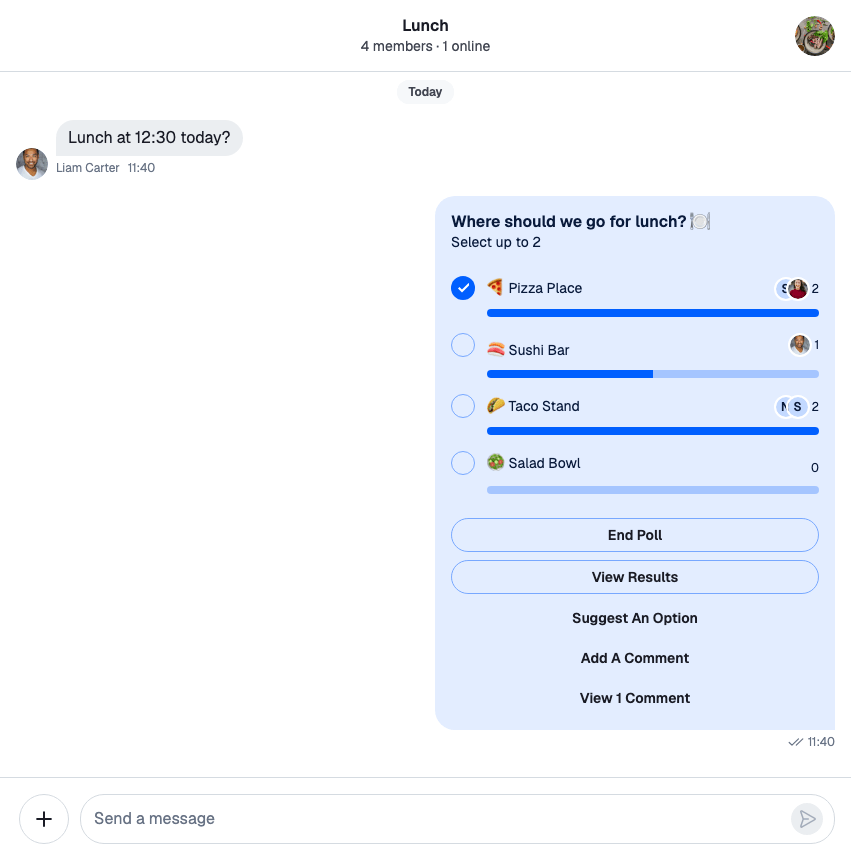
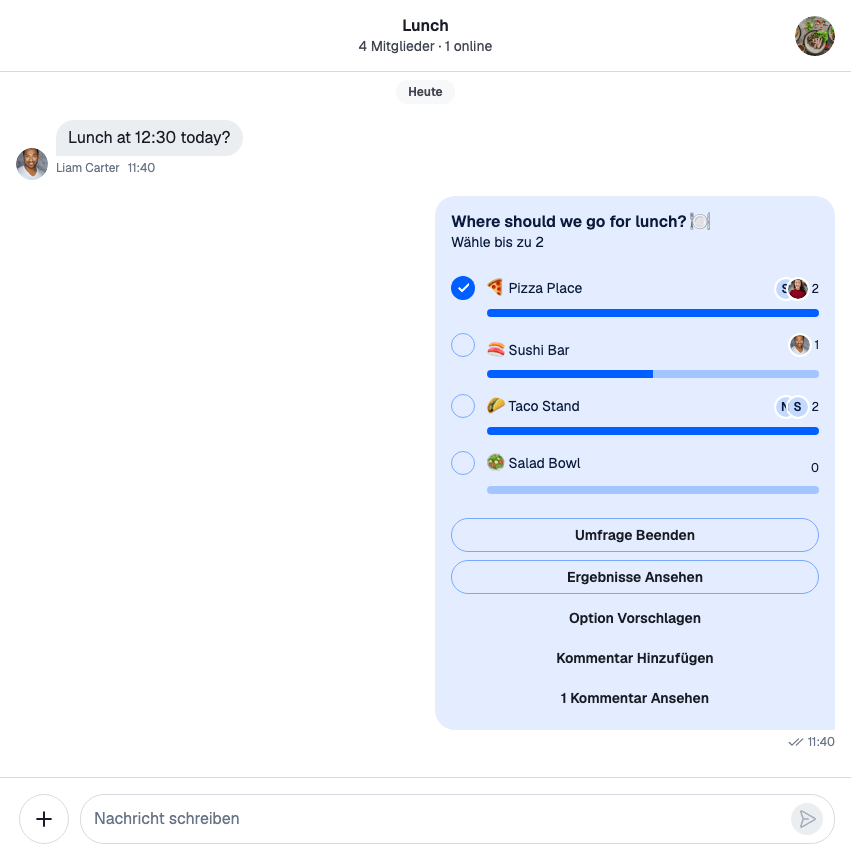
With a complete German dictionary registered, `Streami18n.setLanguage("de")` switches the whole UI:
| English | German |
| ------------------------------------------------------------------------ | ---------------------------------------------------------------------------- |
|  |  |
One instance per language isn't needed, and it costs more: each instance is a separate `i18next` instance, and one swapped into `Chat` renders English until it has initialized.
For an app with one language, the constructor takes the same three things:
```ts
import { Streami18n } from "stream-chat-react";
import { deDayjsLocaleConfig, deTranslations } from "./de";
const streamI18n = new Streami18n({
language: "de",
translationsForLanguage: deTranslations,
dayjsLocaleConfigForLanguage: deDayjsLocaleConfig,
});
```
## Typed dictionaries
Type a dictionary as `TranslationDictionary`, and TypeScript checks every key against the SDK's. A mistyped key is a compile error instead of an entry that silently never applies:
```ts
import type { TranslationDictionary } from "stream-chat-react";
const typo: TranslationDictionary = {
"common.cancel.lable": "Abbrechen",
// TS2353: Object literal may only specify known properties,
// and '"common.cancel.lable"' does not exist in type 'TranslationDictionary'.
};
```
`Streami18n.registerTranslation()` and `translationsForLanguage` take this type, so a dictionary written inline is checked without an annotation. A plural key accepts every form `Intl.PluralRules` can pick (`_zero`, `_one`, `_two`, `_few`, `_many`, `_other`), and a plural form on a key that isn't plural is rejected.
>
> **Warning:** Don't type a dictionary as `Partial>`. `TranslationKey` is the set of keys `t()` accepts, where a plural is the bare key, so that type rejects the `_one` and `_other` entries a dictionary needs.
>
### Reading the catalog from your editor
`TranslationCatalog` maps every key to its English copy. It's a type only, so it adds nothing to your bundle:
```ts
import type { TranslationCatalog } from "stream-chat-react";
type CancelCopy = TranslationCatalog["common.cancel.label"]; // "Cancel"
```
In a typed dictionary, autocomplete lists the keys in a namespace, and hovering a key shows its English copy.
### Checking a dictionary is complete
`TranslationDictionary` requires no key. When a new SDK release adds keys, your build stays green, and the new strings render in English until you translate them.
To be told about them, compare your dictionary with the catalog at the type level. Declare the dictionary `as const satisfies TranslationDictionary` so its literal keys are kept, then exclude them from the catalog's keys:
```ts title="src/i18n/de.ts"
import type {
TranslationCatalog,
TranslationDictionary,
} from "stream-chat-react";
export const deTranslations = {
"common.cancel.label": "Abbrechen",
"common.back.label": "Zurück",
} as const satisfies TranslationDictionary;
// Formatter keys hold expressions, not copy, so they don't count as untranslated.
type TranslatableKey = Exclude<
keyof TranslationCatalog,
| `duration.${string}`
| `timestamp.${string}`
| `translationBuilderTopic.${string}`
>;
// Every key still missing a German translation. Hover it to read the list.
export type Untranslated = Exclude<
TranslatableKey,
keyof typeof deTranslations
>;
```
`satisfies` still checks every key, so a typo is an error, while `as const` keeps the literal keys that `keyof typeof` reads. A plain `: TranslationDictionary` annotation would widen them to the whole catalog, and `Untranslated` would always be empty.
Hovering `Untranslated` lists the missing keys, and the list shrinks as you add them. To make a missing key fail the build, which is what you want in CI for a language that has to stay complete across upgrades, assert that the list is empty:
```ts
type AssertNoneMissing = T;
// A compile error naming a missing key, until the dictionary is complete.
export type GermanIsComplete = AssertNoneMissing;
```
The check runs only at compile time: there is no list of keys to compare against at runtime.
### Your own keys, and `LooseTranslationDictionary`
`LooseTranslationDictionary` is `TranslationDictionary` plus any key you like, so one instance can carry your app's copy next to the SDK's. Nothing catches a mistyped SDK key in it, so use it only for the dictionary that needs it:
```ts
import type { LooseTranslationDictionary } from "stream-chat-react";
const withOwnKeys: LooseTranslationDictionary = {
"common.cancel.label": "Abbrechen",
"myApp.dashboard.title": "Übersicht",
};
streamI18n.registerTranslation("de", withOwnKeys);
```
`t` accepts only the SDK's keys, so reading one of your own goes through `asDynamicKey`:
```tsx
import { asDynamicKey, useTranslationContext } from "stream-chat-react";
export const DashboardTitle = () => {
const { t } = useTranslationContext();
return
;
};
```
The second argument is the copy that renders when no dictionary has the key. The SDK uses `asDynamicKey` itself for the keys it only knows at runtime, such as the description of a custom slash command, which arrives from the API.
## UI language vs message translation
The SDK works with two languages, and they're independent of each other:
| | What it decides | Where it comes from |
| --------------- | ------------------------------------------------------------------ | ---------------------------------------------------------------------- |
| The UI language | the language of the SDK's buttons, labels, placeholders and dates | the `Streami18n` instance: `language`, then `Streami18n.setLanguage()` |
| `userLanguage` | the language the Stream API translates the _text of messages_ into | `client.user.language`, set when the user connects |
The UI language is the instance's, and nothing else changes it: `Chat` has no language prop and detects nothing from the browser. For a German UI, register a German dictionary and set `language: "de"`.
`userLanguage` decides which translation of a message the SDK shows: it reads `message.i18n.de_text` when `userLanguage` is `de`. That text exists only when the API has translated the message, for example because automatic translation is turned on for your app. `userLanguage` follows the connected user, including a language changed after connecting.
Registering a German dictionary doesn't make the API translate messages into German, and connecting a user with `language: "de"` doesn't translate the UI. Set whichever you need, or both. [Message translation](https://getstream.io/chat/docs/sdk/react/v15/features/messaging/message-translation/) explains the message side.
## Date and time formatting
Each place the SDK shows a date reads a `timestamp.*` key, and each duration a `duration.*` key. Their values are format expressions:
| Where | Key | Default |
| --------------------------------------------------------------------------------------------------- | ------------------------------------------------------------ | --------------------------------------------------------------------- |
| Date separators in a message list | `timestamp.DateSeparator` | "Today", "Yesterday", "Last Monday", then `ddd, D MMM` |
| A message's time, its "edited" tooltip, a thread-list row, a user's last activity in search results | `timestamp.MessageTimestamp` | `HH:mm` |
| A channel-list row | `timestamp.ChannelPreviewTimestamp` | the time today, then "Yesterday", the weekday, then `L` |
| A pinned message in channel details | `timestamp.ChannelDetailPinnedMessageTimestamp` | the same as a channel-list row |
| A member's last activity in channel details | `timestamp.ChannelMembersLastActive` | a [relative compact date](#relative-compact-dates): "Today", "3d ago" |
| A poll vote, and its tooltip | `timestamp.PollVote`, `timestamp.PollVoteTooltip` | a relative compact date; the tooltip uses the locale's calendar |
| The image gallery's header | `timestamp.GalleryTimestamp` | the locale's calendar |
| The end time of a live location | `timestamp.LiveLocation` | the locale's calendar |
| A message reminder | `timestamp.ReminderNotification`, `duration.messageReminder` | "Today at 14:30"; within the hour, a duration such as "in 30 minutes" |
| The durations in the "Remind me" menu | `duration.remindMe` | "in 2 hours" |
| Location sharing durations | `duration.shareLocation` | "15 minutes" |
The bundled defaults also hold `timestamp.SystemMessage`, but no component reads it: system messages show no date.
### Changing a format
Override a key in a dictionary, and every component that reads it follows. This English instance shows message times on a 12-hour clock, and older date separators with the full date:
```ts
import { Streami18n } from "stream-chat-react";
const streamI18n = new Streami18n({
translationsForLanguage: {
"timestamp.MessageTimestamp":
"{{ timestamp | timestampFormatter(format: h:mm A) }}",
"timestamp.DateSeparator":
'{{ timestamp | timestampFormatter(calendar: true; calendarFormats: { "sameDay": "[Today]", "nextDay": "[Tomorrow]", "lastDay": "[Yesterday]", "nextWeek": "dddd", "lastWeek": "[Last] dddd", "sameElse": "LL" }) }}',
},
});
```
To change a format in one language only, put the key in that language's dictionary. To change it in every language, pass it in `runtimeDefaults` instead; a language's dictionary still wins over it.
### The formatting syntax
Take this expression:
```text
{{ timestamp | timestampFormatter(calendar: true; calendarFormats: { "lastDay": "[gestern um] LT", "sameElse": "L" }) }}
```
- `{{` and `}}` mark where a value is inserted.
- `timestamp` is the value: the date being formatted.
- `|` separates the value from the formatter that formats it.
- `timestampFormatter` is the formatter. Its options go in the parentheses, separated by `;`.
- An option's value is a word or a number, or a JSON object for `calendarFormats`. Inside a dictionary written as JSON, escape the object's quotes: `\"lastDay\"`.
`timestampFormatter` takes these options:
| Option | What it does |
| ----------------------------- | --------------------------------------------------------------------------------------------------------------------------------- |
| `calendar` | Renders the date relative to today ("Yesterday at 3:58 PM") with Day.js's [calendar](https://day.js.org/docs/en/plugin/calendar). |
| `calendarFormats` | The calendar's six formats: `sameDay`, `nextDay`, `nextWeek`, `lastDay`, `lastWeek` and `sameElse`. Used with `calendar`. |
| `format` | A [Day.js format](https://day.js.org/docs/en/display/format), such as `HH:mm` or `dddd L`. Ignored when `calendar` is set. |
| `relativeCompact` | Renders a short relative date, see [Relative compact dates](#relative-compact-dates). |
| `relativeCompactMaxDays` | The most days ago still shown as days, such as "6d ago". Defaults to 6. |
| `relativeCompactMaxWeeks` | The most weeks ago still shown as weeks, such as "3w ago". Defaults to 3. |
| `relativeCompactWeekRounding` | `floor` or `ceil`: how weeks are counted. Defaults to `floor`. |
`calendarFormats` replaces the locale's calendar wording for that key. Give all six formats: a format left out falls back to Day.js's English one. Square brackets keep text literal: `[heute um] LT`.
`durationFormatter` takes `withSuffix`, which turns "10 minutes" into "in 10 minutes" or "10 minutes ago", and `format`, a Day.js [duration format](https://day.js.org/docs/en/durations/format). A third formatter, `fromNowFormatter`, renders a date as "3 hours ago" and is available for keys of your own.
These expressions follow `i18next`'s [formatting rules](https://www.i18next.com/translation-function/formatting#basic-usage).
### Component props
`DateSeparator`, `MessageTimestamp`, `MessageEditedIndicator` and `Timestamp` also take `calendar`, `calendarFormats` and `format` as props. `DateSeparator` takes the `relativeCompact` options too. A prop wins over the same option in the key's expression, so it changes the format of one component and leaves the others to the key.
Set the props in a replacement registered through `WithComponents`:
```tsx
import type {
DateSeparatorProps,
MessageTimestampProps,
} from "stream-chat-react";
import {
Channel,
DateSeparator,
MessageList,
MessageTimestamp,
WithComponents,
} from "stream-chat-react";
// `calendar` is set in the key's expression, so turn it off for `format` to apply.
const YearDateSeparator = (props: DateSeparatorProps) => (
);
const FullMessageTimestamp = (props: MessageTimestampProps) => (
);
export const ChannelWithDates = () => (
);
```
The edited-at tooltip, the thread-list rows and the user results of a search render `Timestamp` and read `timestamp.MessageTimestamp` too, so a change to that key reaches them as well as message times. The `MessageTimestamp` override reaches message times, and the time in the gallery header when the media was shared in a message: a message's images and videos, and the photos and videos in channel details. Without the override, or for media that carries no message, the gallery header formats the time with `timestamp.GalleryTimestamp`. The date separator above a thread's parent message isn't replaced by the `DateSeparator` override; change it through `timestamp.DateSeparator`.
### A formatting function
For full control over the dates in a message list, pass `formatDate`, a function from `Date` to `string`, to `MessageList` or `VirtualizedMessageList`. It wins over every key and prop:
```tsx
import { MessageList } from "stream-chat-react";
const formatDate = (date: Date) =>
new Intl.DateTimeFormat(undefined, {
dateStyle: "medium",
timeStyle: "short",
}).format(date);
export const Messages = () => ;
```
It reaches the times of messages and their edited-at tooltips, through `MessageContext`, but not a thread's parent message. In `MessageList` it also reaches the date separators between messages, so one function has to suit both. The floating date separator, the date separators of `VirtualizedMessageList` and the one above a thread's parent message keep using `timestamp.DateSeparator`.
### Relative compact dates
`relativeCompact: true` renders a short label instead of a date. `timestamp.ChannelMembersLastActive` and `timestamp.PollVote` use it.
| Age | Renders |
| -------------------------------------- | ------------------------------------- |
| today | `relativeTime.today`: "Today" |
| yesterday | `relativeTime.yesterday`: "Yesterday" |
| up to `relativeCompactMaxDays` days | `relativeTime.daysAgo`: "3d ago" |
| within `relativeCompactMaxWeeks` weeks | `relativeTime.weeksAgo`: "2w ago" |
| older, or in the future | the date as `DD/MM/YY` |
The words are ordinary copy: translate them with the `relativeTime.*` keys. `relativeTime.daysAgo` and `relativeTime.weeksAgo` are plural keys, so they take `_one`, `_other` and any other form your language needs.
`relativeCompactWeekRounding` decides how weeks are counted, and when the label gives way to the date:
| Value | Weeks counted | Shown as weeks until | 8 days | 27 days |
| ----------------- | ------------- | ---------------------------------- | -------- | ---------- |
| `floor` (default) | whole weeks | `relativeCompactMaxWeeks` weeks | "1w ago" | "3w ago" |
| `ceil` | rounded up | `relativeCompactMaxWeeks * 7` days | "2w ago" | `DD/MM/YY` |
Both keys the SDK ships use `ceil`. Write `relativeCompactWeekRounding: ceil` in your own expression to match them.
### Date and time for a new language
Two things make dates read in another language, and they're separate.
**Month and weekday names** come from the Day.js locale. Only `en` is bundled, so import the locale you need, as `import "dayjs/locale/de.js"`. Day.js publishes [locales for many languages](https://github.com/iamkun/dayjs/tree/dev/src/locale). Without the import, `L` and `dddd` render English names whatever your dictionary says.
Day.js comes with the SDK. If your app can't import it, which happens with package managers that don't expose a dependency's dependencies, such as pnpm, add `dayjs` to your app and pass it as `DateTimeParser`, as shown in [Timezones and other parsers](#timezones-and-other-parsers).
**Relative wording** ("heute um 14:30") comes from the calendar config: `dayjsLocaleConfigForLanguage` on the constructor, or the third argument of `Streami18n.registerTranslation()`. No Day.js locale file includes one, so a new language needs both. The config's type is `DayjsLocaleConfig`, a Day.js locale config plus `calendar`. Give all six calendar formats, as in the German module in [Registering dictionaries](#registering-dictionaries).
The calendar config reaches `timestamp.GalleryTimestamp`, `timestamp.LiveLocation` and `timestamp.PollVoteTooltip`, whose expressions set `calendar: true` with no formats of their own. Four keys set their own `calendarFormats`, with English words in square brackets, so the config doesn't reach them:
| Key | English in its `calendarFormats` |
| ----------------------------------------------- | ---------------------------------------------- |
| `timestamp.DateSeparator` | `Today`, `Tomorrow`, `Yesterday`, `Last` |
| `timestamp.ReminderNotification` | `Today`, `Tomorrow`, `Yesterday`, `Last`, `at` |
| `timestamp.ChannelPreviewTimestamp` | `Yesterday` |
| `timestamp.ChannelDetailPinnedMessageTimestamp` | `Yesterday` |
Translate them by overriding the keys in the language's dictionary:
```ts
import type { TranslationDictionary } from "stream-chat-react";
export const deDateKeys: TranslationDictionary = {
"timestamp.DateSeparator":
'{{ timestamp | timestampFormatter(calendar: true; calendarFormats: { "sameDay": "[Heute]", "nextDay": "[Morgen]", "lastDay": "[Gestern]", "nextWeek": "dddd", "lastWeek": "[Letzten] dddd", "sameElse": "ddd, D. MMM" }) }}',
"timestamp.ChannelPreviewTimestamp":
'{{ timestamp | timestampFormatter(calendar: true; calendarFormats: { "sameDay": "LT", "lastDay": "[Gestern]", "lastWeek": "dddd", "sameElse": "L" }) }}',
};
```
#### Timezones and other parsers
Dates render in the browser's timezone. To use another one, pass a [timezone identifier](https://en.wikipedia.org/wiki/List_of_tz_database_time_zones) as `timezone`:
```ts
import { Streami18n } from "stream-chat-react";
const streamI18n = new Streami18n({ timezone: "Europe/Prague" });
```
To keep dates in English whatever the UI language, set `disableDateTimeTranslations: true`.
`DateTimeParser` replaces the Day.js the SDK uses. Pass your app's own `dayjs` when it's a different copy from the SDK's, so the locales your app imports and the parser are the same module:
```ts
import dayjs from "dayjs";
import "dayjs/locale/de.js";
import { Streami18n } from "stream-chat-react";
const streamI18n = new Streami18n({ DateTimeParser: dayjs, language: "de" });
```
[Moment](https://momentjs.com/) works as a parser too. Use `moment-timezone` for `timezone` to apply. A calendar config can't be applied to Moment, so set the locale up on Moment itself.
```ts
import moment from "moment-timezone";
import { Streami18n } from "stream-chat-react";
const streamI18n = new Streami18n({
DateTimeParser: moment,
timezone: "Europe/Prague",
});
```
### Custom formatters
`formatters` replaces a built-in formatter or adds one. A formatter is a function that receives the instance's context and returns the function that formats a value. This one formats every `timestampFormatter` expression with the browser's `Intl.DateTimeFormat`:
```ts
import { Streami18n } from "stream-chat-react";
const streamI18n = new Streami18n({
formatters: {
timestampFormatter:
({ currentLanguage }) =>
(value) =>
new Intl.DateTimeFormat(currentLanguage, {
dateStyle: "medium",
timeStyle: "short",
}).format(new Date(value)),
},
});
```
Replacing `timestampFormatter` replaces it for every `timestamp.*` key, and the options in their expressions reach your function as its third argument. To change some keys only, add a formatter under a new name and use that name in those keys' expressions.
## Translation builder
Some copy can't be looked up by key alone. A notification, for example, renders different text depending on its `type`. The translation builder handles these cases with **topics**: a topic receives what `t()` was called with and picks a **translator** function that returns the text.
The SDK registers one topic, `notification`, which translates every notification `stream-chat` emits. Registering translators for your own notification types is covered in [Displaying notifications](https://getstream.io/chat/docs/sdk/react/v15/ui/customizing/displaying-notifications/#translating-notifications).
A topic of your own extends `TranslationTopic` and implements `TranslationTopic.translate(value, key, options)`. `i18next` runs every topic on every translation, so a topic returns `value` unchanged unless `options` carries its data:
```ts
import { Streami18n, TranslationTopic } from "stream-chat-react";
import type { TranslationTopicOptions, Translator } from "stream-chat-react";
type PresenceOptions = { presence?: "away" | "busy" };
const presenceTranslators: Record> = {
away: ({ t }) => t("myApp.presence.away", "Away"),
busy: ({ t }) => t("myApp.presence.busy", "Busy"),
};
class PresenceTopic extends TranslationTopic {
constructor({ i18next }: TranslationTopicOptions) {
super({ i18next, translators: presenceTranslators });
}
translate = (value: string, key: string, options: PresenceOptions) => {
const translator = options.presence
? this.translators.get(options.presence)
: undefined;
if (!translator) return value;
const t = (copyKey: string, defaultValue: string) =>
this.i18next.t(copyKey, defaultValue);
return translator({ key, options, t, value }) ?? value;
};
}
export const streamI18n = new Streami18n({
runtimeDefaults: {
"translationBuilderTopic.presence": "{{value, presence}}",
},
translationBuilderTopics: { presence: PresenceTopic },
});
```
`translationBuilderTopics` registers the topic under a name, here `presence`, next to the SDK's own. `runtimeDefaults` adds a key for it to every language. Calling `t("translationBuilderTopic.presence", { presence: "away" })` then returns "Away", or its translation.
`TranslationBuilder.registerTranslators(topic, translators)`, on `streamI18n.translationBuilder`, adds translators to a registered topic, and `TranslationBuilder.removeTranslators(topic, names)` removes them.
## Streami18n reference
### Constructor options
| Option | Type | Default | Description |
| ------------------------------ | ------------------------ | ------------------ | ------------------------------------------------------------------------------------------------------ |
| `language` | `string` | `'en'` | The language to render. |
| `translationsForLanguage` | `TranslationDictionary` | | The dictionary for `language`. |
| `dayjsLocaleConfigForLanguage` | `DayjsLocaleConfig` | | The Day.js locale config and calendar wording for `language`. |
| `DateTimeParser` | Day.js or Moment | Day.js | The date library. Day.js gets the plugins the formatters need. |
| `timezone` | `string` | the browser's | The [timezone](https://en.wikipedia.org/wiki/List_of_tz_database_time_zones) dates render in. |
| `disableDateTimeTranslations` | `boolean` | `false` | Keeps dates in English whatever the language. |
| `formatters` | `object` | the built-in three | Replaces or adds formatters. See [Custom formatters](#custom-formatters). |
| `runtimeDefaults` | `Record` | | Keys added to every language, merged over the SDK's bundled defaults. |
| `translationBuilderTopics` | `object` | | Topics for the [translation builder](#translation-builder), added to the SDK's `notification` topic. |
| `parseMissingKeyHandler` | `function` | see below | Called for a key with no translation, no bundled value and no default. |
| `i18nextConfigOverrides` | `Partial` | | Any `i18next` init option, applied over the SDK's. Leave `keySeparator` and `nsSeparator` as they are. |
| `logger` | `function` | `console.warn` | Receives the instance's warnings. |
| `debug` | `boolean` | `false` | Turns on `i18next`'s debug output. |
`parseMissingKeyHandler` never sees untranslated copy: a prose key with no translation renders its English default without calling it. It's called only for a key with nothing to render at all, for example one passed through `asDynamicKey` with no default. The default handler logs a warning and returns the key.
```ts
import { Streami18n } from "stream-chat-react";
const streamI18n = new Streami18n({
parseMissingKeyHandler: (key) => {
console.error(`Nothing to render for the translation key ${key}`);
return "";
},
});
```
To find copy that isn't translated yet, use [the compile-time check](#checking-a-dictionary-is-complete).
### Methods
| Method | Description |
| --------------------------------------------------------------- | ------------------------------------------------------------------------------------------------------- |
| `registerTranslation(language, dictionary, dayjsLocaleConfig?)` | Adds or extends a language. Merged over what the language already has. |
| `setLanguage(language)` | Switches the active language. Returns a promise of nothing; the new translator is published to `state`. |
| `init()` | Initializes `i18next`. `Chat` calls it. Calling it again returns the same promise. |
| `overrideTFunction(t)` | Replaces the translation function, for an app that already has its own i18n layer. |
### Properties
| Property | Type | Description |
| --------------------- | ----------------------------- | -------------------------------------------------------------------------------------------- |
| `currentLanguage` | `string` | The active language. |
| `registeredLanguages` | `ReadonlySet` | The languages a dictionary was registered for, plus `en`. |
| `initialized` | `boolean` | Whether `init()` has finished. Until then, `t` returns each key's English copy. |
| `t` | `StreamTFunction` | The current translation function. |
| `tDateTimeParser` | `TDateTimeParser` | The current date parser. |
| `state` | `StateStore` | `{ t, tDateTimeParser, language, initialized }`. Subscribe to it to follow language changes. |
| `translationBuilder` | `TranslationBuilder` | The [translation builder](#translation-builder). |
| `i18nInstance` | `i18n` | The underlying `i18next` instance. |
## Used in
- [Message translation](https://getstream.io/chat/docs/sdk/react/v15/features/messaging/message-translation/), for the text of messages.
- [Displaying notifications](https://getstream.io/chat/docs/sdk/react/v15/ui/customizing/displaying-notifications/), for notification copy.
- [AI integrations overview](https://getstream.io/chat/docs/sdk/react/v15/features/ai/ai-integrations-overview/), whose components use the same keys and dictionaries.
## Pitfalls
- **A dictionary and no dates.** A dictionary translates the copy. Month names need the Day.js locale import, and relative dates need the calendar config. Translating one and forgetting the others is the most common gap.
- **Untyped dictionaries.** A key from an older version or a typo never matches, and nothing reports it. Type dictionaries as `TranslationDictionary`.
- **Setting the language through the user.** `language` in `connectUser` sets the language messages are translated into, not the UI's. Set the UI language on the `Streami18n` instance.
- **Sending formatter keys to translators.** The `timestamp.*`, `duration.*` and `translationBuilderTopic.*` values are expressions, not copy. A translated expression stops formatting.
- **A new instance on every render.** `new Streami18n()` inside a component gives `Chat` a new instance each time, which initializes again. Create it at module scope or in `useMemo`.
- **New copy after an upgrade.** New keys render in English without a warning. For a language that has to stay complete, run the [completeness check](#checking-a-dictionary-is-complete) in CI.
---
For the most recent version of this documentation, visit [https://getstream.io/chat/docs/sdk/react/v15/ui/customizing/localization/](https://getstream.io/chat/docs/sdk/react/v15/ui/customizing/localization/).