# Channel list UI
> **Info:** This is release candidate documentation for **Stream Chat React SDK v15**. For the latest stable version, see the [latest version (v14)](https://getstream.io/chat/docs/sdk/react/).
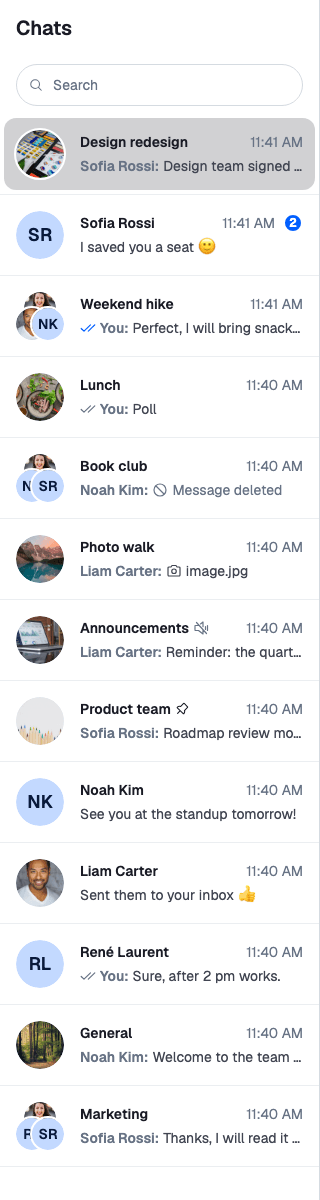
The channel list is the column of channels a user picks from. It is the UI of a `ChannelPaginator`: the paginator holds the query and the channels it loaded, and `ChannelList` renders them. This page covers what renders the list and its rows, what each row reads, and which parts you can replace. The props are in the [ChannelList reference](https://getstream.io/chat/docs/sdk/react/v15/component-reference/channel-list/channellist/).
## The ChannelList component
`` renders the channels of one paginator:
1. When it mounts and the paginator has never loaded, it loads the first page. When the paginator is reset to that state later, for example when the user disconnects and connects again, it loads the first page again.
2. It subscribes to `paginator.state` and renders a row for each channel.
3. When the user scrolls near the end, it loads the next page. `loadMoreThresholdPx` and `loadMoreDebounceMs` tune when.
4. It starts the channel manager's event subscriptions, so the list stays up to date as messages and other events arrive. Every list shares one set of subscriptions.
The list holds no selection. Clicking a row calls `openChannel(channel)` from `useWorkspaceNavigation()`, and the layout decides where the channel opens. Without a layout, `openChannel` does nothing; see [Navigation](https://getstream.io/chat/docs/sdk/react/v15/ui/layout/navigation/).
The paginator should be registered on `client.channelManager`. Registering is what keeps it live; [Channel list paginators](https://getstream.io/chat/docs/sdk/react/v15/state/loading-data/channel-list-paginators/) explains it.
### Several lists
Two components render every registered list for you:
- `ChannelLists` renders one `ChannelList` per paginator on `client.channelManager`, in their order.
- `ChannelNavigation` renders the list header, the search bar and `ChannelLists`. While a search is active, the search results replace the lists.
To place lists yourself, render one `ChannelList` per paginator. This sidebar shows an "Unread" list above the full list:
```tsx title="src/TwoChannelLists.tsx"
import { useEffect, useMemo } from "react";
import { ChannelPaginator } from "stream-chat";
import type { ChannelFilters, SortParamRequest } from "stream-chat";
import { ChannelList, useChatContext } from "stream-chat-react";
const userId = "YOUR_USER_ID";
const sort: SortParamRequest[] = [{ direction: -1, field: "last_message_at" }];
const allFilters: ChannelFilters = {
members: { $in: [userId] },
type: "messaging",
};
const unreadFilters: ChannelFilters = { ...allFilters, has_unread: true };
export const TwoChannelLists = () => {
const { client } = useChatContext();
const [unread, all] = useMemo(
() => [
new ChannelPaginator({
client,
filters: unreadFilters,
id: "unread",
sort,
}),
new ChannelPaginator({ client, filters: allFilters, id: "all", sort }),
],
[client],
);
// Registered lists are kept up to date by the channel manager.
useEffect(() => {
client.channelManager.insertPaginator({ paginator: unread });
client.channelManager.insertPaginator({ paginator: all });
return () => {
client.channelManager.removePaginator(unread);
client.channelManager.removePaginator(all);
};
}, [all, client, unread]);
return (
Unread
All channels
);
};
```
A channel can match both lists. The channel manager decides which lists keep it; see [Channel list paginators](https://getstream.io/chat/docs/sdk/react/v15/state/loading-data/channel-list-paginators/).
## Rows
Each row is a `ChannelListItem`. It reads its channel's stores, so a row re-renders only when its own channel changes:
| The row shows | Read from |
| ----------------------------------------------------------- | --------------------------------------------------------------------------- |
| Title, image and group member avatars | `channel.state`: the channel data and members |
| Last message and its time | `channel.messagePaginator.aggregateState`: the latest message |
| Unread badge | `channel.state`: the user's read state. Hidden while the channel is muted. |
| Muted and pinned icons | `channel.state`: the mute status and the user's membership |
| Sent, delivered or read mark on the user's own last message | `channel.messageReceiptsTracker.snapshotStore` |
| Highlight | `isChannelActive(cid)` from `useWorkspaceNavigation()`: the channel is open |
`ChannelListItem` computes these values and renders `ChannelListItemUI`, the row's look, with them as props. Anything rendered inside a row can read its channel with `useChannelListItemContext()`.
Clicking a row opens the channel and passes the click event on, so a layout can open it beside the current one on ⌘/ctrl-click. See [⌘/ctrl-click opens beside](https://getstream.io/chat/docs/sdk/react/v15/recipes/layout/ctrl-click-opens-beside/).
To preview a different message than the latest, pass `previewedMessage`. Search results do this to show the matched message.
## Header and row actions
`ChannelListHeader` shows the "Chats" title. `ChannelNavigation` renders it above the lists. At its end it renders the `HeaderEndContent` override, but only while a channel is open. The thread list header renders the same override, while a thread is open.
Each row has an actions menu, `ChannelListItemActionButtons`: a mute button, and a dropdown with archive, block (in a direct message), pin and leave. Actions the user can't take are left out: mute needs the `mute-channel` capability, block needs `ban-channel-members`, leave needs `leave-channel`, and archive and pin need the user to be a member. The menu is an action set with no prop, so you change it by replacing `ChannelListItemActionButtons`; [Channel-list row actions](https://getstream.io/chat/docs/sdk/react/v15/ui/customizing/actions/#channel-list-row-actions) shows how.
## Loading, empty and error states
| State | What the list renders | Override key |
| ---------------------------- | ----------------------------------------------------------------------------- | --------------------------- |
| Loading the first page | Placeholder rows | `FirstPageLoadingIndicator` |
| Loading the next page | A spinner after the last row. The component gets `isLoading`. | `LoadingNextPageIndicator` |
| No channels | "No conversations yet" | `EmptyListIndicator` |
| The start or end of the list | Nothing. The component gets `hasEnded` and `reached` (`"top"` or `"bottom"`). | `EndReachedIndicator` |
When a query fails, the paginator retries it, three times by default. Each failure is recorded as `lastQueryError` in `paginator.state`, and `ChannelList` publishes an error notification for it. The notification names no panel, so it shows in the open channel's notification list, not in the one under the channel list; [Displaying notifications](https://getstream.io/chat/docs/sdk/react/v15/ui/customizing/displaying-notifications/) explains where notifications appear. The list has no error state of its own: if the first page fails, the first-page loading indicator stays.
## Replacing parts
Register replacements with `WithComponents`. [Overriding components](https://getstream.io/chat/docs/sdk/react/v15/ui/customizing/overriding-components/) explains how overrides apply.
| Override key | Replaces |
| ---------------------------------------------------------------------------------------------------- | --------------------------------------------------------------------------------- |
| `ListItem` | The whole row. Gets the channel as `item`. The default renders `ChannelListItem`. |
| `ChannelListItemUI` | The row's look. Gets the values in [Rows](#rows) as props. |
| `SummarizedMessagePreview` | The last-message line of a row |
| `ChannelListItemActionButtons` | The row actions menu |
| `ChannelListHeader` | The header that `ChannelNavigation` renders |
| `HeaderEndContent` | The end of the list header, while a channel is open |
| `Search` | The search bar and results in `ChannelNavigation` |
| `FirstPageLoadingIndicator`, `LoadingNextPageIndicator`, `EmptyListIndicator`, `EndReachedIndicator` | The states above |
This sidebar keeps the default row, adds a label to frozen channels, and replaces the empty state:
```tsx title="src/Sidebar.tsx"
import type { ChannelStateData } from "stream-chat";
import type { ChannelListItemUIProps } from "stream-chat-react";
import {
ChannelListItemUI,
ChannelNavigation,
useStateStore,
WithComponents,
} from "stream-chat-react";
const frozenSelector = ({ data }: ChannelStateData) => ({
frozen: !!data?.frozen,
});
const RowWithFrozenLabel = (props: ChannelListItemUIProps) => {
const { frozen } = useStateStore(props.channel.state, frozenSelector);
return (
{frozen && Frozen}
);
};
const NoChannels = () => (
You aren't in any channels yet.
);
// Declared outside the component, so WithComponents gets the same object on every render.
const overrides = {
ChannelListItemUI: RowWithFrozenLabel,
EmptyListIndicator: NoChannels,
};
export const Sidebar = () => (
);
```
The label reads `frozen` from `channel.state` through `useStateStore`, so it updates when the channel is frozen. Reading `channel.data.frozen` during render would not: the getter isn't reactive. See [Reading state in components](https://getstream.io/chat/docs/sdk/react/v15/ui/reading-state-in-components/).
## Used in
- [Channel lists](https://getstream.io/chat/docs/sdk/react/v15/features/channels/channel-lists/)
- [Search](https://getstream.io/chat/docs/sdk/react/v15/features/channels/search/)
- [Preview UI](https://getstream.io/chat/docs/sdk/react/v15/recipes/channel-list/preview-ui/)
- [Members and online status](https://getstream.io/chat/docs/sdk/react/v15/recipes/channel-list/members-and-online-status/)
---
For the most recent version of this documentation, visit [https://getstream.io/chat/docs/sdk/react/v15/ui/components/channel-list-ui/](https://getstream.io/chat/docs/sdk/react/v15/ui/components/channel-list-ui/).