# Custom message

> **Info:** This is release candidate documentation for **Stream Chat React SDK v15**. For the latest stable version, see the [latest version (v14)](https://getstream.io/chat/docs/sdk/react/).

Every message in a message list is rendered by the `MessageUI` component. The default one is easy to restyle with [component variables](https://getstream.io/chat/docs/sdk/react/v15/reference/theming-variables/component-variables/), and each of its parts has its own override key. When that isn't enough, you replace `MessageUI` itself. This recipe builds a custom one step by step, reusing the SDK's parts where they help. How the override works is explained in [Overriding components](https://getstream.io/chat/docs/sdk/react/v15/ui/customizing/overriding-components/#a-custom-messageui).

## Best practices

- Restyle the default `MessageUI` before replacing it. A replacement has to handle every kind of message your app shows.
- Read the message and its handlers with `useMessageContext()`. A custom `MessageUI` receives no props.
- Render the text with `MessageText`, so Markdown, links and mentions keep working.
- Show only the actions the user may take. `useUserRole(message)` reads the user's capabilities in the channel.
- Test the result with deleted, failed and edited messages, messages with attachments, and messages in a thread.

### Message text and avatars

Start with the simplest message UI: the raw text.

```tsx title="src/CustomMessageUi.tsx"
import { useMessageContext } from "stream-chat-react";

export const CustomMessageUi = () => {
  const { message } = useMessageContext();

  return <div data-message-id={message.id}>{message.text}</div>;
};
```

>
> **Note:** The message UI and every component inside it read [`MessageContext`](https://getstream.io/chat/docs/sdk/react/v15/component-reference/message/messagecontext/) with `useMessageContext()`: the message, the handlers for its actions, and the read and delivery state.
>

Register it on the `MessageUI` key with `WithComponents`. Every message list below it, in the channel and in its threads, then renders messages with `CustomMessageUi`:

```tsx title="src/ChannelWithCustomMessages.tsx"
import type { Channel as StreamChannel } from "stream-chat";
import {
  Channel,
  ChannelHeader,
  MessageComposer,
  MessageList,
  WithComponents,
} from "stream-chat-react";
import { CustomMessageUi } from "./CustomMessageUi";

// Declared once, so WithComponents gets the same object on every render.
const overrides = { MessageUI: CustomMessageUi };

export const ChannelWithCustomMessages = ({
  channel,
}: {
  channel: StreamChannel;
}) => (
  <WithComponents overrides={overrides}>
    <Channel channel={channel}>
      <ChannelHeader />
      <MessageList />
      <MessageComposer />
    </Channel>
  </WithComponents>
);
```

![Messages rendered as plain text](https://getstream.io/docs-assets/images/efaf2b7443de.png)

All messages now sit on one side, and you can't tell who sent them. `isMyMessage()` tells the user's own messages apart, and `message.user` holds the sender. Put the user's messages on the right and everyone else's on the left. The styles go in `CustomMessageUi.css`, imported from `CustomMessageUi.tsx` with `import "./CustomMessageUi.css";`:

```tsx label="React" title="src/CustomMessageUi.tsx"
import { useMessageContext } from "stream-chat-react";

export const CustomMessageUi = () => {
  const { isMyMessage, message } = useMessageContext();

  const messageUiClassNames = ["custom-message-ui"];

  if (isMyMessage()) {
    messageUiClassNames.push("custom-message-ui--mine");
  } else {
    messageUiClassNames.push("custom-message-ui--other");
  }

  return (
    <div className={messageUiClassNames.join(" ")} data-message-id={message.id}>
      <strong className="custom-message-ui__name">
        {message.user?.name || message.user?.id}
      </strong>
      <span>{message.text}</span>
    </div>
  );
};
```

```css label="CSS" title="src/CustomMessageUi.css"
.custom-message-ui {
  --cmui-gap-size: 0.5rem;
  --cmui-inline-spacing: 2rem;
  --cmui-block-spacing: 0.5rem;

  display: flex;
  gap: var(--cmui-gap-size);
  padding-inline: var(--cmui-inline-spacing);
  padding-block: var(--cmui-block-spacing);
}

.custom-message-ui__name {
  flex-shrink: 0;
  display: flex;
  gap: var(--cmui-gap-size);
}

.custom-message-ui--mine .custom-message-ui__name::before {
  content: "<";
}

.custom-message-ui--other .custom-message-ui__name::after {
  content: ">";
}

.custom-message-ui--mine {
  flex-direction: row-reverse;
  text-align: right;
}
```

![Messages with the sender's name, on both sides](https://getstream.io/docs-assets/images/3c60ca67bfbd.png)

This already reads better. Next, replace the name with the SDK's [`Avatar`](https://getstream.io/chat/docs/sdk/react/v15/component-reference/message/avatar/), which shows the user's image, or their initials when they have none:

```tsx label="React" title="src/CustomMessageUi.tsx"
import { Avatar, useMessageContext } from "stream-chat-react";

export const CustomMessageUi = () => {
  const { isMyMessage, message } = useMessageContext();

  const messageUiClassNames = ["custom-message-ui"];

  if (isMyMessage()) {
    messageUiClassNames.push("custom-message-ui--mine");
  } else {
    messageUiClassNames.push("custom-message-ui--other");
  }

  return (
    <div className={messageUiClassNames.join(" ")} data-message-id={message.id}>
      <Avatar
        imageUrl={message.user?.image}
        size="sm"
        userName={message.user?.name || message.user?.id}
      />
      <span className="custom-message-ui__text">{message.text}</span>
    </div>
  );
};
```

```css label="CSS" title="src/CustomMessageUi.css"
.custom-message-ui {
  --cmui-gap-size: 0.5rem;
  --cmui-inline-spacing: 2rem;
  --cmui-block-spacing: 0.5rem;

  display: flex;
  gap: var(--cmui-gap-size);
  padding-inline: var(--cmui-inline-spacing);
  padding-block: var(--cmui-block-spacing);
}

.custom-message-ui .str-chat__avatar {
  flex-shrink: 0;
}

.custom-message-ui__text {
  display: flex;
  flex-direction: column;
  align-self: center;
}

.custom-message-ui--mine {
  flex-direction: row-reverse;
  text-align: right;
}
```

![Messages with avatars](https://getstream.io/docs-assets/images/844b6f76aa5b.png)

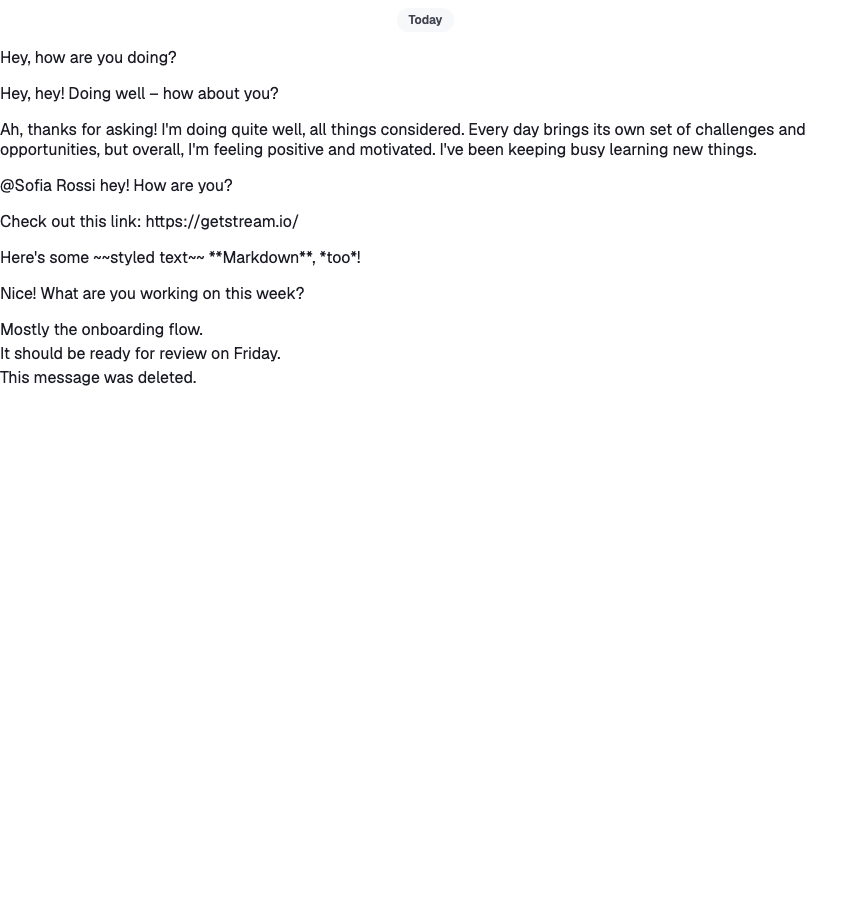
The text is still plain: links, mentions and Markdown show as typed. `MessageText` renders the message's text through [`renderText`](https://getstream.io/chat/docs/sdk/react/v15/component-reference/message/rendertext-function/), which turns them into links, mention highlights and formatted text. It reads the message from `MessageContext`, so it needs no props:

```tsx label="React" title="src/CustomMessageUi.tsx"
import { Avatar, MessageText, useMessageContext } from "stream-chat-react";

export const CustomMessageUi = () => {
  const { isMyMessage, message } = useMessageContext();

  const messageUiClassNames = ["custom-message-ui"];

  if (isMyMessage()) {
    messageUiClassNames.push("custom-message-ui--mine");
  } else {
    messageUiClassNames.push("custom-message-ui--other");
  }

  return (
    <div className={messageUiClassNames.join(" ")} data-message-id={message.id}>
      <Avatar
        imageUrl={message.user?.image}
        size="sm"
        userName={message.user?.name || message.user?.id}
      />
      <MessageText />
    </div>
  );
};
```

```css label="CSS" title="src/CustomMessageUi.css"
.custom-message-ui {
  --cmui-gap-size: 0.5rem;
  --cmui-inline-spacing: 2rem;
  --cmui-block-spacing: 0.5rem;

  display: flex;
  gap: var(--cmui-gap-size);
  padding-inline: var(--cmui-inline-spacing);
  padding-block: var(--cmui-block-spacing);
}

.custom-message-ui .str-chat__avatar {
  flex-shrink: 0;
}

.custom-message-ui--mine {
  flex-direction: row-reverse;
  text-align: right;
}

.custom-message-ui .str-chat__message-text p {
  all: unset;
}

.custom-message-ui .str-chat__message-text {
  display: flex;
  flex-direction: column;
  align-self: center;
}

.custom-message-ui .str-chat__message-mention {
  font-weight: bold;
  color: palevioletred;
  cursor: pointer;
}
```
![Messages with formatted text and highlighted mentions](https://getstream.io/docs-assets/images/76cb5a7ca2b7.png)

>
> **Note:** A mention is highlighted but does nothing when clicked. [Mentions](https://getstream.io/chat/docs/sdk/react/v15/features/messaging/mentions/) shows how to handle clicks on it.
>

### Metadata

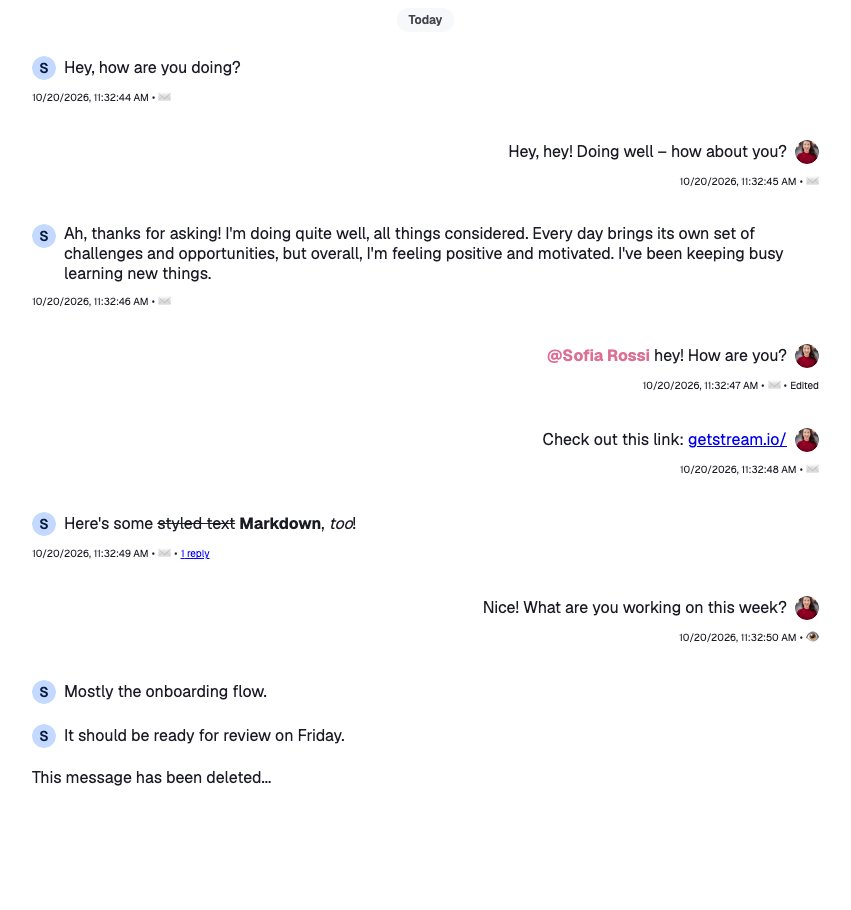
The messages still lack context. Add the time the message was sent, an "Edited" mark, and whether it was sent, delivered or read.

The server's timestamps are nanosecond numbers, so convert them with `convertTimestampToDate` before formatting; [Data conventions](https://getstream.io/chat/docs/sdk/react/v15/state/state-and-entities/data-conventions/#timestamps) explains why. `MessageContext` gives the user's own message `deliveredTo` and `readBy`, the users the message reached and the users who read it. By default only the latest own message that was delivered or read gets them; [`returnAllReadData`](https://getstream.io/chat/docs/sdk/react/v15/component-reference/message-list/messagelist/) on the list gives them to every own message:

```tsx label="React" title="src/CustomMessageUi.tsx"
import type { LocalMessage, UserResponse } from "stream-chat";
import { convertTimestampToDate } from "stream-chat";
import {
  Avatar,
  MessageText,
  useChatContext,
  useMessageContext,
  useThreadContext,
} from "stream-chat-react";

const statusIconMap = {
  delivered: "✅",
  read: "👁️",
  sending: "🛫",
  sent: "✉️",
  unknown: "❓",
};

type MessageStatusParams = {
  deliveredTo: UserResponse[];
  message: LocalMessage;
  ownUserId: string;
  readBy: UserResponse[];
  threadList: boolean;
};

const getMessageStatus = ({
  deliveredTo,
  message,
  ownUserId,
  readBy,
  threadList,
}: MessageStatusParams): keyof typeof statusIconMap => {
  const [firstReader] = readBy;
  const [firstDeliveredUser] = deliveredTo;

  const justReadByMe = readBy.length === 1 && firstReader?.id === ownUserId;
  const read = readBy.length > 0 && !justReadByMe && !threadList;

  const deliveredOnlyToMe =
    deliveredTo.length === 1 && firstDeliveredUser?.id === ownUserId;
  const delivered =
    deliveredTo.length > 0 && !deliveredOnlyToMe && !read && !threadList;

  const sent =
    message.status === "received" && !delivered && !read && !threadList;
  const sending = message.status === "sending";

  if (read) return "read";
  if (delivered) return "delivered";
  if (sent) return "sent";
  if (sending) return "sending";
  return "unknown";
};

const CustomMessageUiMetadata = () => {
  const { deliveredTo = [], message, readBy = [] } = useMessageContext();
  const { client } = useChatContext();
  const threadList = !!useThreadContext();

  const createdAt = convertTimestampToDate(message.created_at);
  const editedAt = convertTimestampToDate(message.message_text_updated_at);
  const status = getMessageStatus({
    deliveredTo,
    message,
    ownUserId: client.user?.id ?? "",
    readBy,
    threadList,
  });

  return (
    <div className="custom-message-ui__metadata">
      <div className="custom-message-ui__metadata-created-at">
        {createdAt?.toLocaleString()}
      </div>
      <div className="custom-message-ui__metadata-read-status">
        {statusIconMap[status]}
      </div>
      {editedAt && (
        <div
          className="custom-message-ui__metadata-edited-status"
          title={editedAt.toLocaleString()}
        >
          Edited
        </div>
      )}
    </div>
  );
};

export const CustomMessageUi = () => {
  const { isMyMessage, message } = useMessageContext();

  const messageUiClassNames = ["custom-message-ui"];

  if (isMyMessage()) {
    messageUiClassNames.push("custom-message-ui--mine");
  } else {
    messageUiClassNames.push("custom-message-ui--other");
  }

  return (
    <div className={messageUiClassNames.join(" ")} data-message-id={message.id}>
      <div className="custom-message-ui__body">
        <Avatar
          imageUrl={message.user?.image}
          size="sm"
          userName={message.user?.name || message.user?.id}
        />
        <MessageText />
      </div>
      <CustomMessageUiMetadata />
    </div>
  );
};
```

```css label="CSS" title="src/CustomMessageUi.css"
.custom-message-ui {
  --cmui-gap-size-md: 0.5rem;
  --cmui-gap-size-sm: 0.2rem;
  --cmui-inline-spacing: 2rem;
  --cmui-block-spacing: 0.5rem;

  display: flex;
  flex-direction: column;
  gap: var(--cmui-gap-size-md);
  padding-inline: var(--cmui-inline-spacing);
  padding-block: var(--cmui-block-spacing);
}

.custom-message-ui .str-chat__avatar {
  flex-shrink: 0;
}

.custom-message-ui__body {
  gap: var(--cmui-gap-size-md);
  display: flex;
}

.custom-message-ui--mine .custom-message-ui__body {
  flex-direction: row-reverse;
  text-align: right;
}

.custom-message-ui__metadata {
  display: flex;
  font-size: x-small;
  align-items: baseline;
}

.custom-message-ui__metadata > *:nth-child(even)::after,
.custom-message-ui__metadata > *:nth-child(even)::before {
  content: "•";
  padding-inline: var(--cmui-gap-size-sm);
}

.custom-message-ui__metadata > *:last-child::after {
  display: none;
}

.custom-message-ui--mine .custom-message-ui__metadata {
  align-self: flex-end;
}

.custom-message-ui .str-chat__message-text p {
  all: unset;
}

.custom-message-ui .str-chat__message-text {
  display: flex;
  flex-direction: column;
  align-self: center;
}

.custom-message-ui .str-chat__message-mention {
  font-weight: bold;
  color: palevioletred;
  cursor: pointer;
}
```

![Messages with their time, delivery status and edited mark](https://getstream.io/docs-assets/images/666a41a0d37e.png)

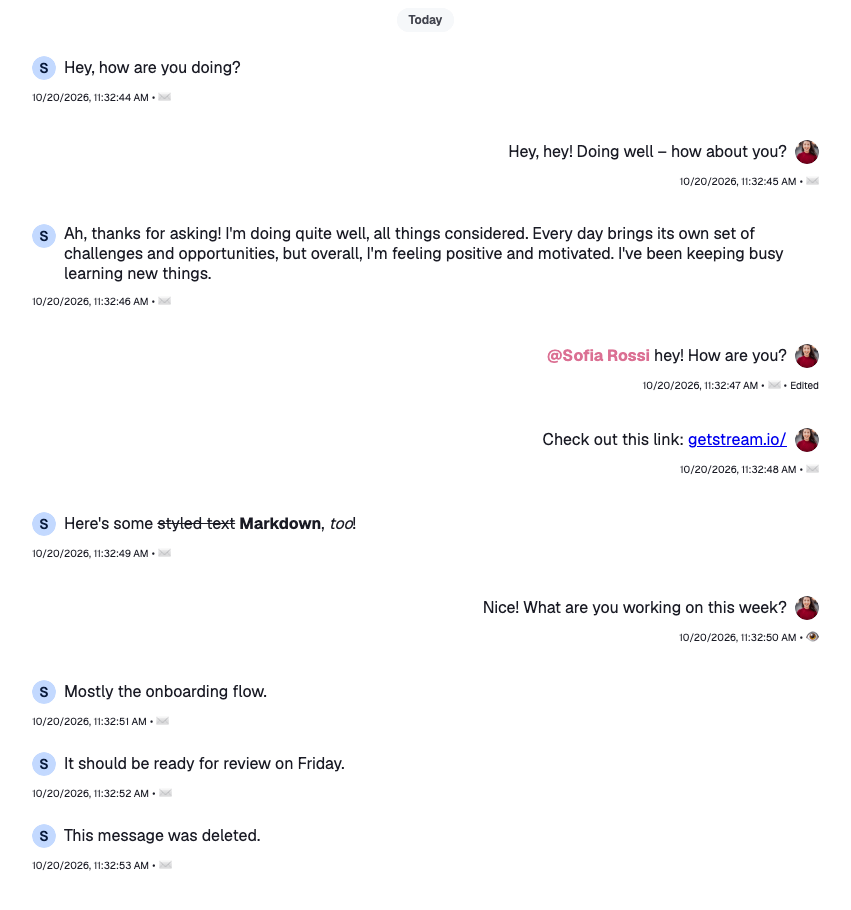
The metadata now repeats under every message. `MessageList` groups consecutive messages from the same sender and puts a class on the list item around each message: `str-chat__li--top`, `--middle`, `--bottom` or `--single`. Show the metadata only under the last message of a group:

```css title="src/CustomMessageUi.css" remove="2" add="3,8-11"
.custom-message-ui__metadata {
  display: flex;
  display: none;
  font-size: x-small;
  align-items: baseline;
}

.str-chat__li--bottom .custom-message-ui__metadata,
.str-chat__li--single .custom-message-ui__metadata {
  display: flex;
}
```
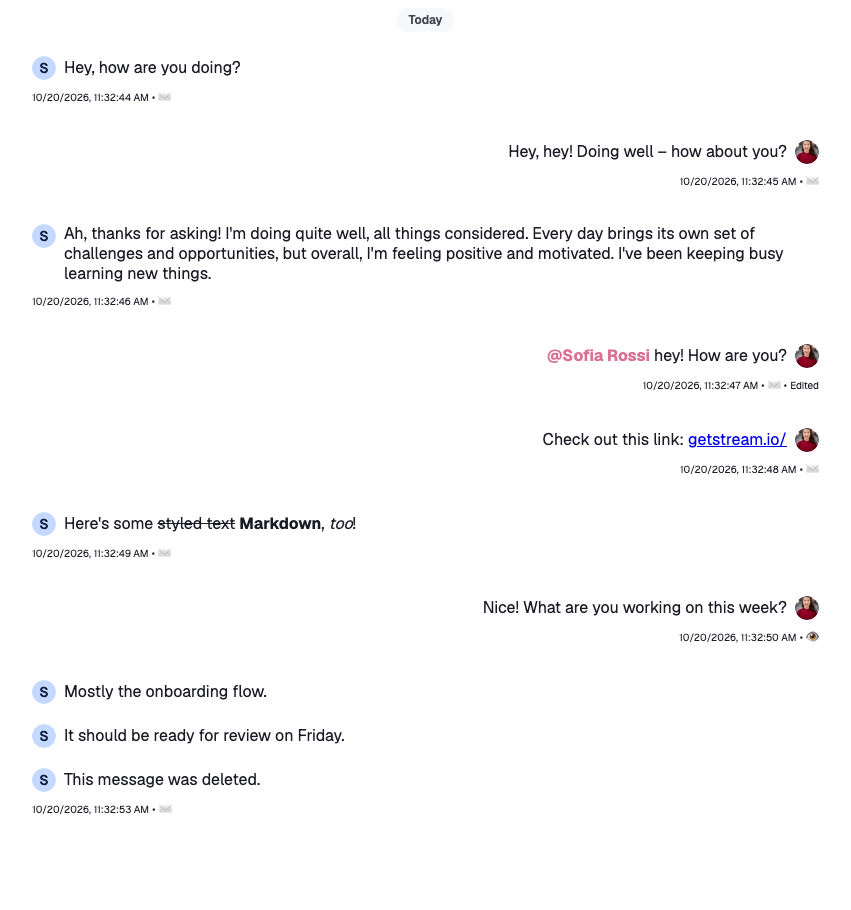
![Metadata shown only under the last message of a group](https://getstream.io/docs-assets/images/59256edbf224.png)

>
> **Note:** `VirtualizedMessageList` puts the same classes on its items, so these rules work there too. To make the same decision in code, read `groupStyles` from `MessageContext`: it holds the message's place in its group, such as `["bottom"]`.
>

The SDK's own `MessageStatus` and `MessageTimestamp` handle more cases, such as the list of readers and translated date formats, and need no props. A custom message UI can render them instead of building its own.

### Message actions

The message can be read now, but not acted on. `MessageContext` has a handler for each action, such as `handleDelete`, `handleFlag`, `handleOpenThread` and `handlePin`. Wire some of them to buttons that show while the pointer is over the message.

>
> **Note:** The next samples show only the components they change. The whole file is in the [complete example](#complete-example) at the end.
>

Show each button only to users who may use it. `useUserRole(message)` reads the user's capabilities in the channel: `canDelete`, `canFlag`, `canPin` and `canReply`. The default actions menu hides most actions on its own, but not Pin, so the check matters most there; [Actions](https://getstream.io/chat/docs/sdk/react/v15/ui/customizing/actions/#message-actions) explains what the default filter does. The SDK offers neither Pin nor Reply on a thread reply, so those buttons stay out of a thread too. `useThreadContext()` returns the thread when the message renders inside `Thread`, and `undefined` in a channel:

```tsx label="React" title="src/CustomMessageUi.tsx" add="65"
const CustomMessageUiActions = () => {
  const { handleDelete, handleFlag, handleOpenThread, handlePin, message } =
    useMessageContext();
  const threadList = !!useThreadContext();
  const { canDelete, canFlag, canPin, canReply } = useUserRole(message);

  return (
    <div className="custom-message-ui__actions">
      <div className="custom-message-ui__actions-group">
        {canPin && !threadList && (
          <button
            onClick={handlePin}
            title={message.pinned ? "Unpin" : "Pin"}
            type="button"
          >
            {message.pinned ? "📍" : "📌"}
          </button>
        )}
        {canDelete && (
          <button
            onClick={() => void handleDelete()}
            title="Delete"
            type="button"
          >
            🗑️
          </button>
        )}
        {canReply && !threadList && (
          <button onClick={handleOpenThread} title="Open thread" type="button">
            ↩️
          </button>
        )}
        {canFlag && (
          <button onClick={handleFlag} title="Flag message" type="button">
            🚩
          </button>
        )}
      </div>
    </div>
  );
};

export const CustomMessageUi = () => {
  const { isMyMessage, message } = useMessageContext();

  const messageUiClassNames = ["custom-message-ui"];

  if (isMyMessage()) {
    messageUiClassNames.push("custom-message-ui--mine");
  } else {
    messageUiClassNames.push("custom-message-ui--other");
  }

  return (
    <div className={messageUiClassNames.join(" ")} data-message-id={message.id}>
      <div className="custom-message-ui__body">
        <Avatar
          imageUrl={message.user?.image}
          size="sm"
          userName={message.user?.name || message.user?.id}
        />
        <MessageText />
      </div>
      <CustomMessageUiMetadata />
      <CustomMessageUiActions />
    </div>
  );
};
```

```css label="CSS" title="src/CustomMessageUi.css"
.custom-message-ui {
  --cmui-bg-color: #efefef;
  --cmui-border-color: #ddd;
  --cmui-border-radius: 0.2rem;

  position: relative;
}

.custom-message-ui:hover,
.custom-message-ui:has(.str-chat__message-text:focus) {
  background: var(--cmui-bg-color);
}

.custom-message-ui__actions {
  display: none;
  position: absolute;
  gap: var(--cmui-gap-size-md);
  top: -20px;
}

.custom-message-ui:hover .custom-message-ui__actions {
  display: flex;
}

.custom-message-ui--mine .custom-message-ui__actions {
  left: var(--cmui-inline-spacing);
}

.custom-message-ui--other .custom-message-ui__actions {
  right: var(--cmui-inline-spacing);
}

.custom-message-ui__actions-group {
  display: flex;
  background-color: var(--cmui-border-color);
  border-radius: var(--cmui-border-radius);
  gap: 1px;
  padding: 1px;
}

.custom-message-ui__actions-group:empty {
  display: none;
}

.custom-message-ui__actions-group button {
  all: unset;
  background: white;
  justify-content: center;
  align-items: center;
  cursor: pointer;
  padding: 5px;
  line-height: 1rem;
}

.custom-message-ui__actions-group button:first-child {
  border-bottom-left-radius: calc(var(--cmui-border-radius) - 1px);
  border-top-left-radius: calc(var(--cmui-border-radius) - 1px);
}

.custom-message-ui__actions-group button:last-child {
  border-bottom-right-radius: calc(var(--cmui-border-radius) - 1px);
  border-top-right-radius: calc(var(--cmui-border-radius) - 1px);
}

.custom-message-ui__actions-group button:hover {
  background: var(--cmui-bg-color);
}
```

The new rules go after the ones from the previous steps.
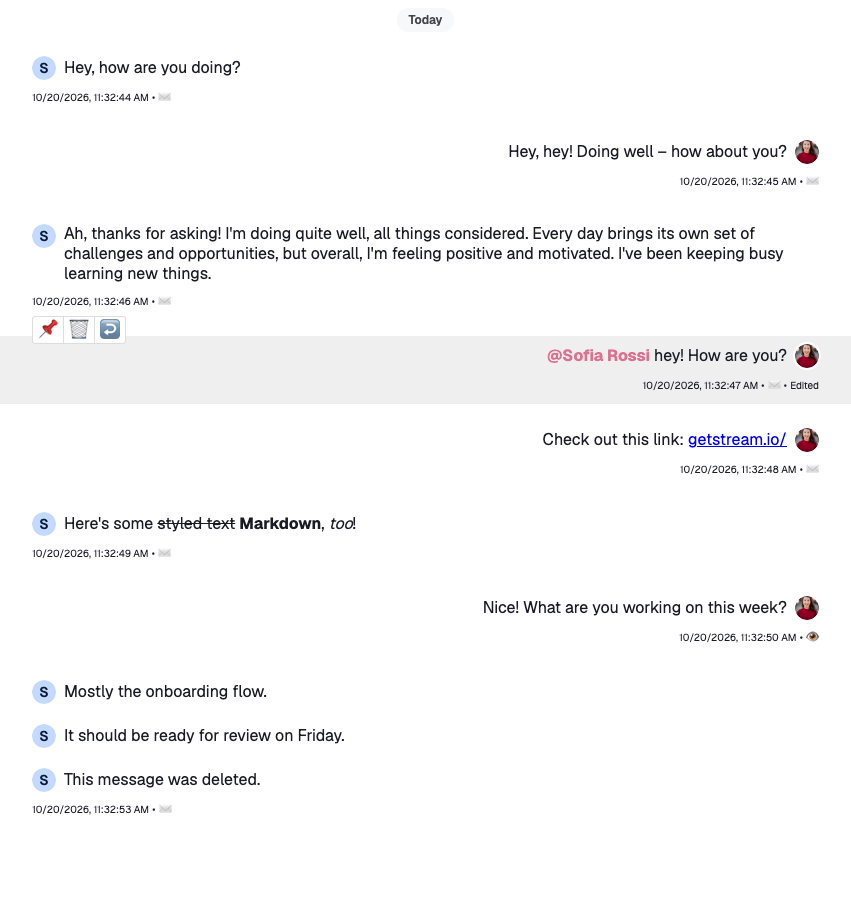
![Action buttons above a hovered message](https://getstream.io/docs-assets/images/4b4feb503032.png)

- `handlePin` pins the message, or unpins it if it's pinned. The message shows its new state at once, and goes back if the request fails. The [Pin indicator](https://getstream.io/chat/docs/sdk/react/v15/recipes/message/pin-indicator/) recipe changes how a pinned message looks.
- `handleDelete` deletes the message. The message list shows it as deleted before the server answers.
- `handleOpenThread` opens the message's thread through the layout, so with `ChatView` it opens in the thread slot. Without a layout it does nothing; see [Navigation](https://getstream.io/chat/docs/sdk/react/v15/ui/layout/navigation/).
- `handleFlag` flags the message for moderation.

#### Thread and reply count

When a message gets replies, its `reply_count` grows. Add a button next to the metadata that shows the count and opens the thread. A message in a thread's own list has no thread to open, so the button stays out of it:

```tsx label="React" title="src/CustomMessageUi.tsx" add="4,37-48"
const CustomMessageUiMetadata = () => {
  const {
    deliveredTo = [],
    handleOpenThread,
    message,
    readBy = [],
  } = useMessageContext();
  const { client } = useChatContext();
  const threadList = !!useThreadContext();

  const createdAt = convertTimestampToDate(message.created_at);
  const editedAt = convertTimestampToDate(message.message_text_updated_at);
  const status = getMessageStatus({
    deliveredTo,
    message,
    ownUserId: client.user?.id ?? "",
    readBy,
    threadList,
  });

  return (
    <div className="custom-message-ui__metadata">
      <div className="custom-message-ui__metadata-created-at">
        {createdAt?.toLocaleString()}
      </div>
      <div className="custom-message-ui__metadata-read-status">
        {statusIconMap[status]}
      </div>
      {editedAt && (
        <div
          className="custom-message-ui__metadata-edited-status"
          title={editedAt.toLocaleString()}
        >
          Edited
        </div>
      )}
      {!threadList && message.reply_count > 0 && (
        <button
          className="custom-message-ui__metadata-reply-count"
          onClick={handleOpenThread}
          type="button"
        >
          <span>
            {message.reply_count}{" "}
            {message.reply_count > 1 ? "replies" : "reply"}
          </span>
        </button>
      )}
    </div>
  );
};
```

```css label="CSS" title="src/CustomMessageUi.css"
.custom-message-ui__metadata-reply-count {
  all: unset;
}

.custom-message-ui__metadata-reply-count > span {
  color: blue;
  text-decoration: underline;
  cursor: pointer;
}
```

#### Deleted message

A deleted message keeps its place in the list, without its text. `isMessageDeleted(message)` covers every way a message can be deleted: a soft delete, a message of type `deleted`, and a message deleted only for the current user. Render a placeholder instead of the content:

```tsx title="src/CustomMessageUi.tsx" add="5,15-21,32-33"
export const CustomMessageUi = () => {
  const { isMyMessage, message } = useMessageContext();

  const messageUiClassNames = ["custom-message-ui"];
  const isDeleted = isMessageDeleted(message);

  if (isMyMessage()) {
    messageUiClassNames.push("custom-message-ui--mine");
  } else {
    messageUiClassNames.push("custom-message-ui--other");
  }

  return (
    <div className={messageUiClassNames.join(" ")} data-message-id={message.id}>
      {isDeleted && (
        <div className="custom-message-ui__body">
          This message has been deleted...
        </div>
      )}
      {!isDeleted && (
        <>
          <div className="custom-message-ui__body">
            <Avatar
              imageUrl={message.user?.image}
              size="sm"
              userName={message.user?.name || message.user?.id}
            />
            <MessageText />
          </div>
          <CustomMessageUiMetadata />
          <CustomMessageUiActions />
        </>
      )}
    </div>
  );
};
```

![A deleted message shown as a placeholder](https://getstream.io/docs-assets/images/8dc27f84cf96.png)

### Reactions

Next, add two reactions, thumbs up and thumbs down, as buttons next to the actions, and show the reactions a message has with the SDK's [`MessageReactions`](https://getstream.io/chat/docs/sdk/react/v15/component-reference/message/reaction-components/).

First define the reactions and register them as `reactionOptions` with `WithComponents`, next to the message UI. Each key is the reaction `type` stored on the server. `MessageReactions`, the reactions dialog and your own components read them from there; [Reactions](https://getstream.io/chat/docs/sdk/react/v15/features/messaging/reactions/#the-reactions-on-offer) explains the format:

```tsx title="src/ChannelWithCustomMessages.tsx"
import type { Channel as StreamChannel } from "stream-chat";
import type { ReactionOptions } from "stream-chat-react";
import {
  Channel,
  ChannelHeader,
  emojiToUnicode,
  MessageComposer,
  MessageList,
  WithComponents,
} from "stream-chat-react";
import { CustomMessageUi } from "./CustomMessageUi";

const reactionOptions: ReactionOptions = {
  quick: {
    "+1": {
      Component: () => <>👍</>,
      name: "Thumbs up",
      unicode: emojiToUnicode("👍"),
    },
    "-1": {
      Component: () => <>👎</>,
      name: "Thumbs down",
      unicode: emojiToUnicode("👎"),
    },
  },
};

const overrides = { MessageUI: CustomMessageUi, reactionOptions };

export const ChannelWithCustomMessages = ({
  channel,
}: {
  channel: StreamChannel;
}) => (
  <WithComponents overrides={overrides}>
    <Channel channel={channel}>
      <ChannelHeader />
      <MessageList />
      <MessageComposer />
    </Channel>
  </WithComponents>
);
```

Then give `CustomMessageUiActions` a button for each quick reaction. It reads the registered options with `useComponentContext()`. `handleReaction(type, event)` adds the reaction, or removes it if the user already reacted with it, and the message shows the change before the server answers. `canReact` is the `send-reaction` capability:

```tsx title="src/CustomMessageUi.tsx" add="7,11-15,49-62"
const CustomMessageUiActions = () => {
  const {
    handleDelete,
    handleFlag,
    handleOpenThread,
    handlePin,
    handleReaction,
    message,
  } = useMessageContext();
  const threadList = !!useThreadContext();
  const { canDelete, canFlag, canPin, canReact, canReply } =
    useUserRole(message);
  const { reactionOptions } = useComponentContext();
  const quickReactions =
    reactionOptions && "quick" in reactionOptions ? reactionOptions.quick : {};

  return (
    <div className="custom-message-ui__actions">
      <div className="custom-message-ui__actions-group">
        {canPin && !threadList && (
          <button
            onClick={handlePin}
            title={message.pinned ? "Unpin" : "Pin"}
            type="button"
          >
            {message.pinned ? "📍" : "📌"}
          </button>
        )}
        {canDelete && (
          <button
            onClick={() => void handleDelete()}
            title="Delete"
            type="button"
          >
            🗑️
          </button>
        )}
        {canReply && !threadList && (
          <button onClick={handleOpenThread} title="Open thread" type="button">
            ↩️
          </button>
        )}
        {canFlag && (
          <button onClick={handleFlag} title="Flag message" type="button">
            🚩
          </button>
        )}
      </div>
      {canReact && (
        <div className="custom-message-ui__actions-group">
          {Object.entries(quickReactions).map(([type, { Component, name }]) => (
            <button
              key={type}
              onClick={(event) => void handleReaction(type, event)}
              title={`React with: ${name}`}
              type="button"
            >
              <Component />
            </button>
          ))}
        </div>
      )}
    </div>
  );
};
```

Finally, render `MessageReactions` under the metadata. It shows each reaction with its count, and opens the reactions dialog when clicked.

#### Complete example

```tsx label="React" title="src/CustomMessageUi.tsx" add="210"
import type { LocalMessage, UserResponse } from "stream-chat";
import { convertTimestampToDate } from "stream-chat";
import {
  Avatar,
  isMessageDeleted,
  MessageReactions,
  MessageText,
  useChatContext,
  useComponentContext,
  useMessageContext,
  useThreadContext,
  useUserRole,
} from "stream-chat-react";
import "./CustomMessageUi.css";

const statusIconMap = {
  delivered: "✅",
  read: "👁️",
  sending: "🛫",
  sent: "✉️",
  unknown: "❓",
};

type MessageStatusParams = {
  deliveredTo: UserResponse[];
  message: LocalMessage;
  ownUserId: string;
  readBy: UserResponse[];
  threadList: boolean;
};

const getMessageStatus = ({
  deliveredTo,
  message,
  ownUserId,
  readBy,
  threadList,
}: MessageStatusParams): keyof typeof statusIconMap => {
  const [firstReader] = readBy;
  const [firstDeliveredUser] = deliveredTo;

  const justReadByMe = readBy.length === 1 && firstReader?.id === ownUserId;
  const read = readBy.length > 0 && !justReadByMe && !threadList;

  const deliveredOnlyToMe =
    deliveredTo.length === 1 && firstDeliveredUser?.id === ownUserId;
  const delivered =
    deliveredTo.length > 0 && !deliveredOnlyToMe && !read && !threadList;

  const sent =
    message.status === "received" && !delivered && !read && !threadList;
  const sending = message.status === "sending";

  if (read) return "read";
  if (delivered) return "delivered";
  if (sent) return "sent";
  if (sending) return "sending";
  return "unknown";
};

const CustomMessageUiActions = () => {
  const {
    handleDelete,
    handleFlag,
    handleOpenThread,
    handlePin,
    handleReaction,
    message,
  } = useMessageContext();
  const threadList = !!useThreadContext();
  const { canDelete, canFlag, canPin, canReact, canReply } =
    useUserRole(message);
  const { reactionOptions } = useComponentContext();
  const quickReactions =
    reactionOptions && "quick" in reactionOptions ? reactionOptions.quick : {};

  return (
    <div className="custom-message-ui__actions">
      <div className="custom-message-ui__actions-group">
        {canPin && !threadList && (
          <button
            onClick={handlePin}
            title={message.pinned ? "Unpin" : "Pin"}
            type="button"
          >
            {message.pinned ? "📍" : "📌"}
          </button>
        )}
        {canDelete && (
          <button
            onClick={() => void handleDelete()}
            title="Delete"
            type="button"
          >
            🗑️
          </button>
        )}
        {canReply && !threadList && (
          <button onClick={handleOpenThread} title="Open thread" type="button">
            ↩️
          </button>
        )}
        {canFlag && (
          <button onClick={handleFlag} title="Flag message" type="button">
            🚩
          </button>
        )}
      </div>
      {canReact && (
        <div className="custom-message-ui__actions-group">
          {Object.entries(quickReactions).map(([type, { Component, name }]) => (
            <button
              key={type}
              onClick={(event) => void handleReaction(type, event)}
              title={`React with: ${name}`}
              type="button"
            >
              <Component />
            </button>
          ))}
        </div>
      )}
    </div>
  );
};

const CustomMessageUiMetadata = () => {
  const {
    deliveredTo = [],
    handleOpenThread,
    message,
    readBy = [],
  } = useMessageContext();
  const { client } = useChatContext();
  const threadList = !!useThreadContext();

  const createdAt = convertTimestampToDate(message.created_at);
  const editedAt = convertTimestampToDate(message.message_text_updated_at);
  const status = getMessageStatus({
    deliveredTo,
    message,
    ownUserId: client.user?.id ?? "",
    readBy,
    threadList,
  });

  return (
    <div className="custom-message-ui__metadata">
      <div className="custom-message-ui__metadata-created-at">
        {createdAt?.toLocaleString()}
      </div>
      <div className="custom-message-ui__metadata-read-status">
        {statusIconMap[status]}
      </div>
      {editedAt && (
        <div
          className="custom-message-ui__metadata-edited-status"
          title={editedAt.toLocaleString()}
        >
          Edited
        </div>
      )}
      {!threadList && message.reply_count > 0 && (
        <button
          className="custom-message-ui__metadata-reply-count"
          onClick={handleOpenThread}
          type="button"
        >
          <span>
            {message.reply_count}{" "}
            {message.reply_count > 1 ? "replies" : "reply"}
          </span>
        </button>
      )}
    </div>
  );
};

export const CustomMessageUi = () => {
  const { isMyMessage, message } = useMessageContext();

  const messageUiClassNames = ["custom-message-ui"];
  const isDeleted = isMessageDeleted(message);

  if (isMyMessage()) {
    messageUiClassNames.push("custom-message-ui--mine");
  } else {
    messageUiClassNames.push("custom-message-ui--other");
  }

  return (
    <div className={messageUiClassNames.join(" ")} data-message-id={message.id}>
      {isDeleted && (
        <div className="custom-message-ui__body">
          This message has been deleted...
        </div>
      )}
      {!isDeleted && (
        <>
          <div className="custom-message-ui__body">
            <Avatar
              imageUrl={message.user?.image}
              size="sm"
              userName={message.user?.name || message.user?.id}
            />
            <MessageText />
          </div>
          <CustomMessageUiMetadata />
          <CustomMessageUiActions />
          <MessageReactions />
        </>
      )}
    </div>
  );
};
```

```css label="CSS" title="src/CustomMessageUi.css"
.custom-message-ui {
  --cmui-gap-size-md: 0.5rem;
  --cmui-gap-size-sm: 0.2rem;
  --cmui-inline-spacing: 2rem;
  --cmui-block-spacing: 0.5rem;
  --cmui-bg-color: #efefef;
  --cmui-border-color: #ddd;
  --cmui-border-radius: 0.2rem;

  position: relative;
  display: flex;
  flex-direction: column;
  gap: var(--cmui-gap-size-md);
  padding-inline: var(--cmui-inline-spacing);
  padding-block: var(--cmui-block-spacing);
}

.custom-message-ui .str-chat__avatar {
  flex-shrink: 0;
}

.custom-message-ui:hover,
.custom-message-ui:has(.str-chat__message-text:focus) {
  background: var(--cmui-bg-color);
}

.custom-message-ui__body {
  gap: var(--cmui-gap-size-md);
  display: flex;
}

.custom-message-ui--mine .custom-message-ui__body {
  flex-direction: row-reverse;
  text-align: right;
}

.custom-message-ui__actions {
  display: none;
  position: absolute;
  gap: var(--cmui-gap-size-md);
  top: -20px;
}

.custom-message-ui:hover .custom-message-ui__actions {
  display: flex;
}

.custom-message-ui__actions-group {
  display: flex;
  background-color: var(--cmui-border-color);
  border-radius: var(--cmui-border-radius);
  gap: 1px;
  padding: 1px;
}

.custom-message-ui__actions-group:empty {
  display: none;
}

.custom-message-ui__actions-group button {
  all: unset;
  background: white;
  justify-content: center;
  align-items: center;
  cursor: pointer;
  padding: 5px;
  line-height: 1rem;
}

.custom-message-ui__actions-group button:first-child {
  border-bottom-left-radius: calc(var(--cmui-border-radius) - 1px);
  border-top-left-radius: calc(var(--cmui-border-radius) - 1px);
}

.custom-message-ui__actions-group button:last-child {
  border-bottom-right-radius: calc(var(--cmui-border-radius) - 1px);
  border-top-right-radius: calc(var(--cmui-border-radius) - 1px);
}

.custom-message-ui__actions-group button:hover {
  background: var(--cmui-bg-color);
}

.custom-message-ui__metadata {
  display: none;
  font-size: x-small;
  align-items: baseline;
}

.str-chat__li--bottom .custom-message-ui__metadata,
.str-chat__li--single .custom-message-ui__metadata {
  display: flex;
}

.custom-message-ui__metadata > *:nth-child(even)::after,
.custom-message-ui__metadata > *:nth-child(even)::before {
  content: "•";
  padding-inline: var(--cmui-gap-size-sm);
}

.custom-message-ui__metadata > *:last-child::after {
  display: none;
}

.custom-message-ui__metadata-reply-count {
  all: unset;
}

.custom-message-ui__metadata-reply-count > span {
  color: blue;
  text-decoration: underline;
  cursor: pointer;
}

.custom-message-ui--mine .str-chat__message-reactions {
  align-self: flex-end;
}

.custom-message-ui--mine .custom-message-ui__metadata {
  align-self: flex-end;
}

.custom-message-ui--mine .custom-message-ui__actions {
  left: var(--cmui-inline-spacing);
}

.custom-message-ui--other .custom-message-ui__actions {
  right: var(--cmui-inline-spacing);
}

.custom-message-ui .str-chat__message-text p {
  all: unset;
}

.custom-message-ui .str-chat__message-text {
  display: flex;
  flex-direction: column;
  align-self: center;
}

.custom-message-ui .str-chat__message-mention {
  font-weight: bold;
  color: palevioletred;
  cursor: pointer;
}
```

![The complete custom message UI with reactions](https://getstream.io/docs-assets/images/0d44e053201c.png)

### Attachments

This message UI shows no attachments. To show them, render the SDK's `Attachment` with the message's attachments, as the default `MessageUI` does. `handleAction` runs the buttons of a Giphy preview, such as Send and Shuffle:

```tsx
const CustomMessageUiAttachments = () => {
  const { handleAction, message } = useMessageContext();

  if (!message.attachments?.length) return null;

  return (
    <Attachment
      actionHandler={handleAction}
      attachments={message.attachments}
    />
  );
};
```

Render `<CustomMessageUiAttachments />` in `CustomMessageUi`, next to `MessageText`.

`Attachment` picks the right component for each attachment: images, videos, files, voice recordings, link previews and Giphy. [Attachments and uploads](https://getstream.io/chat/docs/sdk/react/v15/features/rich-content/attachments-and-uploads/) explains how to change how each kind renders, and [Overriding components](https://getstream.io/chat/docs/sdk/react/v15/ui/customizing/overriding-components/#a-custom-messageui) shows a message UI that renders them.

### Read more

The default `MessageUI` handles more than this recipe does:

- Editing a message in place: [Sending, editing and deleting](https://getstream.io/chat/docs/sdk/react/v15/features/messaging/sending-editing-and-deleting/#editing-a-message-in-place).
- Bounced messages, which moderation rejected: [Sending, editing and deleting](https://getstream.io/chat/docs/sdk/react/v15/features/messaging/sending-editing-and-deleting/#bounced-messages) and [MessageBounceContext](https://getstream.io/chat/docs/sdk/react/v15/component-reference/message/messagebouncecontext/).
- Polls, quoted messages, failed sends and the pin, reminder and translation marks: [Message list UI](https://getstream.io/chat/docs/sdk/react/v15/ui/components/message-list-ui/#a-message) lists every part of a message and its override key.
- The full actions menu, with the user's capabilities applied: [Actions](https://getstream.io/chat/docs/sdk/react/v15/ui/customizing/actions/#message-actions).

---

For the most recent version of this documentation, visit [https://getstream.io/chat/docs/sdk/react/v15/recipes/message/custom-message/](https://getstream.io/chat/docs/sdk/react/v15/recipes/message/custom-message/).