# Attachment actions
> **Info:** This is release candidate documentation for **Stream Chat React SDK v15**. For the latest stable version, see the [latest version (v14)](https://getstream.io/chat/docs/sdk/react/).
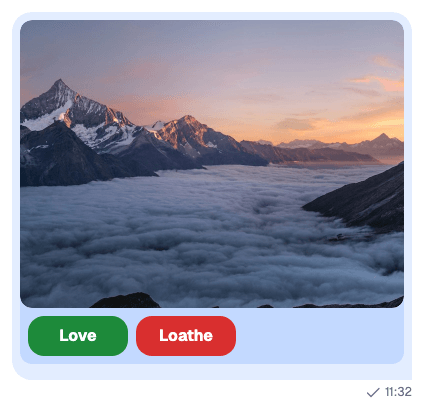
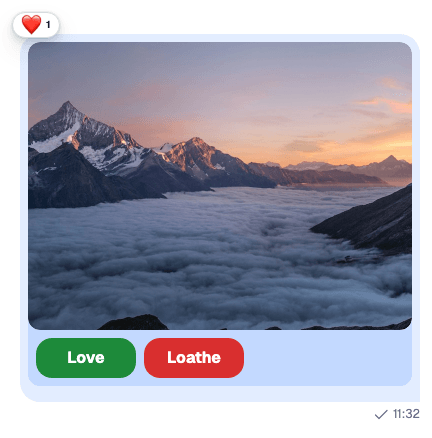
An attachment can carry actions: buttons the message shows under the attachment. Giphy previews use them for Send, Shuffle and Cancel. This recipe adds two buttons, "Love" and "Loathe", to every image a user sends, and clicking one reacts to the message. It's a demo of how far attachments stretch rather than a common use case.
These are actions on attachments in the message list. The menu that adds attachments in the composer is a different thing, the attachment selector's action set, explained in [Actions](https://getstream.io/chat/docs/sdk/react/v15/ui/customizing/actions/#attachment-selector-actions).
The recipe has two parts:
1. The composer adds the actions to each image when the message is sent, with a composition middleware.
2. The message list renders them with an `AttachmentActions` of your own, which reacts instead of calling the server.
## Best practices
- Add the actions in a composition middleware, in the composer setup function. Every composer then adds them, in channels and threads alike, and both `message` and `localMessage` get them.
- Replace `AttachmentActions` through the `Attachment` component, and render the default for other attachments, so Giphy previews keep their buttons.
- Handle your own actions in your component. The default `AttachmentActions` sends a click to the server with `Channel.sendAction()`, which only handles built-in actions such as Giphy's.
- Expect actions on a single image only. A message with several images shows them as a gallery, without actions.
- Pick reaction types the reaction list knows. The message shows only the types in its reaction options: `haha`, `like`, `love`, `sad`, `wow` and `fire` by default.
## Custom actions
An action is an `Action` from `stream-chat`: `name`, `text` and `type`, and optionally `value` and `style`. Each button's `value` here is the reaction it posts:
```ts title="src/voteActions.ts"
import type { Action } from "stream-chat";
export const voteActions: Action[] = [
{ name: "vote", text: "Love", type: "button", value: "love" },
{ name: "vote", text: "Loathe", type: "button", value: "sad" },
];
```
## Custom AttachmentActions
`AttachmentActions` receives the attachment's fields, including `type`, and its `actions`. For images, this one renders a button per action, and each click reacts through `handleReaction` from `useMessageContext()`. Every other attachment gets the default:
```tsx title="src/VoteAttachmentActions.tsx"
import type { AttachmentActionsProps } from "stream-chat-react";
import { AttachmentActions, useMessageContext } from "stream-chat-react";
export const VoteAttachmentActions = (props: AttachmentActionsProps) => {
const { actions, type } = props;
const { handleReaction } = useMessageContext();
if (type !== "image") return ;
return (
{actions.map((action) => (
))}
);
};
```
`handleReaction` toggles: a second click on "Love" removes the user's love reaction. It updates the message at once and undoes the change if the request fails.
## Custom Attachment
`Attachment` renders the attachments of a message and takes its parts as props. Pass it the new actions, and register the result as the `Attachment` override:
```tsx title="src/VoteAttachment.tsx"
import type { AttachmentProps } from "stream-chat-react";
import { Attachment } from "stream-chat-react";
import { VoteAttachmentActions } from "./VoteAttachmentActions";
export const VoteAttachment = (props: AttachmentProps) => (
);
```
[Attachments and uploads](https://getstream.io/chat/docs/sdk/react/v15/features/rich-content/attachments-and-uploads/#in-the-message-list) lists the other parts `Attachment` takes.
## Enrich attachments before message submission
The composition chain builds the message when the user sends it. A middleware inserted after `stream-io/message-composer-middleware/attachments`, which adds the uploaded files, finds the images there and adds the actions:
```ts title="src/voteActionsMiddleware.ts"
import { isImageAttachment } from "stream-chat";
import type {
Attachment,
MessageComposerMiddlewareState,
MessageCompositionMiddleware,
MiddlewareHandlerParams,
} from "stream-chat";
import { voteActions } from "./voteActions";
const addVoteActions = (attachments: Attachment[] = []) =>
attachments.map((attachment) =>
isImageAttachment(attachment)
? { ...attachment, actions: voteActions }
: attachment,
);
export const voteActionsMiddleware: MessageCompositionMiddleware = {
id: "my-app/vote-actions",
handlers: {
compose: ({
forward,
next,
state,
}: MiddlewareHandlerParams) => {
if (!state.message.attachments?.some(isImageAttachment)) return forward();
return next({
...state,
localMessage: {
...state.localMessage,
attachments: addVoteActions(state.localMessage.attachments),
},
message: {
...state.message,
attachments: addVoteActions(state.message.attachments),
},
});
},
},
};
```
Install it in the composer setup function, with a teardown that removes it:
```ts
import { voteActionsMiddleware } from "./voteActionsMiddleware";
client.config.setSetupFunction("messageComposer", ({ composer }) => {
composer.compositionMiddlewareExecutor.insert({
middleware: [voteActionsMiddleware],
position: { after: "stream-io/message-composer-middleware/attachments" },
unique: true,
});
return () =>
composer.compositionMiddlewareExecutor.remove(voteActionsMiddleware.id);
});
```
There is one setup function per kind of object, so put all your composer setup in this one function. [Composer middleware](https://getstream.io/chat/docs/sdk/react/v15/state/writing-messages/composer-middleware/) explains the chain, the ids, and why both copies of the message change.
## Implementation
The app below puts the pieces together, on the layout from the [Quick start](https://getstream.io/chat/docs/sdk/react/v15/getting-started/quick-start/#add-a-channel-list-with-chatview). It imports `voteActionsMiddleware` and `VoteAttachment` from the files above.
### The code
```tsx title="src/App.tsx"
import { useEffect } from "react";
import { ChannelPaginator } from "stream-chat";
import type { ChannelFilters, SortParamRequest } from "stream-chat";
import {
ChannelHeader,
ChannelNavigation,
Chat,
MessageComposer,
MessageList,
useCreateChatClient,
WithComponents,
} from "stream-chat-react";
import { ChannelSlot, ChatView } from "stream-chat-react/slot-layout";
import type { LayoutDescriptor } from "stream-chat-react/slot-layout";
import { VoteAttachment } from "./VoteAttachment";
import { voteActionsMiddleware } from "./voteActionsMiddleware";
import "stream-chat-react/dist/css/index.css";
import "./App.css";
const apiKey = "YOUR_API_KEY";
const userId = "YOUR_USER_ID";
const userToken = "YOUR_USER_TOKEN";
const filters: ChannelFilters = {
members: { $in: [userId] },
type: "messaging",
};
const sort: SortParamRequest[] = [{ direction: -1, field: "last_message_at" }];
const layouts: LayoutDescriptor[] = [
{ id: "channels", slots: ["channel", "thread"] },
];
const overrides = { Attachment: VoteAttachment };
const ChannelsView = () => (
<>
);
const App = () => {
const client = useCreateChatClient({
apiKey,
tokenOrProvider: userToken,
userData: { id: userId },
});
useEffect(() => {
if (!client) return;
const paginator = new ChannelPaginator({
client,
filters,
id: "my-channels",
sort,
});
client.channelManager.insertPaginator({ paginator });
client.config.setSetupFunction("messageComposer", ({ composer }) => {
composer.compositionMiddlewareExecutor.insert({
middleware: [voteActionsMiddleware],
position: {
after: "stream-io/message-composer-middleware/attachments",
},
unique: true,
});
return () =>
composer.compositionMiddlewareExecutor.remove(voteActionsMiddleware.id);
});
return () => {
client.channelManager.removePaginator(paginator);
client.config.setSetupFunction("messageComposer", null);
};
}, [client]);
if (!client) return
Connecting...
;
return (
}} />
);
};
export default App;
```
```css title="src/App.css"
html,
body,
#root {
height: 100%;
}
body {
margin: 0;
}
.vote-actions {
display: flex;
gap: 8px;
padding: 8px;
}
.vote-actions__button {
background: #d92f2f;
border: 0;
border-radius: 16px;
color: #ffffff;
font-size: 1rem;
font-weight: 700;
height: 40px;
width: 100px;
}
.vote-actions__button--love {
background: #1d8a3a;
}
```
### The result
**The rendered message before a click:**
**The rendered message after a click:**
---
For the most recent version of this documentation, visit [https://getstream.io/chat/docs/sdk/react/v15/recipes/composer/attachment-actions/](https://getstream.io/chat/docs/sdk/react/v15/recipes/composer/attachment-actions/).