# Location sharing
> **Info:** This is release candidate documentation for **Stream Chat React SDK v15**. For the latest stable version, see the [latest version (v14)](https://getstream.io/chat/docs/sdk/react/).
Location sharing sends where a user is, either once or live for a while. This page covers the share dialog, how a live location keeps updating, and how a location renders in the message list.
## What users get
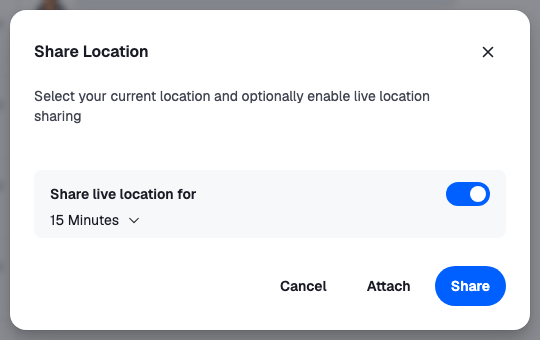
The user opens the attachment menu and picks Location. The Share Location dialog finds their position. They can share it as it is now, or turn on "Share live location for" and pick 15 minutes, 1 hour or 8 hours. Share sends the location as a message of its own. Attach adds it to the message they're writing instead; it shows above the input, and goes out with their text when they send.
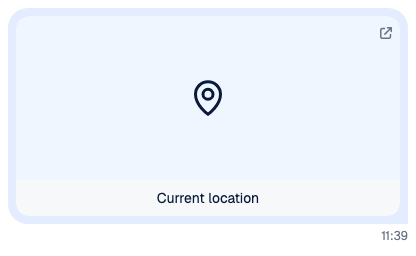
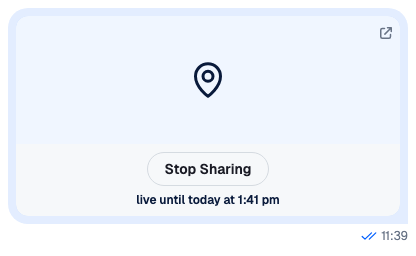
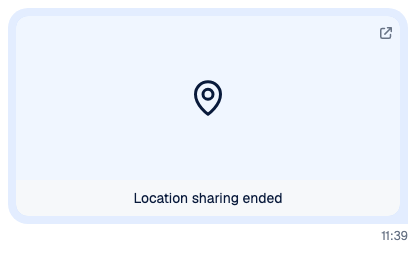
In the message list, a location shows as a card that opens the position in a map. A static location reads "Current location". A live one reads "Live until" and the end time, and the user's own has a Stop sharing button. When the time is up or they stop, it reads "Location sharing ended". While their live share runs, their app keeps sending their position, so the card stays current for everyone in the channel. In the channel list, a channel whose latest message is a location shows "Location" as its preview.
## How it works across the layers
- **State.** The composer's `locationComposer` holds the location being shared. A shared location is stored with its message as `message.shared_location`, not in `message.attachments`. `LiveLocationManager` keeps the user's live shares updated.
- **UI.** `AttachmentSelector` opens `ShareLocationDialog`. The composer shows an attached location above the input, and `Attachment` renders `message.shared_location` with `Geolocation`.
- **Layout.** Not involved.
### Sharing a location
1. `ShareLocationDialog` watches the browser's position with `navigator.geolocation` while it's open.
2. Attach and Share both call `LocationComposer.setData({ latitude, longitude, durationMs })`. `durationMs` is set for a live location only.
3. Share then calls `MessageComposer.sendLocation()`, which sends a message carrying only the location, through `Channel.sendSharedLocation()`. Attach leaves the location in the composer, and the next `MessageComposer.send()` puts it on the message.
4. When the share fails, `MessageComposer.sendLocation()` publishes an `api:location:create:failed` notification and throws. The dialog then publishes `api:location:share:failed` too, and stays open.
A live location is valid only for at least `location.minShareDurationMs`, one minute by default. Sharing works in channels only. [Message composer](https://getstream.io/chat/docs/sdk/react/v15/state/writing-messages/message-composer/#location) explains `locationComposer`.
### Keeping a live location current
`LiveLocationManager` sends new positions for every live location the user is sharing. The React SDK creates one with `useLiveLocationSharingManager`:
1. On start, the manager loads the user's active live locations with `client.getUserLiveLocations()`.
2. When the user starts a new live share, the `live_location_sharing.started` event adds it. Stopping it or deleting its message removes it.
3. While at least one share is active, the manager calls your `watchLocation` function. Each position it reports is sent to every active share with `client.updateLiveLocation()`, at most once every `liveLocationManager.minUpdateThrottleMs` (3 seconds by default).
4. Each share is dropped when its end time passes. Stop sharing on the card calls `Channel.stopLiveLocationSharing()`.
The other clients see the new position on the message's `message.updated` event, and the card re-renders.
## Turning it on or off
Location sharing is on by default. Two sides decide:
- **The client:** `messageComposer.location.enabled`, `true` by default.
- **The server:** the channel type's `shared_locations` setting.
To turn it off in every composer:
```ts
client.config.set({
messageComposer: { location: { enabled: false } },
});
```
The attachment menu offers Location only in channels, not in threads. [Configuration](https://getstream.io/chat/docs/sdk/react/v15/state/state-and-entities/configuration/#who-decides-what) lists every setting both sides decide.
### Live locations need the manager
Without a `LiveLocationManager`, live shares are created, but their position never changes. Call `useLiveLocationSharingManager` once, in a component that stays mounted while the user is signed in, and pass it how to watch the position:
```tsx
import type { StreamChat, WatchLocation } from "stream-chat";
import { useLiveLocationSharingManager } from "stream-chat-react";
// Declared once: a new function on every render would create a new manager.
const watchLocation: WatchLocation = (handler) => {
const watchId = navigator.geolocation.watchPosition((position) => {
handler({
latitude: position.coords.latitude,
longitude: position.coords.longitude,
});
});
return () => navigator.geolocation.clearWatch(watchId);
};
export const LiveLocationReporter = ({ client }: { client: StreamChat }) => {
useLiveLocationSharingManager({ client, watchLocation });
return null;
};
```
`watchLocation` receives a handler to call with each position, and returns a function that stops watching. To report less often, report on a timer instead, for example with `navigator.geolocation.getCurrentPosition()` every 30 seconds. The hook also takes `getDeviceId`, which sets the manager's `deviceId`; by default it's built from the browser and the user id. The device id stored on a new share comes from `messageComposer.location.getDeviceId` instead, a random id by default.
## Customizing
### Show a map in the dialog
The dialog has no map by default. Pass a `GeolocationMap` to it, and change the live durations with `shareDurations`, in milliseconds. This one uses [react-leaflet](https://react-leaflet.js.org/):
```tsx
import "leaflet/dist/leaflet.css";
import { MapContainer, Marker, TileLayer } from "react-leaflet";
import type {
ShareGeolocationMapProps,
ShareLocationDialogProps,
} from "stream-chat-react";
import { ShareLocationDialog } from "stream-chat-react";
const DialogMap = ({
geolocationPositionError,
latitude,
loadingLocation,
longitude,
restartLocationWatching,
}: ShareGeolocationMapProps) => {
if (loadingLocation) return
Finding your location…
;
if (geolocationPositionError || latitude == null || longitude == null) {
return (
Your location isn't available.
);
}
return (
);
};
const shareDurations = [5 * 60 * 1000, 30 * 60 * 1000, 2 * 60 * 60 * 1000];
export const ShareLocationDialogWithMap = (props: ShareLocationDialogProps) => (
);
```
Register it with ``. Durations shorter than one minute are left out.
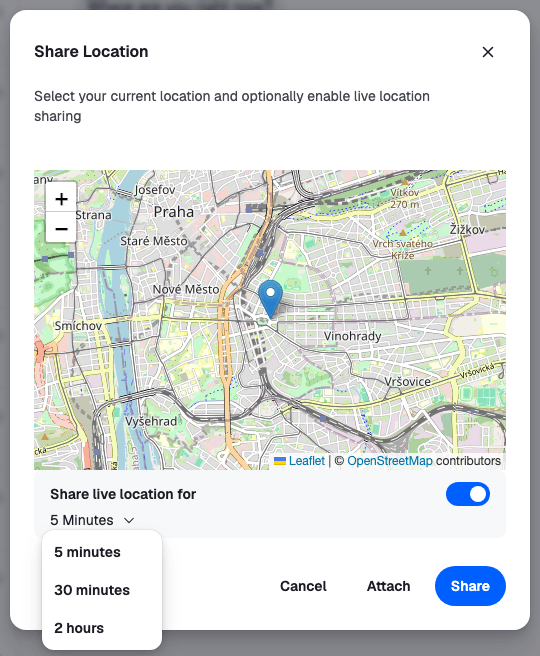
### Show a map in the message
`Geolocation` shows a placeholder that links to a map. Give it a `GeolocationMap`, which receives `latitude` and `longitude`, and pass it to `Attachment`:
```tsx
import { MapContainer, Marker, TileLayer } from "react-leaflet";
import type {
AttachmentProps,
GeolocationMapProps,
GeolocationProps,
} from "stream-chat-react";
import { Attachment, Geolocation } from "stream-chat-react";
const MessageMap = ({ latitude, longitude }: GeolocationMapProps) => (
);
const GeolocationWithMap = (props: GeolocationProps) => (
);
export const AttachmentWithMaps = (props: AttachmentProps) => (
);
```
Register it as the `Attachment` override. A live card re-renders with each new position, so the map follows. `Geolocation` also takes `GeolocationAttachmentMapPlaceholder`, the component shown when there's no map.
The location preview above the input has no override key. To change it, replace the whole composer UI, as the [Custom composer recipe](https://getstream.io/chat/docs/sdk/react/v15/recipes/composer/custom-composer/) does.
## Reference
- [Attachments](https://getstream.io/chat/docs/sdk/react/v15/component-reference/message/attachments/): the `Attachment` props, including `Geolocation`.
- [Attachment Selector](https://getstream.io/chat/docs/sdk/react/v15/component-reference/message-composer/attachment-selector/): the menu that opens the dialog.
- [Location hooks](https://getstream.io/chat/docs/sdk/react/v15/reference/hooks/location-hooks/): `useLiveLocationSharingManager`.
- [MessageComposer API](https://getstream.io/chat/docs/sdk/react/v15/reference/state/messagecomposer-api/): `locationComposer` and `sendLocation()`.
- [Configuration tree](https://getstream.io/chat/docs/sdk/react/v15/reference/state/configuration-tree/): `messageComposer.location` and `liveLocationManager`.
---
For the most recent version of this documentation, visit [https://getstream.io/chat/docs/sdk/react/v15/features/rich-content/location-sharing/](https://getstream.io/chat/docs/sdk/react/v15/features/rich-content/location-sharing/).