# Replies and threads
> **Info:** This is release candidate documentation for **Stream Chat React SDK v15**. For the latest stable version, see the [latest version (v14)](https://getstream.io/chat/docs/sdk/react/).
## What users get
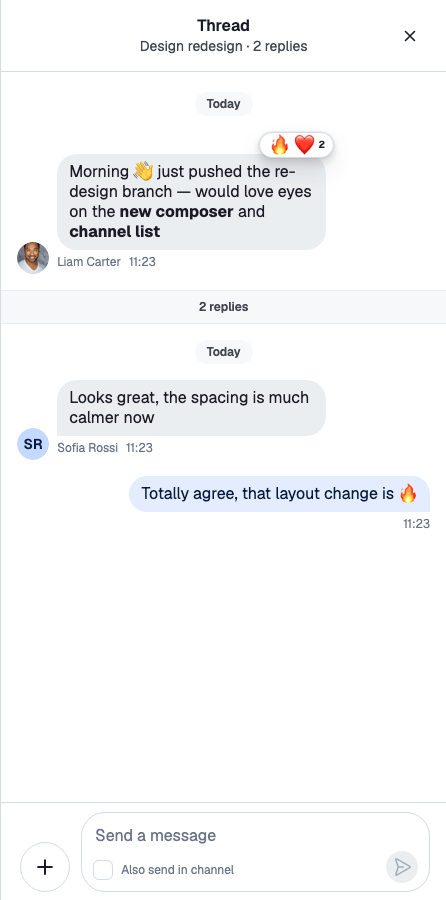
Any message can start a thread: a conversation of replies under it, shown in its own panel. Users also get a thread list with every thread they take part in, and can send a reply to the channel as well.
- **Starting and opening a thread.** The reply button on a message, or **Thread Reply** in its menu, opens the message's thread. A message with replies shows a reply count button with the avatars of the people who replied.
- **The thread panel.** The header shows "Thread", the channel's name and the number of replies, and who is typing. The parent message sits at the top, followed by a reply count divider, the replies and a composer.
- **Also sending to the channel.** The thread's composer has an "Also send in channel" checkbox ("Also send as a direct message" in a one-to-one channel). Such a reply shows "Also sent in channel · View" in the thread, and "Replied to a thread · View" in the channel. **View** jumps to the other copy.
- **The thread list.** A list of the user's threads, each with its parent message, latest reply and unread count. When threads that aren't in the list get new replies, a banner offers to reload it. With `ChatView`, the threads button shows the number of unread threads.
## How it works across the layers
### State: a thread and its replies
A thread is identified by its parent message: `thread.id` is the parent message's id. A reply is a message with a `parent_id`. With `show_in_channel: true`, it's also shown in the channel's message list.
There is one `Thread` instance per thread, shared by every component that shows it. `client.threads.ensure({ channel, parentMessage })` returns the existing instance or creates one, and `client.threads.get(id)` looks one up. A `Thread` holds what a channel holds, for its replies:
- `thread.state`: the parent message, the reply count, the participants, read state, and the flags `isLoading` and `isStateStale`;
- `thread.messagePaginator`: the replies;
- `thread.messageComposer`: the reply being written, with `showReplyInChannel` for the "Also send in channel" choice;
- `thread.messageOperations`: sending, editing and deleting replies. Requests go through the thread's channel, so a thread uses its channel's request handlers.
A thread created from its parent message knows only that message. It starts stale when the parent has replies or its channel isn't watched, and `Thread.reload()` loads its replies, participants and read state. See [Thread](https://getstream.io/chat/docs/sdk/react/v15/state/channels-and-threads/what-channels-and-threads-hold/#thread) for what a thread holds and how unread threads are counted.
### UI: the thread panel
`Thread` renders the thread passed as `thread`, and only its children. It gives the thread to the components inside it and loads the thread while its state is stale. Inside it:
- `ThreadHeader` shows the title, the reply count and who is typing, with back and close buttons.
- `MessageList` renders `thread.messagePaginator`, with the parent message on top (`ThreadHead`) and the reply count divider below it (`ThreadStart`).
- `MessageComposer` drives `thread.messageComposer` and shows the "Also send in channel" checkbox.
`Thread` renders nothing until it knows the parent message, and nothing when replies are turned off for the channel.
With `ChatView`, `ThreadSlot` renders the thread in its slot: a `Thread` for it, around its children. The reply button and the **Thread Reply** action call `openThread({ channel, message })` from `useWorkspaceNavigation()`, and `ChatView` puts the thread in a thread slot. The [Quick start](https://getstream.io/chat/docs/sdk/react/v15/getting-started/quick-start/#add-threads) builds this layout. Every way of opening a thread, and the **View** links of replies sent to the channel, are on [Moving between channels, threads and messages](https://getstream.io/chat/docs/sdk/react/v15/ui/layout/moving-between-channels-threads-and-messages/#opening-a-thread).
The thread's message list marks it read when the user reaches its latest reply; see [Read state, unread and receipts](https://getstream.io/chat/docs/sdk/react/v15/features/messaging/read-state-unread-and-receipts/).
### The thread list
The thread list is `client.threads`, the thread manager:
- `client.threads.paginator` holds the user's threads. Each page loads 25 threads, with up to 10 participants and the latest 10 replies of each.
- `client.threads.state` holds `unreadThreadCount`, `unseenThreadIds` and `isThreadOrderStale`.
`ThreadList` renders the paginator's threads, one `ThreadListItem` per thread, and loads the next page when the user scrolls to the end. When it mounts, it reloads the list. While the page is visible, it keeps the thread manager active. Each activation, such as coming back to the tab, reloads the list when it's stale or has unseen threads.
`Chat` starts the thread manager's event handling, so `unreadThreadCount` stays current even while no thread list is on screen.
#### Order
The list is in the order the server returns. The client doesn't sort it. A thread that gets a new reply updates its row in place, without moving.
#### New threads
When a thread gets a reply (`notification.thread_message_new`), the thread manager doesn't insert or move anything:
- If the thread is in the list, it sets `isThreadOrderStale`, because the server might now order the list differently.
- If it isn't, it adds the thread's id to `unseenThreadIds`. `ThreadListUnseenThreadsBanner` shows "N unread threads" while that list isn't empty.
Both start only once the first page has loaded.
#### Reloading the list
`client.threads.reload()` asks the server for the first page again, sized to the threads already loaded plus the unseen ones (up to one page), and replaces the list in server order. Then it clears `unseenThreadIds` and `isThreadOrderStale`.
- Without `force`, it reloads only when the list is empty, stale or has unseen threads. Clicking the banner calls it this way.
- `client.threads.reload({ force: true })` always reloads. `ThreadList` calls it when it mounts.
- After a reconnect, the thread manager reloads the list by itself, if it was ever activated.
The current threads stay on screen until the new page arrives. If the request fails, the list stays as it was and `client.threads.paginator.lastQueryError` holds the error.
## Turning it on or off
Replies are on by default. Two settings must both allow them:
- **On the client:** `channel.replies.enabled` in `client.config`.
- **On the server:** the channel type's `replies` setting, in the dashboard. When the server turns replies off, the client can't turn them on.
```ts
client.config.set({ channel: { replies: { enabled: false } } });
```
Check `channel.config.replies.enabled` for the value in effect. When it's `false`, `Thread` renders nothing.
The `send-reply` capability decides who can reply. Without it, the message actions leave out the reply button and **Thread Reply**. The actions check only the capability, so when you turn replies off on the client, remove the reply actions too; see [Actions](https://getstream.io/chat/docs/sdk/react/v15/ui/customizing/actions/#message-actions).
## Customizing
### Composing the thread panel
`Thread` and `ThreadSlot` render their children, so the panel is whatever you put inside: your own header, a `VirtualizedMessageList` instead of `MessageList`, or extra content. See [Thread UI](https://getstream.io/chat/docs/sdk/react/v15/ui/components/thread-ui/).
### Replacing the parent message area
`ThreadHead` renders the parent message, and `ThreadStart` the divider under it. Both are override keys. This divider names how many people replied:
```tsx
import type { ThreadState } from "stream-chat";
import {
useStateStore,
useThreadContext,
WithComponents,
} from "stream-chat-react";
const parentSelector = (state: ThreadState) => ({
participants: state.participants,
replyCount: state.replyCount,
});
const RepliesStart = () => {
const thread = useThreadContext();
const { participants, replyCount } =
useStateStore(thread?.state, parentSelector) ?? {};
if (!replyCount) return null;
return (
{replyCount} replies from {participants?.length ?? 0} people
);
};
export const App = () => (
{/* the rest of the app */}
);
```
### Replacing a thread list row
`ThreadListItemUI` renders one row of the thread list. A replacement reads its thread with `useThreadListItemContext()` and opens it with `openThread`:
```tsx
import type { ThreadState } from "stream-chat";
import {
useChatContext,
useStateStore,
useThreadListItemContext,
useWorkspaceNavigation,
WithComponents,
} from "stream-chat-react";
const rowSelector = (state: ThreadState) => ({
parentMessage: state.parentMessage,
read: state.read,
replyCount: state.replyCount,
});
const CompactThreadRow = () => {
const thread = useThreadListItemContext();
const { client } = useChatContext();
const { isThreadActive, openThread } = useWorkspaceNavigation();
const { parentMessage, read, replyCount } =
useStateStore(thread?.state, rowSelector) ?? {};
if (!thread || !parentMessage) return null;
const unreadCount = read?.[client.userID ?? ""]?.unreadMessageCount ?? 0;
return (
);
};
export const App = () => (
{/* the rest of the app */}
);
```
`ThreadListItem`, `ThreadListUnseenThreadsBanner`, `ThreadListEmptyPlaceholder` and `ThreadListLoadingIndicator` are override keys too.
### Threads without ChatView
Without a layout, `openThread` does nothing, so the reply button opens nothing. Provide your own navigation with `WorkspaceNavigationProvider`, keep the open thread in state, and render it with `Thread`:
```tsx
import { useMemo, useState } from "react";
import { Thread as StreamThread } from "stream-chat";
import type { Channel as StreamChannel } from "stream-chat";
import {
Channel,
defaultWorkspaceNavigation,
MessageComposer,
MessageList,
Thread,
ThreadHeader,
useChatContext,
WorkspaceNavigationProvider,
} from "stream-chat-react";
import type { WorkspaceNavigation } from "stream-chat-react";
export const ChannelWithThreads = ({ channel }: { channel: StreamChannel }) => {
const { client } = useChatContext();
const [thread, setThread] = useState();
const navigation = useMemo(
() => ({
...defaultWorkspaceNavigation,
closeThread: () => setThread(undefined),
isThreadActive: (threadId) => threadId === thread?.id,
isThreadDismissable: () => true,
openThread: (target) =>
setThread(
target instanceof StreamThread
? target
: client.threads.ensure({
channel: target.channel,
parentMessage: target.message,
}),
),
openThreads: thread ? [thread] : [],
}),
[client, thread],
);
return (
{thread && (
)}
);
};
```
`client.threads.ensure()` returns the one instance for the thread, so the list and the panel share it. The close button of `ThreadHeader` calls `closeThread`. See [Providing your own navigation](https://getstream.io/chat/docs/sdk/react/v15/ui/layout/navigation/#providing-your-own-navigation).
### Showing the unread thread count
`client.threads.state.unreadThreadCount` holds the number of threads with unread replies. Read it with `useStateStore`, as the example in [What's new in v15](https://getstream.io/chat/docs/sdk/react/v15/#state-lives-in-the-low-level-client) does.
## Reference
- State: [What channels and threads hold](https://getstream.io/chat/docs/sdk/react/v15/state/channels-and-threads/what-channels-and-threads-hold/), [Message paginators](https://getstream.io/chat/docs/sdk/react/v15/state/loading-data/message-paginators/) and [Thread and thread manager](https://getstream.io/chat/docs/sdk/react/v15/reference/state/thread-and-thread-manager/).
- UI: [Thread UI](https://getstream.io/chat/docs/sdk/react/v15/ui/components/thread-ui/), [Moving between channels, threads and messages](https://getstream.io/chat/docs/sdk/react/v15/ui/layout/moving-between-channels-threads-and-messages/) and [Workspace with ChatView](https://getstream.io/chat/docs/sdk/react/v15/ui/layout/workspace-with-chatview/).
- Props: [Thread](https://getstream.io/chat/docs/sdk/react/v15/component-reference/thread-list/thread/), [ThreadList](https://getstream.io/chat/docs/sdk/react/v15/component-reference/thread-list/threadlist/), [ThreadListItem](https://getstream.io/chat/docs/sdk/react/v15/component-reference/thread-list/threadlistitem/), [ThreadContext](https://getstream.io/chat/docs/sdk/react/v15/component-reference/thread-list/threadcontext/) and [ChatView components](https://getstream.io/chat/docs/sdk/react/v15/component-reference/layout/chatview-components/) for `ThreadSlot` and `ThreadListSlot`.
- Hooks: [Channel and thread hooks](https://getstream.io/chat/docs/sdk/react/v15/reference/hooks/channel-and-thread-hooks/).
---
For the most recent version of this documentation, visit [https://getstream.io/chat/docs/sdk/react/v15/features/messaging/replies-and-threads/](https://getstream.io/chat/docs/sdk/react/v15/features/messaging/replies-and-threads/).