# Thread UI
A thread is a message and its replies, shown in a panel of its own beside the channel. Use this page to know what `` provides to the components inside it, what the thread header shows, and which parts you can replace. The list of the user's threads is on [Thread list UI](https://getstream.io/chat/docs/sdk/react/ui/components/thread-list-ui/). The props are in the [Thread](https://getstream.io/chat/docs/sdk/react/component-reference/thread-list/thread/) reference.
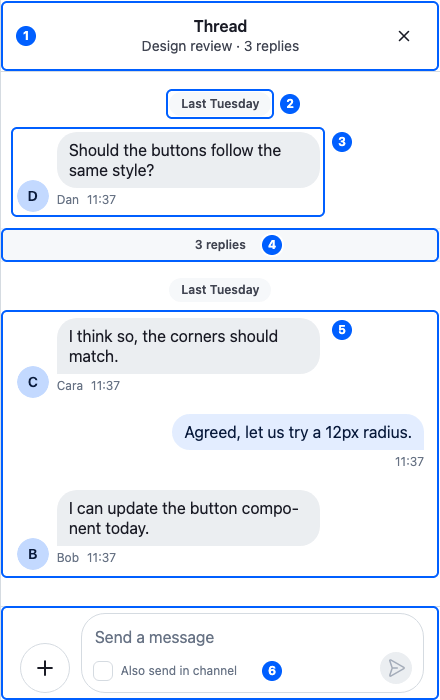
This is the default thread panel, for Dan's message in Design review, with three replies. Its parts:
| Part | Explained in |
| -------------------------------------------- | ------------------------------------------------------------------------------ |
| 1. The header | [The thread header](#the-thread-header) |
| 2. The parent message's date separator | [Separators](https://getstream.io/chat/docs/sdk/react/ui/components/message-list-ui/#separators) |
| 3. The parent message | [The Thread component](#the-thread-component) |
| 4. The reply count | [Replacing parts](#replacing-parts) |
| 5. The replies | [Message list UI](https://getstream.io/chat/docs/sdk/react/ui/components/message-list-ui/) |
| 6. The composer, with "Also send in channel" | [Message composer UI](https://getstream.io/chat/docs/sdk/react/ui/components/message-composer-ui/) |
## The Thread component
`` shows the thread passed as `thread`. Like ``, it renders no UI of its own, only a container around its children. Here is a `ThreadPanel` component that renders one thread:
```tsx title="src/ThreadPanel.tsx"
import type { Thread as StreamThread } from "stream-chat";
import {
MessageComposer,
MessageList,
Thread,
ThreadHeader,
} from "stream-chat-react";
export const ThreadPanel = ({ thread }: { thread: StreamThread }) => (
);
```
What `` does:
| `` | What it means for you |
| -------------------------------------------- | ------------------------------------------------------------------------------------------------------------------------------------------------------------- |
| provides the thread to the components inside | They retrieve it with `useThreadContext()`. `useChannel()` returns the thread's channel, so `` needs no `` around it. |
| connects them to the thread's controllers | `` renders the replies in `thread.messagePaginator`, and `` reads and writes the state of `thread.messageComposer`. |
| loads the thread while its state is stale | A thread created from its parent message starts stale when it may have replies to load. A thread from the thread list arrives loaded. |
| waits for the parent message | It renders nothing until the thread has its parent message, and nothing when replies are turned off for the channel (`replies.enabled` in its configuration). |
| provides its own audio players | Voice recordings and audio attachments in the thread stop playing when the thread closes. |
| renders the `.str-chat__thread` container | Style the panel through it. |
The parent message isn't a child you place. `` renders it above the replies, so it scrolls with them: its date separator, the message, and the reply count under it. [Separators](https://getstream.io/chat/docs/sdk/react/ui/components/message-list-ui/#separators) shows the date separator.
Get the thread from `client.threads`, not with `new Thread()`. `client.threads.ensure({ channel, parentMessage })` returns the thread for a message, creating it if needed, and `client.threads.get(id)` returns one the client already has. Either way the client keeps one instance per thread and sends it its events. [What channels and threads hold](https://getstream.io/chat/docs/sdk/react/state/channels-and-threads/what-channels-and-threads-hold/) explains the thread's state.
With ``, `` renders `` for the thread in its slot, as in [Add threads](https://getstream.io/chat/docs/sdk/react/getting-started/quick-start/#add-threads). Without ``, render `` yourself for the thread the user opens; see [Navigation](https://getstream.io/chat/docs/sdk/react/ui/layout/navigation/).
## The thread header
`` shows, from start to end:


The start area is empty in these images: the back button shows only when the thread is stacked over other content.
| Area | Shows | Prop |
| ----------- | ------------------------------------------------------------------------------------------------------------------------------------------------------------------------------------------------------------------------------- | -------------------------------------------------------------------------------------------------------------------------------------- |
| 1. Start | The back button, ``, only when the thread is stacked over other content in its panel | `StartContent` |
| 2. Title | "Thread" | |
| 3. Subtitle | The channel's title and the reply count, such as "Design review · 4 replies". A channel without a title shows the parent message author's name instead. While someone types in the thread, who is typing replaces the subtitle. | `overrideTitle`, which replaces the channel's title. It's named after the channel title it overrides, not the header's "Thread" title. |
| 4. End | The close button, ``, only when the thread's panel can be closed. It closes it with `useCloseThread()`. | `EndContent` |
Like the channel header's buttons, both buttons come from the layout, and neither renders without one. A component passed as `StartContent` or `EndContent` replaces the button; render the button inside it to keep it. The [Thread header recipe](https://getstream.io/chat/docs/sdk/react/ui-cookbooks/headers/thread-header/) builds a header of its own.
## Replacing parts
Register replacements with ``. [Overriding components](https://getstream.io/chat/docs/sdk/react/ui/components/overriding-components/) explains how overrides apply.
| Component to override (`` key) | Replaces |
| ----------------------------------------------- | -------------------------------------------------------------------------------------------------------------------- |
| `ThreadHead` | The parent message above the replies, with its date separator and reply count. Gets the parent message as `message`. |
| `ThreadStart` | The reply count under the parent message |
The default `ThreadHead` isn't exported, so a replacement for it can't render the default inside it.
`` and `` have no override key as we render them directly. Render other children in ``, and change `` through its props. Inside a thread, the message list and the composer take the same override keys as anywhere else; [Message list UI](https://getstream.io/chat/docs/sdk/react/ui/components/message-list-ui/#replacing-parts) and [Message composer UI](https://getstream.io/chat/docs/sdk/react/ui/components/message-composer-ui/#replacing-parts) list them.
## Used in
- [Replies and threads](https://getstream.io/chat/docs/sdk/react/features/messaging/replies-and-threads/)
- [Thread header](https://getstream.io/chat/docs/sdk/react/ui-cookbooks/headers/thread-header/)
---
For the most recent version of this documentation, visit [https://getstream.io/chat/docs/sdk/react/ui/components/thread-ui/](https://getstream.io/chat/docs/sdk/react/ui/components/thread-ui/).