# Message list UI
The message list is the scrolling part of a channel or a thread. It shows the messages and loads more as the user scrolls. Use this page to choose between the SDK's two message lists, to learn what they show besides the messages, such as separators and notifications, and to customize them. How one message is put together is on [Message UI](https://getstream.io/chat/docs/sdk/react/ui/components/message-ui/). The props are in the [MessageList](https://getstream.io/chat/docs/sdk/react/component-reference/message-list/messagelist/) and [VirtualizedMessageList](https://getstream.io/chat/docs/sdk/react/component-reference/message-list/virtualizedmessagelist/) references.
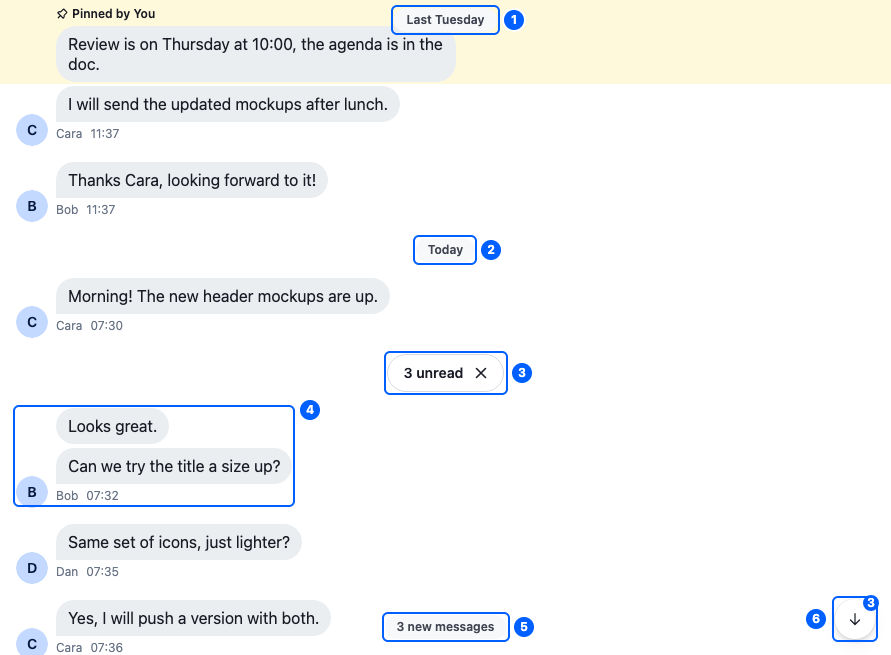
This is the default message list of a channel, scrolled up after three new messages arrived. Its parts:
| Part | Explained in |
| ------------------------------------------- | ------------------------------------------------- |
| 1. The floating date separator | [Separators](#separators) |
| 2. A date separator | [Separators](#separators) |
| 3. The unread messages separator | [Separators](#separators) |
| 4. A message group: Bob's messages in a row | [Message grouping](#message-grouping) |
| 5. The new message notification | [Floating notifications](#floating-notifications) |
| 6. The scroll-to-latest button | [Floating notifications](#floating-notifications) |
The typing indicator isn't in the image: it shows only while the list is scrolled to the bottom, and the notification and the button only while it isn't.
## MessageList and VirtualizedMessageList
Both lists show the channel's messages, or a thread's replies when rendered inside a ``. They differ in what they put in the page:
| | `` | `` |
| ---------------------------------------------- | --------------------------------------------------------- | -------------------------------------------------------------- |
| Renders | every message of the [active interval](#loading-messages) | only the messages near the visible area, with `react-virtuoso` |
| Suits | most channels and threads | very long histories, or a lot of traffic, such as a livestream |
| Date separators, grouping and typing indicator | on by default | off by default |
Other differences, such as in the floating notifications and jumps, are in [Differences between the lists](#differences-between-the-lists).
## Loading messages
The list shows the messages that `channel.messagePaginator` or `thread.messagePaginator` loaded. It shows one [interval](https://getstream.io/chat/docs/sdk/react/state/loading-data/message-paginators/#intervals-after-a-jump) at a time, the active one: usually the latest messages, or those around a message the user jumped to.
- Scrolling to the top loads older messages, and scrolling to the bottom of an older interval loads newer ones.
- At the latest message, with the page visible, the list marks the channel or thread read. [Read state, unread and receipts](https://getstream.io/chat/docs/sdk/react/features/messaging/read-state-unread-and-receipts/) covers the exceptions.
## Separators
Separators mark a point in the conversation. The list renders four kinds:
| Separator | Component | Marks | Hidden by |
| ------------------------------ | ------------------------------------------------------------------------------------------------------------------------ | ----------------------------------------------------------------------------------------------------------------------------------- | ------------------------------------------------------------------------------------------------------------------ |
| Date separator | `` | where a day starts | `withDateSeparator={false}`. It defaults to `true` in `` and `false` in ``. |
| Floating date separator | `` | the date of the messages at the top | `withDateSeparator={false}` |
| Thread parent's date separator | `` | the date of the parent message, above a thread's replies | nothing |
| Unread messages separator | `` in the list, and `` floating at the top while it's out of view | the first unread message in a channel: "5 unread" in the list, and "↑ 5 unread" floating, which jumps to it. Not shown in a thread. | the user clicking the ✕ on either, which also marks the channel read |
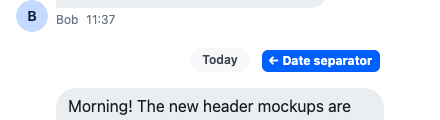
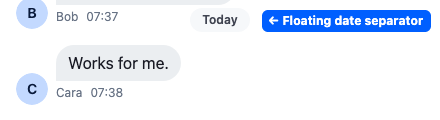
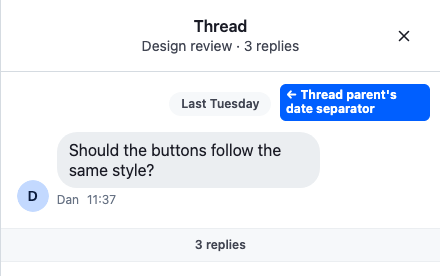
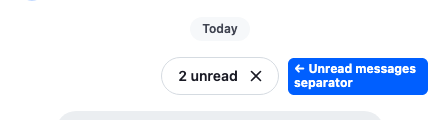
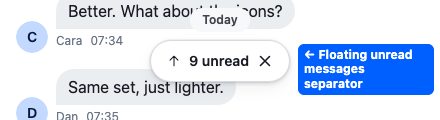
Before the first unread message, the list can also add a date separator, even within the same day. `hideNewMessageSeparator` removes it.
To replace a separator, register your own component under the key `DateSeparator`, `UnreadMessagesSeparator` or `UnreadMessagesNotification` in ``. The `DateSeparator` override also replaces the date above a thread's parent message.
The floating date separator shows while the user scrolls, and hides a second after the scrolling stops. It appears only once the date separator of the day at the top has scrolled out of view, so the same date is never shown twice. The lists find the date separators on screen by their `str-chat__date-separator` class and read each one's date from its `data-date` attribute, to decide when the floating one shows. A `DateSeparator` replacement keeps both, and adds the `str-chat__date-separator--floating` class when it gets `floating`, as the [DateSeparator](https://getstream.io/chat/docs/sdk/react/component-reference/message/dateseparator/) reference shows. While a date separator sits where the floating one is drawn, the floating one stays hidden, so it never covers it.
To change how a date separator writes its date, pass a `formatDate` function to `` or ``, which takes the `Date` and returns the text to show, such as "Mon, 12 May". It applies to the date separators between messages in ``, and in both lists to the one above a thread's parent message. It doesn't apply to the floating one, or to those between messages in ``. [Localization](https://getstream.io/chat/docs/sdk/react/features/app-experience/localization/) covers date formats.
The unread messages separator keeps its place after opening the channel marks it read, so the user still sees where the new messages start. The paginator keeps that place in its unread snapshot. It goes away when the user catches up at the latest message, or clicks its ✕. [Live view and unread](https://getstream.io/chat/docs/sdk/react/state/loading-data/message-paginators/#live-view-and-unread) on Message paginators explains the snapshot.
## Message grouping
Messages a sender posts one after another form a group: their avatar and name show once, and the bubbles sit closer together. A group also ends:
- at a date separator, so each day starts a new group;
- at a system or error message;
- at a message with attachments, which always stands alone;
- before a message with reactions, which starts a new group;
- after an edited message.
Grouping is on by default in `` and off in ``. The `groupByUser` prop of either list turns it on or off.
Each message gets its place in its group: `top`, `middle`, `bottom` or `single`. The [message UI](https://getstream.io/chat/docs/sdk/react/ui/components/message-ui/) styles the message from it.
Both lists take two props to change it:
- `maxTimeBetweenGroupedMessages` also starts a new group when two messages are further apart than this, in milliseconds. It isn't set by default.
- `getGroupStyles` replaces the function that decides each message's place in its group. It receives one object with the message and its neighbors.
Here is a `getGroupStyles` function that keeps the default grouping, but shows pinned messages on their own:
```tsx
import { getGroupStyles, isLocalMessage, MessageList } from "stream-chat-react";
// Pinned messages stand alone; every other message is grouped as by default.
const pinnedStandAlone: typeof getGroupStyles = (params) =>
isLocalMessage(params.message) && params.message.pinned
? "single"
: getGroupStyles(params);
export const ChannelMessages = () => (
);
```
## Floating notifications
Three elements float over the list to tell the user there is more to see:
| Element | Shows | When | Clicking it | Component to override (`` key) |
| ---------------------------------- | --------------------------------------------------------------------------------------------------- | ----------------------------------------------------------------------- | ---------------------------------------------------------------- | ----------------------------------------------- |
| Floating unread messages separator | "↑ 5 unread", at the top of a channel's list; see [Separators](#separators). Not shown in a thread. | while the first unread message is above the visible area, or not loaded | jumps to the first unread message. Its ✕ marks the channel read. | `UnreadMessagesNotification` |
| Scroll-to-latest button | an arrow, with a badge | while the list isn't at the latest message | scrolls to the bottom, or loads the latest messages first | `ScrollToLatestMessageButton` |
| New message notification | "3 new messages", or "New Messages!" | while the user is scrolled up and someone else's message arrives | nothing: it's a status label, read out by screen readers | `NewMessageNotification` |

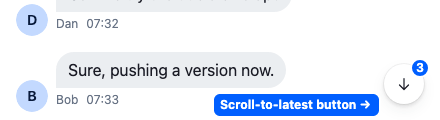
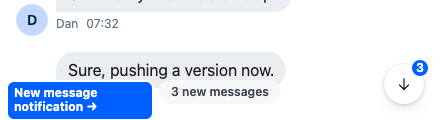
- **The floating unread messages separator** also shows while the first unread message is below the visible area, with `showUnreadNotificationAlways`.
- **The scroll-to-latest badge** counts different things in a channel and in a thread. In a channel, it's the user's unread count, `channel.state.read[userId].unread_messages`, so it includes messages from before the user opened the channel, and drops to 0 once the channel is read. In a thread, it's the replies posted while the user was scrolled up.
- **The new message notification** counts the unread messages from the unread snapshot. Without them, it says "New Messages!".
## Jumps on screen
A jump moves the list to one message, such as a quoted message, a search result, a pinned message, or the first unread one. [Moving between channels, threads and messages](https://getstream.io/chat/docs/sdk/react/ui/layout/moving-between-channels-threads-and-messages/) lists every place in the UI that starts a jump.
On a jump, the list:
1. shows the messages around the target, loading them first if needed, with the target in the middle;
2. highlights the target with the `str-chat__message--highlighted` class. `` removes it after 3 seconds in view (the jump's `focusSignalTtlMs`). `` doesn't remove it: it stays until the next jump;
3. shows the scroll-to-latest button if the target isn't among the latest messages.
How the paginator jumps is on [Message paginators](https://getstream.io/chat/docs/sdk/react/state/loading-data/message-paginators/).
## Scrolling
Both lists follow new messages: they scroll down when the user sends a message, or when someone else does while the user is at the bottom. They don't follow while the user reads older messages after a jump.
| Prop | Lists | What it does |
| ------------------------------ | --------------------------- | ----------------------------------------------------------------------------------- |
| `suppressAutoscroll` | both | Turns following new messages off. |
| `scrolledUpThreshold` | `` | How far from the bottom, in pixels, counts as scrolled up. 200 by default. |
| `stickToBottomScrollBehavior` | `` | How the list scrolls when it follows the user's own message: `'smooth'` by default. |
| `scrollToLatestMessageOnFocus` | `` | Scrolls to the latest message when the page gets focus. Off by default. |
## Differences between the lists
The sections above describe each part. This table puts side by side how the parts differ between the two lists, in a channel and in a thread:
| | `` in a channel | `` in a thread | `` in a channel | `` in a thread |
| --------------------------------------------------------------------------------------------------- | ---------------------------------------------------------------------------- | --------------------------------------------- | ---------------------------------------------------- | ---------------------------------------------------------------- |
| Parent message above the list | no | yes | no | yes |
| [Date separators](#separators) | on | on, and the parent message has one of its own | off | off, but the parent message has one of its own |
| [Grouping](#message-grouping) | on | on | off | off |
| [Unread messages separator](#separators), in the list and floating | yes | no | yes | no |
| [Scroll-to-latest badge](#floating-notifications) counts | the user's unread messages | replies posted while scrolled up | the user's unread messages | replies posted while scrolled up |
| [Highlight after a jump](#jumps-on-screen) | removed after 3 s | removed after 3 s | stays until the next jump | stays until the next jump |
| Typing indicator | built in | built in, for typing in the thread | only with a `TypingIndicator` override | only with a `TypingIndicator` override, for typing in the thread |
| Empty state | `EmptyStateIndicator` | nothing | `EmptyStateIndicator` | `EmptyStateIndicator`, which draws nothing by default |
| Loading indicator | while older messages load | while older messages load | while any messages load | while any messages load |
| [Read and delivered marks](https://getstream.io/chat/docs/sdk/react/features/messaging/read-state-unread-and-receipts/) | on the user's last message, or on every own message with `returnAllReadData` | none: only "sending" shows | as in `` | none: only "sending" shows |
| Giphy preview before sending | in the list | in the list | in the list, or after it with `separateGiphyPreview` | in the list, or after it with `separateGiphyPreview` |
Two differences need a sentence more:
- **The floating unread messages separator** decides when to show in a different way. `` watches where the separator in the list is. `` renders only part of the list, so it compares the dates of the messages on screen with the user's last read.
- **Marking read** in `` also waits until the last message is fully visible.
## Changing what the list renders
| To… | Prop | Lists |
| ----------------------------------------------------------------------------------------------- | ------------------------ | --------------------------- |
| leave deleted messages out | `hideDeletedMessages` | both |
| change, replace or add items after the list has built them, for example a separator of your own | `reviewProcessedMessage` | both |
| render the items yourself | `renderMessages` | `` |
| render each item yourself | `customMessageRenderer` | `` |
## Replacing parts
Register replacements with ``. [Overriding components](https://getstream.io/chat/docs/sdk/react/ui/components/overriding-components/) explains how overrides apply.
| Component to override (`` key) | Replaces |
| ------------------------------------------------------------------------------------- | ------------------------------------------------------------------------------------------------------------------------------------------------------------------------------------------------------------------------------------------------------- |
| `DateSeparator` | The date and new messages separators, the floating one and the date above a thread's parent message included |
| `UnreadMessagesSeparator` | The unread messages separator in the list |
| `UnreadMessagesNotification`, `ScrollToLatestMessageButton`, `NewMessageNotification` | The [floating notifications](#floating-notifications) |
| `TypingIndicator` | The typing indicator |
| `EmptyStateIndicator` | What an empty list shows |
| `LoadingIndicator` | The spinner at the top of the list while messages load: older messages in ``, any messages in `` |
| `ThreadHead`, `ThreadStart` | The parent message above a thread's replies, and the reply count under it |
| `MessageListWrapper`, `MessageListItem` | The `ul` around the messages and the `li` around each, in ``. They get `MessageListWrapperProps` and `MessageListItemProps`; spread them onto the element, because jump-to-message and scroll restoration find items by `data-message-id` |
The keys for a message and its parts, `MessageUI` and `VirtualMessage` included, are on [Message UI](https://getstream.io/chat/docs/sdk/react/ui/components/message-ui/#replacing-parts).
The default `ThreadHead` isn't exported, so a replacement for it can't render the default inside it.
## Used in
- [Reactions](https://getstream.io/chat/docs/sdk/react/features/messaging/reactions/)
- [Pinned messages](https://getstream.io/chat/docs/sdk/react/features/messaging/pinned-messages/)
- [Read state, unread and receipts](https://getstream.io/chat/docs/sdk/react/features/messaging/read-state-unread-and-receipts/)
---
For the most recent version of this documentation, visit [https://getstream.io/chat/docs/sdk/react/ui/components/message-list-ui/](https://getstream.io/chat/docs/sdk/react/ui/components/message-list-ui/).