# Threads view
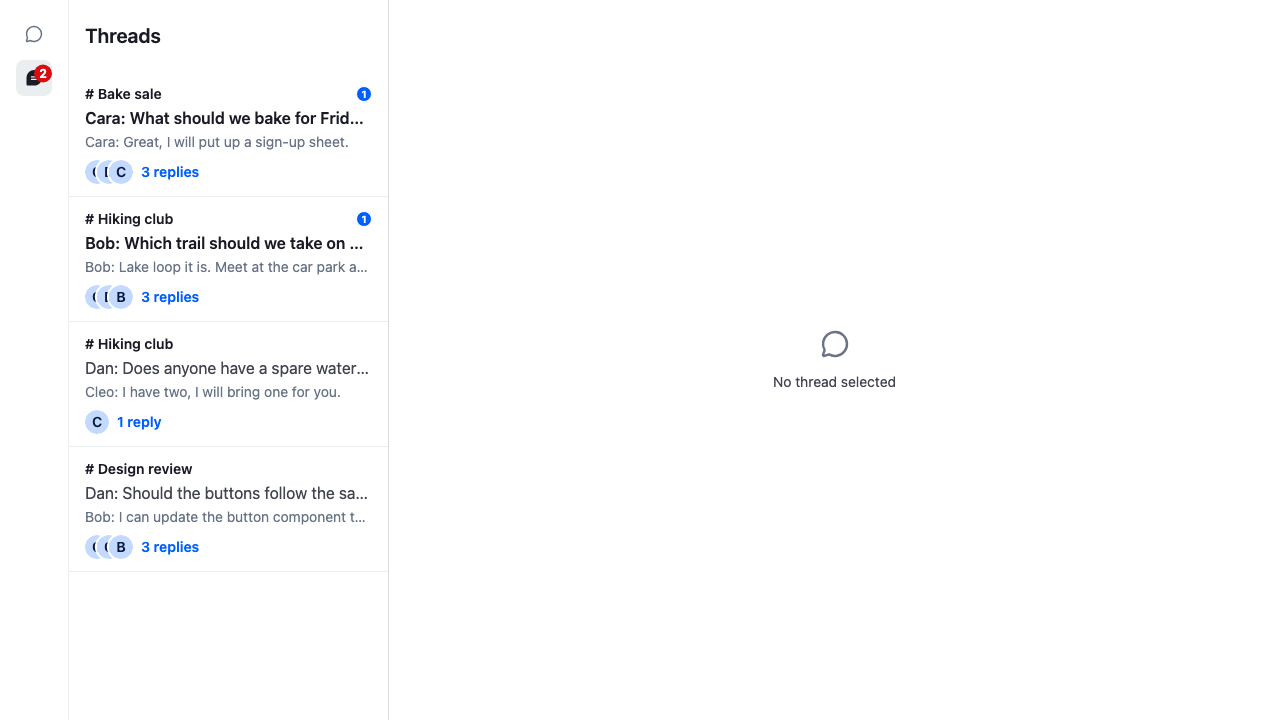
Many chat apps have a Threads view: every thread the user takes part in, in one list, in the place of the channel list. This recipe adds that view to the base app.
>
> **Note:** **What you'll build**
>
> - A rail to switch between Channels and Threads
> - Thread rows with the first message, latest reply and reply count
> - Unread badges on threads with new replies
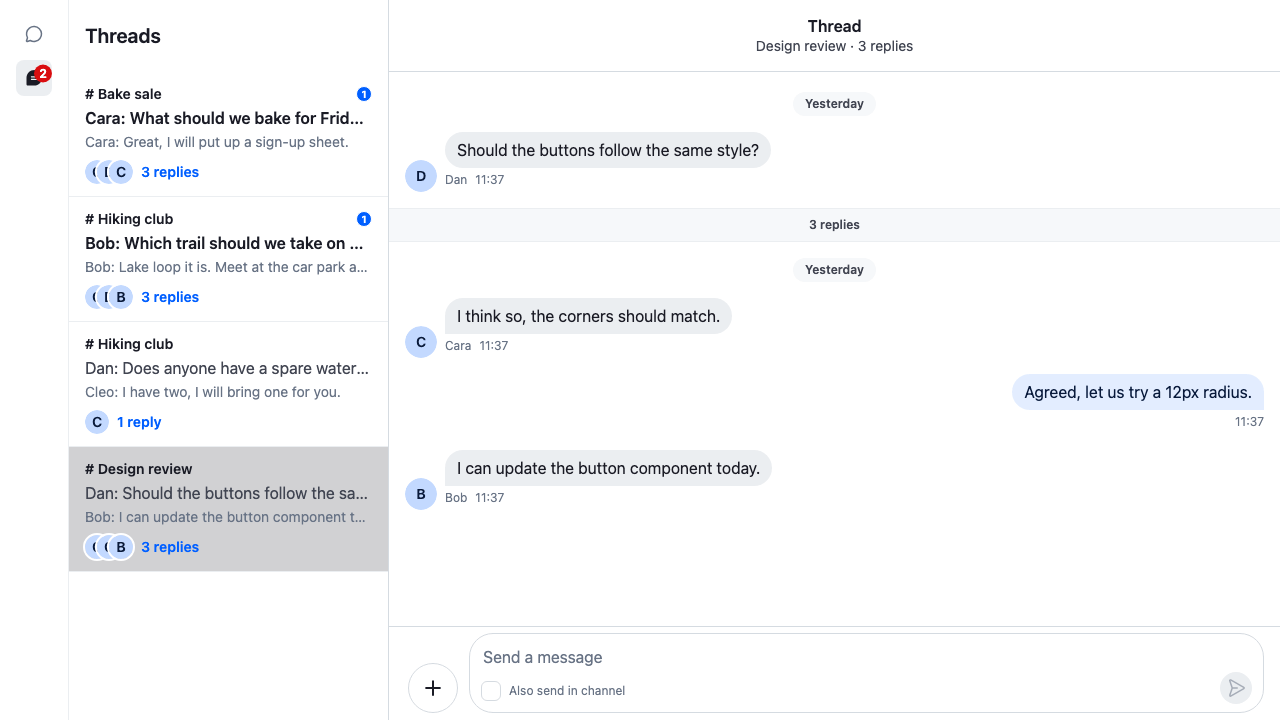
> - The picked thread opened beside the list
>
---
**Preview**
---
**Approach:** Compose and Replace one part. [Choosing where to start](https://getstream.io/chat/docs/sdk/react/ui-cookbooks/overview/#choosing-where-to-start) explains the approaches.
**Starts from:** [the base app](https://getstream.io/chat/docs/sdk/react/ui-cookbooks/overview/#the-base-app). The page shows only what the recipe adds: the threads view, its row, and the changes to the base app's `ChatView`.
## Best practices
- Render `ThreadList` once, in the threads view. Each `ThreadList` reloads `client.threads` when it mounts and deactivates it when it unmounts, so a second list would switch off the first one's live updates.
- Replace the row through the `ThreadListItemUI` override key and keep `ThreadListItem`, which gives each row its thread through `useThreadListItemContext()`.
- Keep the row a `button` with `role="option"`, `aria-selected` and `data-thread-id`. `ThreadList` is a listbox, and its arrow-key navigation finds rows by those attributes.
- Read the unread count from the thread, not the channel: `thread.state.read[userId].unreadMessageCount`. Replies don't count toward the channel's unread count.
- Keep the row light. The list is virtualized, so rows mount and unmount as the user scrolls.
## A threads view
### The row
`ThreadRow` reads the row's thread with `useThreadListItemContext()` and two of its stores with `useStateStore`: `thread.state` for the channel, the parent message, the participants, the reply count and the read state, and `thread.messagePaginator.aggregateState` for the latest reply. Unread threads get a badge with the number of unread replies, and a parent message in bold.
```tsx label="React" title="src/ThreadRow.tsx"
import { useCallback, useEffect } from "react";
import type { MessagePaginatorAggregateState, ThreadState } from "stream-chat";
import type { ThreadListItemUIProps } from "stream-chat-react";
import {
AvatarStack,
Badge,
useChannelPreviewInfo,
useChatContext,
useStateStore,
useThreadListItemContext,
useWorkspaceNavigation,
} from "stream-chat-react";
import "./ThreadRow.css";
const latestReplySelector = ({
latestMessage,
}: MessagePaginatorAggregateState) => ({
latestReply: latestMessage,
});
/**
* One row of the thread list: the channel, the message that started the thread, its latest reply,
* who takes part, and how many replies the user hasn't read.
*/
export const ThreadRow = ({ resetHighlighting }: ThreadListItemUIProps) => {
const { client } = useChatContext();
// ThreadListItem always provides the row's thread.
const thread = useThreadListItemContext()!;
const { isThreadActive, openThread } = useWorkspaceNavigation();
const threadSelector = useCallback(
(state: ThreadState) => ({
channel: state.channel,
parentMessage: state.parentMessage,
participants: state.participants,
replyCount: state.replyCount,
unreadCount: state.read[client.userId ?? ""]?.unreadMessageCount ?? 0,
}),
[client],
);
const { channel, parentMessage, participants, replyCount, unreadCount } =
useStateStore(thread.state, threadSelector);
const { latestReply } = useStateStore(
thread.messagePaginator.aggregateState,
latestReplySelector,
);
const { displayTitle } = useChannelPreviewInfo({ channel });
const participantInfo = (participants ?? []).map(({ user }) => ({
id: user?.id,
imageUrl: user?.image,
userName: user?.name ?? user?.id,
}));
const isActive = isThreadActive(thread.id);
// A thread that a reload just brought into the list is highlighted for two seconds.
useEffect(() => {
if (!resetHighlighting) return;
const timeout = setTimeout(resetHighlighting, 2000);
return () => clearTimeout(timeout);
}, [resetHighlighting]);
const className = [
"cookbook-thread-row",
unreadCount > 0 && "cookbook-thread-row--unread",
resetHighlighting && "cookbook-thread-row--new",
]
.filter(Boolean)
.join(" ");
return (
// role, aria-selected and data-thread-id: what ThreadList's arrow-key navigation looks for.
);
};
```
```css label="CSS" title="src/ThreadRow.css"
@layer stream-overrides {
.cookbook-thread-row {
display: flex;
flex-direction: column;
gap: var(--str-chat__spacing-xxs);
width: 100%;
padding: var(--str-chat__spacing-sm) var(--str-chat__spacing-md);
border: 0;
border-bottom: 1px solid var(--str-chat__border-core-subtle);
background: none;
color: var(--str-chat__text-secondary);
font: var(--str-chat__font-body-default);
text-align: start;
cursor: pointer;
}
.cookbook-thread-row:hover {
background: var(--str-chat__background-utility-hover);
}
.cookbook-thread-row[aria-selected="true"] {
background: var(--str-chat__background-utility-selected);
}
.cookbook-thread-row--new {
background: var(--str-chat__background-core-highlight);
}
.cookbook-thread-row__header {
display: flex;
align-items: center;
justify-content: space-between;
gap: var(--str-chat__spacing-xs);
}
.cookbook-thread-row__channel {
color: var(--str-chat__text-primary);
font: var(--str-chat__font-caption-emphasis);
}
.cookbook-thread-row--unread .cookbook-thread-row__parent {
color: var(--str-chat__text-primary);
font: var(--str-chat__font-body-emphasis);
}
.cookbook-thread-row__parent,
.cookbook-thread-row__latest-reply {
overflow: hidden;
text-overflow: ellipsis;
white-space: nowrap;
}
.cookbook-thread-row__latest-reply {
color: var(--str-chat__text-tertiary);
font: var(--str-chat__font-caption-default);
}
.cookbook-thread-row__author {
margin-inline-end: var(--str-chat__spacing-xxs);
font-weight: inherit;
}
.cookbook-thread-row__author::after {
content: ":";
}
.cookbook-thread-row__footer {
display: flex;
align-items: center;
gap: var(--str-chat__spacing-xs);
margin-block-start: var(--str-chat__spacing-xxs);
color: var(--str-chat__text-link);
font: var(--str-chat__font-caption-emphasis);
}
}
```
### The view
`ThreadsView` is the view's content: the `ThreadList` with `ThreadRow` registered for the `ThreadListItemUI` key, and a `ThreadSlot` for the thread the user picks. Until the user picks one, the slot renders its `fallback`, the SDK's `ChatViewEmptyPlaceholder`, which says "No thread selected" in this view. `ActiveThread` is the same as in the base app's channels view: it tells the open thread it's on screen, so its new replies are marked read.
```tsx label="React" title="src/ThreadsView.tsx"
import {
MessageComposer,
MessageList,
ThreadHeader,
ThreadList,
useThreadContext,
WithComponents,
} from "stream-chat-react";
import {
ChatViewEmptyPlaceholder,
ThreadSlot,
useActiveThread,
} from "stream-chat-react/slot-layout";
import { ThreadRow } from "./ThreadRow";
import "./ThreadsView.css";
// Declared once, so WithComponents gets the same object on every render.
const overrides = { ThreadListItemUI: ThreadRow };
// Marks the open thread as on screen, so its new replies are marked read.
const ActiveThread = () => {
const thread = useThreadContext();
useActiveThread({ activeThread: thread });
return null;
};
/** The user's threads in place of the channel list, and the one picked beside them. */
export const ThreadsView = () => (
<>
} slot="thread">
);
```
```css label="CSS" title="src/ThreadsView.css"
@layer stream-overrides {
/* As wide as the channel list it replaces. */
.str-chat {
--str-chat__thread-list-width: 320px;
}
}
```
### Adding the view to ChatView
In the base app, give `ChatView` a threads layout and the threads view, and render `ChatView.Selector` as its child. `Workspace` takes the place of the base app's `ChatView` in `App`. This block is base-app setup: `ChannelsView` is [the base app](https://getstream.io/chat/docs/sdk/react/ui-cookbooks/overview/#the-base-app)'s channels view, moved unchanged into a file of its own, and `SIDE_PANEL_SLOT` comes from its side panel. The cookbook app adds the view through its recipe config instead, so this file isn't in the recipe's folder:
```tsx title="src/App.tsx"
import { ChatView } from "stream-chat-react/slot-layout";
import type { LayoutDescriptor } from "stream-chat-react/slot-layout";
// The base app's ChannelsView, unchanged, in a file of its own.
import { ChannelsView } from "./ChannelsView";
import { SIDE_PANEL_SLOT } from "./SidePanel";
import { ThreadsView } from "./ThreadsView";
// The channels layout from the base app, and a threads layout with one slot
// for the picked thread.
const layouts: LayoutDescriptor[] = [
{ id: "channels", slots: ["channel", "thread", SIDE_PANEL_SLOT] },
{ id: "threads", slots: ["thread"] },
];
// Replaces the base app's ChatView, inside Chat and SidePanelProvider.
export const Workspace = () => (
, threads: }}
>
);
```
`ChatView` renders only the active view's content, and its children in every view. `ChatView.Selector` is a column of buttons, Channels and Threads, before the view, so the user can switch from either one. The Threads button shows `client.threads.state.unreadThreadCount`, the number of threads with unread replies.
The user picks a thread in the list, and it opens beside it:
---
**A thread open beside the list**
---
## How it works
>
> **Info:** **Example**
>
> The user clicks the Threads button, then the Design review thread:
>
> 1. `ChatView.Selector` calls `setActiveView("threads")`. `ChatView` renders the threads view's content in place of the channels view's. Each view keeps its own slots, so the channel and thread open in the channels view are still there when the user switches back.
> 2. `ThreadList` mounts and calls `client.threads.reload({ force: true })`. The thread manager queries the user's threads, 25 at a time, and the list renders a `ThreadListItem` for each, with `ThreadRow` inside.
> 3. Each row subscribes to its thread's state. The server sends the threads with unread replies first, then the rest by their latest reply.
> 4. The click calls `openThread(thread)` from `useWorkspaceNavigation()`. `ChatView` binds the thread to the threads view's only slot, `thread`, and `ThreadSlot` renders it. `isThreadActive(thread.id)` is now true for that row, so it's marked selected.
> 5. `ActiveThread` activates the thread while the window is visible and focused. The thread marks itself read, and its row's unread count and the Threads button's count go down.
>
While the list is on screen, `ThreadList` keeps `client.threads` active. A new reply in a listed thread updates its row in place without moving it. A reply in a thread that isn't in the list shows the "unread threads" banner above the rows, and clicking it reloads the list. [The user's threads](https://getstream.io/chat/docs/sdk/react/state/channels-and-threads/what-channels-and-threads-hold/#the-users-threads) explains how the list loads and stays current.
`unreadCount` comes from the thread's own read state. A thread counts every reply from someone else as unread until the user reads the thread; [Read state in threads](https://getstream.io/chat/docs/sdk/react/state/channels-and-threads/read-state-and-unread-counts/#read-state-in-threads) lists what changes it.
## Related
- [The user's threads](https://getstream.io/chat/docs/sdk/react/state/channels-and-threads/what-channels-and-threads-hold/#the-users-threads): how the thread list loads and stays current.
- [ThreadList](https://getstream.io/chat/docs/sdk/react/component-reference/thread-list/threadlist/) and [ThreadListItem](https://getstream.io/chat/docs/sdk/react/component-reference/thread-list/threadlistitem/): the props and override keys, and the default row.
- [Thread list UI](https://getstream.io/chat/docs/sdk/react/ui/components/thread-list-ui/): the thread list, the unseen threads banner, and [what each item shows](https://getstream.io/chat/docs/sdk/react/ui/components/thread-list-ui/#thread-list-items).
- [Workspace with ChatView](https://getstream.io/chat/docs/sdk/react/ui/layout/workspace-with-chatview/#views-and-slots): views, layouts and slots.
- [Read state and unread counts](https://getstream.io/chat/docs/sdk/react/state/channels-and-threads/read-state-and-unread-counts/#read-state-in-threads): a thread's read state and `unreadThreadCount`.
- [Channel and thread side by side](https://getstream.io/chat/docs/sdk/react/ui-cookbooks/layout/channel-and-thread-side-by-side/): a threads view with the default rows, and a thread beside the channel.
- [Thread header](https://getstream.io/chat/docs/sdk/react/ui-cookbooks/headers/thread-header/): a header of your own for the opened thread.
---
For the most recent version of this documentation, visit [https://getstream.io/chat/docs/sdk/react/ui-cookbooks/panels/threads-view/](https://getstream.io/chat/docs/sdk/react/ui-cookbooks/panels/threads-view/).