# Editing a poll
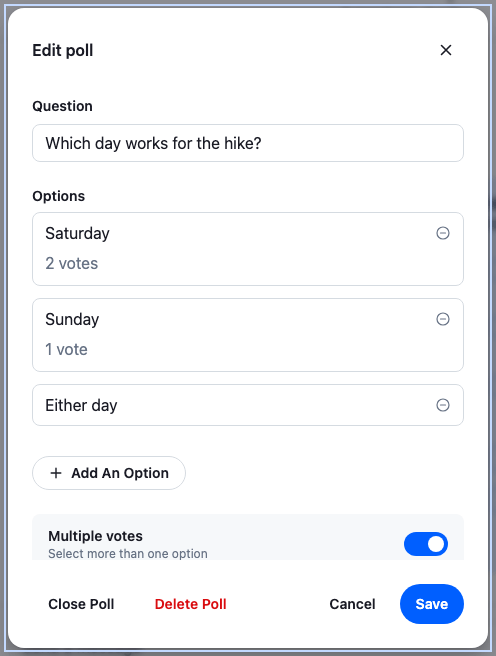
A poll can't be edited from the SDK's UI: the poll creation dialog only creates, and no message action opens a poll again. This recipe adds a way to edit the user's own polls.
>
> **Note:** **What you'll build**
>
> - An Edit poll item on the user's own open polls
> - An edit dialog filled from the poll
> - Saving without overwriting other people's changes
> - Closing and deleting the poll
>
---
**Preview**
---
**Approach:** Replace one part and Change behaviour in the state layer. [Choosing where to start](https://getstream.io/chat/docs/sdk/react/ui-cookbooks/overview/#choosing-where-to-start) explains the approaches.
**Starts from:** [the base app](https://getstream.io/chat/docs/sdk/react/ui-cookbooks/overview/#the-base-app). The page shows only what the recipe adds.
## Best practices
- Edit only the user's own polls, and only while they're open. That's this recipe's rule: editing another user's poll wasn't tested. A closed poll takes no more votes, so there is little left to edit.
- Send only what the user changed. `Poll.partialUpdate()` changes the fields it names and leaves the rest alone; `Poll.update()` replaces the whole poll.
- Don't write `poll.state` yourself. Every poll request makes the server send `poll.updated`, and the client applies it to every message that shows the poll.
- Rename freely, but ask before removing an option that has votes. A renamed option keeps its votes; a deleted one takes its votes with it.
- Ask before deleting. A deleted poll can't be brought back, and its votes go with it.
## An Edit poll action
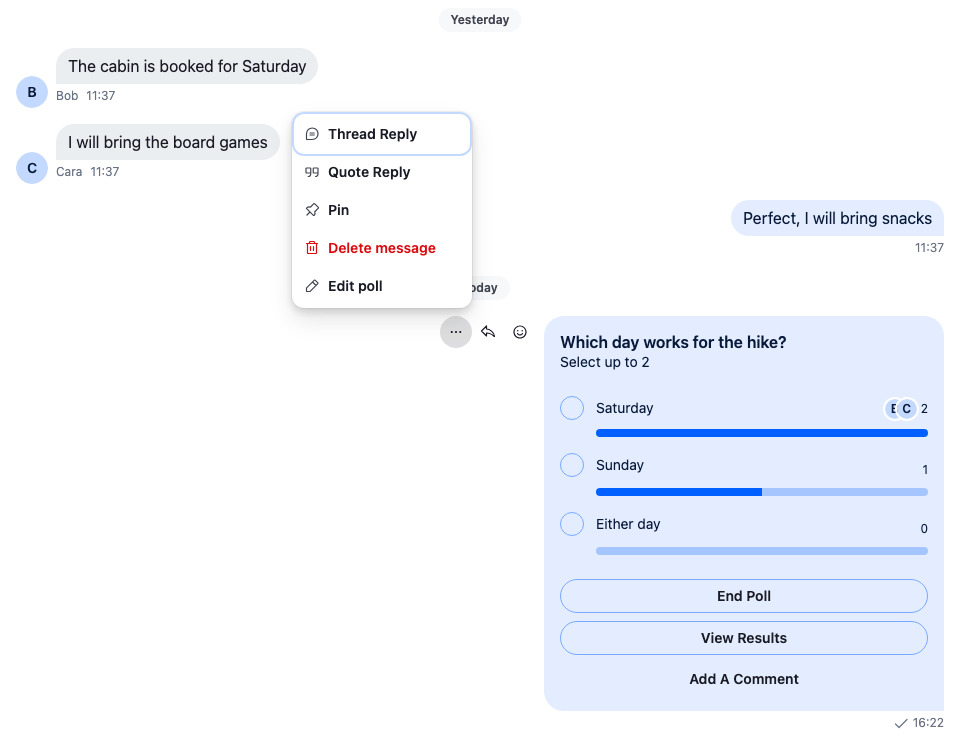
The action is a menu item added to `defaultMessageActionSet`, as in [Custom message actions](https://getstream.io/chat/docs/sdk/react/ui-cookbooks/message-actions/custom-message-actions/). It reads the message's poll from `client.polls`, the client's cache of polls, by `message.poll_id`, and renders nothing unless `poll.state.created_by_id` is the user and `poll.state.is_closed` is false.
The menu closes, and its items unmount, before the dialog opens. So the dialog lives in `WithEditPoll`, above the message lists, and the item only tells it which poll to open, through a context:
```tsx title="src/EditPollAction.tsx"
import { createContext, useContext, useState } from "react";
import type { PropsWithChildren } from "react";
import type { Poll, PollState } from "stream-chat";
import type { MessageActionSetItem } from "stream-chat-react";
import {
ContextMenuButton,
defaultMessageActionSet,
MessageActions,
useChannel,
useChatContext,
useComponentContextIcons,
useContextMenuContext,
useMessageContext,
useStateStore,
useThreadContext,
WithComponents,
} from "stream-chat-react";
import { EditPollDialog } from "./EditPollDialog";
import type { EditPollTarget } from "./EditPollDialog";
// The menu closes, and its items unmount, before the dialog opens, so the dialog lives above the
// message list and the action only says which poll to open it for.
const OpenEditPollContext = createContext<(target: EditPollTarget) => void>(
() => undefined,
);
const pollSelector = ({ created_by_id, is_closed }: PollState) => ({
created_by_id,
is_closed,
});
/** Only on a poll the user created, while it's open. */
const useEditablePoll = (): Poll | undefined => {
const { client } = useChatContext();
const { message } = useMessageContext();
const poll = message.poll_id
? client.polls.fromState(message.poll_id)
: undefined;
const state = useStateStore(poll?.state, pollSelector);
const isEditable =
!!state && !state.is_closed && state.created_by_id === client.userId;
return isEditable ? poll : undefined;
};
const EditPollActionItem = () => {
const { IconEdit } = useComponentContextIcons();
const { closeMenu } = useContextMenuContext();
const { message } = useMessageContext();
const channel = useChannel();
const thread = useThreadContext();
const openEditPoll = useContext(OpenEditPollContext);
const poll = useEditablePoll();
if (!poll) return null;
return (
{
closeMenu();
openEditPoll({
// Not `handleDelete` from `MessageContext`: it reports a failure as a notification and
// resolves, so the dialog couldn't tell. `messageOperations.delete()` rejects instead.
deleteMessage: () =>
(thread ?? channel).messageOperations.delete({
localMessage: message,
}),
poll,
});
}}
>
Edit poll
);
};
// Declared once: the base filter recomputes whenever it gets a new list.
const messageActionSet: MessageActionSetItem[] = [
...defaultMessageActionSet,
{ Component: EditPollActionItem, placement: "dropdown", type: "editPoll" },
];
const MessageActionsWithEditPoll = () => (
);
const overrides = { MessageActions: MessageActionsWithEditPoll };
/** Adds Edit poll to the message actions, and renders the one dialog it opens. */
export const WithEditPoll = ({ children }: PropsWithChildren) => {
const [target, setTarget] = useState();
return (
{children} setTarget(undefined)} target={target} />
);
};
```
Wrap the app inside `Chat` in `WithEditPoll`. Above `ChatView`, it applies in channels and threads alike. This block is base-app setup: it's [the base app](https://getstream.io/chat/docs/sdk/react/ui-cookbooks/overview/#the-base-app)'s `App` with the wrapper added. The cookbook app adds the wrapper through its recipe config instead, so this file isn't in the recipe's folder:
```tsx title="src/App.tsx"
import type { StreamChat } from "stream-chat";
import { Chat } from "stream-chat-react";
import { ChatView } from "stream-chat-react/slot-layout";
import { WithEditPoll } from "./EditPollAction";
export const App = ({ client }: { client: StreamChat }) => (
{/* your views */}
);
```
The [Polls API](https://getstream.io/chat/docs/javascript/polls-api/#permissions) lists app permissions for polls: `UpdatePoll`, `ClosePoll` and `DeletePoll`. It doesn't say whether the default roles may change only their own polls or anyone's, and no channel capability names them, so `useChannelCapabilities()` can't tell. The recipe's rule is to edit only the user's own polls: it offers Edit poll only to the poll's creator, as the SDK does for its End Poll action. Editing another user's poll wasn't tested. Check what your app's roles grant, and expect a request to fail for a user without the permission: the dialog then stays open with an error.
The item goes last in the menu of the user's own poll message:
---
**Edit poll in the menu**
---
The default Edit message action doesn't show on a message with a poll: the `edit` item's `isVisible` hides it on a message with `poll_id`. If you add your own way to edit such a message's text, the edit keeps `message.poll_id`, because the composer's poll middleware skips edits.
## A dialog filled from the poll
The SDK's `PollCreationDialog` can't be reused for editing. Its fields read and write the composer's `PollComposer`, which starts from an empty poll (`PollComposer.initState()`) and has no way to start from an existing one. So the dialog keeps its own form state, filled from `poll.state` when it opens.
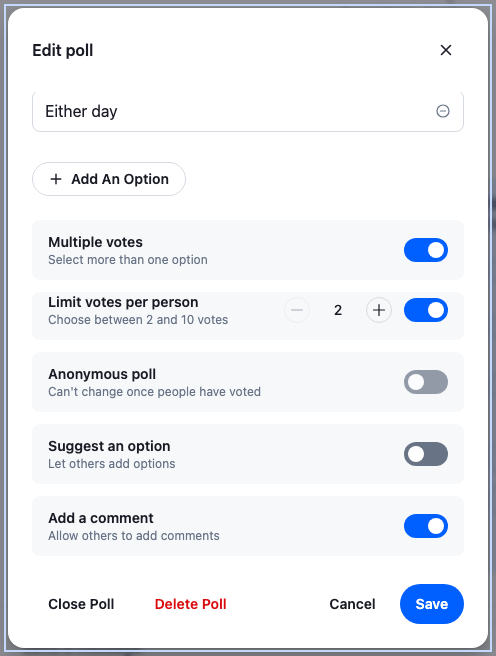
It reuses the SDK's form parts that don't need a composer: `TextInput`, `TextInputFieldSet`, `SwitchField`, `SwitchFieldLabel` and `NumericInput`, inside a `Prompt` in a `GlobalModal`. The `str-chat__poll-creation-dialog` class gives it the size and spacing of the creation dialog. The settings are the creation dialog's: multiple votes, a vote limit per person, anonymous voting, suggested options and comments:
```tsx label="React" title="src/EditPollDialog.tsx"
import { useId, useState } from "react";
import type { Poll, PollState } from "stream-chat";
import {
Button,
GlobalModal,
NumericInput,
Prompt,
SwitchField,
SwitchFieldLabel,
TextInput,
TextInputFieldSet,
useComponentContextIcons,
useStateStore,
} from "stream-chat-react";
import {
hasErrors,
pollFormFromState,
restoreOptions,
savePollForm,
validatePollForm,
} from "./pollForm";
import type {
ConfirmedVoteLoss,
PollForm,
PollFormOption,
PollOption,
} from "./pollForm";
import "./EditPollDialog.css";
export type EditPollTarget = {
/** Deletes the message that carries the poll; rejects when the request fails. */
deleteMessage: () => Promise;
poll: Poll;
};
const votesSelector = ({ vote_count, vote_counts_by_option }: PollState) => ({
vote_count,
vote_counts_by_option,
});
const votesLabel = (votes: number) =>
`${votes} ${votes === 1 ? "vote" : "votes"}`;
/** Why Save sent nothing: these options got votes after the user removed them. */
const newVotesNotice = (options: PollOption[]) => {
const names = options.map(({ text }) => `"${text}"`).join(", ");
const [pronoun, isBack] =
options.length === 1 ? ["it", "it's back"] : ["them", "they're back"];
return `${names} got votes after you removed ${pronoun}, so ${isBack}. Nothing was saved yet: press Save again to keep your other changes.`;
};
let newOptionCount = 0;
const newOption = (): PollFormOption => ({
key: `new-${++newOptionCount}`,
text: "",
});
type EditPollFormProps = { onClose: () => void; target: EditPollTarget };
const EditPollForm = ({
onClose,
target: { deleteMessage, poll },
}: EditPollFormProps) => {
const { IconMinusCircle, IconPlus } = useComponentContextIcons();
// The poll as it was when the dialog opened: the form starts from it, and Save sends only what
// differs from it.
const [saved] = useState(() => poll.data);
const [form, setForm] = useState(() => pollFormFromState(saved));
const [showErrors, setShowErrors] = useState(false);
const [isBusy, setIsBusy] = useState(false);
const [alertText, setAlertText] = useState();
const [isConfirmingDelete, setIsConfirmingDelete] = useState(false);
// The row whose removal waits for the user to confirm that its votes go with it.
const [confirmingRemovalKey, setConfirmingRemovalKey] = useState();
const [confirmedVoteLoss, setConfirmedVoteLoss] = useState(
{},
);
// Set once `Poll.delete()` succeeded, so trying again deletes only the message.
const [isPollDeleted, setIsPollDeleted] = useState(false);
// Live, so the counts and the removal confirmation follow votes cast while the dialog is open.
const { vote_count, vote_counts_by_option } = useStateStore(
poll.state,
votesSelector,
);
// A row whose votes dropped to zero needs no confirmation any more, so its prompt is dropped
// for good rather than coming back with the next vote.
const confirmingOption = form.options.find(
(option: PollFormOption) => option.key === confirmingRemovalKey,
);
if (
confirmingRemovalKey &&
!(confirmingOption?.id && vote_counts_by_option[confirmingOption.id])
) {
setConfirmingRemovalKey(undefined);
}
const id = useId();
const errors = validatePollForm(form);
const maxVotesError = showErrors && !!errors.max_votes_allowed;
const update = (changes: Partial) =>
setForm((prev: PollForm) => ({ ...prev, ...changes }));
const updateOption = (key: string, text: string) =>
update({
options: form.options.map((option: PollFormOption) =>
option.key === key ? { ...option, text } : option,
),
});
const removeOption = (key: string) =>
update({
options: form.options.filter(
(option: PollFormOption) => option.key !== key,
),
});
/** Removes a row with votes once the user confirmed, and notes the votes they agreed to delete. */
const confirmRemoval = (option: PollFormOption, votes: number) => {
const { id } = option;
if (id)
setConfirmedVoteLoss((prev: ConfirmedVoteLoss) => ({
...prev,
[id]: votes,
}));
setConfirmingRemovalKey(undefined);
removeOption(option.key);
};
/**
* Runs the requests, then closes the dialog. A notice the requests return, or a failure, keeps
* it open and says so.
*/
const run = async (
requests: () => Promise,
failure: string,
) => {
setIsBusy(true);
setAlertText(undefined);
try {
const notice = await requests();
if (!notice) {
onClose();
return;
}
setAlertText(notice);
} catch {
setAlertText(failure);
}
setIsBusy(false);
};
const save = () => {
if (hasErrors(errors)) {
setShowErrors(true);
return;
}
void run(async () => {
const { optionsWithNewVotes } = await savePollForm(
poll,
saved,
form,
confirmedVoteLoss,
);
if (!optionsWithNewVotes.length) return;
setForm((prev: PollForm) =>
restoreOptions(prev, saved, optionsWithNewVotes),
);
return newVotesNotice(optionsWithNewVotes);
}, "Not every change was saved. Close the dialog and open it again to see the poll as it is now.");
};
/**
* The poll first: if that fails, nothing has changed. Then its message, which would otherwise go
* on showing the deleted poll.
*/
const deletePollAndMessage = () =>
run(async () => {
if (!isPollDeleted) {
try {
await poll.delete();
} catch {
return "The poll could not be deleted. Nothing has changed.";
}
setIsPollDeleted(true);
}
try {
await deleteMessage();
} catch {
return "The poll was deleted, but its message could not be. Press Delete to try again.";
}
}, "The poll could not be deleted.");
return (
{alertText && (
{alertText}
)}
{isConfirmingDelete ? (
Delete the poll, its votes and its message?
setIsConfirmingDelete(false)}
>
Keep
) : (
void run(async () => {
await poll.close();
}, "The poll could not be closed.")
}
>
Close poll
Cancel
Save
)}
);
};
type EditPollDialogProps = { onClose: () => void; target?: EditPollTarget };
/** A dialog filled from `target.poll`; a new form starts each time it opens. */
export const EditPollDialog = ({ onClose, target }: EditPollDialogProps) => (
{target && (
)}
);
```
```css label="CSS" title="src/EditPollDialog.css"
@layer stream-overrides {
.cookbook-edit-poll__add-option {
align-self: flex-start;
}
.cookbook-edit-poll__footer {
display: flex;
flex-wrap: wrap;
align-items: center;
justify-content: space-between;
gap: var(--str-chat__spacing-sm);
width: 100%;
}
.cookbook-edit-poll__poll-actions {
display: flex;
gap: var(--str-chat__spacing-xs);
}
.cookbook-edit-poll__confirm {
margin: 0;
color: var(--str-chat__text-primary);
font: var(--str-chat__font-body-emphasis);
}
.cookbook-edit-poll__remove-confirm {
display: flex;
align-items: center;
gap: var(--str-chat__spacing-xs);
padding-top: var(--str-chat__spacing-xs);
}
.cookbook-edit-poll__remove-confirm-text {
flex: 1;
margin: 0;
color: var(--str-chat__text-primary);
font: var(--str-chat__font-caption-emphasis);
}
.cookbook-edit-poll__error {
margin: 0;
color: var(--str-chat__accent-error);
font: var(--str-chat__font-caption-default);
}
}
```
The settings sit below the options; the body scrolls:
---
**The poll settings**
---
The dialog reads `poll.data`, the current value of `poll.state`, once, into `saved`. The form starts from it, and Save compares the form with it. The vote counts are read live with `useStateStore`, so each row's count, and the confirmation for removing it, follow votes that arrive while the dialog is open. The user may already have removed an option by then, so Save checks the votes again, below.
## Saving the changes
The poll has two ways to change its fields:
- `Poll.update()` sends the whole poll. Any field the request leaves out is removed or set back to its default, so the dialog would have to send every field, including `poll.state.description` and custom data it doesn't show. Each of its options needs an `id`, which a new option doesn't have yet.
- `Poll.partialUpdate({ set, unset })` changes the fields in `set` and removes the fields in `unset`. Everything else stays as it is.
The recipe uses `Poll.partialUpdate()` for the question and the settings, and the option requests for the options: `Poll.deleteOption()` for a removed option, `Poll.updateOption()` for a renamed one, and `Poll.createOption()` for a new one. It sends only what differs from `saved`, so a change someone else made while the dialog was open isn't overwritten:
```ts title="src/pollForm.ts"
import type { PartialPollUpdate, Poll, PollState } from "stream-chat";
/** One option row. `id` is the option's id on the server; a row the user added has none yet. */
export type PollFormOption = { id?: string; key: string; text: string };
/** What the dialog edits, named as in the poll. */
export type PollForm = {
allow_answers: boolean;
allow_user_suggested_options: boolean;
enforce_unique_vote: boolean;
/** Whether a multiple-vote poll limits the votes per user to `max_votes_allowed`. */
limitVotes: boolean;
/** The vote limit per user, as typed. */
max_votes_allowed: string;
name: string;
options: PollFormOption[];
voting_visibility: "anonymous" | "public";
};
export type PollFormErrors = {
max_votes_allowed?: string;
name?: string;
/** Keyed by `PollFormOption.key`. */
options: Record;
};
export const pollFormFromState = (state: PollState): PollForm => ({
allow_answers: state.allow_answers,
allow_user_suggested_options: state.allow_user_suggested_options,
enforce_unique_vote: state.enforce_unique_vote,
limitVotes: !!state.max_votes_allowed,
max_votes_allowed: state.max_votes_allowed
? String(state.max_votes_allowed)
: "",
name: state.name,
options: state.options.map(({ id, text }) => ({ id, key: id, text })),
voting_visibility: state.voting_visibility,
});
export const validatePollForm = (form: PollForm): PollFormErrors => {
const errors: PollFormErrors = { options: {} };
if (!form.name.trim()) errors.name = "Question is required";
const seen = new Set();
for (const option of form.options) {
const text = option.text.trim();
// An empty new row is left out on save; an existing option needs its text.
if (!text) {
if (option.id) errors.options[option.key] = "Option is empty";
continue;
}
if (seen.has(text.toLowerCase()))
errors.options[option.key] = "Option already exists";
seen.add(text.toLowerCase());
}
const maxVotes = Number(form.max_votes_allowed);
if (
!form.enforce_unique_vote &&
form.limitVotes &&
!(Number.isInteger(maxVotes) && maxVotes >= 2 && maxVotes <= 10)
) {
errors.max_votes_allowed = "Type a number from 2 to 10";
}
return errors;
};
export const hasErrors = (errors: PollFormErrors) =>
!!errors.name ||
!!errors.max_votes_allowed ||
Object.keys(errors.options).length > 0;
/** An option as the poll holds it. */
export type PollOption = PollState["options"][number];
/**
* For each option the user removed while it had votes, the vote count the confirmation showed:
* the votes the user agreed to delete with it. Keyed by option id.
*/
export type ConfirmedVoteLoss = Record;
/**
* The options the form removes that have more votes now than the user agreed to delete: any vote
* for an option removed while it had none, or more than the confirmation showed. It reads
* `poll.state` when it's called, so it sees a vote that arrived after the user removed the row.
*/
export const removedOptionsWithNewVotes = (
poll: Poll,
saved: PollState,
form: PollForm,
confirmedVoteLoss: ConfirmedVoteLoss,
): PollOption[] => {
const { vote_counts_by_option } = poll.state.getLatestValue();
return saved.options.filter(({ id }) => {
const isRemoved = !form.options.some((row) => row.id === id);
const votesNow = vote_counts_by_option[id] ?? 0;
return isRemoved && votesNow > (confirmedVoteLoss[id] ?? 0);
});
};
/** The form with the removed `options` back in the place they had when the dialog opened. */
export const restoreOptions = (
form: PollForm,
saved: PollState,
options: PollOption[],
): PollForm => {
const rows = [...form.options];
for (const option of options) {
const index = Math.min(saved.options.indexOf(option), rows.length);
rows.splice(index, 0, { id: option.id, key: option.id, text: option.text });
}
return { ...form, options: rows };
};
/** The vote limit to store: none for a single-vote poll or without a limit. */
const maxVotesOf = (form: PollForm) =>
form.enforce_unique_vote || !form.limitVotes
? undefined
: Number(form.max_votes_allowed);
/**
* Sends only what the user changed since the dialog opened (`saved`, the poll's state then), so a
* change someone else made meanwhile isn't overwritten. The settings go in one
* `Poll.partialUpdate()`; each option goes through its own request. None of these requests
* updates `poll.state`: each one makes the server send `poll.updated`, and the client applies it.
*
* Deleting an option deletes its votes, so it sends nothing while the form removes an option that
* has more votes now than the user agreed to delete, and returns those options instead. Renaming
* an option keeps its votes.
*/
export const savePollForm = async (
poll: Poll,
saved: PollState,
form: PollForm,
confirmedVoteLoss: ConfirmedVoteLoss,
): Promise<{ optionsWithNewVotes: PollOption[] }> => {
const optionsWithNewVotes = removedOptionsWithNewVotes(
poll,
saved,
form,
confirmedVoteLoss,
);
if (optionsWithNewVotes.length) return { optionsWithNewVotes };
const before = pollFormFromState(saved);
const after = { ...form, name: form.name.trim() };
const set: NonNullable = {};
const unset: NonNullable = [];
if (after.name !== before.name) set.name = after.name;
if (after.allow_answers !== before.allow_answers)
set.allow_answers = after.allow_answers;
if (
after.allow_user_suggested_options !== before.allow_user_suggested_options
) {
set.allow_user_suggested_options = after.allow_user_suggested_options;
}
if (after.enforce_unique_vote !== before.enforce_unique_vote) {
set.enforce_unique_vote = after.enforce_unique_vote;
}
if (after.voting_visibility !== before.voting_visibility) {
set.voting_visibility = after.voting_visibility;
}
const maxVotes = maxVotesOf(after);
if (maxVotes !== maxVotesOf(before)) {
if (maxVotes === undefined) unset.push("max_votes_allowed");
else set.max_votes_allowed = maxVotes;
}
if (Object.keys(set).length || unset.length)
await poll.partialUpdate({ set, unset });
for (const option of saved.options) {
if (!form.options.some(({ id }) => id === option.id))
await poll.deleteOption(option.id);
}
for (const { id, text } of form.options) {
const trimmed = text.trim();
const savedOption = saved.options.find((option) => option.id === id);
// `Poll.updateOption()` replaces the whole option, so its custom data goes along.
if (savedOption && trimmed !== savedOption.text) {
await poll.updateOption({
custom: savedOption.custom,
id: savedOption.id,
text: trimmed,
});
}
if (!id && trimmed) await poll.createOption({ text: trimmed });
}
return { optionsWithNewVotes: [] };
};
```
`Poll.updateOption()` replaces the option, so the recipe passes its `custom` data along with the new text. Turning the vote limit off removes `max_votes_allowed` with `unset`, and so does turning multiple votes off: a single-vote poll has no limit.
None of these methods writes `poll.state`. Each request makes the server send `poll.updated` with the whole poll, and the client's poll cache passes it to `poll.state`. Every message that shows the poll re-renders from there, on this device and on everyone else's. If one request fails, the ones before it are already saved, so the dialog stays open and says so.
Before it sends anything, `savePollForm()` reads `poll.state` again, with `removedOptionsWithNewVotes()`. Renaming keeps the votes, so it looks only at removed options. A removed option counts when it has more votes now than the user agreed to delete, which includes any vote for an option removed while it had none. If any option counts, the save sends nothing and returns those options. The dialog puts them back where they were, with `restoreOptions()`, and says which ones got votes; the user's other changes stay in the form, and Save sends them. A vote that arrives while the requests are on their way isn't caught: the check runs once, at the start of the save.
## Options that already have votes
The [Polls API](https://getstream.io/chat/docs/javascript/polls-api/#adding-updating-and-deleting-poll-options) lets you add, update and delete options after the poll is created, but doesn't say what happens to their votes. These changes were tested on a Stream app with polls turned on, as the poll's creator:
- Renaming an option that has a vote worked, and the vote stayed with the option. So the option rows stay editable whatever their votes; each row with votes says how many it has, from `poll.state.vote_counts_by_option`, which holds the counts by option id.
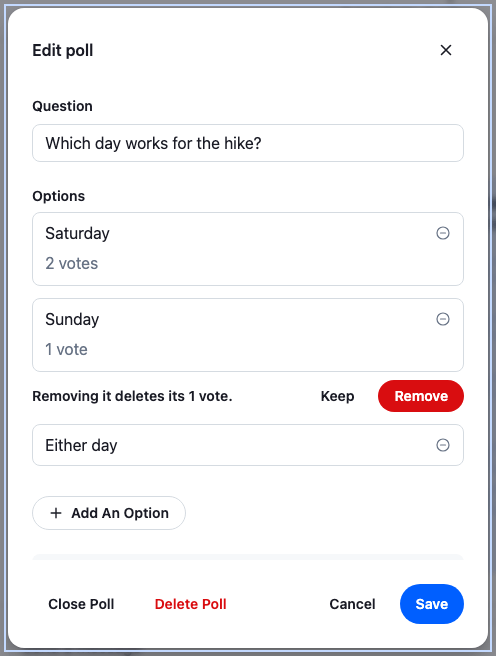
- Deleting an option that has a vote worked, and its votes were deleted with it. So the recipe still lets the user remove such an option, but its remove button asks first: "Removing it deletes its 1 vote." Only Remove takes the row out of the form; nothing is deleted until Save.
- Lowering `max_votes_allowed` to 1 worked, on a poll with one vote. The test called the API directly: the recipe's form accepts 2 to 10, so the user can't set 1 there. What happens to votes already cast above a new, lower limit wasn't tested. The recipe leaves them as they are and doesn't remove any itself. Turning `enforce_unique_vote` on while someone has several votes wasn't tested either.
---
**Confirming a voted option's removal**
---
Anonymous poll can't be changed once `poll.state.vote_count` is above zero. Turning it off would show who cast votes that were made anonymously.
## Closing and deleting the poll
The SDK's `Button` capitalizes every word of its label, so the dialog shows the buttons as Close Poll, Delete Poll and Add An Option. Close Poll calls `Poll.close()`. It's optimistic: `poll.state.is_closed` turns true at once, and goes back if the request fails. The poll stops taking votes, and the Edit poll item disappears from the menu.
Delete Poll asks first, then deletes the poll and its message. The [Polls API](https://getstream.io/chat/docs/javascript/polls-api/#deleting-a-poll) says deleting a poll removes it with its options and votes; it doesn't say what happens to the message that carries it. The client doesn't handle the `poll.deleted` event either: the poll stays in `client.polls`, and the message keeps `message.poll_id` and goes on showing the poll. Deleting the message as well leaves nothing behind.
The two requests run in this order, and each one's failure says what happened:
1. `Poll.delete()`. If it fails, nothing has changed, and the dialog says the poll could not be deleted.
2. `MessageOperations.delete()` on the message, from `channel.messageOperations`, or `thread.messageOperations` in a thread. If it fails, the poll is already gone: the dialog says so and keeps the confirmation open, and Delete then retries only the message.
The message isn't deleted with `handleDelete` from `MessageContext`: it reports a failure as a notification and resolves, so the dialog would close as if the delete had worked. `MessageOperations.delete()` rejects instead.
## How it works
>
> **Info:** **Example**
>
> The user opens the menu on their own poll and picks Edit poll:
>
> 1. The default `MessageUI` renders `MessageActionsWithEditPoll`. `EditPollActionItem` finds the poll in `client.polls` by `message.poll_id`, sees that the user created it and that it's open, and renders Edit poll.
> 2. The user picks it. The item closes the menu and passes the poll to `WithEditPoll`, which opens `EditPollDialog`.
> 3. The dialog copies `poll.data` into `saved` and fills the form from it. Each option with votes shows its count.
> 4. The user changes the question and saves. `savePollForm()` checks the votes again, then sends `Poll.partialUpdate({ set: { name }, unset: [] })` and nothing else.
> 5. The server sends `poll.updated`. The client applies it to `poll.state`, and the poll in the message shows the new question.
>
>
> **Info:** **Example**
>
> The user asked "Which day works for the hike?" with Saturday, Sunday and Either day. Saturday has two votes, Sunday one. In the dialog, the user renames Saturday to "Saturday morning", removes Sunday and confirms that its one vote goes with it, adds "Next weekend" and turns on comments. Save sends `Poll.partialUpdate({ set: { allow_answers: true }, unset: [] })`, then `Poll.deleteOption()` for Sunday, `Poll.updateOption()` for Saturday, which keeps its two votes, and `Poll.createOption({ text: "Next weekend" })`. Four `poll.updated` events follow, and the poll in the message changes after each.
>
## Related
- [Polls](https://getstream.io/chat/docs/sdk/react/features/rich-content/polls/): what the SDK's poll UI does, from creating a poll to voting.
- [Polls in the composer](https://getstream.io/chat/docs/sdk/react/state/writing-messages/polls/): the `PollComposer` that the creation dialog fills in.
- [Poll components](https://getstream.io/chat/docs/sdk/react/component-reference/poll-components/): `PollCreationDialog` and the poll's other parts.
- [Custom message actions](https://getstream.io/chat/docs/sdk/react/ui-cookbooks/message-actions/custom-message-actions/): adding an item to the message actions menu.
- [Polls API](https://getstream.io/chat/docs/javascript/polls-api/): updating, closing and deleting polls, their events and permissions.
---
For the most recent version of this documentation, visit [https://getstream.io/chat/docs/sdk/react/ui-cookbooks/message-actions/editing-a-poll/](https://getstream.io/chat/docs/sdk/react/ui-cookbooks/message-actions/editing-a-poll/).