# ⌘/ctrl-click opens beside
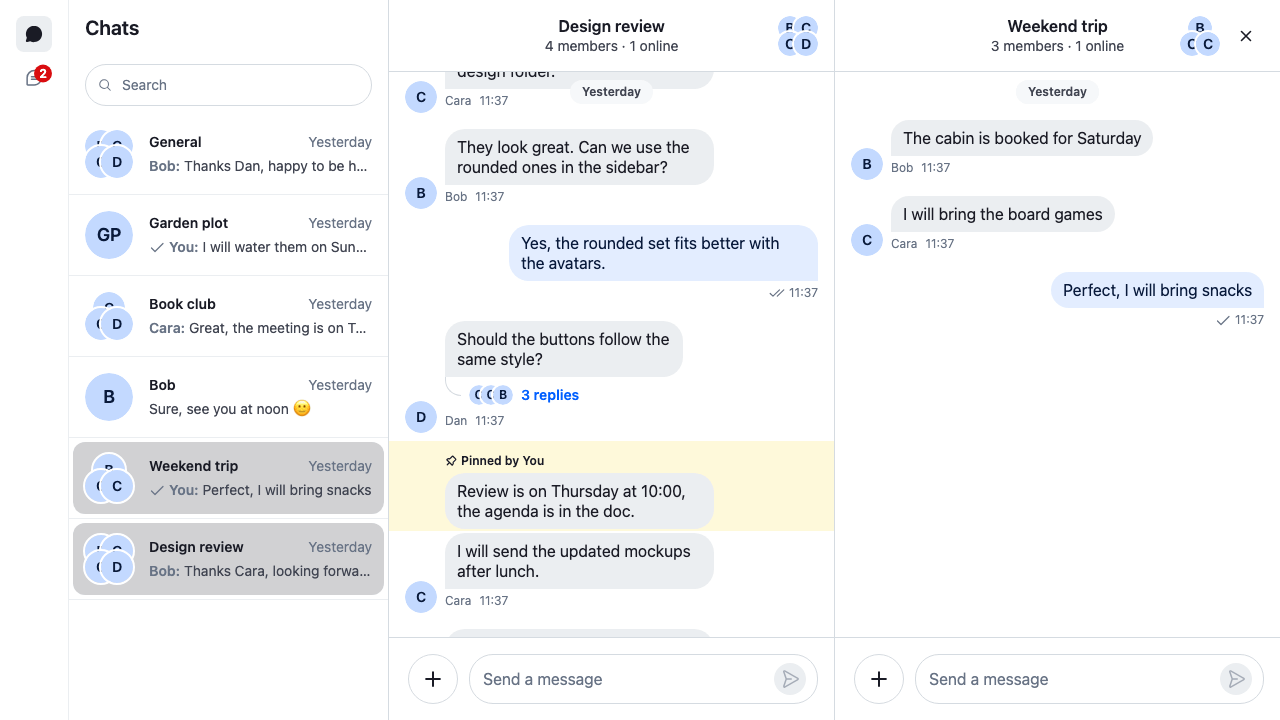
This recipe lets the user open a second channel beside the open one, to read two channels side by side.
>
> **Note:** **What you'll build**
>
> - ⌘-click or ctrl-click to open a channel beside
> - Two channels side by side
> - Close and back buttons on the second channel
> - A variant only for wide windows
>
---
**Preview**
---
**Approach:** Compose. [Choosing where to start](https://getstream.io/chat/docs/sdk/react/ui-cookbooks/overview/#choosing-where-to-start) explains the approaches.
**Starts from:** [the base app](https://getstream.io/chat/docs/sdk/react/ui-cookbooks/overview/#the-base-app). The page shows the whole app, because the layout replaces the base app's views.
A channel opened beside goes into the `thread` slot, next to the open channel.
## Overriding navigation
```tsx label="React" title="src/App.tsx"
import { useEffect } from "react";
import { ChannelPaginator } from "stream-chat";
import type {
ChannelFilters,
SortParamRequest,
Thread as StreamThread,
} from "stream-chat";
import {
Channel,
ChannelHeader,
ChannelNavigation,
Chat,
MessageComposer,
MessageList,
Thread,
ThreadHeader,
ThreadList,
useCreateChatClient,
} from "stream-chat-react";
import { ChatView, Slot, useActiveThread } from "stream-chat-react/slot-layout";
import type {
ChatViewSlotRenderers,
DeriveWorkspaceNavigation,
LayoutDescriptor,
} from "stream-chat-react/slot-layout";
import "./layout.css";
const apiKey = "YOUR_API_KEY";
const userId = "YOUR_USER_ID";
const userToken = "YOUR_USER_TOKEN";
const filters: ChannelFilters = {
members: { $in: [userId] },
type: "messaging",
};
const sort: SortParamRequest[] = [{ direction: -1, field: "last_message_at" }];
const layouts: LayoutDescriptor[] = [
{ id: "channels", slots: ["channel", "thread"] },
{ id: "threads", slots: ["thread"] },
];
// ⌘/ctrl-click on a channel opens it beside the open one. Declared outside the
// component, so ChatView gets the same function on every render.
const deriveWorkspaceNavigation: DeriveWorkspaceNavigation = (base) => ({
openChannel: (channel, options) =>
base.openChannel(channel, {
...options,
additive:
options?.additive ??
!!(options?.event?.metaKey || options?.event?.ctrlKey),
}),
});
const ThreadContent = ({ thread }: { thread: StreamThread }) => {
// Marks the thread as on screen while the window is visible and focused.
useActiveThread({ activeThread: thread });
return (
);
};
// How a slot shows a channel and a thread. Each renderer returns an element;
// hooks go in the component it renders.
const slotRenderers: ChatViewSlotRenderers = {
channel: ({ source }) => (
),
thread: ({ source }) => ,
};
const ChannelsView = () => (
<>
);
const ThreadsView = () => (
<>
);
const App = () => {
const client = useCreateChatClient({
apiKey,
tokenOrProvider: userToken,
userData: { id: userId },
});
useEffect(() => {
if (!client) return;
const paginator = new ChannelPaginator({
client,
filters,
id: "my-channels",
sort,
});
client.channelManager.insertPaginator({ paginator });
return () => {
client.channelManager.removePaginator(paginator);
};
}, [client]);
if (!client) return Connecting...
;
return (
, threads: }}
/>
);
};
export default App;
```
```css label="CSS" title="src/layout.css"
/* The SDK's stylesheet in a layer, so the overrides below win over it. */
@layer stream, stream-overrides;
@import "stream-chat-react/dist/css/index.css" layer(stream);
html,
body,
#root {
height: 100%;
}
body {
margin: 0;
}
@layer stream-overrides {
.str-chat {
--str-chat__channel-list-width: 320px;
--str-chat__thread-list-width: 320px;
}
}
```
`layout.css` loads the SDK's stylesheet into the `stream` layer, and the recipe's rules go in `stream-overrides`, after it, as [Theming → CSS layers](https://getstream.io/chat/docs/sdk/react/features/app-experience/theming/#css-layers) explains.
A row in the channel list doesn't decide where its channel opens. It calls `openChannel(channel, { event })` and leaves that to the layout. By default, `ChatView` replaces the open channel, whatever keys are held.
`deriveWorkspaceNavigation` changes that. `ChatView` calls it with the SDK's navigation as `base`, and uses the members it returns in place of the SDK's. This one returns only `openChannel`, which adds `additive: true` on ⌘/ctrl-click and hands the call to `base`. Every other member keeps the SDK's behaviour. The override reaches every component that opens a channel through `useWorkspaceNavigation()`, so the search results open beside on ⌘/ctrl-click too.
With `additive`, `ChatView` skips the slot that already holds a channel and opens the channel in another one. With nothing open yet, a ⌘/ctrl-click opens the channel in the `channel` slot, like a plain click. With a channel open, here is what the user sees:
1. **With no thread open,** the channel opens in the `thread` slot. Its header has a close button, which closes it.
2. **With a thread open,** the channel opens on top of the thread. Its header has a back button, which shows the thread again. The close button closes both.
3. **With a channel open beside,** a ⌘/ctrl-clicked channel opens on top of it, so back returns to the one before.
4. **A plain click** replaces the channel in the `channel` slot, and closes a thread open beside it. A channel open beside stays.
[Beside and on top](https://getstream.io/chat/docs/sdk/react/ui/layout/navigation/#beside-and-on-top) and [Layers](https://getstream.io/chat/docs/sdk/react/ui/layout/customizing-chatview/#layers) explain both behaviours.
The `thread` slot now holds a channel or a thread, and sometimes one on top of the other. `ChannelSlot` shows only a channel and `ThreadSlot` only a thread, and neither shows what's on top. With the base app's `ThreadSlot`, a channel opened beside wouldn't show at all. `Slot` shows whatever its slot holds, on top included, through `slotRenderers`. Each view renders its slots with it. See [`Slot` and `slotRenderers`](https://getstream.io/chat/docs/sdk/react/ui/layout/workspace-with-chatview/#slot-and-slotrenderers).
The SDK's stylesheet gives each slot that holds something an equal share of the width beside the list, so two channels split it in half. A slot with nothing in it gives up its share.
## Reading the modifier key
`options.event` is the click that started the navigation. The channel list and the search results pass it. The SDK doesn't act on it; it's there for an override like this one.
The event is a React mouse, keyboard or touch event. All three have `metaKey` and `ctrlKey`, so the override reads them without checking the event's type:
- `metaKey` is ⌘ on a Mac.
- `ctrlKey` is ctrl on Windows and Linux.
Checking both works on every system. A row in the thread list checks the same two keys.
`options?.additive ??` keeps an `additive` that the caller passed itself. Only when it passed none does the override decide from the keys.
Only clicks that pass their event can open beside through the override:
- **Rows in the channel list and the search results** pass it.
- **The replies button**, the reply actions on a message, and **View** next to "Also sent in channel" or "Replied to a thread" don't, so an override can't read ⌘ or ctrl from them.
- **Send direct message** on a member's profile and a pinned message in channel details call `openChannel` without options either, so they open the channel in place of the open one.
Rows in the thread list don't need an override. They open a thread beside the open one on ⌘/ctrl-click when the view has a second thread slot. The threads view here has a single slot, so a ⌘/ctrl-clicked thread replaces the open one.
## Keeping the function stable
`ChatView` builds the navigation from `deriveWorkspaceNavigation`. Given a new function, it builds the navigation again, and every component that reads it renders again: each row in the channel list, each header. A new function on every render means all of them render every time `App` does.
The app above declares the override outside the component, so it's the same function on every render. When the override depends on a value inside a component, build it with `useCallback`, with that value as a dependency.
For example, two channels side by side need a wide window. This hook opens beside only while the window is at least 1200px wide:
```ts title="src/useOpenBesideOnWideWindows.ts"
import { useCallback, useSyncExternalStore } from "react";
import type { DeriveWorkspaceNavigation } from "stream-chat-react/slot-layout";
const wideWindow = window.matchMedia("(min-width: 1200px)");
const subscribeToWidth = (onChange: () => void) => {
wideWindow.addEventListener("change", onChange);
return () => wideWindow.removeEventListener("change", onChange);
};
const isWindowWide = () => wideWindow.matches;
export const useOpenBesideOnWideWindows = (): DeriveWorkspaceNavigation => {
const isWide = useSyncExternalStore(subscribeToWidth, isWindowWide);
// A new function only when the window crosses 1200px.
return useCallback(
(base) => ({
openChannel: (channel, options) =>
base.openChannel(channel, {
...options,
additive:
options?.additive ??
(isWide && !!(options?.event?.metaKey || options?.event?.ctrlKey)),
}),
}),
[isWide],
);
};
```
In `App`, call it at the top, before `if (!client)`, and pass the result to `ChatView`: `const deriveWorkspaceNavigation = useOpenBesideOnWideWindows();`. The navigation is then built again when the window crosses 1200px, and not on every render.
Always call the `base` that `ChatView` passes in. `ChatView` calls the function again with a new `base` whenever what's open changes, and an older one still sees the layout as it was.
The members, their options and the types are listed in [Workspace navigation API](https://getstream.io/chat/docs/sdk/react/component-reference/layout/workspace-navigation-api/).
## How it works
>
> **Info:** **Example**
>
> The user has Design review open and ⌘-clicks Weekend trip in the channel list:
>
> 1. The row calls `openChannel(channel, { event })` with the click.
> 2. The override sees `event.metaKey`, adds `additive: true`, and hands the call to `base.openChannel`.
> 3. `ChatView` skips the `channel` slot, which holds Design review, and opens Weekend trip in the `thread` slot.
> 4. The view renders the `thread` slot with `Slot`, which shows the channel. The two channels split the width beside the list.
> 5. The user clicks Book club without a key. It replaces Design review in the `channel` slot, and Weekend trip stays beside it.
>
## Related
- [Beside and on top](https://getstream.io/chat/docs/sdk/react/ui/layout/navigation/#beside-and-on-top): opening a channel beside the open one, or on top of it.
- [Layers](https://getstream.io/chat/docs/sdk/react/ui/layout/customizing-chatview/#layers): a channel or thread on top of another in one slot.
- [`Slot` and `slotRenderers`](https://getstream.io/chat/docs/sdk/react/ui/layout/workspace-with-chatview/#slot-and-slotrenderers): rendering whatever a slot holds.
- [Workspace navigation API](https://getstream.io/chat/docs/sdk/react/component-reference/layout/workspace-navigation-api/): the navigation's members, their options and the types.
- [Moving between channels, threads and messages](https://getstream.io/chat/docs/sdk/react/ui/layout/moving-between-channels-threads-and-messages/): the other ways to open a channel or a thread.
- [Channel and thread side by side](https://getstream.io/chat/docs/sdk/react/ui-cookbooks/layout/channel-and-thread-side-by-side/): the `thread` slot beside the channel.
---
For the most recent version of this documentation, visit [https://getstream.io/chat/docs/sdk/react/ui-cookbooks/layout/ctrl-click-opens-beside/](https://getstream.io/chat/docs/sdk/react/ui-cookbooks/layout/ctrl-click-opens-beside/).