# Channel and thread side by side
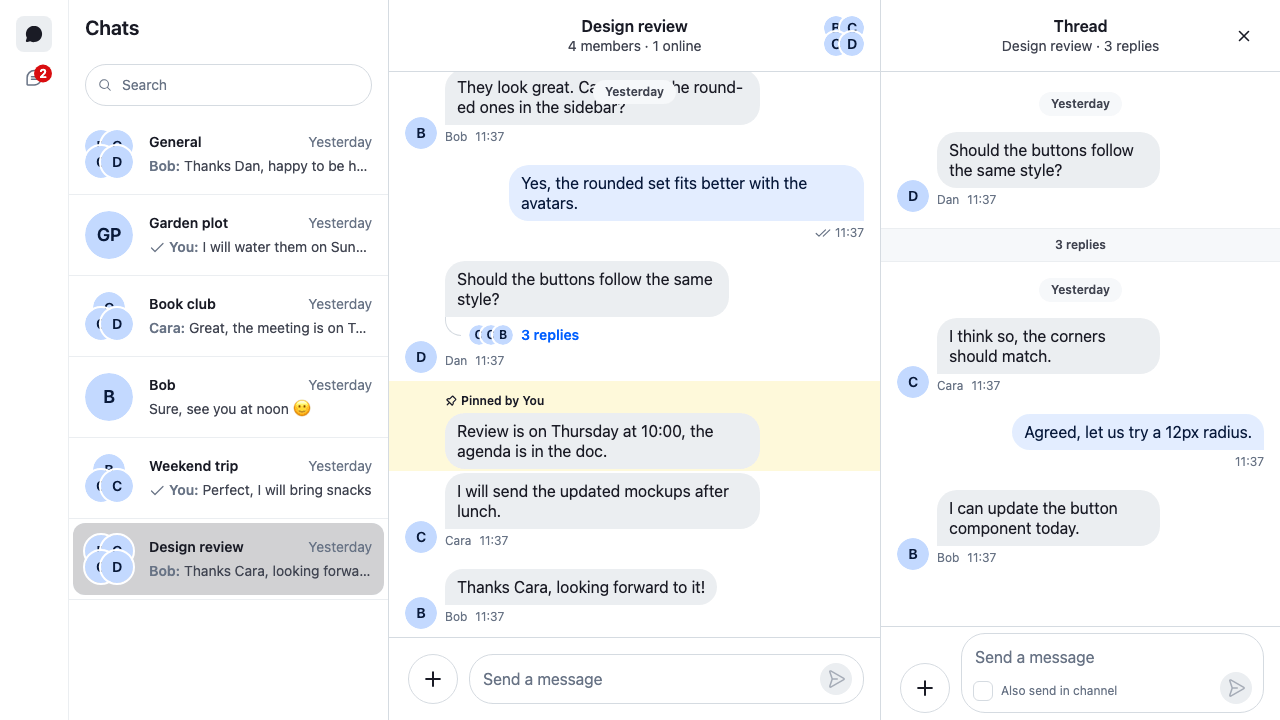
This recipe shows the open channel with a thread beside it.
>
> **Note:** **What you'll build**
>
> - A three-column layout with the thread on the right
> - A "No chat selected" empty state
>
---
**Preview**
---
**Approach:** Compose. [Choosing where to start](https://getstream.io/chat/docs/sdk/react/ui-cookbooks/overview/#choosing-where-to-start) explains the approaches.
**Starts from:** [the base app](https://getstream.io/chat/docs/sdk/react/ui-cookbooks/overview/#the-base-app). The page shows the whole app, because the layout replaces the base app's views.
The base app already has a slot for the channel and one for the thread.
## A layout with two slots
```tsx label="React" title="src/App.tsx"
import { useEffect } from "react";
import { ChannelPaginator } from "stream-chat";
import type { ChannelFilters, SortParamRequest } from "stream-chat";
import {
ChannelHeader,
ChannelNavigation,
Chat,
MessageComposer,
MessageList,
ThreadHeader,
ThreadList,
useCreateChatClient,
useThreadContext,
} from "stream-chat-react";
import {
ChannelSlot,
ChatView,
ChatViewEmptyPlaceholder,
ThreadSlot,
useActiveThread,
} from "stream-chat-react/slot-layout";
import type {
ChatViewProps,
LayoutDescriptor,
} from "stream-chat-react/slot-layout";
import "./layout.css";
const apiKey = "YOUR_API_KEY";
const userId = "YOUR_USER_ID";
const userToken = "YOUR_USER_TOKEN";
const filters: ChannelFilters = {
members: { $in: [userId] },
type: "messaging",
};
const sort: SortParamRequest[] = [{ direction: -1, field: "last_message_at" }];
// The channels view has a slot for the open channel and, after it, one for a
// thread opened from it. The threads view has one slot, for the thread picked
// in the list.
const layouts: LayoutDescriptor[] = [
{ id: "channels", slots: ["channel", "thread"] },
{ id: "threads", slots: ["thread"] },
];
// In the channels view, every thread opens in the "thread" slot.
const viewActionSlotResolvers: ChatViewProps["viewActionSlotResolvers"] = {
channels: { openThread: () => "thread" },
};
// Marks the thread as on screen while the window is visible and focused.
const ActiveThread = () => {
const thread = useThreadContext();
useActiveThread({ activeThread: thread });
return null;
};
const ThreadPanel = () => (
);
const ChannelsView = () => (
<>
} slot="channel">
);
const ThreadsView = () => (
<>
);
const App = () => {
const client = useCreateChatClient({
apiKey,
tokenOrProvider: userToken,
userData: { id: userId },
});
useEffect(() => {
if (!client) return;
const paginator = new ChannelPaginator({
client,
filters,
id: "my-channels",
sort,
});
client.channelManager.insertPaginator({ paginator });
return () => {
client.channelManager.removePaginator(paginator);
};
}, [client]);
if (!client) return Connecting...
;
return (
, threads: }}
/>
);
};
export default App;
```
```css label="CSS" title="src/layout.css"
/* The SDK's stylesheet in a layer, so the overrides below win over it. */
@layer stream, stream-overrides;
@import "stream-chat-react/dist/css/index.css" layer(stream);
html,
body,
#root {
height: 100%;
}
body {
margin: 0;
}
@layer stream-overrides {
.str-chat {
--str-chat__channel-list-width: 320px;
--str-chat__thread-list-width: 320px;
}
/* Beside the channel, the thread is a 400px column. The channel takes the rest. */
.str-chat__chat-view__channels > .str-chat__thread-container {
flex: 0 0 400px;
}
}
```
`layouts` gives the channels view two slots, `channel` and then `thread`. The view's content places them side by side:
- `ChannelSlot` renders the channel in the `channel` slot. Until the user picks one, it renders its `fallback`: `ChatViewEmptyPlaceholder` is the SDK's empty state, "No chat selected".
- `ThreadSlot` renders the thread in the `thread` slot, after the channel. While no thread is open, it renders nothing, so the channel takes the full width.
`ThreadPanel` is in both views. In the threads view, its `thread` slot is the view's only slot, and the thread fills the space beside the thread list.
In the CSS, `layout.css` loads the SDK's stylesheet into the `stream` layer, and the recipe's rules go in `stream-overrides`, after it, as [Theming → CSS layers](https://getstream.io/chat/docs/sdk/react/features/app-experience/theming/#css-layers) explains. The selector `.str-chat__chat-view__channels` matches only the channels view, so only the thread beside a channel gets the fixed width. The SDK has no variable for that width, so this one rule sets `flex` on the SDK's thread container. [Workspace with ChatView](https://getstream.io/chat/docs/sdk/react/ui/layout/workspace-with-chatview/#views-and-slots) explains views and slots in full.
## How it works
### Opening a thread beside the channel
The replies button under a message, and the reply actions on it, open its thread.
>
> **Info:** **Example**
>
> The user clicks "3 replies" under Bob's message in Design review:
>
> 1. The button calls `openThread` with the channel and the message. `openThread` gets the message's thread from `client.threads`, which creates it if it doesn't exist yet.
> 2. A thread opens in the view that's shown, here the channels view. `viewActionSlotResolvers` picks its slot: `thread`.
> 3. `ThreadSlot` renders a `Thread` for it, around the header, the message list and the composer. The thread loads its replies.
> 4. `ActiveThread` calls `useActiveThread`. The SDK doesn't tell a thread it's on screen; this hook does, while the window is visible and focused. Then the thread's new replies are marked read, and a thread that went out of date, after a lost connection for example, reloads.
>
Without `viewActionSlotResolvers`, `ChatView` picks the slot by [its own rules](https://getstream.io/chat/docs/sdk/react/ui/layout/workspace-with-chatview/#where-an-opened-channel-or-thread-lands). While a channel is open, they pick `thread` too. With no channel open, they would pick the first empty slot, `channel`, where `ChannelSlot` doesn't show a thread. The resolver keeps a thread opened from your own code, such as a notification, beside the empty state.
Opening another thread replaces the one beside the channel, because that slot already holds a thread. The other ways to open a thread, and how to add your own button for it, are in [Opening a thread](https://getstream.io/chat/docs/sdk/react/ui/layout/moving-between-channels-threads-and-messages/#opening-a-thread).
### Closing the thread
Three things close the thread beside the channel:
- **The close button in the thread's header.** `ThreadHeader` renders it on a thread beside a channel. It empties the `thread` slot. `ThreadSlot` then renders nothing, and the channel takes the full width.
- **Opening a channel.** A click on a channel in the list or in the search results closes the thread, even when it's the channel that's already open.
- **Your own control.** `useCloseThread()` returns the function the close button calls. [Back and close](https://getstream.io/chat/docs/sdk/react/ui/layout/moving-between-channels-threads-and-messages/#back-and-close) shows a custom thread header that uses it.
In the threads view, the thread is the view's main panel, so its header has no close button. The user picks another thread or switches views.
On a phone there's no room for two columns. Below 768px, the SDK's stylesheet also hides the channel list. [Single-pane mobile with back button](https://getstream.io/chat/docs/sdk/react/ui-cookbooks/layout/single-pane-mobile-with-back-button/) shows one panel at a time, and [Responsive layouts](https://getstream.io/chat/docs/sdk/react/ui/layout/responsive-layouts/) lays the thread over the channel instead.
## Related
- [Workspace with ChatView](https://getstream.io/chat/docs/sdk/react/ui/layout/workspace-with-chatview/#views-and-slots): views, slots and how a channel or thread lands in one.
- [Moving between channels, threads and messages](https://getstream.io/chat/docs/sdk/react/ui/layout/moving-between-channels-threads-and-messages/#opening-a-thread): the ways to open and close a thread.
- [Replies and threads](https://getstream.io/chat/docs/sdk/react/features/messaging/replies-and-threads/): threads end to end.
- [Read state and unread counts](https://getstream.io/chat/docs/sdk/react/state/channels-and-threads/read-state-and-unread-counts/): when replies are marked read.
- [Responsive layouts](https://getstream.io/chat/docs/sdk/react/ui/layout/responsive-layouts/): the thread over the channel on small screens.
- [Thread header](https://getstream.io/chat/docs/sdk/react/ui-cookbooks/headers/thread-header/): a thread header of your own.
- [Single-pane mobile with back button](https://getstream.io/chat/docs/sdk/react/ui-cookbooks/layout/single-pane-mobile-with-back-button/): one panel at a time on a phone.
---
For the most recent version of this documentation, visit [https://getstream.io/chat/docs/sdk/react/ui-cookbooks/layout/channel-and-thread-side-by-side/](https://getstream.io/chat/docs/sdk/react/ui-cookbooks/layout/channel-and-thread-side-by-side/).