# Empty and loading states
A channel list has three states before it shows any channels: its first page is loading, the user has no channels, or loading failed. This recipe gives each one its own look.
>
> **Note:** **What you'll build**
>
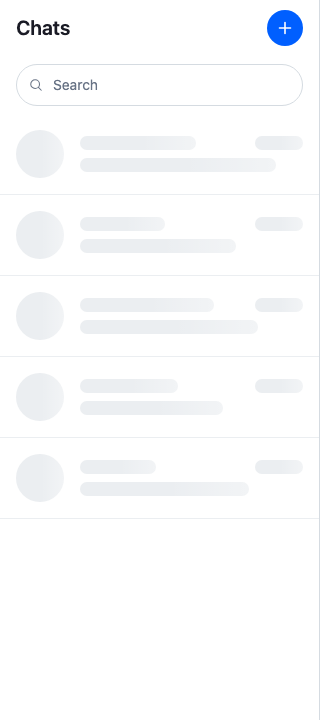
> - Placeholder rows while the first page loads
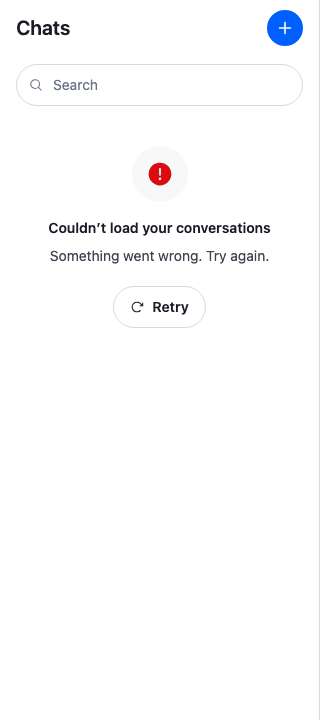
> - An error message with a Retry button
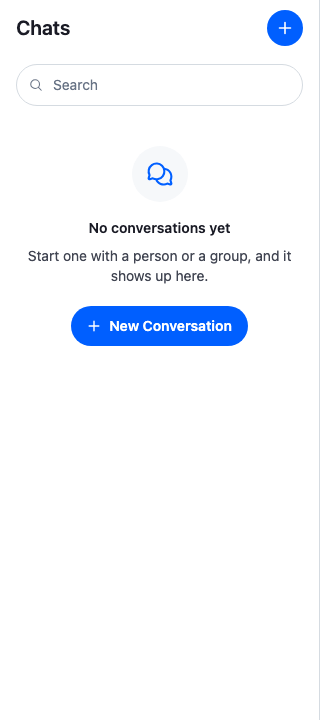
> - A "No conversations yet" message with a New conversation button
>
---
**Preview**
---
**Approach:** Replace one part. [Choosing where to start](https://getstream.io/chat/docs/sdk/react/ui-cookbooks/overview/#choosing-where-to-start) explains the approaches.
**Starts from:** [the base app](https://getstream.io/chat/docs/sdk/react/ui-cookbooks/overview/#the-base-app), with the [Starting a conversation](https://getstream.io/chat/docs/sdk/react/ui-cookbooks/channel-list/starting-a-conversation/) recipe, whose New conversation dialog the empty list opens. The page shows only what the recipe adds.
## Best practices
- Shape the placeholder rows like the real rows, with the same height and spacing, so nothing moves when the channels arrive.
- Hide the placeholder's shapes from screen readers, and tell them the list is loading with one message, such as "Loading conversations…", through the SDK's announcer.
- Stop the shimmer when the user asks for reduced motion.
- Give the empty list one clear action. Here it opens the same dialog as the header's New conversation button, so both start a conversation the same way.
- Show the error in the list's place, with a way to try again. A list whose first page failed has no channels to show, so the error replaces the placeholder, not the rows.
- Mark the Retry button busy while the retry runs, with `aria-busy` and `aria-disabled` rather than `disabled`, so the focus stays on it.
- Register the states around the channel list only, since `` reads the same loading and error keys.
## Show placeholder rows while the first page loads
`` renders its `FirstPageLoadingIndicator` until `paginator.state.items` holds the first page. These rows have the avatar, the title and the time, and the last message of a real row, with a different width on each row. A live region that appears already filled is often not read, so the placeholder announces "Loading conversations…" with `useAriaLiveAnnouncer()` instead, through the live region `` keeps on the page. [Announcing to assistive technology](https://getstream.io/chat/docs/sdk/react/features/app-experience/accessibility/#announcing-to-assistive-technology) explains the announcer:
```tsx label="React" title="src/ChannelListSkeleton.tsx"
import { useEffect } from "react";
import { useAriaLiveAnnouncer } from "stream-chat-react";
import "./ChannelListSkeleton.css";
// Different widths per row, so the placeholder reads as a list of conversations.
const rows = [
{ preview: "88%", title: "52%" },
{ preview: "70%", title: "38%" },
{ preview: "80%", title: "60%" },
{ preview: "64%", title: "44%" },
{ preview: "76%", title: "34%" },
];
/**
* Placeholder rows shaped like the channel list's rows: an avatar, the title and the time on the
* first line, the last message on the second. Screen readers skip the shapes and hear one message
* through the SDK's announcer instead.
*/
export const ChannelListSkeleton = () => {
const announce = useAriaLiveAnnouncer();
// Delayed, so a first page that arrives quickly is not announced at all; unmounting cancels it.
useEffect(
() => announce("Loading conversations…", { delayMs: 300 }),
[announce],
);
return (
{rows.map(({ preview, title }, index) => (
))}
);
};
```
```css label="CSS" title="src/ChannelListSkeleton.css"
@layer stream-overrides {
.cookbook-channel-list-skeleton {
display: flex;
flex-direction: column;
}
/* The same size and spacing as a channel list row, so nothing moves when the rows arrive. */
.cookbook-channel-list-skeleton__row {
display: flex;
align-items: center;
gap: var(--str-chat__spacing-md);
padding: calc(var(--str-chat__spacing-sm) + var(--str-chat__spacing-xxs));
border-bottom: 1px solid var(--str-chat__border-core-subtle);
}
.cookbook-channel-list-skeleton__avatar {
flex-shrink: 0;
width: var(--str-chat__size-48);
height: var(--str-chat__size-48);
border-radius: var(--str-chat__radius-full);
}
.cookbook-channel-list-skeleton__lines {
display: flex;
flex: 1;
flex-direction: column;
gap: var(--str-chat__spacing-xs);
min-width: 0;
}
.cookbook-channel-list-skeleton__first-line {
display: flex;
justify-content: space-between;
gap: var(--str-chat__spacing-md);
}
.cookbook-channel-list-skeleton__bar {
height: 14px;
border-radius: var(--str-chat__radius-full);
}
.cookbook-channel-list-skeleton__bar--time {
flex-shrink: 0;
width: var(--str-chat__size-48);
}
/* The skeleton tokens are a shimmer laid over a surface, so the shapes get a surface below it that
stands out from the list. One shimmer moves across every shape. */
.cookbook-channel-list-skeleton__avatar,
.cookbook-channel-list-skeleton__bar {
background-color: var(--str-chat__background-core-surface-default);
background-image: linear-gradient(
90deg,
var(--str-chat__skeleton-loading-base) 0%,
var(--str-chat__skeleton-loading-highlight) 50%,
var(--str-chat__skeleton-loading-base) 100%
);
background-repeat: no-repeat;
background-size: 200% 100%;
animation: cookbook-channel-list-shimmer 1.4s linear infinite;
}
@media (prefers-reduced-motion: reduce) {
.cookbook-channel-list-skeleton__avatar,
.cookbook-channel-list-skeleton__bar {
animation: none;
}
}
@keyframes cookbook-channel-list-shimmer {
from {
background-position: 200% 0;
}
to {
background-position: -200% 0;
}
}
}
```
## Show an error with a Retry
When the first page fails, the paginator retries it, three times by default. Meanwhile the list keeps showing its `FirstPageLoadingIndicator`. Once the last attempt fails, the paginator records the error as `paginator.state.lastQueryError`, and `paginator.state.items` stays `undefined`. `` then renders its `ListLoadErrorIndicator` in place of the list. Its `retry` calls `ChannelPaginator.reload()`. [ListLoadErrorIndicatorProps](https://getstream.io/chat/docs/sdk/react/component-reference/utilities/indicators/#listloaderrorindicatorprops) lists its props.
The list keeps the error view on screen while a retry runs, as [FirstPageLoadingIndicator and ListLoadErrorIndicator](https://getstream.io/chat/docs/sdk/react/component-reference/utilities/indicators/#firstpageloadingindicator-and-listloaderrorindicator) explains. `` reads "Retrying…" meanwhile. When the retry fails too, the button reads Retry again and the error is announced once more. The recipe's error announcement is polite, so it does not compete with the SDK's error notification, which is announced assertively at the same moment:
```tsx label="React" title="src/ChannelListLoadError.tsx"
import { useEffect } from "react";
import type { ListLoadErrorIndicatorProps } from "stream-chat-react";
import {
Button,
IconExclamationCircleFill,
IconRetry,
useAriaLiveAnnouncer,
} from "stream-chat-react";
import "./ChannelListState.css";
const title = "Couldn’t load your conversations";
/**
* Shown in place of the channel list when its first page failed to load. `retry` queries the first
* page again. The list keeps this view on screen while the retry runs, so the Retry button keeps
* focus: it turns busy, and reads Retry again if the retry fails.
*/
export const ChannelListLoadError = ({
isRetrying,
retry,
}: ListLoadErrorIndicatorProps) => {
const announce = useAriaLiveAnnouncer();
// Announced when the error first shows and again whenever a retry fails. Polite, so it follows
// the SDK's own error notification, which is announced assertively at the same moment. The dedupe
// window swallows the second run of the effect in development.
useEffect(() => {
if (isRetrying) return;
announce(title, { dedupeMs: 1000, priority: "polite" });
}, [announce, isRetrying]);
return (
{title}
Something went wrong. Try again.
{/* aria-disabled, not disabled: a disabled button would lose focus. */}
);
};
```
```css label="CSS" title="src/ChannelListState.css"
@layer stream-overrides {
/* The error and the empty list: a centred message with one action. */
.cookbook-channel-list-state {
display: flex;
flex-direction: column;
align-items: center;
gap: var(--str-chat__spacing-xs);
padding: var(--str-chat__spacing-2xl) var(--str-chat__spacing-xl);
text-align: center;
}
.cookbook-channel-list-state__icon {
display: flex;
align-items: center;
justify-content: center;
width: var(--str-chat__size-56);
height: var(--str-chat__size-56);
margin-bottom: var(--str-chat__spacing-xs);
border-radius: var(--str-chat__radius-full);
background: var(--str-chat__background-core-surface-subtle);
color: var(--str-chat__accent-primary);
}
.cookbook-channel-list-state__icon svg {
width: var(--str-chat__size-28);
height: var(--str-chat__size-28);
}
.cookbook-channel-list-state__icon--error {
color: var(--str-chat__accent-error);
}
.cookbook-channel-list-state__title {
margin: 0;
color: var(--str-chat__text-primary);
font: var(--str-chat__font-heading-xs);
}
.cookbook-channel-list-state__text {
margin: 0 0 var(--str-chat__spacing-sm);
color: var(--str-chat__text-secondary);
font: var(--str-chat__font-caption-default);
}
}
```
---
**The load error with Retry**
---
## Show an empty list with a call to action
`` renders its `EmptyListIndicator` when the first page came back with no channels. This one invites the user to start a conversation, and its button opens the `NewConversationDialog` from [Starting a conversation](https://getstream.io/chat/docs/sdk/react/ui-cookbooks/channel-list/starting-a-conversation/#pick-people-in-a-dialog). It uses the stylesheet of [Show an error with a Retry](#show-an-error-with-a-retry):
```tsx title="src/EmptyChannelList.tsx"
import { useState } from "react";
import {
Button,
GlobalModal,
IconMessageBubbles,
IconPlus,
} from "stream-chat-react";
import { NewConversationDialog } from "./NewConversationDialog";
import "./ChannelListState.css";
/**
* Shown in place of the channel list when the user has no conversations. The button opens the same
* New conversation dialog as the header's button.
*/
export const EmptyChannelList = () => {
const [open, setOpen] = useState(false);
const close = () => setOpen(false);
return (
No conversations yet
Start one with a person or a group, and it shows up here.
{/* Mounted only while open, so every opening starts with an empty dialog. */}
{open && }
);
};
```
---
**The empty channel list**
---
## Register the states
`FirstPageLoadingIndicator`, `ListLoadErrorIndicator` and `EmptyListIndicator` are `ComponentContext` keys, so `` registers them for every channel list inside it. The wrapper goes around the channel list only, because [the thread list reads the same loading and error keys](https://getstream.io/chat/docs/sdk/react/ui/components/list-states-ui/#replacing-a-state-in-one-list-only):
```tsx title="src/WithChannelListStates.tsx"
import type { PropsWithChildren } from "react";
import { WithComponents } from "stream-chat-react";
import { ChannelListLoadError } from "./ChannelListLoadError";
import { ChannelListSkeleton } from "./ChannelListSkeleton";
import { EmptyChannelList } from "./EmptyChannelList";
// Declared once, so WithComponents gets the same object on every render.
const overrides = {
EmptyListIndicator: EmptyChannelList,
FirstPageLoadingIndicator: ChannelListSkeleton,
ListLoadErrorIndicator: ChannelListLoadError,
};
/**
* Replaces the loading, error and empty states of every channel list inside it. `ThreadList` reads
* the loading and error slots too, so wrap only the channel list: the `ChannelNavigation` your view
* renders, or `slotRenderers.channelList` when `ChatView` renders the list from its slot registry.
*/
export const WithChannelListStates = ({ children }: PropsWithChildren) => (
{children}
);
```
Wrap the `` of the channels view in it. Wrap the app in `` from [Starting a conversation](https://getstream.io/chat/docs/sdk/react/ui-cookbooks/channel-list/starting-a-conversation/#add-the-button-to-the-channel-list-header), which registers the handler that creates a new conversation on its first message:
```tsx title="src/App.tsx"
import {
ChannelHeader,
ChannelNavigation,
Chat,
MessageComposer,
MessageList,
ThreadHeader,
} from "stream-chat-react";
import {
ChannelSlot,
ChatView,
ThreadSlot,
} from "stream-chat-react/slot-layout";
import type { LayoutDescriptor } from "stream-chat-react/slot-layout";
import { WithNewConversation } from "./NewConversationButton";
import { WithChannelListStates } from "./WithChannelListStates";
const layouts: LayoutDescriptor[] = [
{ id: "channels", slots: ["channel", "thread"] },
];
const ChannelsView = () => (
<>
);
export const App = () => (
}} />
);
```
When `` renders the channel list itself, through its built-in layout, wrap the list in `slotRenderers.channelList` instead. [`slotRenderers`](https://getstream.io/chat/docs/sdk/react/component-reference/layout/slot-layout/#slotrenderers) explains the renderers.
## How it works
>
> **Info:** **Example**
>
> The user opens the app while the server is having trouble, so the query for the channels fails with a server error although the client is connected:
>
> 1. `` asks the paginator for the first page with `ChannelPaginator.toTailDebounced()`. Until the first page arrives, `paginator.state.items` is `undefined`, so the list renders ``. If the first page takes a moment, screen readers hear "Loading conversations…".
> 2. The request fails. The paginator retries it, three times by default, and `paginator.state.isLoading` stays `true`, so `` stays on screen.
> 3. The last retry fails. The paginator records the error as `paginator.state.lastQueryError` and sets `paginator.state.isLoading` to `false`. `paginator.state.items` is still `undefined`, so the list renders `` in place of the rows. Screen readers hear the SDK's error notification, "Error notification: Couldn't load conversations", then the recipe's "Couldn’t load your conversations".
> 4. A moment later, the user presses Retry. `retry` calls `ChannelPaginator.reload()`. The list keeps `` on screen with `isRetrying` set, so the Retry button, which keeps the focus, reads "Retrying…" while the query runs.
> 5. This time the first page arrives, with no channels: the user isn't a member of any channel yet. The paginator sets `paginator.state.items` to an empty array, so the list renders ``, and screen readers hear "Conversations loaded". Had the retry failed, the button would read Retry again, still focused, and screen readers would hear the error once more.
> 6. The user presses New conversation, picks Bob, and sends a first message. The new channel matches the list's filters, so it shows up in the list, which then renders its rows instead of the empty state.
>
Each failed query also publishes an error notification, "Couldn't load conversations", of type `api:channel:query:failed`. It shows in the `channel-list` panel, below the lists of ``. [When the first page fails](https://getstream.io/chat/docs/sdk/react/ui/components/list-states-ui/#when-the-first-page-fails) explains it.
The states apply to every channel list inside ``, so a `` with several lists shows them in each list whose first page is loading, empty or failed.
## Related
- [List states UI](https://getstream.io/chat/docs/sdk/react/ui/components/list-states-ui/): the loading, empty and error states of both lists.
- [ChannelList](https://getstream.io/chat/docs/sdk/react/component-reference/channel-list/channellist/#ui-customization): the slots the list renders.
- [Indicators](https://getstream.io/chat/docs/sdk/react/component-reference/utilities/indicators/#listloaderrorindicatorprops): the props of `ListLoadErrorIndicator`.
- [ChannelManager and ChannelPaginator](https://getstream.io/chat/docs/sdk/react/reference/state/channel-manager-and-channelpaginator/#the-base-paginator): the paginator's state and `ChannelPaginator.reload()`.
- [Accessibility](https://getstream.io/chat/docs/sdk/react/features/app-experience/accessibility/#announcing-to-assistive-technology): announcing with `useAriaLiveAnnouncer()`.
- [How pagination works](https://getstream.io/chat/docs/sdk/react/state/loading-data/how-pagination-works/): how a paginator loads its pages.
- [Starting a conversation](https://getstream.io/chat/docs/sdk/react/ui-cookbooks/channel-list/starting-a-conversation/): the New conversation dialog the empty list opens.
---
For the most recent version of this documentation, visit [https://getstream.io/chat/docs/sdk/react/ui-cookbooks/channel-list/empty-and-loading-states/](https://getstream.io/chat/docs/sdk/react/ui-cookbooks/channel-list/empty-and-loading-states/).