# Emoji Picker
This guide shows how to add `EmojiPicker` to your chat app—no chat experience is complete without emojis.
## Best Practices
- Use the SDK `EmojiPicker` for the quickest and most consistent setup.
- Keep the picker lightweight to avoid input latency.
- Return focus to the textarea after emoji insertion.
- Hide the picker on selection if your UI is compact.
- Verify emoji rendering across platforms and fonts.
## Prerequisites
`EmojiPicker` is built on `emoji-mart`. Start by installing the required packages (make sure they meet our [peer dependency requirements](https://github.com/GetStream/stream-chat-react/blob/master/package.json)):
```bash
yarn add emoji-mart @emoji-mart/data
```
Versions prior to 14.11.0 also require `@emoji-mart/react`, because the SDK imported the React wrapper from that package instead of vendoring it:
```bash
yarn add emoji-mart @emoji-mart/data @emoji-mart/react
```
On `npm` that extra package needs a workaround to install on React 19 - see [npm and React 19 compatibility](#npm-and-react-19-compatibility).
Import the dedicated picker stylesheet alongside the main chat CSS:
```tsx
import "stream-chat-react/dist/css/index.css";
import "stream-chat-react/dist/css/emoji-picker.css";
```
If your app uses CSS layers, you can import the picker stylesheet into your plugin layer instead:
```css
@import url("stream-chat-react/dist/css/emoji-picker.css") layer(stream-plugins);
```
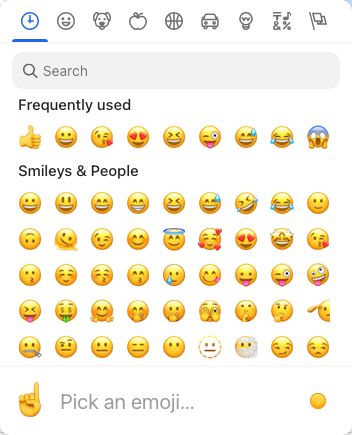
## Basic Usage
The SDK `EmojiPicker` includes both the button and picker UI and manages its own open state.
```tsx
import { Channel, WithComponents } from "stream-chat-react";
import { EmojiPicker } from "stream-chat-react/emojis";
const WrappedChannel = ({ children }) => {
return (
{children}
);
};
```
## Building custom EmojiPicker component
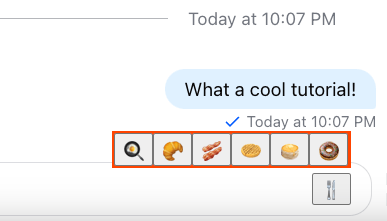
If `emoji-mart` is too heavy for your use case, you can build your own. Here’s a simple example using native emojis:
```tsx
import { useState } from "react";
import {
useMessageComposerContext,
useMessageComposerController,
} from "stream-chat-react";
const emojis = ["🍳", "🥐", "🥓", "🧇", "🥞", "🍩"];
export const CustomEmojiPicker = () => {
const [open, setOpen] = useState(false);
const { textComposer } = useMessageComposerController();
const { textareaRef } = useMessageComposerContext("CustomEmojiPicker");
return (
{open && (
{emojis.map((emoji) => (
))}
)}
);
};
```
## npm and React 19 compatibility
Applies only to versions prior to 14.11.0, which require `@emoji-mart/react`. From 14.11.0 on the SDK vendors that wrapper itself, so you can ignore this section.
`@emoji-mart/react` declares its React peer as `^16.8 || ^17 || ^18`, so `npm` fails to resolve it against React 19.
Both of the following are required - the override on its own is not enough, since npm validates a newly added package's peer range before it consults `overrides`:
1. Add an `overrides` block to your `package.json`, mapping the wrapper's React peers onto your app's versions:
```json
{
"overrides": {
"@emoji-mart/react": {
"react": "$react",
"react-dom": "$react-dom"
}
}
}
```
2. Pass `--legacy-peer-deps` on the install itself:
```bash
npm install emoji-mart @emoji-mart/data @emoji-mart/react --legacy-peer-deps
```
`yarn` and `pnpm` need neither change.
---
This page was last updated at 2026-08-10T16:00:57.345Z.
For the most recent version of this documentation, visit [https://getstream.io/chat/docs/sdk/react/guides/emoji-picker/](https://getstream.io/chat/docs/sdk/react/guides/emoji-picker/).