# Replies and threads
## What users get
Any message can start a thread: a conversation of replies under it, shown in its own panel. Users also get a thread list with every thread they take part in, and can send a reply to the channel as well.
- **Starting and opening a thread.** The reply button on a message, or **Thread Reply** in its menu, opens the message's thread. A message with replies shows a reply count button with the avatars of the people who replied.
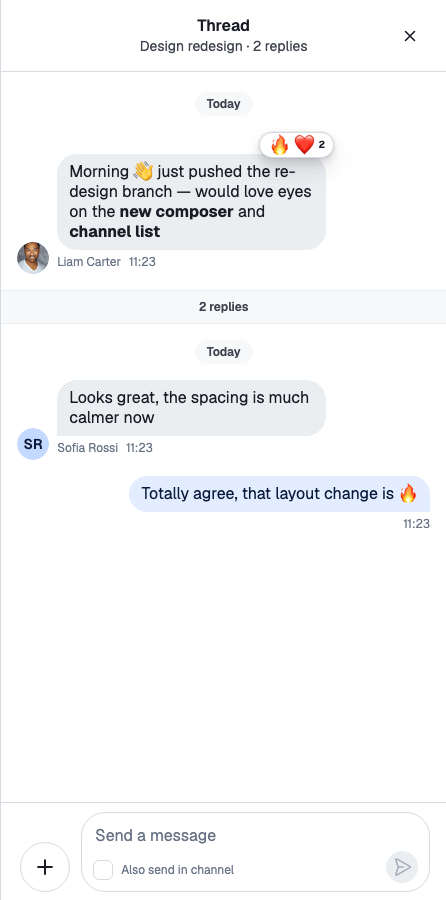
- **The thread panel.** The header shows "Thread", the channel's name and the number of replies, and who is typing. The parent message sits at the top, followed by a reply count divider, the replies and a composer.
- **Also sending to the channel.** The thread's composer has an "Also send in channel" checkbox ("Also send as a direct message" in a one-to-one channel). Such a reply shows "Also sent in channel · View" in the thread, and "Replied to a thread · View" in the channel. **View** jumps to the other copy.
- **The thread list.** A list of the user's threads, each with its parent message, latest reply and unread count. When threads that aren't in the list get new replies, a banner offers to reload it. With `ChatView`, the threads button shows the number of unread threads.
## How it works across the layers
### State: a thread and its replies
A reply is a message with a `parent_id`, and a thread is identified by its parent message: `thread.id` is the parent message's id. The client keeps one `Thread` per thread, shared by every component that shows it: `client.threads.ensure({ channel, parentMessage })` returns it. Like a channel, it has `thread.messagePaginator` for the replies, `thread.messageComposer` and `thread.messageOperations`; [Parent message and replies](https://getstream.io/chat/docs/sdk/react/state/channels-and-threads/what-channels-and-threads-hold/#parent-message-and-replies) explains what it holds and when it loads.
### UI: the thread panel
`` renders the thread passed as `thread` and provides it to its children: ``, `` for the parent message and the replies, and `` with the "Also send in channel" checkbox. [The Thread component](https://getstream.io/chat/docs/sdk/react/ui/components/thread-ui/#the-thread-component) explains what it does.
With ``, the reply button and the **Thread Reply** action call `openThread({ channel, message })` from `useWorkspaceNavigation()`, and `` renders the thread. The [Quick start](https://getstream.io/chat/docs/sdk/react/getting-started/quick-start/#add-threads) builds this layout. Every way of opening a thread, and the **View** links of replies sent to the channel, are on [Moving between channels, threads and messages](https://getstream.io/chat/docs/sdk/react/ui/layout/moving-between-channels-threads-and-messages/#opening-a-thread).
The thread's message list marks it read when the user reaches its latest reply; see [Read state, unread and receipts](https://getstream.io/chat/docs/sdk/react/features/messaging/read-state-unread-and-receipts/).
### The thread list
The thread manager, `client.threads`, loads the user's threads in its paginator and keeps the unread thread count, even while no thread list is on screen. `` renders the threads in the server's order. A new reply updates a thread's row in place, and a reply in a thread that isn't in the list shows the unseen threads banner; clicking it reloads the list. A reload asks for as many threads as are loaded plus the unseen ones, up to one page.
- State: [The user's threads](https://getstream.io/chat/docs/sdk/react/state/channels-and-threads/what-channels-and-threads-hold/#the-users-threads).
- UI: [Thread list UI](https://getstream.io/chat/docs/sdk/react/ui/components/thread-list-ui/).
- API: [Thread and thread manager](https://getstream.io/chat/docs/sdk/react/reference/state/thread-and-thread-manager/#clientthreads).
## Turning it on or off
Replies are on by default. Two settings must both allow them:
- **On the client:** `channel.replies.enabled` in `client.config`.
- **On the server:** the channel type's `replies` setting, in the dashboard. When the server turns replies off, the client can't turn them on.
```ts
client.config.set({ channel: { replies: { enabled: false } } });
```
Check `channel.config.replies.enabled` for the value in effect. When it's `false`, `Thread` renders nothing.
The `send-reply` capability decides who can reply. Without it, the message actions leave out the reply button and **Thread Reply**. The actions check only the capability, so when you turn replies off on the client, remove the reply actions too; see [Actions](https://getstream.io/chat/docs/sdk/react/ui/components/actions/#message-actions).
## Customizing
### Composing the thread panel
`Thread` and `ThreadSlot` render their children, so the panel is whatever you put inside: your own header, a `VirtualizedMessageList` instead of `MessageList`, or extra content. See [Thread UI](https://getstream.io/chat/docs/sdk/react/ui/components/thread-ui/).
### Replacing the parent message area
`ThreadHead` renders the parent message, and `ThreadStart` the divider under it. Both are override keys. This divider names how many people replied:
```tsx
import type { ThreadState } from "stream-chat";
import {
useStateStore,
useThreadContext,
WithComponents,
} from "stream-chat-react";
const parentSelector = (state: ThreadState) => ({
participants: state.participants,
replyCount: state.replyCount,
});
const RepliesStart = () => {
const thread = useThreadContext();
const { participants, replyCount } =
useStateStore(thread?.state, parentSelector) ?? {};
if (!replyCount) return null;
return (
{replyCount} replies from {participants?.length ?? 0} people
);
};
export const App = () => (
{/* the rest of the app */}
);
```
### Replacing a thread list row
`ThreadListItemUI` renders one row of the thread list. A replacement reads its thread with `useThreadListItemContext()` and opens it with `openThread`:
```tsx
import type { ThreadState } from "stream-chat";
import {
useChatContext,
useStateStore,
useThreadListItemContext,
useWorkspaceNavigation,
WithComponents,
} from "stream-chat-react";
const rowSelector = (state: ThreadState) => ({
parentMessage: state.parentMessage,
read: state.read,
replyCount: state.replyCount,
});
const CompactThreadRow = () => {
const thread = useThreadListItemContext();
const { client } = useChatContext();
const { isThreadActive, openThread } = useWorkspaceNavigation();
const { parentMessage, read, replyCount } =
useStateStore(thread?.state, rowSelector) ?? {};
if (!thread || !parentMessage) return null;
const unreadCount = read?.[client.userId ?? ""]?.unreadMessageCount ?? 0;
return (
);
};
export const App = () => (
{/* the rest of the app */}
);
```
`ThreadListItem`, `ThreadListUnseenThreadsBanner`, `ThreadListEmptyPlaceholder` and `ThreadListLoadingIndicator` are override keys too.
### Threads without ChatView
Without a layout, `openThread` does nothing, so the reply button opens nothing. Provide your own navigation with `WorkspaceNavigationProvider`, keep the open thread in state, and render it with `Thread`:
```tsx
import { useMemo, useState } from "react";
import { Thread as StreamThread } from "stream-chat";
import type { Channel as StreamChannel } from "stream-chat";
import {
Channel,
defaultWorkspaceNavigation,
MessageComposer,
MessageList,
Thread,
ThreadHeader,
useChatContext,
WorkspaceNavigationProvider,
} from "stream-chat-react";
import type { WorkspaceNavigation } from "stream-chat-react";
export const ChannelWithThreads = ({ channel }: { channel: StreamChannel }) => {
const { client } = useChatContext();
const [thread, setThread] = useState();
const navigation = useMemo(
() => ({
...defaultWorkspaceNavigation,
closeThread: () => setThread(undefined),
isThreadActive: (threadId) => threadId === thread?.id,
isThreadDismissable: () => true,
openThread: (target) =>
setThread(
target instanceof StreamThread
? target
: client.threads.ensure({
channel: target.channel,
parentMessage: target.message,
}),
),
openThreads: thread ? [thread] : [],
}),
[client, thread],
);
return (
{thread && (
)}
);
};
```
`client.threads.ensure()` returns the one instance for the thread, so the list and the panel share it. The close button of `ThreadHeader` calls `closeThread`. See [Providing your own navigation](https://getstream.io/chat/docs/sdk/react/ui/layout/navigation/#providing-your-own-navigation).
### Showing the unread thread count
`client.threads.state.unreadThreadCount` holds the number of threads with unread replies. Read it with `useStateStore`, as the example in [What's new in v15](https://getstream.io/chat/docs/sdk/react/#state-lives-in-the-low-level-client) does.
## Reference
- State: [What channels and threads hold](https://getstream.io/chat/docs/sdk/react/state/channels-and-threads/what-channels-and-threads-hold/), [Message paginators](https://getstream.io/chat/docs/sdk/react/state/loading-data/message-paginators/) and [Thread and thread manager](https://getstream.io/chat/docs/sdk/react/reference/state/thread-and-thread-manager/).
- UI: [Thread UI](https://getstream.io/chat/docs/sdk/react/ui/components/thread-ui/), [Thread list UI](https://getstream.io/chat/docs/sdk/react/ui/components/thread-list-ui/), [Moving between channels, threads and messages](https://getstream.io/chat/docs/sdk/react/ui/layout/moving-between-channels-threads-and-messages/) and [Workspace with ChatView](https://getstream.io/chat/docs/sdk/react/ui/layout/workspace-with-chatview/).
- Props: [Thread](https://getstream.io/chat/docs/sdk/react/component-reference/thread-list/thread/), [ThreadList](https://getstream.io/chat/docs/sdk/react/component-reference/thread-list/threadlist/), [ThreadListItem](https://getstream.io/chat/docs/sdk/react/component-reference/thread-list/threadlistitem/), [ThreadContext](https://getstream.io/chat/docs/sdk/react/component-reference/thread-list/threadcontext/) and [ChatView components](https://getstream.io/chat/docs/sdk/react/component-reference/layout/chatview-components/) for `ThreadSlot` and `ThreadListSlot`.
- Hooks: [Channel and thread hooks](https://getstream.io/chat/docs/sdk/react/reference/hooks/channel-and-thread-hooks/).
---
For the most recent version of this documentation, visit [https://getstream.io/chat/docs/sdk/react/features/messaging/replies-and-threads/](https://getstream.io/chat/docs/sdk/react/features/messaging/replies-and-threads/).