# Date separators

> **Info:** This is release candidate documentation for **Stream Chat React Native SDK v10**. For the latest stable version, see the [latest version (v9)](https://getstream.io/chat/docs/sdk/react-native/).

`MessageList` and `MessageFlashList` render a date separator above the first message of each day, so every message below a separator belongs to the day it names. This UI cookbook covers when a separator shows, how to change its text and look, and how to hide it on days that hold nothing but system messages. Where the separators sit among the list's other parts is explained in [Message list UI](https://getstream.io/chat/docs/sdk/react-native/v10/ui/components/message-list-ui/#separators).

## Best practices

- Change the date format through its translation key, so every separator and every language follows it.
- Format dates with `getDateString()`, which uses the translation function and the date parser of the app.
- Convert server timestamps with `nsToDate()` or `convertTimestampToDate()` from `stream-chat`. They are nanosecond numbers, and `new Date()` can't read them.
- Declare a replacement separator, and any selector it uses, at module scope.
- Keep the separator cheap, because it renders once per day boundary in the loaded messages.

## When a separator shows

For each message, the list compares the calendar day of the message with the day of the message before it, in the device's time zone. When they differ, an `InlineDateSeparator` renders above the message, with the message's creation time as `date`. The oldest loaded message always gets one.

System messages, such as "Cleo joined the channel", are left out by default. That matters when a system message is the first message of a day: the day boundary falls on it, and the regular message below it shares its day, so that day has no separator at all. `allowDateSeparatorForSystemMessages` on `Channel` and `Thread` renders the separator above the system message that opens the day:

```tsx
<Channel allowDateSeparatorForSystemMessages channel={channel}>
  <MessageList />
  <MessageComposer />
</Channel>
```

The regular messages that follow get none, so the day is still dated once.

Above the list, the sticky header shows the date of the topmost message on screen. It hides while the oldest message of the channel is on screen, where the inline separator says the same.

## Changing the text

The separator formats its date with the `timestamp.InlineDateSeparator` translation key, and the sticky header with `timestamp.StickyHeader`. Both default to a calendar date: "Today", "Yesterday", the weekday for the last week, and the date before that. To change the format everywhere, register a different value for the keys, as [Changing a format](https://getstream.io/chat/docs/sdk/react-native/v10/ui/customizing/localization/#changing-a-format) shows.

A separator of your own formats its date with `getDateString()`. It takes the date as `messageCreatedAt`, with the translation function and the date parser from `useTranslationContext()`. With a translation key, it renders the key's expression, and the options you pass, such as `format`, override the expression's own:

```tsx title="src/DaySeparator.tsx"
import { useMemo } from "react";
import { StyleSheet, Text, View } from "react-native";
import {
  getDateString,
  useTheme,
  useTranslationContext,
} from "stream-chat-react-native";
import type {
  ComponentOverrides,
  InlineDateSeparatorProps,
} from "stream-chat-react-native";

const DaySeparator = ({ date }: InlineDateSeparatorProps) => {
  const { t, tDateTimeParser } = useTranslationContext();
  const {
    theme: { semantics },
  } = useTheme();

  const dateString = useMemo(
    () =>
      getDateString({
        calendar: false,
        format: "dddd, LL",
        messageCreatedAt: date,
        t,
        tDateTimeParser,
        timestampTranslationKey: "timestamp.InlineDateSeparator",
      }),
    [date, t, tDateTimeParser],
  );

  if (!dateString) return null;

  return (
    <View style={styles.row}>
      <View
        style={[styles.line, { backgroundColor: semantics.borderCoreDefault }]}
      />
      <Text style={[styles.text, { color: semantics.textSecondary }]}>
        {dateString}
      </Text>
      <View
        style={[styles.line, { backgroundColor: semantics.borderCoreDefault }]}
      />
    </View>
  );
};

export const separatorOverrides: ComponentOverrides = {
  InlineDateSeparator: DaySeparator,
};

const styles = StyleSheet.create({
  line: { flex: 1, height: StyleSheet.hairlineWidth },
  row: {
    alignItems: "center",
    flexDirection: "row",
    gap: 8,
    paddingHorizontal: 16,
  },
  text: { fontSize: 12, fontWeight: "600" },
});
```

<table>
  <tr>
  <td align='center' width='50%'>

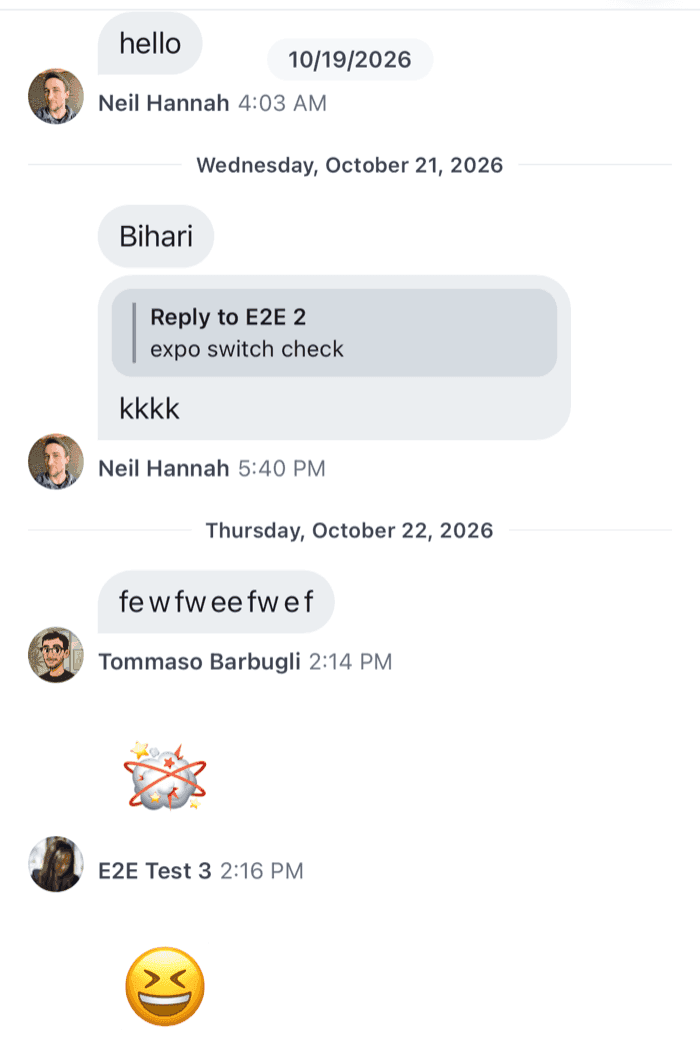
![Date separators with a line, the weekday and the full date on iOS](https://getstream.io/docs-assets/images/c232162fdc1a.png)

  </td>
  <td align='center' width='50%'>

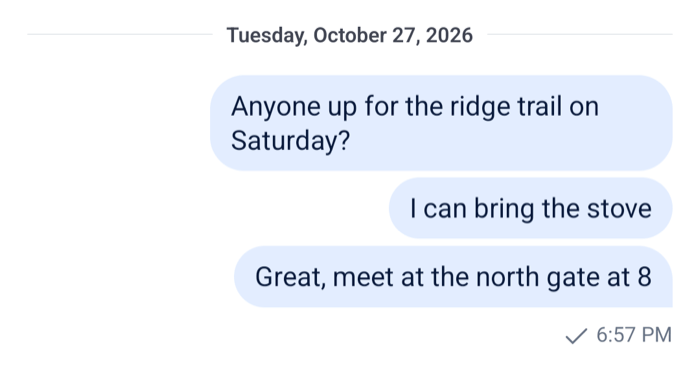
![Date separators with a line, the weekday and the full date on Android](https://getstream.io/docs-assets/images/ba51f195d2d7.png)

  </td>
  </tr>
</table>

Pass `separatorOverrides` to a `WithComponents` around `Channel` and `Thread`. Each separator shows the weekday and the full date, such as "Monday, October 26, 2026", in the user's language.

- `date` is already a `Date`. The list converts the message's nanosecond `created_at` before passing it.
- `getDateString()` returns `null` when there's nothing to show, so the separator renders nothing then.
- The default separator gives screen readers the date from `getCalendarDateStringForA11y()`: "Today", "Yesterday", the weekday for the last week, and the date with the month spelled out before that. Add an `accessibilityLabel` with it if your separator shortens the date.

To restyle the default separator instead, use the theme: `inlineDateSeparator.container` and `inlineDateSeparator.text` for the pill and its text, and `messageList.inlineDateSeparatorContainer` for the space around it. The sticky header's text is the `DateHeader` key, with the theme key `dateHeader`.

## Hiding separators on some days

Some apps write system messages that mark something other than a membership change, such as the start of a support session, and don't want a date on a day that holds nothing but those markers. A separator that renders nothing hides that day's date. Combine it with `allowDateSeparatorForSystemMessages`: without it, those days have no separator to hide.

The separator receives only its date, so it reads the loaded messages from the message paginator of its list. `useMessagePaginator()` returns the thread's paginator inside a `Thread` and the channel's otherwise:

```tsx title="src/DaysWithMessagesOnly.tsx"
import { nsToDate } from "stream-chat";
import type { LocalMessage, PaginatorState } from "stream-chat";
import {
  InlineDateSeparator,
  useMessagePaginator,
  useStateStore,
} from "stream-chat-react-native";
import type {
  ComponentOverrides,
  InlineDateSeparatorProps,
} from "stream-chat-react-native";

const dayKey = (date: Date) =>
  date.getFullYear() * 10000 + date.getMonth() * 100 + date.getDate();

// One set per list of loaded messages: the paginator publishes a new array when it changes.
const dayCache = new WeakMap<LocalMessage[], Set<number>>();

const daysWithRegularMessages = (messages: LocalMessage[]) => {
  let days = dayCache.get(messages);
  if (!days) {
    days = new Set<number>();
    for (const message of messages) {
      if (message.type !== "system")
        days.add(dayKey(nsToDate(message.created_at)));
    }
    dayCache.set(messages, days);
  }
  return days;
};

const loadedMessagesSelector = ({
  hasMoreTail,
  items,
}: PaginatorState<LocalMessage>) => ({ hasMoreTail, items });

const DaysWithMessagesOnly = (props: InlineDateSeparatorProps) => {
  const { date } = props;
  const paginator = useMessagePaginator();
  const { hasMoreTail, items } = useStateStore(
    paginator.state,
    loadedMessagesSelector,
  );

  if (!date || !items?.length) return null;

  const day = dayKey(date);
  // Older messages of the oldest loaded day may not be loaded yet, so it keeps its date.
  const oldestLoadedDay = dayKey(nsToDate(items[0].created_at));
  const dayIsPartlyLoaded = hasMoreTail && day === oldestLoadedDay;

  if (!dayIsPartlyLoaded && !daysWithRegularMessages(items).has(day))
    return null;

  return <InlineDateSeparator {...props} />;
};

export const separatorOverrides: ComponentOverrides = {
  InlineDateSeparator: DaysWithMessagesOnly,
};
```

1. The paginator's `items` are the loaded messages, oldest first, and `hasMoreTail` is `true` while older ones can still be loaded.
2. `daysWithRegularMessages` collects the days that have a regular message once per `items` array. The paginator publishes a new array whenever the loaded messages change, so a `WeakMap` keyed on it computes the set once, and every other separator looks it up.
3. A day with only system messages renders no separator, except the oldest loaded day while older messages can still load. Its regular messages may be on the next page, and a separator that appeared after scrolling would move the messages under the user.
4. Every other day renders the SDK's `InlineDateSeparator`, which is exported, with the same props.

The selector is declared at module scope, so each separator subscribes once. It selects `items`, so every mounted separator re-renders when the loaded messages change; there's one per day, so that's a handful of components. Comparing integer day keys rather than `toDateString()` strings keeps the loop over the messages cheap.

The list wraps each separator in a view with the `messageList.inlineDateSeparatorContainer` theme style, whose default has vertical padding. A separator that renders nothing leaves that padding as a gap. Set the padding to `0` in the theme, and put the spacing inside your own separator instead:

```ts
import type { DeepPartial, Theme } from "stream-chat-react-native";

export const theme: DeepPartial<Theme> = {
  messageList: { inlineDateSeparatorContainer: { paddingVertical: 0 } },
};
```

In a channel that stays open for a long time, the loaded messages keep growing, and so does the loop over them. `maxLoadedItems` caps them, as [Capping the loaded messages](https://getstream.io/chat/docs/sdk/react-native/v10/features/app-experience/performance/#capping-the-loaded-messages) shows.

## Turning separators off

`hideDateSeparators` on `Channel` and `Thread` removes the inline separators. It wins over `allowDateSeparatorForSystemMessages`. `hideStickyDateHeader` removes the sticky header at the top of the list.

```tsx
<Channel channel={channel} hideDateSeparators hideStickyDateHeader>
```

## Read more

- [Localization](https://getstream.io/chat/docs/sdk/react-native/v10/ui/customizing/localization/#date-and-time-formatting): the date formats, their translation keys and the formatting syntax.
- [Data conventions](https://getstream.io/chat/docs/sdk/react-native/v10/state/state-and-entities/data-conventions/#timestamps): nanosecond timestamps and the helpers that convert them.
- [Message paginators](https://getstream.io/chat/docs/sdk/react-native/v10/state/loading-data/message-paginators/): what the paginator loads, and the memory cap.

---

For the most recent version of this documentation, visit [https://getstream.io/chat/docs/sdk/react-native/v10/ui-cookbook/message/date-separators/](https://getstream.io/chat/docs/sdk/react-native/v10/ui-cookbook/message/date-separators/).