# Channel header

> **Info:** This is release candidate documentation for **Stream Chat React Native SDK v10**. For the latest stable version, see the [latest version (v9)](https://getstream.io/chat/docs/sdk/react-native/).

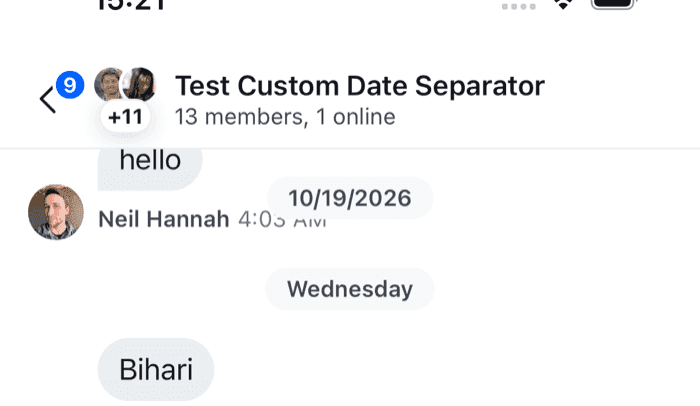
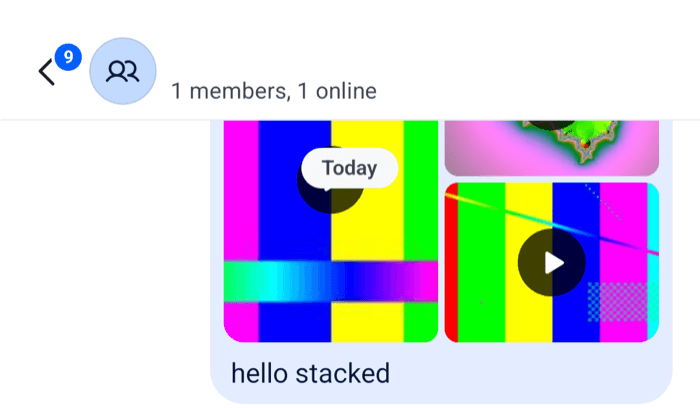
This UI cookbook builds a channel header of its own: a back button with a badge for the unread messages in the user's other channels, the channel's avatar and name, and a subtitle that shows the connection status, who is typing, or the member and online counts. The SDK has no channel header component; how a header gets onto a channel screen, and the hooks it reads, are explained in [Channel UI](https://getstream.io/chat/docs/sdk/react-native/v10/ui/components/channel-ui/#the-channel-header).

## Best practices

- Render the header as the first child of `Channel`, and hide the navigator's header for that screen. The header then reads the channel with `useChannel()`, and `Channel` starts at the top of the screen, so pass `keyboardVerticalOffset={0}`. Left out, it's `86.5` on iOS and `-300` on Android.
- Add the top safe area inset to the header's padding, from `useSafeAreaInsets()`, so the status bar and the notch don't cover it.
- Wrap the header in `PortalWhileClosingView`, so a message animating back from the message menu passes under it, not over it.
- Read the name, the avatar, the counts and typing through the SDK's hooks, which follow the channel's stores. `channel.data` read during render doesn't update the header.
- Keep the header light. It re-renders on every typing event, and the badge counts again on every client event.

## Implementation

```tsx title="src/ChannelHeader.tsx"
import { useEffect, useState } from "react";
import { Pressable, StyleSheet, Text, View } from "react-native";
import { useSafeAreaInsets } from "react-native-safe-area-context";
import type { Channel, NetworkConnectionState } from "stream-chat";
import {
  BadgeNotification,
  ChannelAvatar,
  ChevronLeft,
  PortalWhileClosingView,
  useChannel,
  useChannelMemberCount,
  useChannelOnlineMemberCount,
  useChannelPreviewDisplayName,
  useChatContext,
  useNetworkConnectionStateSelector,
  useSettledWSConnectionHealth,
  useTheme,
  useTypingString,
} from "stream-chat-react-native";

const isOnlineSelector = ({ isOnline }: NetworkConnectionState) => ({
  isOnline,
});

// The unread messages of every other channel the client holds, except the muted ones.
const useOtherChannelsUnreadCount = (channel: Channel) => {
  const { client } = useChatContext();
  const [count, setCount] = useState(0);

  useEffect(() => {
    const countUnread = () =>
      client.channelManager.values().reduce((total, other) => {
        // A channel that was deleted, or that the user was removed from, is disconnected.
        if (other.cid === channel.cid || other.pendingDisposal) return total;
        if (other.state.getLatestValue().muteStatus.muted) return total;
        return total + other.state.unreadCount;
      }, 0);

    setCount(countUnread());
    // The client applies each event to the channels before it calls its listeners.
    const { unsubscribe } = client.on(() => setCount(countUnread()));
    return unsubscribe;
  }, [channel, client]);

  return count;
};

type ChannelHeaderProps = {
  onBack: () => void;
  onOpenDetails: () => void;
};

export const ChannelHeader = ({
  onBack,
  onOpenDetails,
}: ChannelHeaderProps) => {
  const channel = useChannel();
  const { top } = useSafeAreaInsets();
  const {
    theme: { semantics },
  } = useTheme();
  const name = useChannelPreviewDisplayName(channel);
  const memberCount = useChannelMemberCount(channel);
  const onlineCount = useChannelOnlineMemberCount(channel);
  const typing = useTypingString();
  const unreadElsewhere = useOtherChannelsUnreadCount(channel);
  const { isOnline } =
    useNetworkConnectionStateSelector(isOnlineSelector) ?? {};
  const isConnected = useSettledWSConnectionHealth();

  // `=== false`: `undefined` means the network status isn't known yet.
  const subtitle =
    isOnline === false
      ? "Waiting for network..."
      : !isConnected
        ? "Connecting..."
        : typing || `${memberCount} members, ${onlineCount} online`;

  return (
    <PortalWhileClosingView
      portalHostName="channel-header"
      portalName="channel-header"
    >
      <View
        style={[
          styles.container,
          {
            backgroundColor: semantics.backgroundCoreElevation1,
            borderBottomColor: semantics.borderCoreSubtle,
            paddingTop: top + 8,
          },
        ]}
      >
        <Pressable
          accessibilityLabel={
            unreadElsewhere > 0 ? `Back, ${unreadElsewhere} unread` : "Back"
          }
          accessibilityRole="button"
          hitSlop={8}
          onPress={onBack}
          style={styles.back}
        >
          <ChevronLeft height={24} stroke={semantics.textPrimary} width={24} />
          {unreadElsewhere > 0 ? (
            <View style={styles.badge}>
              <BadgeNotification
                count={unreadElsewhere}
                size="xs"
                type="primary"
              />
            </View>
          ) : null}
        </Pressable>
        <Pressable
          accessibilityLabel="Channel details"
          accessibilityRole="button"
          onPress={onOpenDetails}
          style={styles.details}
        >
          <ChannelAvatar channel={channel} size="lg" />
          <View style={styles.title}>
            <Text
              numberOfLines={1}
              style={[styles.name, { color: semantics.textPrimary }]}
            >
              {name}
            </Text>
            <Text
              numberOfLines={1}
              style={[styles.subtitle, { color: semantics.textSecondary }]}
            >
              {subtitle}
            </Text>
          </View>
        </Pressable>
      </View>
    </PortalWhileClosingView>
  );
};

const styles = StyleSheet.create({
  back: {
    alignItems: "center",
    height: 40,
    justifyContent: "center",
    width: 40,
  },
  badge: { left: 22, position: "absolute", top: 2 },
  container: {
    alignItems: "center",
    borderBottomWidth: 1,
    flexDirection: "row",
    gap: 4,
    paddingBottom: 8,
    paddingHorizontal: 8,
  },
  details: { alignItems: "center", flex: 1, flexDirection: "row", gap: 8 },
  name: { fontSize: 16, fontWeight: "600" },
  subtitle: { fontSize: 13 },
  title: { flex: 1 },
});
```

<table>
  <tr>
  <td align='center' width='50%'>

![A channel header with a back button, an unread badge, the channel name and member counts on iOS](https://getstream.io/docs-assets/images/7e4d7df1ea31.png)

  </td>
  <td align='center' width='50%'>

![A channel header with a back button, an unread badge, the channel name and member counts on Android](https://getstream.io/docs-assets/images/95ed0dedbe84.png)

  </td>
  </tr>
</table>

Here is what each part reads:

- `useChannelPreviewDisplayName(channel)` gives the name the channel list shows: the channel's name, or its other members' names when it has none. `ChannelAvatar` shows the channel's image, or the members' avatars, with the online dot in a direct message.
- `useChannelMemberCount(channel)` reads `memberCount` from `channel.state`. `useChannelOnlineMemberCount(channel)` reads `watcherCount`, the number of users watching the channel right now.
- `useTypingString()` returns "Cleo is typing", or "Cleo and 2 more are typing", for the people typing in the channel itself, and an empty string while nobody is. It leaves out the current user and the replies typed in threads. It reads the channel from `Channel`, so the header has to be inside it.
- `useNetworkConnectionStateSelector` reads whether the device has a network, and `useSettledWSConnectionHealth()` whether the connection to Stream is up. A drop of the connection shorter than five seconds doesn't count, so a short reconnect doesn't flash "Connecting...". [Connection status](https://getstream.io/chat/docs/sdk/react-native/v10/features/app-experience/connection-status/#a-status-of-your-own) explains both.

### The unread badge

The badge counts the messages the user hasn't read in other channels, so it stays useful after they leave this one. No hook returns that number, so `useOtherChannelsUnreadCount` adds it up:

- It sums `channel.state.unreadCount`, the user's unread count in each channel, over the channels in `client.channelManager`: the channels the client has loaded, such as the ones in your channel lists. Channels the client hasn't loaded don't count.
- It leaves out this channel and the muted ones, as the channel list's badges do. It also leaves out a channel that was deleted or that the user was removed from: the client disconnects it and keeps it until its listeners have run.
- It counts again on every client event. The client updates a channel's state before it calls the listeners, so the count includes the event's message or read.

For a total over all the user's channels, loaded or not, read `total_unread_count` from the server: `client.user?.total_unread_count` after connecting, and the same field on the events that carry it, such as `notification.message_new` and `notification.mark_read`. That total includes this channel while its new messages wait to be marked read.

## Final code

The channel screen hides the navigator's header and renders `ChannelHeader` above the list:

```tsx title="src/ChannelScreen.tsx"
import type { NativeStackScreenProps } from "@react-navigation/native-stack";
import {
  Channel,
  MessageComposer,
  MessageList,
  useChatContext,
} from "stream-chat-react-native";
import { ChannelHeader } from "./ChannelHeader";

type StackParamList = {
  Channel: { cid: string };
  ChannelDetails: { cid: string };
  Thread: { threadId: string };
};

export const ChannelScreen = ({
  navigation,
  route,
}: NativeStackScreenProps<StackParamList, "Channel">) => {
  const { client } = useChatContext();
  const channel = client.channelManager.get(route.params.cid);

  if (!channel) return null;

  return (
    <Channel channel={channel} keyboardVerticalOffset={0}>
      <ChannelHeader
        onBack={() => navigation.goBack()}
        onOpenDetails={() =>
          navigation.navigate("ChannelDetails", { cid: channel.cid })
        }
      />
      <MessageList
        onThreadSelect={(thread) =>
          navigation.navigate("Thread", { threadId: thread.id })
        }
      />
      <MessageComposer />
    </Channel>
  );
};
```

Register the screen with `options={{ headerShown: false }}`. The header is part of the screen's views, so `Channel` gets a `keyboardVerticalOffset` of `0` and no `topInset`; see [Keyboard and insets](https://getstream.io/chat/docs/sdk/react-native/v10/ui/layout/keyboard-and-insets/). The details screen the avatar opens is on [Channel UI](https://getstream.io/chat/docs/sdk/react-native/v10/ui/components/channel-ui/#channel-details), and the thread screen on [Navigation](https://getstream.io/chat/docs/sdk/react-native/v10/ui/layout/navigation/).

A thread screen can use the same header pattern inside `Thread`. There, `useTypingString()` counts only the people typing in that thread, and `useChannel()` returns the thread's channel. The [Thread header](https://getstream.io/chat/docs/sdk/react-native/v10/ui-cookbook/headers/thread-header/) UI cookbook builds one.

---

For the most recent version of this documentation, visit [https://getstream.io/chat/docs/sdk/react-native/v10/ui-cookbook/headers/channel-header/](https://getstream.io/chat/docs/sdk/react-native/v10/ui-cookbook/headers/channel-header/).