# Attachment previews

> **Info:** This is release candidate documentation for **Stream Chat React Native SDK v10**. For the latest stable version, see the [latest version (v9)](https://getstream.io/chat/docs/sdk/react-native/).

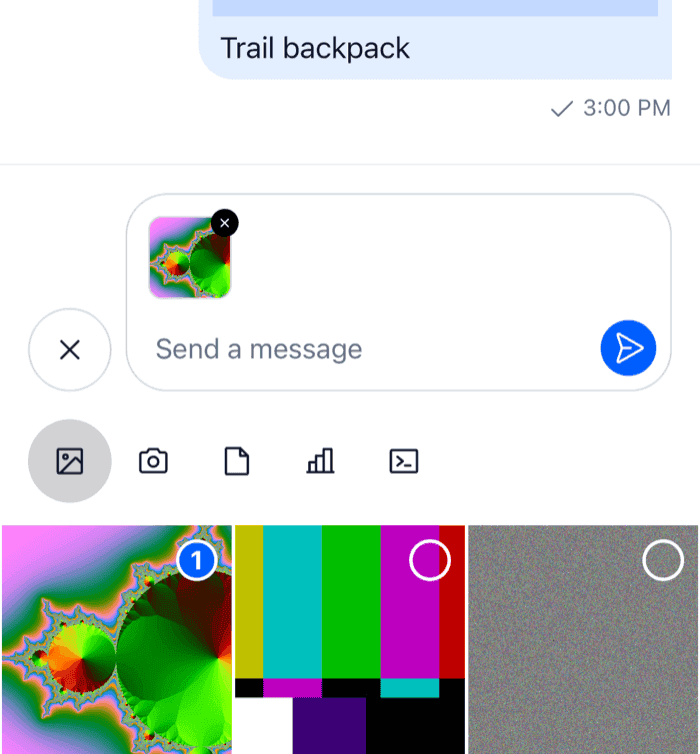
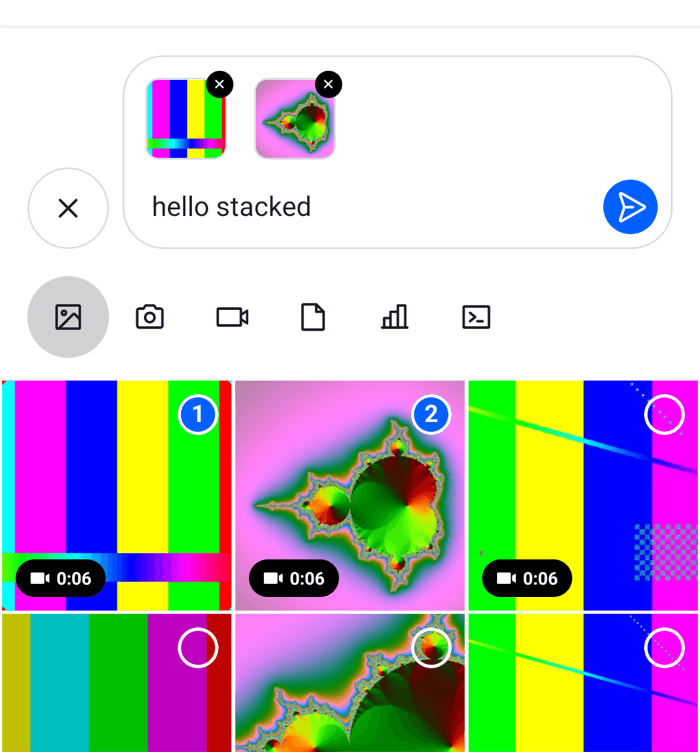
The composer shows what a message will carry above the input: each attachment with its upload state, voice recordings and link previews. This UI cookbook replaces those previews, one kind at a time: images and videos as small square thumbnails, the upload progress as a percentage, and voice recordings as a compact row. How attachments are added and uploaded is explained in [Attachments and uploads](https://getstream.io/chat/docs/sdk/react-native/v10/features/rich-content/attachments-and-uploads/#in-the-composer), and where the previews sit in [Message composer UI](https://getstream.io/chat/docs/sdk/react-native/v10/ui/components/message-composer-ui/#previews).

## Best practices

- Replace one kind of preview through its own override key, such as `ImageAttachmentUploadPreview`. `AttachmentUploadPreviewList` keeps laying out the previews, and the other kinds keep their defaults.
- Replace `VideoAttachmentUploadPreview` together with `ImageAttachmentUploadPreview` when videos should look like images. The default video preview renders the SDK's image preview, not your override.
- To change only how the upload progress looks, override `CircularProgressIndicator`. It draws the progress in every preview and on message attachments that are still uploading.
- Keep the remove and retry buttons working in a preview of your own: call `removeAttachments` and `handleRetry`, which every preview receives.
- Show the upload state only while `usePendingUploadsEnabled()` is `false`, as the default previews do. With pending uploads on, the message is sent while its files upload, and the message list shows the progress.
- To keep the default for some attachments, render the SDK's exported component for them, not the one from `useComponentsContext()`, which returns your override.
- Keep previews small. Images, videos and files share one row that scrolls sideways.

## Default attachment previews

`AttachmentUploadPreviewList` renders one preview per attachment in the composer, picked by the attachment's type. Each preview is an override key:

| Attachment                            | Override key                   | Default                                                                                                  |
| ------------------------------------- | ------------------------------ | -------------------------------------------------------------------------------------------------------- |
| An image                              | `ImageAttachmentUploadPreview` | A 72 by 72 thumbnail, with the upload progress over it and a remove button in the corner                 |
| A video                               | `VideoAttachmentUploadPreview` | The image preview of the video's thumbnail, with the video's duration                                    |
| Any other file                        | `FileAttachmentUploadPreview`  | A row with the file's icon, name, and size or upload progress                                            |
| An audio file                         | `AudioAttachmentUploadPreview` | A player, when an audio package is installed. Without one, the file preview.                             |
| A voice recording                     | `AudioAttachmentUploadPreview` | A player. None with `audioRecordingSendOnComplete`, which sends the recording at once.                   |
| An attachment of a type your app adds | none                           | Nothing. The list has no preview for types it doesn't know; see [Your own types](#your-own-types) below. |

Voice recordings, and audio files when an audio package is installed, are stacked above the others, each in a row of its own. Images, videos and files share one row that scrolls sideways.

Every preview receives the same three props:

- `attachment` is the attachment, with its `localMetadata`: `id`, `file`, `previewUri` (the local file's URI) and `uploadState`, which is `pending`, `uploading`, `finished`, `failed` or `blocked`.
- `removeAttachments(ids)` removes attachments from the composer by their `localMetadata.id`. Removing one that is still uploading cancels its upload.
- `handleRetry(attachment)` uploads a failed attachment again.

Two more previews are rendered outside the list, by `MessageInputHeaderView`:

- Link previews, as a card for the first link in the text. They have no override key; see [Link previews](#link-previews) below.
- The message being edited or quoted, by `Reply`.

`LocationComposer.setData()` puts a location on the message being written, but the composer shows no preview of it. See [Location sharing](https://getstream.io/chat/docs/sdk/react-native/v10/features/rich-content/location-sharing/#sharing-a-location).

## Square image and video previews

A replacement renders the whole preview. These show images and videos as 48 by 48 thumbnails. They read the SDK's upload state parts from `useComponentsContext()`, so overrides of those parts apply here too:

```tsx title="src/SquareMediaPreviews.tsx"
import { Pressable, StyleSheet, View } from "react-native";
import type { LocalImageAttachment, LocalVideoAttachment } from "stream-chat";
import {
  useComponentsContext,
  usePendingUploadsEnabled,
  useTheme,
} from "stream-chat-react-native";
import type {
  ImageAttachmentUploadPreviewProps,
  UploadAttachmentPreviewProps,
} from "stream-chat-react-native";

type SquarePreviewProps = UploadAttachmentPreviewProps<
  LocalImageAttachment | LocalVideoAttachment
> & {
  isVideo?: boolean;
  uri: string;
};

const SquarePreview = ({
  attachment,
  handleRetry,
  isVideo,
  removeAttachments,
  uri,
}: SquarePreviewProps) => {
  const {
    icons,
    ImageComponent,
    ImageUploadInProgressIndicator,
    ImageUploadNotSupportedIndicator,
    ImageUploadRetryIndicator,
  } = useComponentsContext();
  const pendingUploadsEnabled = usePendingUploadsEnabled();
  const {
    theme: { semantics },
  } = useTheme();
  const { id, previewUri, uploadState } = attachment.localMetadata;

  return (
    <View style={styles.container}>
      <View
        style={[styles.thumbnail, { borderColor: semantics.borderCoreDefault }]}
      >
        <ImageComponent source={{ uri }} style={StyleSheet.absoluteFill} />
        {isVideo ? (
          <icons.Play
            height={16}
            pathFill={semantics.textOnInverse}
            width={16}
          />
        ) : null}
        {!pendingUploadsEnabled && uploadState === "uploading" ? (
          <ImageUploadInProgressIndicator localId={id} sourceUrl={previewUri} />
        ) : null}
        {!pendingUploadsEnabled && uploadState === "failed" ? (
          <ImageUploadRetryIndicator
            onRetryHandler={() => handleRetry(attachment)}
          />
        ) : null}
        {uploadState === "blocked" ? (
          <ImageUploadNotSupportedIndicator />
        ) : null}
      </View>
      <Pressable
        accessibilityLabel="Remove attachment"
        accessibilityRole="button"
        hitSlop={12}
        onPress={() => removeAttachments([id])}
        style={[
          styles.remove,
          { backgroundColor: semantics.controlRemoveControlBg },
        ]}
      >
        <icons.NewClose
          height={12}
          stroke={semantics.controlRemoveControlIcon}
          width={12}
        />
      </Pressable>
    </View>
  );
};

export const SquareImagePreview = (
  props: ImageAttachmentUploadPreviewProps,
) => {
  const { attachment } = props;
  // The local file, or the uploaded image when the composer was restored from a draft or an edit.
  const uri = attachment.localMetadata.previewUri ?? attachment.image_url;

  return uri ? <SquarePreview {...props} uri={uri} /> : null;
};

export const SquareVideoPreview = (
  props: UploadAttachmentPreviewProps<LocalVideoAttachment>,
) => {
  const { FileAttachmentUploadPreview } = useComponentsContext();
  const { thumb_url } = props.attachment;

  // A video without a thumbnail from its picker shows as a file row.
  return thumb_url ? (
    <SquarePreview {...props} isVideo uri={thumb_url} />
  ) : (
    <FileAttachmentUploadPreview {...props} />
  );
};

const styles = StyleSheet.create({
  container: { padding: 4 },
  remove: {
    borderRadius: 10,
    padding: 2,
    position: "absolute",
    right: 0,
    top: 0,
  },
  thumbnail: {
    alignItems: "center",
    borderRadius: 8,
    borderWidth: 1,
    height: 48,
    justifyContent: "center",
    overflow: "hidden",
    width: 48,
  },
});
```

<table>
  <tr>
  <td align='center' width='50%'>

![A composer with a small square thumbnail and a remove button above the attachment picker on iOS](https://getstream.io/docs-assets/images/70145d34794a.png)

  </td>
  <td align='center' width='50%'>

![A composer with a small square thumbnail and a remove button above the attachment picker on Android](https://getstream.io/docs-assets/images/ce086ed8e134.png)

  </td>
  </tr>
</table>

Here is what each part does:

- `ImageUploadInProgressIndicator` covers the thumbnail with the upload progress. It reads the upload from `client.uploadManager` by the attachment's `localMetadata.id`, and renders only while that upload runs and `sourceUrl` is a local file.
- `ImageUploadRetryIndicator` shows after a failed upload, and calls `handleRetry`. `ImageUploadNotSupportedIndicator` marks a file the app's upload settings refused. The SDK removes such a file from the composer right after.
- The video preview uses the thumbnail the picker generated, `thumb_url`. A video without one renders `FileAttachmentUploadPreview`, which is your override when you register one.

`ImageAttachmentUploadPreviewProps`, `FileAttachmentUploadPreviewProps` and `AudioAttachmentUploadPreviewProps` are exported. The video preview's props type and its default component aren't, so the video preview is typed with `UploadAttachmentPreviewProps<LocalVideoAttachment>`, and a video can't fall back to the default video preview. The [Composer UI components reference](https://getstream.io/chat/docs/sdk/react-native/v10/component-reference/message-composer/composer-ui-components/#upload-preview-props) lists the props.

## Upload progress

The previews build their upload state from smaller parts, each an override key. From the most specific to the most general:

| Override key                                                                                      | Shows                                                                                                                                          |
| ------------------------------------------------------------------------------------------------- | ---------------------------------------------------------------------------------------------------------------------------------------------- |
| `CircularProgressIndicator`                                                                       | The progress ring, from `progress`, 0 to 100. Used wherever a progress is known.                                                               |
| `MediaUploadProgressOverlay`                                                                      | The cover over an image or video thumbnail while it uploads: the ring, or a spinner while the progress is unknown                              |
| `AttachmentUploadIndicator`                                                                       | The overlay over thumbnails, and the ring or a spinner on file rows. Renders only while `client.uploadManager` has the upload of a local file. |
| `ImageUploadInProgressIndicator`, `ImageUploadRetryIndicator`, `ImageUploadNotSupportedIndicator` | The upload states of the composer's image and video previews                                                                                   |
| `FileUploadInProgressIndicator`, `FileUploadRetryIndicator`, `FileUploadNotSupportedIndicator`    | The upload states of the composer's file previews. The in-progress part adds "1.2 MB / 3.0 MB" next to the ring.                               |

The first three also show the progress on message attachments when [sending with pending uploads](https://getstream.io/chat/docs/sdk/react-native/v10/features/messaging/sending-with-pending-uploads/#progress-in-the-ui) is on, so an attachment looks the same before and after the user sends it. Pending uploads are off by default, and `Chat` turns them on with `enableOfflineSupport`. While they're on, the composer's previews show no progress and no retry button.

This ring shows the progress as a percentage:

```tsx title="src/UploadPercentRing.tsx"
import { StyleSheet, Text, View } from "react-native";
import type { CircularProgressIndicatorProps } from "stream-chat-react-native";

export const UploadPercentRing = ({
  filledColor,
  progress,
  size = 16,
  style,
  testID,
}: CircularProgressIndicatorProps) => (
  <View
    style={[styles.container, { minHeight: size, minWidth: size }, style]}
    testID={testID}
  >
    <Text style={[styles.percent, { color: filledColor }]}>
      {Math.round(progress)}%
    </Text>
  </View>
);

const styles = StyleSheet.create({
  container: { alignItems: "center", justifyContent: "center" },
  percent: { fontSize: 11, fontVariant: ["tabular-nums"], fontWeight: "600" },
});
```

`size` is 16 on file rows and 28 over thumbnails. While the progress is unknown, the SDK shows a spinner instead of the ring. To replace that too, override `AttachmentUploadIndicator`, as [Sending with pending uploads](https://getstream.io/chat/docs/sdk/react-native/v10/features/messaging/sending-with-pending-uploads/#replacing-the-progress-ui) shows.

The audio and voice recording previews render the SDK's own `File...` indicators, not the ones registered under their keys. A `CircularProgressIndicator` or `AttachmentUploadIndicator` override still reaches them.

## Compact voice recording previews

A voice recording waiting to be sent shows in `AudioAttachmentUploadPreview`, the same key as audio files. This preview shows recordings as a row with their duration, and renders the SDK's player for audio files:

```tsx title="src/CompactVoiceRecordingPreview.tsx"
import { Pressable, StyleSheet, Text, View } from "react-native";
import { isLocalVoiceRecordingAttachment } from "stream-chat";
import {
  AudioAttachmentUploadPreview,
  useComponentsContext,
  usePendingUploadsEnabled,
  useTheme,
} from "stream-chat-react-native";
import type { AudioAttachmentUploadPreviewProps } from "stream-chat-react-native";

const formatDuration = (seconds = 0) => {
  const total = Math.round(seconds);
  return `${Math.floor(total / 60)}:${String(total % 60).padStart(2, "0")}`;
};

export const CompactVoiceRecordingPreview = (
  props: AudioAttachmentUploadPreviewProps,
) => {
  const { attachment, handleRetry, removeAttachments } = props;
  const { icons } = useComponentsContext();
  const pendingUploadsEnabled = usePendingUploadsEnabled();
  const {
    theme: { semantics },
  } = useTheme();

  // Audio files keep the SDK's player.
  if (!isLocalVoiceRecordingAttachment(attachment)) {
    return <AudioAttachmentUploadPreview {...props} />;
  }

  const { id, uploadState } = attachment.localMetadata;

  return (
    <View style={[styles.row, { borderColor: semantics.borderCoreDefault }]}>
      <icons.Mic height={16} stroke={semantics.textSecondary} width={16} />
      <Text style={[styles.label, { color: semantics.textPrimary }]}>
        Voice message, {formatDuration(attachment.custom.duration)}
      </Text>
      {!pendingUploadsEnabled && uploadState === "failed" ? (
        <Pressable
          accessibilityRole="button"
          onPress={() => handleRetry(attachment)}
        >
          <Text style={{ color: semantics.textLink }}>Retry</Text>
        </Pressable>
      ) : null}
      <Pressable
        accessibilityLabel="Remove voice message"
        accessibilityRole="button"
        hitSlop={12}
        onPress={() => removeAttachments([id])}
      >
        <icons.NewClose
          height={16}
          stroke={semantics.textSecondary}
          width={16}
        />
      </Pressable>
    </View>
  );
};

const styles = StyleSheet.create({
  label: { flex: 1 },
  row: {
    alignItems: "center",
    borderRadius: 12,
    borderWidth: 1,
    flexDirection: "row",
    gap: 8,
    marginVertical: 4,
    padding: 8,
  },
});
```

The recording's duration is in seconds, in `attachment.custom.duration`. The row has no player, so the user can't listen to the recording before sending it. Voice recording is off until `Channel` and `Thread` get `audioRecordingEnabled`. [Voice recordings and audio playback](https://getstream.io/chat/docs/sdk/react-native/v10/features/rich-content/voice-recordings-and-audio-playback/) covers recording and the players.

## Link previews

The composer's link previews have no override key, and the list that renders them isn't exported. `MessageInputHeaderView` renders them after the attachment previews, so a replacement of it renders the quoted or edited message and `AttachmentUploadPreviewList` too. [Link previews](https://getstream.io/chat/docs/sdk/react-native/v10/features/rich-content/link-previews/#replace-the-previews-in-the-composer) has a complete header that reads the previews from `linkPreviewsManager.state`.

## Your own types

`AttachmentUploadPreviewList` renders nothing for an attachment whose type it doesn't know, so an attachment of your own in `messageComposer.attachmentManager` has no preview. The attachment manager also sends only attachments whose upload has finished. The [Custom attachments UI cookbook](https://getstream.io/chat/docs/sdk/react-native/v10/ui-cookbook/message/custom-attachments/) keeps its product out of the attachment manager: the composer's custom data holds it, a picker above the composer shows it, and a composition middleware adds it to the message when it's sent.

## Register the previews

Register the previews and the ring with `WithComponents`, declared once at module scope:

```tsx title="src/ChannelScreen.tsx"
import type { Channel as StreamChannel } from "stream-chat";
import {
  Channel,
  MessageComposer,
  MessageList,
  WithComponents,
} from "stream-chat-react-native";
import type { ComponentOverrides } from "stream-chat-react-native";
import { CompactVoiceRecordingPreview } from "./CompactVoiceRecordingPreview";
import { SquareImagePreview, SquareVideoPreview } from "./SquareMediaPreviews";
import { UploadPercentRing } from "./UploadPercentRing";

const overrides: ComponentOverrides = {
  AudioAttachmentUploadPreview: CompactVoiceRecordingPreview,
  CircularProgressIndicator: UploadPercentRing,
  ImageAttachmentUploadPreview: SquareImagePreview,
  VideoAttachmentUploadPreview: SquareVideoPreview,
};

export const ChannelScreen = ({ channel }: { channel: StreamChannel }) => (
  <WithComponents overrides={overrides}>
    <Channel audioRecordingEnabled channel={channel}>
      <MessageList />
      <MessageComposer />
    </Channel>
  </WithComponents>
);
```

The list and the previews read the composer from `useMessageComposer()`, so they work in a channel, in a thread and while a message is being edited. Wrap the thread screen in the same `WithComponents`, or register the overrides once around your navigator. [Overriding components](https://getstream.io/chat/docs/sdk/react-native/v10/ui/customizing/overriding-components/) explains how overrides apply.

## Related

- To change the whole composer row around the previews, see the [Custom composer UI cookbook](https://getstream.io/chat/docs/sdk/react-native/v10/ui-cookbook/composer/custom-composer/).
- To compress files before they upload, see the [File compression UI cookbook](https://getstream.io/chat/docs/sdk/react-native/v10/ui-cookbook/composer/file-compression/).
- To render an attachment type of your own in the message list, see the [Custom attachments UI cookbook](https://getstream.io/chat/docs/sdk/react-native/v10/ui-cookbook/message/custom-attachments/).

---

For the most recent version of this documentation, visit [https://getstream.io/chat/docs/sdk/react-native/v10/ui-cookbook/composer/attachment-previews/](https://getstream.io/chat/docs/sdk/react-native/v10/ui-cookbook/composer/attachment-previews/).