# Pinning and archiving

> **Info:** This is release candidate documentation for **Stream Chat React Native SDK v10**. For the latest stable version, see the [latest version (v9)](https://getstream.io/chat/docs/sdk/react-native/).

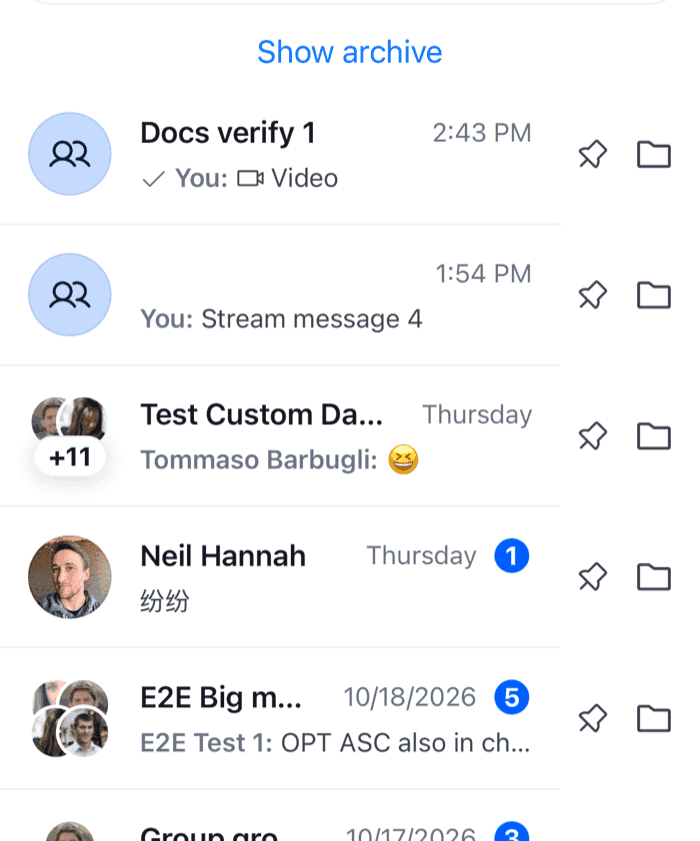
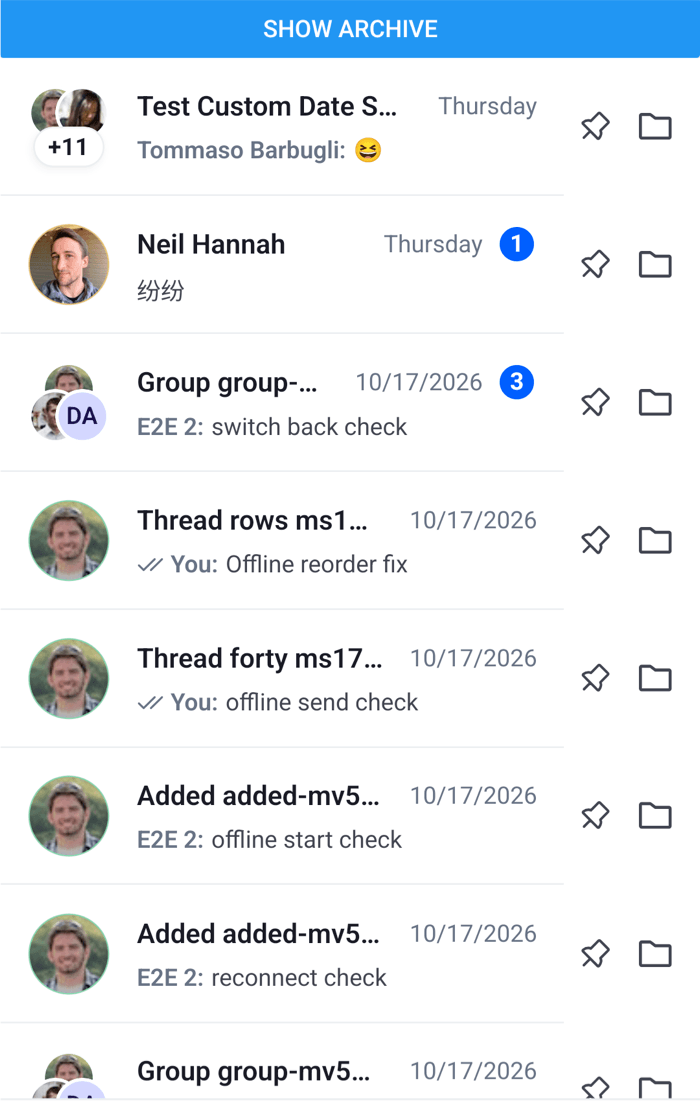
Pinning keeps a channel at the top of the user's list, and archiving moves it out of the list into an archive. Both belong to the current user alone: other members don't see them. The SDK's swipe sheet already has Pin, and no Archive. This UI cookbook puts a pin and an archive button on every row, and shows them working with an inbox that keeps pinned channels on top and an archive the user can switch to. What the lists do when a channel is pinned or archived is explained in [Channel lists](https://getstream.io/chat/docs/sdk/react-native/v10/features/channels/channel-lists/).

## Best practices

- Read pinned and archived from the user's membership, `pinned_at` and `archived_at`. The row's `pinned` prop and `useChannelMembershipState(channel)` both follow it.
- Change them with the handlers of `useChannelActions(channel)`. They call `Channel.pin()`, `Channel.archive()` and the others, and publish "Channel pinned" or an error notification, as the swipe sheet does.
- Show a pending state. Neither change is optimistic: the membership changes when the server's `member.updated` event arrives, not when the button is pressed.
- Put the order and the split in the lists' filters and sort, not in the rows. Sort on `pinned_at` to keep pinned channels on top, and filter on `archived` to keep archived channels out of the inbox.
- Make undoing easy. An archived channel leaves the list the user is looking at, so give them a way to reach the archive and unarchive it.

## Pin and archive buttons on the row

The row renders the default content, `ChannelPreviewView`, and two buttons after it. The screen has an inbox and an archive, each a `ChannelPaginator`:

```tsx title="src/ChannelsWithPinAndArchive.tsx"
import { useEffect, useMemo, useState } from "react";
import { Button, Pressable, StyleSheet, View } from "react-native";
import { ChannelPaginator } from "stream-chat";
import type { Channel, ChannelFilters, SortParamRequest } from "stream-chat";
import {
  ChannelList,
  ChannelPreviewView,
  useChannelActions,
  useChannelMembershipState,
  useChatContext,
  useComponentsContext,
  useTheme,
  WithComponents,
} from "stream-chat-react-native";
import type {
  ChannelActionHandler,
  ChannelPreviewViewProps,
} from "stream-chat-react-native";

const userId = "YOUR_USER_ID";

// Pinned channels first, the most recently pinned on top, then the latest message first.
const sort: SortParamRequest[] = [
  { direction: -1, field: "pinned_at" },
  { direction: -1, field: "last_message_at" },
];
const inboxFilters: ChannelFilters = {
  archived: false,
  members: { $in: [userId] },
};
const archiveFilters: ChannelFilters = {
  archived: true,
  members: { $in: [userId] },
};

const RowWithPinAndArchive = (props: ChannelPreviewViewProps) => {
  const { channel, pinned } = props;
  const { icons } = useComponentsContext();
  const {
    theme: { semantics },
  } = useTheme();
  const { archive, pin, unarchive, unpin } = useChannelActions(channel);
  const membership = useChannelMembershipState(channel);
  const archived = !!membership?.archived_at;
  const [pending, setPending] = useState(false);

  // The membership changes when the server's member.updated event arrives.
  useEffect(() => setPending(false), [archived, pinned]);

  const run = (action: ChannelActionHandler) => {
    setPending(true);
    void action({ onFailure: () => setPending(false) });
  };

  const iconColor = pending ? semantics.textTertiary : semantics.textSecondary;

  return (
    <View style={styles.row}>
      <View style={styles.preview}>
        <ChannelPreviewView {...props} />
      </View>
      <Pressable
        accessibilityLabel={pinned ? "Unpin" : "Pin"}
        accessibilityRole="button"
        disabled={pending}
        hitSlop={8}
        onPress={() => run(pinned ? unpin : pin)}
        style={styles.button}
      >
        {pinned ? (
          <icons.Unpin height={20} stroke={iconColor} width={20} />
        ) : (
          <icons.Pin height={20} stroke={iconColor} width={20} />
        )}
      </Pressable>
      <Pressable
        accessibilityLabel={archived ? "Unarchive" : "Archive"}
        accessibilityRole="button"
        disabled={pending}
        hitSlop={8}
        onPress={() => run(archived ? unarchive : archive)}
        style={styles.button}
      >
        <icons.Folder height={20} stroke={iconColor} width={20} />
      </Pressable>
    </View>
  );
};

// Declared once, so WithComponents gets the same object on every render.
const overrides = { ChannelPreview: RowWithPinAndArchive };

export const ChannelsScreen = ({
  onSelect,
}: {
  onSelect: (channel: Channel) => void;
}) => {
  const { client } = useChatContext();
  const [showArchive, setShowArchive] = useState(false);

  const [inbox, archiveList] = useMemo(
    () => [
      new ChannelPaginator({
        client,
        filters: inboxFilters,
        id: "inbox",
        sort,
      }),
      new ChannelPaginator({
        client,
        filters: archiveFilters,
        id: "archive",
        sort,
      }),
    ],
    [client],
  );

  // Both lists are registered, so a channel moves between them while either is on screen.
  useEffect(() => {
    client.channelManager.insertPaginator({ paginator: inbox });
    client.channelManager.insertPaginator({ paginator: archiveList });
    return () => {
      client.channelManager.removePaginator(inbox);
      client.channelManager.removePaginator(archiveList);
      inbox.dispose();
      archiveList.dispose();
    };
  }, [archiveList, client, inbox]);

  return (
    <WithComponents overrides={overrides}>
      <View style={styles.screen}>
        <Button
          onPress={() => setShowArchive((value) => !value)}
          title={showArchive ? "Show inbox" : "Show archive"}
        />
        <ChannelList
          onSelect={onSelect}
          paginator={showArchive ? archiveList : inbox}
        />
      </View>
    </WithComponents>
  );
};

const styles = StyleSheet.create({
  button: { padding: 8 },
  preview: { flex: 1 },
  row: { alignItems: "center", flexDirection: "row", paddingRight: 8 },
  screen: { flex: 1 },
});
```

<table>
  <tr>
  <td align='center' width='50%'>

![Channel rows with a pin button and an archive button at the end of each row on iOS](https://getstream.io/docs-assets/images/fe613eef3c52.png)

  </td>
  <td align='center' width='50%'>

![Channel rows with a pin button and an archive button at the end of each row on Android](https://getstream.io/docs-assets/images/e81573d1e923.png)

  </td>
  </tr>
</table>

>
> **Info:** **Example**
>
> What happens when the user taps the pin button on "Design":
>
> 1. `run(pin)` disables both buttons and grays their icons, then calls the `pin` handler, which calls `Channel.pin()`.
> 2. The handler publishes "Channel pinned" to the channel list's notification list when the request succeeds. When it fails, it publishes an error, calls `onFailure`, and the buttons come back.
> 3. The server sends `member.updated`. It sets `pinned_at` on the user's membership in `channel.state`.
> 4. The list passes the row `pinned`, so the row shows the pin icon after the title and the unpin button. The effect that watches `pinned` clears the pending state.
> 5. The channel manager routes "Design" again. The inbox sorts on `pinned_at`, so the channel moves to the top.
>

Archiving runs the same way, and at step 5 the channel leaves the inbox, whose filters say `archived: false`, and joins the archive. Its row unmounts in the inbox and mounts in the archive, where the same button unarchives it. [How events move channels between paginators](https://getstream.io/chat/docs/sdk/react-native/v10/state/loading-data/channel-list-paginators/#how-events-move-channels-between-paginators) explains the routing.

The swipe actions still work on these rows, because the list wraps the override in them. The sheet's Pin and the row's pin button call the same handler, so they can't disagree.

## Pinning from anywhere else

The handlers and the membership aren't tied to a row. A pin button in a channel's header, or anywhere inside `Chat`, works the same way with the channel it shows:

```tsx title="src/PinChannelButton.tsx"
import { Button } from "react-native";
import type { Channel } from "stream-chat";
import {
  useChannelActions,
  useIsChannelPinned,
} from "stream-chat-react-native";

export const PinChannelButton = ({ channel }: { channel: Channel }) => {
  const pinned = useIsChannelPinned(channel);
  const { pin, unpin } = useChannelActions(channel);

  return (
    <Button
      onPress={() => void (pinned ? unpin() : pin())}
      title={pinned ? "Unpin" : "Pin"}
    />
  );
};
```

Outside a channel list, the handlers' notifications go to the notification list that mounted most recently, or to the one of the surface the button sits in, such as the open channel. [Routing notifications](https://getstream.io/chat/docs/sdk/react-native/v10/ui/customizing/displaying-notifications/#routing-notifications) explains how they're placed.

To call the channel without notifications, use `Channel.pin()`, `Channel.unpin()`, `Channel.archive()` and `Channel.unarchive()` directly.

## Going further

- **An Archive item in the swipe sheet** instead of a button on the row. Add it with `getChannelActionItems`, as [Which channels a list shows](https://getstream.io/chat/docs/sdk/react-native/v10/features/channels/channel-lists/#which-channels-a-list-shows-and-in-what-order) does.
- **Pin and unpin in channel details.** The details screen leaves pinning out by default. [In channel details](https://getstream.io/chat/docs/sdk/react-native/v10/ui/customizing/actions/#in-channel-details) shows how to add it, and the [Custom channel actions](https://getstream.io/chat/docs/sdk/react-native/v10/ui-cookbook/channel-details/custom-channel-actions/) UI cookbook builds it.
- **Pinned channels in a list of their own,** such as a "Pinned" section above the inbox. Give it a paginator filtered on `pinned: true`, and an ownership rule so a pinned channel shows in that list only. See [Channels that match several paginators](https://getstream.io/chat/docs/sdk/react-native/v10/state/loading-data/channel-list-paginators/#channels-that-match-several-paginators).
- **A pending state outside React.** [Showing a pending state](https://getstream.io/chat/docs/sdk/react-native/v10/state/writing-messages/whats-optimistic-and-what-isnt/#showing-a-pending-state) waits for the membership to change with `StateStore.subscribeWithSelector()` on `channel.state`.

---

For the most recent version of this documentation, visit [https://getstream.io/chat/docs/sdk/react-native/v10/ui-cookbook/channel-list/pinning-and-archiving/](https://getstream.io/chat/docs/sdk/react-native/v10/ui-cookbook/channel-list/pinning-and-archiving/).