# Reactions
> **Info:** This is release candidate documentation for **Stream Chat React Native SDK v10**. For the latest stable version, see the [latest version (v9)](https://getstream.io/chat/docs/sdk/react-native/).
## What users get
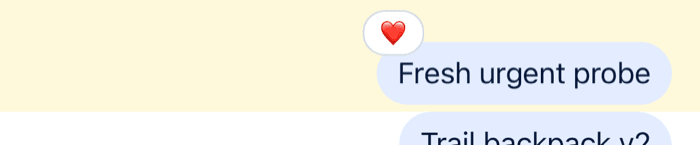
Users react to a message with an emoji, and see who reacted with what. A reaction shows on the message at once, for everyone viewing it.
- **Adding a reaction.** A long press on a message opens the message menu, with a row of quick reactions above the message: like, haha, love, wow and sad by default. A **+** button at the end of the row opens a bottom sheet with the full emoji set. Picking a reaction the user already gave removes it.
- **Reactions on the message.** The reactions sit above the message bubble. By default they're clustered into one pill that shows up to four reaction types, followed by the number of further types when there are more; the segmented style shows one chip per reaction type, with its count.
- **Who reacted.** Tapping the reactions opens a bottom sheet that lists the users who reacted, filtered by reaction type. Tapping one reaction type opens it filtered to that type. The sheet has its own button to add a reaction.

## How it works across the layers
### State
A message carries its reactions in three fields:
- `reaction_groups`: one summary per reaction type, with the count and when it was first and last used;
- `latest_reactions`: the most recent reactions, with their users;
- `own_reactions`: the current user's reactions.
The state layer applies `reaction.new`, `reaction.updated` and `reaction.deleted` events to the message, wherever it's shown: the channel's list, a thread, or a thread's parent message.
The message operations of a channel or a thread change reactions optimistically:
- `MessageOperations.addReaction({ messageId, reaction, options })` adds the reaction to the message, then sends the request. With `options: { enforce_unique: true }`, the new reaction replaces the user's other reactions on the message.
- `MessageOperations.deleteReaction({ messageId, type })` removes the user's reaction of that type, then sends the request.
When the server answers, its copy of the message replaces the local one. If the request fails, the change is undone, unless the request was queued to be sent later. With offline support, a reaction made while offline is queued and sent after the next reconnect. See [Message operations](https://getstream.io/chat/docs/sdk/react-native/v10/state/writing-messages/message-operations/).
### UI
The user picks the thumbs-up reaction (`like`) on Ben's message:
1. `MessageReactionPicker` closes the menu and calls `handleReaction("like")` from the message context.
2. The handler calls `handleReaction` from `Channel`'s props first, when you pass one. Then it checks `own_reactions`. The user hasn't reacted with `like` yet, so it adds the reaction; had they, it would remove it.
3. The reaction goes through `messageOperations` of the thread, when the message is a reply loaded in the open thread, and of the channel otherwise. `enforce_unique` follows the `enforceUniqueReaction` prop. The message updates in the list at once.
4. `ReactionListTop` re-renders from the message's `reaction_groups` and `own_reactions`, and marks the user's reaction as theirs.
| Part | Component |
| ---------------------------------------- | ---------------------------------------------------------------------------------------------- |
| The quick reactions in the message menu | `MessageReactionPicker` |
| The emoji sheet behind **+** | `EmojiViewerButton`, inside `MessageReactionPicker` |
| The reactions on a message | `ReactionListTop` or `ReactionListBottom`, with `ReactionListClustered` and `ReactionListItem` |
| The bottom sheet that lists who reacted | `MessageUserReactions`, with `MessageUserReactionsItem` and `MessageUserReactionsAvatar` |
| The reactions that are offered and shown | `supportedReactions` on `Channel` and `Thread` |
The bottom sheet loads the users with `client.queryReactionsAndHydrate()`, 25 at a time, the newest first.
A message shows only the reaction types listed in `supportedReactions`. A reaction of any other type still counts on the server, but no list renders it. By default, `supportedReactions` is `reactionData`: the five quick reactions, and every emoji of the **+** sheet, each with its Unicode code points as its type, such as `U+1F525`.
## Turning it on or off
Reactions are always available. The `send-reaction` capability decides who can add them: without it, the message menu shows no reaction row. The server derives the capability from the user's role and the channel type's settings, which include `reactions`.
Reactions on a message show whatever the capability. To hide reactions in your UI, pass `overrideOwnCapabilities={{ sendReaction: false }}` to `Channel` and `Thread`, and replace `ReactionListTop` (or `ReactionListBottom`, depending on `reactionListPosition`) with a component that renders nothing.
## Customizing
### The reactions on offer
`supportedReactions` on `Channel` and `Thread` lists the reactions. Each item has a `type`, the reaction type stored on the server, and an `Icon`. Items with `isMain: true` make the quick row in the message menu. The others are only rendered on messages:
```tsx
import { Text } from "react-native";
import type { Channel as StreamChannel } from "stream-chat";
import type { IconProps, ReactionData } from "stream-chat-react-native";
import {
Channel,
MessageComposer,
MessageList,
} from "stream-chat-react-native";
const emojiIcon = (emoji: string) => {
const EmojiIcon = ({ size = 12 }: IconProps) => (
{emoji}
);
return EmojiIcon;
};
const supportedReactions: ReactionData[] = [
{ Icon: emojiIcon("\u{2B06}\u{FE0F}"), isMain: true, type: "arrow_up" },
{ Icon: emojiIcon("\u{2B07}\u{FE0F}"), isMain: true, type: "arrow_down" },
{ Icon: emojiIcon("\u{1F525}"), type: "fire" },
];
export const VotingChannel = ({ channel }: { channel: StreamChannel }) => (
);
```
The **+** sheet always offers the SDK's full emoji set, whatever `supportedReactions` holds, and a reaction picked there has a type such as `U+1F44D`. With a custom list, add the types you want to show, or replace `MessageReactionPicker` with a picker that has no **+** button:
```tsx
import { View } from "react-native";
import type { MessageReactionPickerProps } from "stream-chat-react-native";
import {
MessageReactionPickerList,
scheduleActionOnClose,
useOwnCapabilitiesContext,
WithComponents,
} from "stream-chat-react-native";
const QuickReactionsOnly = ({
dismissOverlay,
handleReaction,
}: MessageReactionPickerProps) => {
const { sendReaction } = useOwnCapabilitiesContext();
if (!sendReaction) return null;
return (
{
dismissOverlay?.();
if (handleReaction) scheduleActionOnClose(() => handleReaction(type));
}}
/>
);
};
export const App = () => (
{/* the rest of the app */}
);
```
`scheduleActionOnClose` runs the reaction once the menu has closed, as the default picker does.
### Style and position
`reactionListType` on `Channel` and `Thread` is `"clustered"` (the default) or `"segmented"`, and `reactionListPosition` is `"top"` (the default) or `"bottom"`:
```tsx
```
Segmented reactions at the top show at most four chips and a counter for the rest. At the bottom, every reaction type shows.
The reaction types are in the order they were first used on the message.
### One reaction per user
`enforceUniqueReaction` on `Channel` and `Thread` makes a new reaction replace the user's previous one on the message:
```tsx
```
### Changing what a reaction does
`handleReaction` on `Channel` and `Thread` runs with the message and the reaction type before the default handler, for example to record analytics. `selectReaction` replaces the handler: it takes the message and returns the function that receives the reaction type. It covers the quick reactions, the **+** sheet and the bottom sheet. This one adds reactions but never removes them:
```tsx
import { useCallback } from "react";
import type { LocalMessage, Channel as StreamChannel } from "stream-chat";
import {
Channel,
MessageComposer,
MessageList,
} from "stream-chat-react-native";
export const ChannelWithPermanentReactions = ({
channel,
}: {
channel: StreamChannel;
}) => {
const selectReaction = useCallback(
(message: LocalMessage) => async (type: string) => {
const alreadyReacted = message.own_reactions?.some(
(reaction) => reaction.type === type,
);
if (alreadyReacted) return;
await channel.messageOperations.addReaction({
messageId: message.id,
reaction: { type },
});
},
[channel],
);
return (
);
};
```
This handler sends through the channel, which suits a channel's list. In a thread, use `thread.messageOperations` for replies loaded there.
### Toggling a reaction with a tap
Tapping a reaction on a message opens the bottom sheet of who reacted. To toggle the reaction instead, intercept the `reactionList` emitter in `onPressMessage`:
```tsx
import type { Channel as StreamChannel } from "stream-chat";
import {
Channel,
MessageComposer,
MessageList,
} from "stream-chat-react-native";
export const ChannelWithTapToReact = ({
channel,
}: {
channel: StreamChannel;
}) => (
{
if (emitter === "reactionList" && additionalInfo?.reactionType) {
void actionHandlers?.toggleReaction(additionalInfo.reactionType);
return;
}
defaultHandler?.();
}}
>
);
```
The clustered pill and the "+N" chip pass no `reactionType`, so they keep opening the sheet.
### The reactions bottom sheet
`MessageUserReactions` is an override key. It receives the `message` and the `selectedReaction` type, `undefined` for all types. `MessageUserReactionsItem` renders one user's row and `MessageUserReactionsAvatar` its avatar; both are override keys. `useFetchReactions({ message, reactionType, sort })` loads the users who reacted, for a sheet of your own.
`MessageReactionPicker`, `ReactionListTop`, `ReactionListBottom`, `ReactionListClustered`, `ReactionListItem` and `ReactionListCountItem` are override keys too. `ReactionListItemWrapper` is also a key, but setting it has no effect, because the reaction lists render the default directly. See [Overriding components](https://getstream.io/chat/docs/sdk/react-native/v10/ui/customizing/overriding-components/) and the [Custom reactions](https://getstream.io/chat/docs/sdk/react-native/v10/ui-cookbook/message/custom-reactions/) UI cookbook.
## Reference
- State: [Message operations](https://getstream.io/chat/docs/sdk/react-native/v10/state/writing-messages/message-operations/) and [What's optimistic and what isn't](https://getstream.io/chat/docs/sdk/react-native/v10/state/writing-messages/whats-optimistic-and-what-isnt/).
- UI: [Message list UI](https://getstream.io/chat/docs/sdk/react-native/v10/ui/components/message-list-ui/), [Overlays and bottom sheets](https://getstream.io/chat/docs/sdk/react-native/v10/ui/customizing/overlays-and-bottom-sheets/) and [Overriding components](https://getstream.io/chat/docs/sdk/react-native/v10/ui/customizing/overriding-components/).
- Props: [Reaction components](https://getstream.io/chat/docs/sdk/react-native/v10/component-reference/message/reaction-components/), [Channel](https://getstream.io/chat/docs/sdk/react-native/v10/component-reference/channel/channel/), [MessagesContext](https://getstream.io/chat/docs/sdk/react-native/v10/component-reference/message-list/messagescontext/) and [MessageContext](https://getstream.io/chat/docs/sdk/react-native/v10/component-reference/message/messagecontext/).
- Hooks: [Message hooks](https://getstream.io/chat/docs/sdk/react-native/v10/reference/hooks/message-hooks/).
---
For the most recent version of this documentation, visit [https://getstream.io/chat/docs/sdk/react-native/v10/features/messaging/reactions/](https://getstream.io/chat/docs/sdk/react-native/v10/features/messaging/reactions/).