
# Pinned messages

> **Info:** This is release candidate documentation for **Stream Chat React Native SDK v10**. For the latest stable version, see the [latest version (v9)](https://getstream.io/chat/docs/sdk/react-native/).

Pinning keeps an important message easy to find. This page covers how a message gets pinned, how the channel keeps its list of pinned messages, and the components that show them.

## What users get

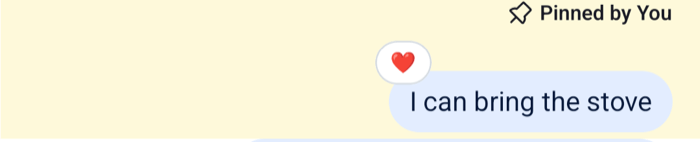
The user opens the menu on a message and picks Pin to Conversation. A line with a pin icon above the message now reads "Pinned by" and the user's name, or "Pinned by You" on their own screen. Picking Unpin from Conversation removes it.

`ChannelDetails` has a Pinned messages row. It opens a full-screen list of the channel's pinned messages with their author and date, and a search field filters them by text. When there are none, the list says "Long-press a message to pin it to the chat".

<table>
  <tr>
  <td align='center' width='50%'>

![A pinned message with a line reading Pinned by You above it and a highlighted row on iOS](https://getstream.io/docs-assets/images/15466357fc9f.png)

  </td>
  <td align='center' width='50%'>

![A pinned message with a line reading Pinned by You above it and a highlighted row on Android](https://getstream.io/docs-assets/images/d014313f77af.png)

  </td>
  </tr>
</table>

## How it works across the layers

A pin is part of the message. A pinned message has `pinned: true`, `pinned_at`, `pinned_by` and, when the pin expires, `pin_expires`.

- **State.** `client.pinMessage` and `client.unpinMessage` change the message on the server. The `message.updated` event then brings the change to every client watching the channel, and each channel keeps its pinned messages in `channel.pinnedMessagesPaginator`.
- **UI.** `MessageHeader` renders `MessagePinnedHeader` above any message with `message.pinned`. The Pin and Unpin actions in the message menu call the client. `PinnedMessageList` is the list behind the Pinned messages row of `ChannelDetails`.
- **Navigation.** Not involved. The items of `PinnedMessageList` don't open the message.

### The pinned list

`channel.pinnedMessagesPaginator` holds the channel's pinned messages, oldest pin first. It's a paginator like the others in the state layer: its `state` store has `items`, `isLoading`, `hasMoreTail`, `hasMoreHead` and `lastQueryError`. [How pagination works](https://getstream.io/chat/docs/sdk/react-native/v10/state/loading-data/how-pagination-works/) explains these fields.

>
> **Info:** **Example**
>
> Take a channel with 25 pinned messages:
>
> 1. When the channel is queried or watched, the response carries a page of its pinned messages. They become the first page of the list.
> 2. `PinnedMessagePaginator.toTail()` loads the next page of earlier pins from the pinned messages endpoint.
> 3. Bob pins another message. The `message.updated` event arrives, the message now has `pinned: true`, and the list adds it. When he unpins it, the next `message.updated` removes it.
> 4. A pinned message that is edited, reacted to or deleted changes in the list too, because the list and the message list share each message.
>

Thread replies stay out of the list, unless a reply was also sent to the channel. A pinned reply still shows "Pinned by" in its thread. Truncating the channel also clears the pins from before the cutoff.

#### Pinning and unpinning

Pass the message, or `{ id }`. The second argument sets when the pin expires, as a `Date` or an RFC 3339 string, and `pinned_at`, the pin time that orders the pinned list, which defaults to now:

```ts
// Pinned until someone unpins it
await client.pinMessage(message);

// Expires after an hour
await client.pinMessage(message, {
  pin_expires: new Date(Date.now() + 60 * 60 * 1000),
});

// Expires at an exact time
await client.pinMessage(message, { pin_expires: "2026-12-31T23:00:00Z" });

await client.unpinMessage(message);
```

Neither call changes local state. The message and the pinned list update when `message.updated` arrives. The Pin action does the same, and shows a "Message pinned" notification once the request succeeds, or an error notification when it fails.

## Turning it on or off

Pinning is always available. The server decides who may pin through the `pin-message` capability, which comes from the channel type's permissions. See [Permissions reference](https://getstream.io/chat/docs/javascript/permissions-reference/).

The message menu shows Pin to Conversation and Unpin from Conversation only to users with `pin-message`, on channel messages and thread replies alike. To hide them from users who have it, pass `overrideOwnCapabilities={{ pinMessage: false }}` to `Channel` and `Thread`, or remove the `pinMessage` and `unpinMessage` actions, as [Message actions](https://getstream.io/chat/docs/sdk/react-native/v10/features/messaging/message-actions/#customizing) shows.

## Customizing

### The pinned header

Replace `MessagePinnedHeader` through `WithComponents`. It reads the message from `useMessageContext()`:

```tsx
import { StyleSheet, Text, View } from "react-native";
import {
  Pin,
  useMessageContext,
  WithComponents,
} from "stream-chat-react-native";

const PinnedLabel = () => {
  const { message } = useMessageContext();

  if (!message?.pinned) return null;

  return (
    <View style={styles.row}>
      <Pin height={12} width={12} />
      <Text style={styles.text}>
        {message.pinned_by?.name ?? "Someone"} pinned this
      </Text>
    </View>
  );
};

const styles = StyleSheet.create({
  row: { alignItems: "center", flexDirection: "row", gap: 4 },
  text: { fontSize: 12 },
});

export const App = () => (
  <WithComponents overrides={{ MessagePinnedHeader: PinnedLabel }}>
    {/* the rest of the app */}
  </WithComponents>
);
```

`MessageHeader` renders the pinned header together with the reminder header and the "Also sent in channel" header. Replace `MessageHeader` to change how they're laid out. The [Pin indicator](https://getstream.io/chat/docs/sdk/react-native/v10/ui-cookbook/message/pin-indicator/) UI cookbook restyles the pinned header and replaces it.

### Your own pinned list

To show pins outside channel details, for example in a bar above the message list, read `channel.pinnedMessagesPaginator.state`. Place this component inside `Channel`:

```tsx
import { Pressable, Text, View } from "react-native";
import type { LocalMessage, PaginatorState } from "stream-chat";
import { useChannel, useStateStore } from "stream-chat-react-native";

const pinnedListSelector = ({
  hasMoreTail,
  isLoading,
  items,
}: PaginatorState<LocalMessage>) => ({ hasMoreTail, isLoading, items });

export const PinnedBar = () => {
  const channel = useChannel();
  const {
    hasMoreTail,
    isLoading,
    items = [],
  } = useStateStore(channel.pinnedMessagesPaginator.state, pinnedListSelector);

  if (!items.length) return null;

  return (
    <View>
      {items.map((message) => (
        <Pressable
          key={message.id}
          onPress={() =>
            void channel.messagePaginator.jumpToMessage(message.id)
          }
        >
          <Text numberOfLines={1}>
            {message.user?.name}: {message.text}
          </Text>
        </Pressable>
      ))}
      {hasMoreTail ? (
        <Pressable
          disabled={isLoading}
          onPress={() => void channel.pinnedMessagesPaginator.toTail()}
        >
          <Text>Earlier pins</Text>
        </Pressable>
      ) : null}
    </View>
  );
};
```

The list keeps itself current, so the bar re-renders when someone pins or unpins a message. [Reading state in components](https://getstream.io/chat/docs/sdk/react-native/v10/ui/reading-state-in-components/) explains the selector rules this sample follows. [Message list UI](https://getstream.io/chat/docs/sdk/react-native/v10/ui/components/message-list-ui/) covers what the list shows after a jump.

### The Pinned messages list

`PinnedMessageList` loads its list through a `MessageSearchSource`, 25 messages per page, filtered to the channel's pinned messages and searched by text. It takes a `searchSource` prop to use a search source of your own, and `searchInputProps` and `additionalFlatListProps` for its parts. `PinnedMessageList` and `PinnedMessageItem` are override keys. To change the rows of channel details, see [Channel details and members](https://getstream.io/chat/docs/sdk/react-native/v10/features/channels/channel-details-and-members/).

## Reference

- [Pinned messages paginator](https://getstream.io/chat/docs/sdk/react-native/v10/reference/state/pinned-messages-paginator/): the state, loading methods and what updates the list.
- [Channel details lists](https://getstream.io/chat/docs/sdk/react-native/v10/component-reference/channel-details/channel-details-lists/): `PinnedMessageList` and its props.
- [ComponentsContext](https://getstream.io/chat/docs/sdk/react-native/v10/component-reference/channel/componentscontext/): the `MessagePinnedHeader`, `PinnedMessageList` and `PinnedMessageItem` override keys.
- [Message hooks](https://getstream.io/chat/docs/sdk/react-native/v10/reference/hooks/message-hooks/): the handlers behind the Pin action.
- [Pinned messages in the JavaScript client](https://getstream.io/chat/docs/javascript/pinned-messages/): the server API, including pin expiry.

---

For the most recent version of this documentation, visit [https://getstream.io/chat/docs/sdk/react-native/v10/features/messaging/pinned-messages/](https://getstream.io/chat/docs/sdk/react-native/v10/features/messaging/pinned-messages/).