# Message actions

> **Info:** This is release candidate documentation for **Stream Chat React Native SDK v10**. For the latest stable version, see the [latest version (v9)](https://getstream.io/chat/docs/sdk/react-native/).

Message actions are what a user can do with one message: reply to it, quote it, pin it, edit it, delete it and more. This page lists the actions the SDK ships, what each one does and who sees it. To add, remove or replace actions, see [Customizing](#customizing) and [Actions](https://getstream.io/chat/docs/sdk/react-native/v10/ui/customizing/actions/).

## What users get

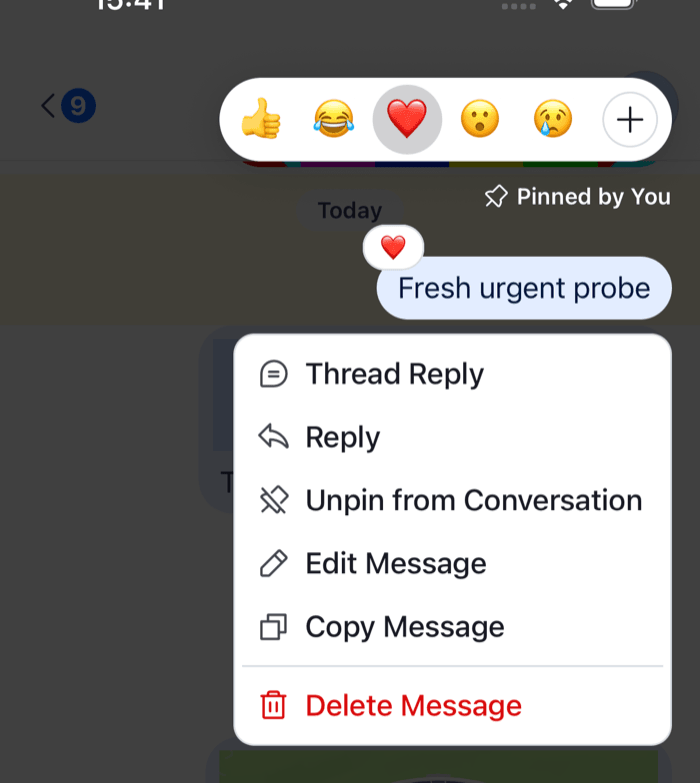
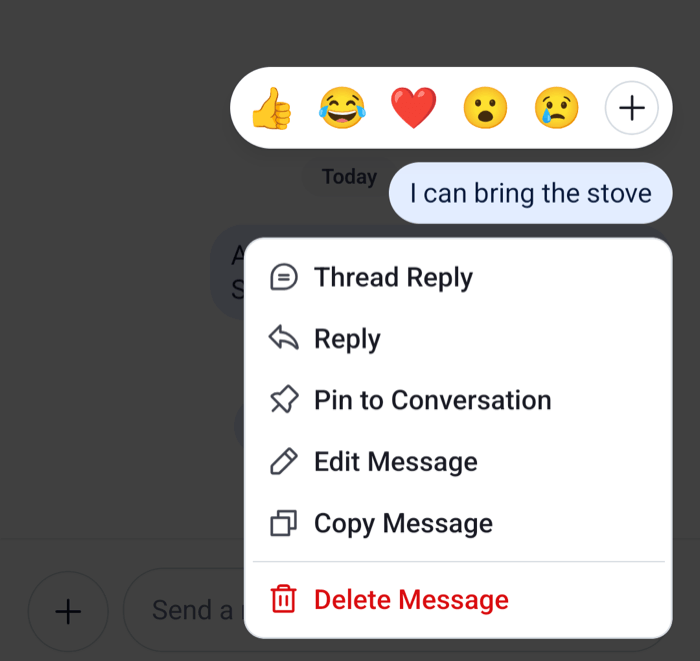
A long press on a message opens the message menu. The message is lifted over a dimmed background, with the reaction row above it and the list of actions below it. Tapping the background closes the menu. Tapping a message that failed to send opens the same menu.

Say the user opens the menu on a message from Bob. They see Thread Reply, Reply, Pin to Conversation, Copy Message, Mark as Unread, Flag Message and Mute User, then, after a separator, Block User in red. On their own message they see Edit Message and Delete Message instead of Mark as Unread, Flag Message, Mute User and Block User. Most actions confirm the result with a notification, such as "Message pinned" or "Message copied to clipboard".

<table>
  <tr>
  <td align='center' width='50%'>

![The message menu with the quick reactions above the message and the list of actions below it on iOS](https://getstream.io/docs-assets/images/f145b10e2276.png)

  </td>
  <td align='center' width='50%'>

![The message menu with the quick reactions above the message and the list of actions below it on Android](https://getstream.io/docs-assets/images/04aa460b9b67.png)

  </td>
  </tr>
</table>

## How it works across the layers

`Message` opens the menu with `showMessageOverlay()`. The menu renders `MessageReactionPicker` above the message and `MessageActionList` below it, through the portal hosts of `OverlayProvider`. Reactions have their own page, see [Reactions](https://getstream.io/chat/docs/sdk/react-native/v10/features/messaging/reactions/).

The actions are built only while the menu is open. `useMessageActions()` builds every action for the message, and the `messageActions` function decides which ones show, and in which order. Unless you pass your own to `Channel` and `Thread`, it's the SDK's `messageActions`. Each action is a `MessageActionType` with these fields:

- `actionType` names the action, for example `pinMessage`;
- `title` and `icon` render it;
- `type` is `'standard'` or `'destructive'`. `MessageActionList` renders the standard actions first, then a separator and the destructive ones;
- `action` runs it. `MessageActionListItem` closes the menu first, and runs the action once the menu has closed.

Each action calls the state layer. The table lists the default actions in menu order, with what each one calls and when `messageActions` keeps it. "Own" means the connected user sent the message, "in a thread" means the menu is open inside a `Thread` or on a reply shown in the channel, and names in code font such as `send-reply` are channel capabilities.

| Action                                       | `actionType`                 | What it calls                                                                     | Shown when                                                                                         |
| -------------------------------------------- | ---------------------------- | --------------------------------------------------------------------------------- | -------------------------------------------------------------------------------------------------- |
| Resend                                       | `retry`                      | `MessageOperations.retry`                                                         | The message failed, and it's own                                                                   |
| Thread Reply                                 | `threadReply`                | `onThreadSelect` of the message list, with `client.threads.ensure()`              | `send-reply`, not in a thread, not failed                                                          |
| Reply                                        | `quotedReply`                | `MessageComposer.setQuotedMessage(message)`                                       | `quote-message`, not in a thread, not failed                                                       |
| Pin to Conversation, Unpin from Conversation | `pinMessage`, `unpinMessage` | `client.pinMessage(message)`, `client.unpinMessage(message)`                      | `pin-message`                                                                                      |
| Edit Message                                 | `editMessage`                | Starts an edit in the composer                                                    | `update-any-message`, or `update-own-message` on an own message; never a poll, a Giphy or an Imgur |
| Copy Message                                 | `copyMessage`                | Copies the text, translated into the user's language when it is, to the clipboard | A clipboard package is installed, the message has text, not failed                                 |
| Mark as Unread                               | `markUnread`                 | `Channel.markUnread({ message_id })`                                              | Not own, `read-events`, not in a thread, not failed                                                |
| Flag Message                                 | `flagMessage`                | Asks to confirm, then `client.moderation.flagMessage({ message_id })`             | Not own, and `flag-message`                                                                        |
| Mute User, Unmute User                       | `muteUser`                   | `client.moderation.mute` or `client.moderation.unmute` for the author             | Not own                                                                                            |
| Ban User, Unban User                         | `banUser`                    | `client.moderation.ban({ target_user_id })`, `client.unbanUser()`                 | Not own, and `ban-channel-members`                                                                 |
| Delete Message                               | `deleteMessage`              | Asks to confirm, then `MessageOperations.delete`                                  | `delete-any-message`, or `delete-own-message` on an own message                                    |
| Block User, Unblock User                     | `blockUser`                  | Asks to confirm a block, then `client.blockUser()` or `client.unblockUser()`      | Not own                                                                                            |

Ban User, Delete Message and Block User are destructive, so they show after the separator in that order. A message that failed to send keeps at most Resend, Edit Message and Delete Message.

`useMessageActions()` also builds `deleteForMeMessage` ("Delete for me"), which deletes the message for the current user only with `delete_for_me: true`. The default list leaves it out.

Some messages open no menu: a deleted message, a blocked message, a message with Giphy preview buttons, and the parent message at the top of a thread. A bounced message opens the bounce alert instead, see [Sending, editing and deleting](https://getstream.io/chat/docs/sdk/react-native/v10/features/messaging/sending-editing-and-deleting/#bounced-messages). The menu doesn't check whether a message has reached the server, so a message that is still sending opens it too.

A few things the table implies:

- **Updates on screen.** Reactions, deletes and resends change the message list before the server answers. Pinning doesn't: the message updates when the server's `message.updated` event arrives. [What's optimistic and what isn't](https://getstream.io/chat/docs/sdk/react-native/v10/state/writing-messages/whats-optimistic-and-what-isnt/) has the full list.
- **Notifications.** Copy Message, Pin, Unpin, Mark as Unread, Flag Message, Mute, Unmute and Delete Message report success or failure as a notification in the message list. Ban and Block report nothing. See [Notifications](https://getstream.io/chat/docs/sdk/react-native/v10/features/app-experience/notifications/).
- **Navigation.** Thread Reply calls `onThreadSelect` on the `MessageList`. Without it, Thread Reply does nothing. See [Replies and threads](https://getstream.io/chat/docs/sdk/react-native/v10/features/messaging/replies-and-threads/).
- **Clipboard.** Copy Message needs a clipboard package: `@react-native-clipboard/clipboard` with `stream-chat-react-native`, or `expo-clipboard` with `stream-chat-expo`.

Each action has its own feature page: [Replies and threads](https://getstream.io/chat/docs/sdk/react-native/v10/features/messaging/replies-and-threads/), [Quoted replies](https://getstream.io/chat/docs/sdk/react-native/v10/features/messaging/quoted-replies/), [Pinned messages](https://getstream.io/chat/docs/sdk/react-native/v10/features/messaging/pinned-messages/), [Sending, editing and deleting](https://getstream.io/chat/docs/sdk/react-native/v10/features/messaging/sending-editing-and-deleting/), [Read state, unread and receipts](https://getstream.io/chat/docs/sdk/react-native/v10/features/messaging/read-state-unread-and-receipts/) and [Flagging, muting, blocking and bans](https://getstream.io/chat/docs/sdk/react-native/v10/features/moderation-and-safety/flagging-muting-blocking-and-bans/).

## Turning it on or off

Message actions are always on. Who sees which action depends on the user's capabilities. The server gives the connected user a set of capabilities on each channel, derived from their roles and the channel type's permissions, and `messageActions` reads them from `OwnCapabilitiesContext` for every message. Change them on the server, see [Permissions reference](https://getstream.io/chat/docs/javascript/permissions-reference/).

`messageActions` doesn't check a capability for Mute User and Block User.

To take actions away from users who have the capability, pass `overrideOwnCapabilities` to `Channel` and `Thread`. This hides Pin and Unpin:

```tsx
<Channel channel={channel} overrideOwnCapabilities={{ pinMessage: false }}>
```

To show no actions on any message, return an empty list. The menu then shows only the reaction row:

```tsx
<Channel channel={channel} messageActions={() => []}>
```

## Customizing

`messageActions` on `Channel` and `Thread` takes a function. It receives `MessageActionsParams`: every action built for the message, the `message`, `isMyMessage`, `isThreadMessage`, `error`, the user's `ownCapabilities` and `dismissOverlay`. It returns the actions to show, in order. Start from the SDK's `messageActions` to keep the default rules.

This one removes Block User and adds Delete for me:

```tsx
import type { Channel as StreamChannel } from "stream-chat";
import type { MessageActionsParams } from "stream-chat-react-native";
import {
  Channel,
  MessageComposer,
  MessageList,
  messageActions,
} from "stream-chat-react-native";

const customMessageActions = (params: MessageActionsParams) => {
  const actions = messageActions(params).filter(
    (action) => action.actionType !== "blockUser",
  );

  if (params.deleteForMeMessage && !params.error) {
    actions.push(params.deleteForMeMessage);
  }

  return actions;
};

export const ChannelWithCustomActions = ({
  channel,
}: {
  channel: StreamChannel;
}) => (
  <Channel channel={channel} messageActions={customMessageActions}>
    <MessageList />
    <MessageComposer />
  </Channel>
);
```

Define the function at module scope, or memoize it, and pass the same one to `Thread`.

An action of your own is an object with the same fields. Its `action` runs after the menu has closed, so it doesn't need to close the menu. [Message translation](https://getstream.io/chat/docs/sdk/react-native/v10/features/messaging/message-translation/#customizing) adds a Translate action, [Reminders and save for later](https://getstream.io/chat/docs/sdk/react-native/v10/features/messaging/reminders-and-save-for-later/#customizing) adds the reminder actions, and the [Custom message actions](https://getstream.io/chat/docs/sdk/react-native/v10/ui-cookbook/message/custom-message-actions/) UI cookbook walks through more.

Other ways in:

- **Side effects.** `handleBan`, `handleBlockUser`, `handleCopy`, `handleDelete`, `handleDeleteForMe`, `handleEdit`, `handleFlag`, `handleMarkUnread`, `handleMute`, `handlePinMessage`, `handleQuotedReply`, `handleRetry` and `handleThreadReply` on `Channel` and `Thread` are called before the default action, for example for analytics. They don't replace it.
- **Rendering.** `MessageActionList` and `MessageActionListItem` are override keys for the list and its rows.
- **Your own menu.** `onLongPressMessage` on `Channel` replaces the long press. Its payload has `actionHandlers` to run the default actions, and `defaultHandler` to open the default menu. Inside a message, `useMessageActions()` returns every action, keyed by name, for a menu of your own.

## Reference

- [Channel](https://getstream.io/chat/docs/sdk/react-native/v10/component-reference/channel/channel/): `messageActions`, `overrideOwnCapabilities` and the `handle*` callbacks.
- [MessagesContext](https://getstream.io/chat/docs/sdk/react-native/v10/component-reference/message-list/messagescontext/): where the list and its messages read them.
- [ComponentsContext](https://getstream.io/chat/docs/sdk/react-native/v10/component-reference/channel/componentscontext/): the `MessageActionList`, `MessageActionListItem` and `MessageReactionPicker` override keys.
- [Message hooks](https://getstream.io/chat/docs/sdk/react-native/v10/reference/hooks/message-hooks/): `useMessageActions` and the handlers behind the actions.
- [Overlays and bottom sheets](https://getstream.io/chat/docs/sdk/react-native/v10/ui/customizing/overlays-and-bottom-sheets/): how the menu is drawn over the screen.

---

For the most recent version of this documentation, visit [https://getstream.io/chat/docs/sdk/react-native/v10/features/messaging/message-actions/](https://getstream.io/chat/docs/sdk/react-native/v10/features/messaging/message-actions/).