# Slow mode

> **Info:** This is release candidate documentation for **Stream Chat React Native SDK v10**. For the latest stable version, see the [latest version (v9)](https://getstream.io/chat/docs/sdk/react-native/).

In slow mode, each member waits a number of seconds after sending a message before they can send the next one. This page covers what the composer shows during the wait, where the countdown comes from, and how to change it.

## What users get

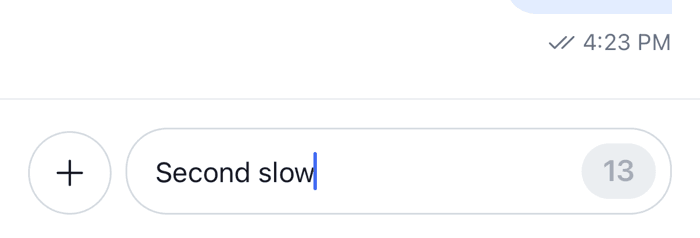
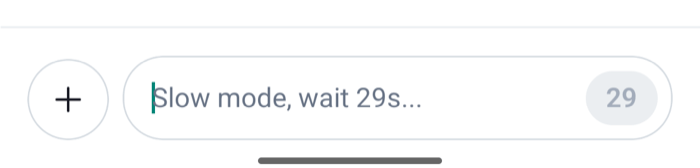
The "Announcements" channel has a cooldown of 30 seconds. The user sends a message. For the next 30 seconds their composer changes:

- The send button is replaced by the seconds left, counting down, on a disabled button.
- While the text field is empty, its placeholder says "Slow mode, wait 30s...", with the seconds counting down.
- The voice recording button is hidden.

The text field stays editable, so the user can type their next message during the wait, and the attachment button still adds attachments. They send them when the countdown reaches zero and the send button comes back. If the user closes and reopens the app during the wait, the countdown resumes from the time they sent their last message.

Moderators and admins usually don't wait: users with the `skip-slow-mode` capability see no countdown.

<table>
  <tr>
  <td align='center' width='50%'>

![The composer in slow mode with the send button replaced by a countdown on iOS](https://getstream.io/docs-assets/images/5f53faa047fa.png)

  </td>
  <td align='center' width='50%'>

![The composer in slow mode with the send button replaced by a countdown on Android](https://getstream.io/docs-assets/images/44471c7df2c8.png)

  </td>
  </tr>
</table>

## How it works across the layers

### State: the cooldown timer

The channel's `data.cooldown` holds the cooldown in seconds, and is unset or `0` without slow mode. Every channel has a `channel.cooldownTimer`, whose `state` store counts down for the current user:

- `cooldownRemaining` is the whole seconds left until the user can send again, `0` when they can send;
- `cooldownConfigSeconds` is the channel's cooldown;
- `canSkipCooldown` is whether the user has `skip-slow-mode`;
- `ownLatestMessageTimestamp` is when the user last sent a message.

The timer starts from the user's latest message in the channel's message list, so loading the channel again, or a message sent from another device, starts it too. A reply sent only to a thread isn't in that list, so it doesn't start the countdown. The timer updates when the channel's cooldown or the user's capabilities change. [What channels and threads hold](https://getstream.io/chat/docs/sdk/react-native/v10/state/channels-and-threads/what-channels-and-threads-hold/#slow-mode) shows the store and how to subscribe to it.

The state layer doesn't stop a send during the countdown: `MessageComposer.send()` doesn't check the timer. The server enforces the cooldown. A composer of your own reads `cooldownRemaining` to block sending, as the SDK's composer does.

### UI: the composer

The parts of `MessageComposer` read the timer of the channel in context:

- The output buttons render `CooldownTimer` in place of the send button while `cooldownRemaining` is above zero. `CooldownTimer` shows the number of seconds, which it reads with `useCooldownRemaining()`.
- The text input's placeholder shows the seconds left, from the same hook.

Two states of the composer take precedence over the countdown. While the user edits a message, or has a command such as `/giphy` in the composer, the composer shows the button that saves the edit or runs the command instead of `CooldownTimer`. A command can therefore be sent during the countdown, and the server decides whether to accept it. While an AI response is generating, the button that stops it shows instead of `CooldownTimer` too.

A thread's composer reads the same timer, its channel's, so it waits too.

## Turning it on or off

Slow mode is a setting of each channel, its `cooldown`. Turn it on in the Chat Explorer of the [Stream Dashboard](https://getstream.io/signin/?product=chat), or from the client with `Channel.enableSlowMode(seconds)`, and off with `Channel.disableSlowMode()`:

```ts
// Members wait 30 seconds between messages.
await channel.enableSlowMode(30);

await channel.disableSlowMode();
```

Changing the cooldown needs the `update-channel-cooldown` permission, which the server's default grants give to admins and moderators. A user who has it sees `set-channel-cooldown` in the channel's own capabilities. Every client watching the channel gets the new value with the `channel.updated` event, and the countdown follows. [Slow mode](https://getstream.io/chat/docs/javascript/slow-mode/) in the Chat API docs has the allowed range and who skips the cooldown.

## Customizing

### What the countdown looks like

Replace `CooldownTimer` through `WithComponents`. Your component reads the seconds with `useCooldownRemaining()`:

```tsx title="src/CooldownLabel.tsx"
import type { PropsWithChildren } from "react";
import { StyleSheet, Text, View } from "react-native";
import { useCooldownRemaining, WithComponents } from "stream-chat-react-native";

const CooldownLabel = () => {
  const secondsLeft = useCooldownRemaining();

  return (
    <View
      accessibilityLabel={`Slow mode, ${secondsLeft} seconds left`}
      accessible
      style={styles.label}
    >
      <Text>Wait {secondsLeft}s</Text>
    </View>
  );
};

// Declared outside the component, so WithComponents gets the same object on every render.
const overrides = { CooldownTimer: CooldownLabel };

export const WithCooldownLabel = ({ children }: PropsWithChildren) => (
  <WithComponents overrides={overrides}>{children}</WithComponents>
);

const styles = StyleSheet.create({
  label: { justifyContent: "center", paddingHorizontal: 8 },
});
```

Wrap `Channel` and `Thread` in it, or put the override in the `WithComponents` you already have. The countdown's container is themed as `messageComposer.cooldownButtonContainer`.

The placeholder text is the translation key `autoCompleteInput.slowMode.placeholder`, with the seconds as `seconds`. [Localization](https://getstream.io/chat/docs/sdk/react-native/v10/ui/customizing/localization/) explains how to change it.

### Showing slow mode elsewhere

`useCooldownRemaining()` works anywhere inside a `Channel` or a `Thread`. This header badge tells members that the channel is in slow mode, and how long they still wait:

```tsx title="src/SlowModeBadge.tsx"
import { Text } from "react-native";
import type { ChannelStateData } from "stream-chat";
import {
  useChannel,
  useCooldownRemaining,
  useStateStore,
} from "stream-chat-react-native";

const cooldownSelector = ({ data }: ChannelStateData) => ({
  cooldown: data?.cooldown ?? 0,
});

export const SlowModeBadge = () => {
  const channel = useChannel();
  const { cooldown } = useStateStore(channel.state, cooldownSelector);
  const secondsLeft = useCooldownRemaining();

  if (!cooldown) return null;

  return (
    <Text>
      Slow mode: {cooldown}s{secondsLeft > 0 ? `, wait ${secondsLeft}s` : ""}
    </Text>
  );
};
```

It reads `data.cooldown` through `useStateStore`, so it updates when a moderator changes the cooldown. Reading `channel.data.cooldown` during render wouldn't: the getter isn't reactive. See [Reading state in components](https://getstream.io/chat/docs/sdk/react-native/v10/ui/reading-state-in-components/#getters-that-arent-reactive).

## Reference

- [Composer UI components](https://getstream.io/chat/docs/sdk/react-native/v10/component-reference/message-composer/composer-ui-components/): `CooldownTimer` and the other composer parts.
- [ComponentsContext](https://getstream.io/chat/docs/sdk/react-native/v10/component-reference/channel/componentscontext/): the `CooldownTimer` override key.
- [Composer hooks](https://getstream.io/chat/docs/sdk/react-native/v10/reference/hooks/composer-hooks/): `useCooldownRemaining`.
- [Channel and channel state](https://getstream.io/chat/docs/sdk/react-native/v10/reference/state/channel-and-channel-state/): `cooldownTimer`, `enableSlowMode` and `disableSlowMode`.

---

For the most recent version of this documentation, visit [https://getstream.io/chat/docs/sdk/react-native/v10/features/channels/slow-mode/](https://getstream.io/chat/docs/sdk/react-native/v10/features/channels/slow-mode/).