# User details

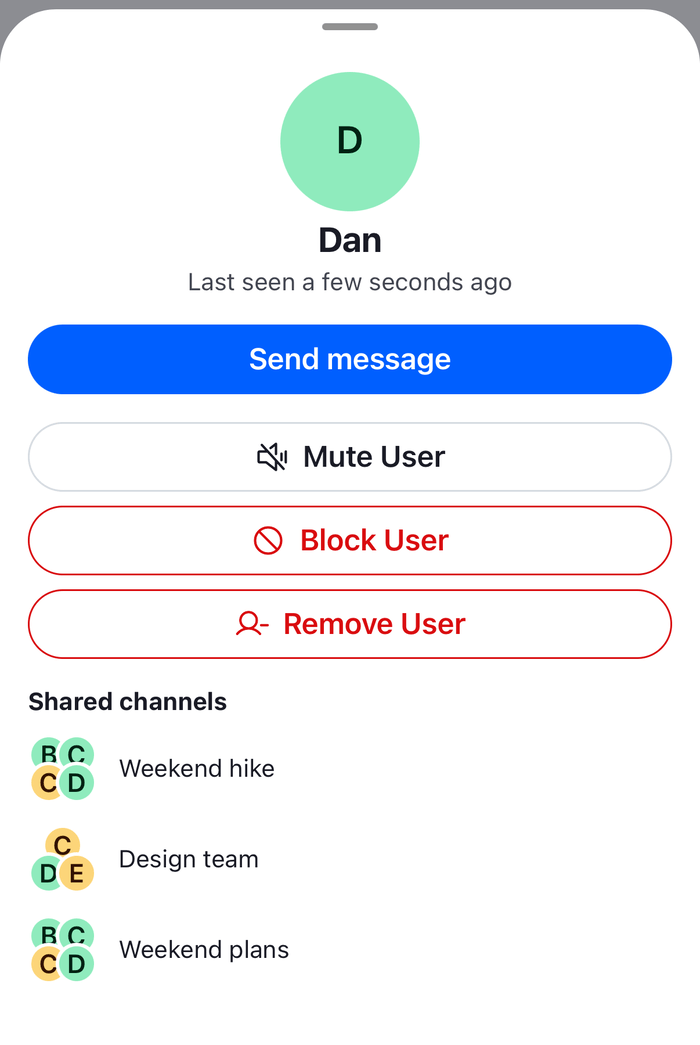
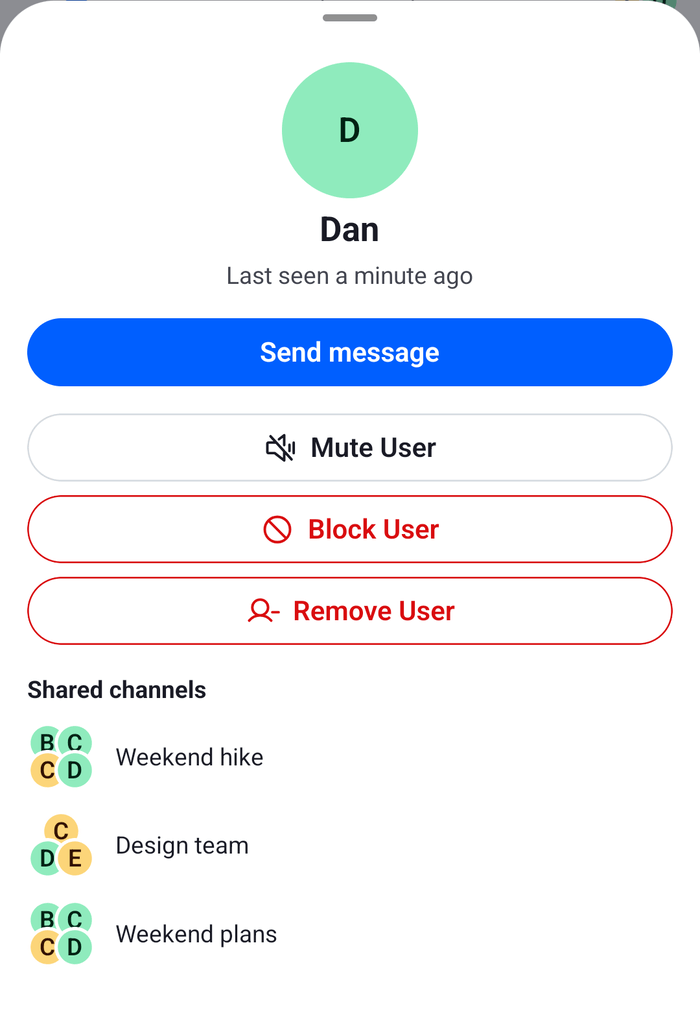
This UI cookbook opens a person's details in a bottom sheet when the user taps their avatar in a message, or a mention of them. The sheet shows whether the person is online or when they were last active, a Send message button for the direct conversation, Mute and Block, and the group channels the two of them share. The same mute and block actions are in the sheet of a member in channel details, which [Actions](https://getstream.io/chat/docs/sdk/react-native/ui/components/actions/#member-actions) explains.

>
> **Note:** **What you'll build**
>
> - a message author that opens the sheet
> - a bottom sheet with the person's status, a Send message button, Mute and Block, and shared group channels
>

---

**Approach:** Replace one part and Compose. [Choosing where to start](https://getstream.io/chat/docs/sdk/react-native/ui-cookbooks/overview/#choosing-where-to-start) explains the approaches.

## Best practices

- Open the sheet from what the message list already has: the `MessageAuthor` key for the avatar, and `onPressMessage` on `Channel` and `Thread` for a mention. Both reach every message without replacing the message component.
- Keep the pressed user in state, and read the member from `useChannelMembersState()`. The member follows presence changes and profile updates, so the sheet stays current while it is open.
- Use `useChannelMemberActionItems()` for the actions. It returns the same items as the member sheet of channel details, with their confirmations, and each action publishes its own success or error notification.
- Find the direct conversation with `client.channel("messaging", { members })` and `Channel.watch()`, which returns the conversation that exists or creates it.
- Take the shared channels from the channels the client holds. Listing every channel two people share needs a query of its own.
- Close the sheet before you navigate. It is a modal, so it stays over the screen you open.

## Open the sheet from the message list

`ChannelWithUserDetails` is a channel screen with two ways to open the sheet:

- `AuthorWithDetails` replaces the `MessageAuthor` key. It renders the default avatar inside a `Pressable`, and opens the sheet with the message's user. It reads `lastGroupMessage` and `showAvatar` from `useMessageContext()`, as the default does, so only the avatar that shows can be pressed.
- `onPressMessage` receives a press on a user mention with the `textMention` emitter, and `additionalInfo.user` is the pressed user. A mention of `@channel` or a role has no user, so nothing opens. Every other press runs its `defaultHandler`.

Pass the same `overrides` to a `WithComponents` around `Thread`, and the same `onPressMessage` to `Thread`, so a thread opens the sheet too.

```tsx title="src/ChannelWithUserDetails.tsx"
import { createContext, useCallback, useContext, useState } from "react";
import { Pressable } from "react-native";
import type { Channel as StreamChannel, UserResponse } from "stream-chat";
import {
  Channel,
  MessageAuthor,
  MessageComposer,
  MessageList,
  useMessageContext,
  WithComponents,
} from "stream-chat-react-native";
import type {
  ComponentOverrides,
  MessageAuthorProps,
  MessagePressableHandlerPayload,
} from "stream-chat-react-native";
import { UserDetailsSheet } from "./UserDetailsSheet";

// Opens the sheet for a user. Message components read it, wherever they render.
const OpenUserContext = createContext<(user: UserResponse) => void>(() => {});

/** The default avatar, pressable. It shows only where the default shows it. */
const AuthorWithDetails = (props: MessageAuthorProps) => {
  const { lastGroupMessage, message, showAvatar } = useMessageContext();
  const openUser = useContext(OpenUserContext);
  const { user } = message;
  const visible =
    typeof showAvatar === "boolean" ? showAvatar : lastGroupMessage;

  return (
    <Pressable
      accessibilityLabel={user?.name ?? user?.id}
      accessibilityRole="button"
      disabled={!visible || !user}
      onPress={() => user && openUser(user)}
    >
      <MessageAuthor {...props} />
    </Pressable>
  );
};

// Declared once: WithComponents reads its overrides when it mounts.
const overrides: ComponentOverrides = { MessageAuthor: AuthorWithDetails };

export const ChannelWithUserDetails = ({
  channel,
  onOpenChannel,
}: {
  channel: StreamChannel;
  onOpenChannel: (cid: string) => void;
}) => {
  const [user, setUser] = useState<UserResponse>();

  // A press on a user mention opens the user. Every other press keeps its default.
  const onPressMessage = useCallback(
    ({
      additionalInfo,
      defaultHandler,
      emitter,
    }: MessagePressableHandlerPayload) => {
      if (emitter === "textMention") {
        if (additionalInfo?.user) setUser(additionalInfo.user);
        return;
      }
      defaultHandler?.();
    },
    [],
  );

  return (
    <OpenUserContext.Provider value={setUser}>
      <WithComponents overrides={overrides}>
        <Channel channel={channel} onPressMessage={onPressMessage}>
          <MessageList />
          <MessageComposer />
          <UserDetailsSheet
            onClose={() => setUser(undefined)}
            onOpenChannel={onOpenChannel}
            user={user}
          />
        </Channel>
      </WithComponents>
    </OpenUserContext.Provider>
  );
};
```

`OpenUserContext` carries the setter to `AuthorWithDetails`, because the override is a component of the message list and takes no props from the screen. `WithComponents` reads its overrides once, so `overrides` is declared at module scope.

## Build the sheet

The sheet reads the channel with `useChannel()`, so it renders inside `Channel` or `Thread`. It is a `BottomSheetModal` that wraps its content.

- The member comes from `useChannelMembersState(channel, pick)`, with the `pick` function at module scope, so the sheet re-renders only when a field it shows changes. A user who isn't a member any more, such as the author of a mention, shows as they were pressed, without the actions.
- `useUserActivityStatus(user)` returns "Online" while the user is online, and otherwise "Last seen" and the time. `UserAvatar` draws the online dot.
- `useChannelMemberActionItems({ channel, member })` returns Mute or Unmute, Block or Unblock, and Remove User for a user who can change the channel's members. The current user's own row has no items. To leave Remove User out, pass `getChannelMemberActionItems`, as [Custom member actions](https://getstream.io/chat/docs/sdk/react-native/ui-cookbooks/channel-details/custom-member-actions/) shows.
- The shared channels are the channels in `client.channelManager.values()` that have more than two members, with both people among them. Only the members a channel has loaded count.
- Send message watches the direct message channel and gives its `cid` to `onOpenChannel`. A channel created from its members has no real `cid` until its first query, so the sheet navigates with the one `Channel.watch()` returns, as [Ids in the route params](https://getstream.io/chat/docs/sdk/react-native/ui/layout/navigation/#ids-in-the-route-params) describes.

```tsx title="src/UserDetailsSheet.tsx"
import { useMemo } from "react";
import { Alert, Pressable, StyleSheet, Text, View } from "react-native";
import type {
  Channel as StreamChannel,
  ChannelMemberResponse,
  UserResponse,
} from "stream-chat";
import {
  BottomSheetModal,
  Button,
  ChannelAvatar,
  useChannel,
  useChannelMembersState,
  useChannelMemberActionItems,
  useChannelPreviewDisplayName,
  useChatContext,
  useTheme,
  useUserActivityStatus,
  UserAvatar,
} from "stream-chat-react-native";
import type { ChannelMemberPick } from "stream-chat-react-native";

// The member fields the sheet shows. Other changes to a member don't re-render it.
const pickShownFields: ChannelMemberPick = ({ user }) => ({
  image: user?.image,
  last_active: user?.last_active,
  name: user?.name,
  online: user?.online,
});

// Mute and block with the SDK's own items, confirmation included.
const MemberActions = ({
  channel,
  member,
}: {
  channel: StreamChannel;
  member: ChannelMemberResponse;
}) => {
  const items = useChannelMemberActionItems({ channel, member });

  return (
    <View style={styles.actions}>
      {items.map(({ action, Icon, id, label, type }) => (
        <Button
          key={id}
          LeadingIcon={(iconProps) => <Icon {...iconProps} />}
          label={label}
          onPress={() => void action()}
          type="outline"
          variant={type === "destructive" ? "destructive" : "secondary"}
        />
      ))}
    </View>
  );
};

const SharedChannel = ({
  channel,
  onPress,
}: {
  channel: StreamChannel;
  onPress: () => void;
}) => {
  const {
    theme: { semantics },
  } = useTheme();
  const name = useChannelPreviewDisplayName(channel);

  return (
    <Pressable
      accessibilityRole="button"
      onPress={onPress}
      style={styles.sharedChannel}
    >
      <ChannelAvatar channel={channel} size="lg" />
      <Text style={{ color: semantics.textPrimary }}>{name}</Text>
    </Pressable>
  );
};

type UserDetailsSheetProps = {
  /** Opens the channel screen. */
  onOpenChannel: (cid: string) => void;
  onClose: () => void;
  /** The user to show. The sheet is closed without one. */
  user?: UserResponse;
};

/** Render it inside `Channel` or `Thread`, which it reads the channel from. */
export const UserDetailsSheet = ({
  onClose,
  onOpenChannel,
  user: pressedUser,
}: UserDetailsSheetProps) => {
  const { client } = useChatContext();
  const channel = useChannel();
  const {
    theme: { semantics },
  } = useTheme();
  const members = useChannelMembersState(channel, pickShownFields);
  // The member is kept current. A user who is not a member any more shows as they were pressed.
  const member = pressedUser ? members[pressedUser.id] : undefined;
  const user = member?.user ?? pressedUser;
  const userId = user?.id;
  const status = useUserActivityStatus(user);

  // The group channels the client holds that both of them are in. Listing every channel two people
  // share needs a query of its own.
  const sharedChannels = useMemo(() => {
    if (!userId) return [];
    return client.channelManager.values().filter((candidate) => {
      const { members: candidateMembers } = candidate.state.getLatestValue();
      return (
        Object.keys(candidateMembers).length > 2 &&
        !!candidateMembers[userId] &&
        !!candidateMembers[client.userId ?? ""]
      );
    });
  }, [client, userId]);

  const sendMessage = async () => {
    if (!user) return;
    try {
      // The direct message channel with them. Watching it creates it when it doesn't exist yet.
      const direct = await client
        .channel("messaging", {
          members: [{ user_id: client.userId ?? "" }, { user_id: user.id }],
        })
        .watch();
      onClose();
      onOpenChannel(direct.cid);
    } catch {
      Alert.alert("Couldn't open the conversation");
    }
  };

  return (
    <BottomSheetModal
      enableDynamicSizing
      onClose={onClose}
      visible={!!pressedUser}
    >
      {user ? (
        <View style={styles.content}>
          <View style={styles.header}>
            <UserAvatar
              showOnlineIndicator={user.online}
              size="2xl"
              user={user}
            />
            <Text style={[styles.name, { color: semantics.textPrimary }]}>
              {user.name ?? user.id}
            </Text>
            <Text style={{ color: semantics.textSecondary }}>{status}</Text>
          </View>
          {user.id === client.userId ? null : (
            <Button
              label="Send message"
              onPress={() => void sendMessage()}
              type="solid"
              variant="primary"
            />
          )}
          {member ? <MemberActions channel={channel} member={member} /> : null}
          {sharedChannels.length ? (
            <View>
              <Text style={[styles.heading, { color: semantics.textPrimary }]}>
                Shared channels
              </Text>
              {sharedChannels.map((shared) => (
                <SharedChannel
                  channel={shared}
                  key={shared.cid}
                  onPress={() => {
                    onClose();
                    onOpenChannel(shared.cid);
                  }}
                />
              ))}
            </View>
          ) : null}
        </View>
      ) : null}
    </BottomSheetModal>
  );
};

const styles = StyleSheet.create({
  actions: { gap: 8 },
  content: { gap: 16, padding: 16 },
  header: { alignItems: "center", gap: 4 },
  heading: { fontWeight: "700", marginBottom: 4 },
  name: { fontSize: 20, fontWeight: "700" },
  sharedChannel: {
    alignItems: "center",
    flexDirection: "row",
    gap: 12,
    paddingVertical: 6,
  },
});
```

<table>
  <tr>
  <td align='center' width='50%'>

![A bottom sheet for Dan with Last seen, Send message, Mute User, Block User, Remove User and the shared group channels on iOS](https://getstream.io/docs-assets/images/7f5f3ad93b32.png)

  </td>
  <td align='center' width='50%'>

![A bottom sheet for Dan with Last seen, Send message, Mute User, Block User, Remove User and the shared group channels on Android](https://getstream.io/docs-assets/images/8704760f1fe4.png)

  </td>
  </tr>
</table>

`onOpenChannel` navigates to your channel screen with the `cid`, as on [Navigation](https://getstream.io/chat/docs/sdk/react-native/ui/layout/navigation/):

```tsx
<ChannelWithUserDetails
  channel={channel}
  onOpenChannel={(cid) => navigation.navigate("Channel", { cid })}
/>
```

## How it works

1. The message list renders each avatar through the `MessageAuthor` key, so `AuthorWithDetails` renders for every message on the left, which are the messages of other users. A press on a mention calls `onPressMessage` with the `textMention` emitter.
2. The screen stores the pressed user, which makes `visible` `true` on the sheet.
3. The sheet looks the user up in the channel's members. `channel.state` updates a member when the user's presence changes, because the client puts the new user object into every channel it holds with them, so the status and the dot follow.
4. Mute and Block call `client.moderation.mute()` and `client.blockUser()` through `useUserActions()`, and the items follow `client.mutedUsersStore` and `client.blockedUsers`, so the label changes when the action succeeds.

>
> **Info:** **Example**
>
> The user opens Design review, and taps Bob's avatar:
>
> 1. Bob's details open in a sheet over the channel: his avatar with an online dot, "Online", Send message, Mute User, Block User, and the group channels the two of them share, such as Weekend trip.
> 2. The user taps Weekend trip. The sheet closes, and `onOpenChannel` pushes that channel.
> 3. Back in Design review, the user taps Send message. The sheet closes, the screen watches the direct message channel with Bob, which exists already, and pushes it.
>

- The sheet shows no actions and no Send message button for the current user's own avatar.
- A muted user's messages still show in the message list. They don't count as unread, and the server sends no push notifications for them. Blocking hides the direct message channels between the two users from the one who blocked, and group channels aren't affected. [Flagging, muting, blocking and bans](https://getstream.io/chat/docs/sdk/react-native/features/moderation-and-safety/flagging-muting-blocking-and-bans/) explains both.

## Read more

- [Actions](https://getstream.io/chat/docs/sdk/react-native/ui/components/actions/#member-actions): the member actions, their ids and when they show.
- [Channel details hooks](https://getstream.io/chat/docs/sdk/react-native/reference/hooks/channel-details-hooks/#usechannelmemberactionitems): `useChannelMemberActionItems`, `useUserActions` and `useUserActivityStatus`.
- [Mentions](https://getstream.io/chat/docs/sdk/react-native/features/messaging/mentions/#reacting-to-presses): the `textMention` press on `Channel` and `Thread`.
- [Members and online status](https://getstream.io/chat/docs/sdk/react-native/ui-cookbooks/channel-list/members-and-online-status/): the members of a channel in a row, with who is online.
- [Custom member actions](https://getstream.io/chat/docs/sdk/react-native/ui-cookbooks/channel-details/custom-member-actions/): an action of your own in the member sheet of channel details.
- [Overriding components](https://getstream.io/chat/docs/sdk/react-native/ui/components/overriding-components/): how `WithComponents` applies overrides.

---

For the most recent version of this documentation, visit [https://getstream.io/chat/docs/sdk/react-native/ui-cookbooks/screens-and-sheets/user-details/](https://getstream.io/chat/docs/sdk/react-native/ui-cookbooks/screens-and-sheets/user-details/).